Macrium Reflect no longer free?

ZaphodB

New member
Power User
VIP
Local time
7:07 PM
Messages
203
I've just installed Macrium Reflect 7.1.3169 (yes, I know that the latest version is 8.0.6635 but my machine won't run that).

Only options I get when installing are 30-day trial or input the (presumably paid-for) license key.

Does that mean that Macrium Reflect is no longer free for personal use?

Zaph
 

My Computer

Computer type
Laptop
Computer Manufacturer/Model Number
DELL Inspiron 1525 / Sony VAIO VGN FW21L / Zoostorm 7877-0095
OS
Windows 7 Home Premium SP1 64-bit (now looking at Linux Mint!)
CPU
Core2 Duo T5750 2GHz/Core2 Duo T5800 2GHz/Core i5 3300 3.1GH
Motherboard
DELL 0U990C / "SONY Corp VAIO" (??) / GA-H61M-DS2 DVI
Memory
4Gb / 4Gb / 8Gb
Graphics Card(s)
Intel 965 Express/ATi Mob Radeon HD 3400/AMD Radeon R7 200
Hard Drives
WD 750Gb Black (WD7500BPKT) - DELL
WD 1Tb Black (WD10JPLX) - SONY
ST 2Tb Barracuda (2000DM001) - Zoostorm
Internet Speed
VM Fibre 100 Mbps
Antivirus
Kaspersky IS 2019 / Kaspersky IS 2019 / Kaspersky IS 2019
Browser
Chrome 76.0.3809 / Chrome 79.0.3945 / Chrome 76.0.3809
You must have downloaded the trial for a paid version.

Reflect Free is still free.

Macrium

  • Reflect Free
  • Reflect Home
  • Workstation
2022-04-02 14_06_24-Macrium Software _ Reflect Free Edition — Mozilla Firefox.jpg


Why do you say it doesn't work on your computer?


Macrium Reflect 8.0 System Requirements

PC and Windows

In order to run Macrium Reflect, you must have a system that has the following minimum system requirements:

  • At least 512MB RAM (1GB min recommended)
  • Windows XP Service Pack 3 or Windows Server 2003 Service Pack 2 or later
  • A keyboard and mouse
To use the rescue media, you will need either a CD/DVD writing drive or a USB drive.

Supported File Systems

Imaging clusters in use and changed clusters (intelligent copy) is supported by FAT16, FAT32, NTFS, exFAT, ReFS (on server editions), and Ext 2,3,4 file systems. All other file systems and unformatted partitions will be imaged on a sector by sector basis, i.e, every sector in the partition will be copied.
 

My Computers

System One System Two

  • Computer type
    PC/Desktop
    Computer Manufacturer/Model Number
    Custom build
    OS
    Windows 7 Home Premium 64-bits
    CPU
    AMD FX-8350
    Motherboard
    Gigabyte GA-990FXA-UD3 (AM3+)
    Memory
    GSKILL Ripjaw-X PC3 12800 8GB (2x4GB)
    Graphics Card(s)
    ASUS ROG STRIX GTX 1060 6GB
    Sound Card
    Integrated
    Monitor(s) Displays
    Asus VE228H (21.5-in)
    Screen Resolution
    1920x1080 60Hz
    Hard Drives
    SAMSUNG 870 EVO 2.5 Inch SATA SSD (1TB)
    SAMSUNG 870 EVO 2.5 Inch SATA SSD (1TB)
    SAMSUNG 870 EVO 2.5 Inch SATA SSD (1TB)
    PSU
    Corsair RM750x (750 watts)
    Case
    Corsair Carbide Series 200R
    Cooling
    Corsair Hydro Series H60 (CWCH60)
    Keyboard
    Logitech Elite
    Mouse
    Logitech M510 Wireless Mouse
    Internet Speed
    Comcast Gigabit Extra (1200Mbps down / 35Mbps up)
    Antivirus
    Malwarebytes
    Browser
    Firefox, Edge, Chrome
    Other Info
    ASUS DRW-24B1ST DVD-RW (24X) optical drive
    Seagate Expansion Desk (5TB) external SATA/USB HDD
    Comcast XB8 Internet Gateway
  • Computer type
    PC/Desktop
    System Manufacturer/Model Number
    Custom
    OS
    Windows 7 Pro (64-bit)
    CPU
    AMD Phenom II 960T X4
    Motherboard
    ASUS M4N82 Deluxe
    Memory
    Corsair XMS2 DDR2-800 8GB (4x2GB)
    Graphics Card(s)
    ASUS ENGTX560 DCII OC/2DI/1GD5 1GB
    Monitor(s) Displays
    Samsung 930B 19-inch LCD
    Screen Resolution
    1280x1024
    Hard Drives
    Samsung SSD 870 EVO 1000 GB (Windows 10)
    Seagate ST1000DM003 1000 GB (Windows 7)
    PSU
    Antec TruePower (new) TP-650
    Case
    Antec Three Hundred
    Cooling
    AMD stock cooler from FX8350
    Mouse
    Logitech M100
    Internet Speed
    Xfinity Gigabit Extra 1200/35 Mbps
You must have downloaded the trial for a paid version.

Reflect Free is still free.

Macrium

  • Reflect Free
  • Reflect Home
  • Workstation
View attachment 421153


Why do you say it doesn't work on your computer?
It doesn't because the installation says it needs SHA-2 code sign support but both Microsoft patches for Windows 7 for SHA=2 (KB4474419 and KB4490628) say that they are not applicable to my computer!

I tried an earlier version of Macrium - and that worked, however I couldn't see the free version!

Zaph
 

My Computer

Computer type
Laptop
Computer Manufacturer/Model Number
DELL Inspiron 1525 / Sony VAIO VGN FW21L / Zoostorm 7877-0095
OS
Windows 7 Home Premium SP1 64-bit (now looking at Linux Mint!)
CPU
Core2 Duo T5750 2GHz/Core2 Duo T5800 2GHz/Core i5 3300 3.1GH
Motherboard
DELL 0U990C / "SONY Corp VAIO" (??) / GA-H61M-DS2 DVI
Memory
4Gb / 4Gb / 8Gb
Graphics Card(s)
Intel 965 Express/ATi Mob Radeon HD 3400/AMD Radeon R7 200
Hard Drives
WD 750Gb Black (WD7500BPKT) - DELL
WD 1Tb Black (WD10JPLX) - SONY
ST 2Tb Barracuda (2000DM001) - Zoostorm
Internet Speed
VM Fibre 100 Mbps
Antivirus
Kaspersky IS 2019 / Kaspersky IS 2019 / Kaspersky IS 2019
Browser
Chrome 76.0.3809 / Chrome 79.0.3945 / Chrome 76.0.3809
It doesn't because the installation says it needs SHA-2 code sign support but both Microsoft patches for Windows 7 for SHA=2 (KB4474419 and KB4490628) say that they are not applicable to my computer!

Are you sure your updates are the correct bittedness? There are 32- and 64-bit versions, and IMHE they install successfully on Win 7 when using the correct version. The only issue I've ever run into was on a newer computer with an "unsupported" CPU, but the SHA-2 updates installed fine once I applied the wufuc patch to get around the CPU issue.


I tried an earlier version of Macrium - and that worked, however I couldn't see the free version!

Personally, I prefer ver. 7 instead of 8 anyway, so I'll note that you can still find ver. 7.3 here. These are the free, 64-bit versions only.

(Warning: the links to 7.2 and 7.1 do not work. They link only to macrium's live download agent, which does not download the older versions. FTR, note ver. 7.1 has a known bug with Win 10, so if you want to reserve the option of using ver. 7 with Win 10/11 in the future, you should grab the ver. 7.3 installer while you still can.)
 

My Computer

Computer type
PC/Desktop
Computer Manufacturer/Model Number
Dell Optiplex 7050
OS
Windows 7/8.1/10 multiboot
CPU
Intel Core i7-7700
Motherboard
Dell, Intel Q270 chipset
Memory
48GB (2x16GB Crucial DDR4-3200 + 2x8GB Hynix DDR4-2400)
Graphics Card(s)
Intel HD630 + AMD Radeon R7 450 PCIe
Monitor(s) Displays
Asus VC279 (27")
Screen Resolution
1920x1080
Hard Drives
Toshiba M.2 NVMe (256GB),
Samsung 960 Evo (500GB),
WD Red Plus 80EFBX (8TB)
Are you sure your updates are the correct bittedness? There are 32- and 64-bit versions, and IMHE they install successfully on Win 7 when using the correct version. The only issue I've ever run into was on a newer computer with an "unsupported" CPU, but the SHA-2 updates installed fine once I applied the wufuc patch to get around the CPU issue.

Hi, thanks for the input dg.

Yes - correct version of Win 7 (x64) and not the server versions either. Having said that, is is worth checking that I * have * actually installed the 64-bit version!!

You've sown a seed of doubt there for sure.

I'm pretty sure that a Core-2 Duo E6600 would be supported. Would overclocking screw things up any as the specs say 2.4GHz yet mine is running at 3.06GHz? Resolved. I have a Dual Core E6600 and not the Core 2 Duo E6600 (why, Intel, why give diffrerent processors the same ID No.?)

Personally, I prefer ver. 7 instead of 8 anyway, so I'll note that you can still find ver. 7.3 here. These are the free, 64-bit versions only.

(Warning: the links to 7.2 and 7.1 do not work. They link only to Macrium's live download agent, which does not download the older versions. FTR, note ver. 7.1 has a known bug with Win 10, so if you want to reserve the option of using ver. 7 with Win 10/11 in the future, you should grab the ver. 7.3 installer while you still can.)

Thanks, I'll look at and seek to replace the 7.1.3169 with a version 7.3.

Kind regards,

Zaph

BTW Anyone else having issue with bold highlighting not working as it should on the forum? Now seems to be working properly again! Technology eh?
 
Last edited:

My Computer

Computer type
Laptop
Computer Manufacturer/Model Number
DELL Inspiron 1525 / Sony VAIO VGN FW21L / Zoostorm 7877-0095
OS
Windows 7 Home Premium SP1 64-bit (now looking at Linux Mint!)
CPU
Core2 Duo T5750 2GHz/Core2 Duo T5800 2GHz/Core i5 3300 3.1GH
Motherboard
DELL 0U990C / "SONY Corp VAIO" (??) / GA-H61M-DS2 DVI
Memory
4Gb / 4Gb / 8Gb
Graphics Card(s)
Intel 965 Express/ATi Mob Radeon HD 3400/AMD Radeon R7 200
Hard Drives
WD 750Gb Black (WD7500BPKT) - DELL
WD 1Tb Black (WD10JPLX) - SONY
ST 2Tb Barracuda (2000DM001) - Zoostorm
Internet Speed
VM Fibre 100 Mbps
Antivirus
Kaspersky IS 2019 / Kaspersky IS 2019 / Kaspersky IS 2019
Browser
Chrome 76.0.3809 / Chrome 79.0.3945 / Chrome 76.0.3809
Only options I get when installing are 30-day trial or input the (presumably paid-for) license key.

Does that mean that Macrium Reflect is no longer free for personal use?


As others have said, Reflect Free is still available. But there's no problem if you installed the 30-day trial instead. At the end of the trial it prompts you to purchase, and if you decline it will just revert to the Free version.
 

My Computers

System One System Two

  • Computer type
    Laptop
    Computer Manufacturer/Model Number
    Toshiba satellite C650D
    OS
    Windows 7 Home Premium x64
    CPU
    AMD V120
    Memory
    4GB
    Internet Speed
    150 Mbps
    Antivirus
    MSE
    Browser
    IE11, Edge, Firefox
    Other Info
    I also have W7 Pro on my System Two, and several W7 Hyper-V VMs. My other machines run Windows 10/11. Their specs are in my Ten Forums & Eleven Forum profiles.
  • Computer type
    Laptop
    System Manufacturer/Model Number
    Lenovo Thinkpad T430
    OS
    Windows 7 Pro x64
    CPU
    Intel i5-3320M
    Memory
    8 GB
    Hard Drives
    250GB Samsung SSD 860 EVO
    Other Info
    Antivirus: MSE
As others have said, Reflect Free is still available. But there's no problem if you installed the 30-day trial instead. At the end of the trial it prompts you to purchase, and if you decline it will just revert to the Free version.
Thanks Bree,

I seem to remember that now that you mention it.

I still think I’ll update to 7.3 however. Do I need to uninstall the trial first or does the install automatically delete/overwrite the existing install?

Zaph
 

My Computer

Computer type
Laptop
Computer Manufacturer/Model Number
DELL Inspiron 1525 / Sony VAIO VGN FW21L / Zoostorm 7877-0095
OS
Windows 7 Home Premium SP1 64-bit (now looking at Linux Mint!)
CPU
Core2 Duo T5750 2GHz/Core2 Duo T5800 2GHz/Core i5 3300 3.1GH
Motherboard
DELL 0U990C / "SONY Corp VAIO" (??) / GA-H61M-DS2 DVI
Memory
4Gb / 4Gb / 8Gb
Graphics Card(s)
Intel 965 Express/ATi Mob Radeon HD 3400/AMD Radeon R7 200
Hard Drives
WD 750Gb Black (WD7500BPKT) - DELL
WD 1Tb Black (WD10JPLX) - SONY
ST 2Tb Barracuda (2000DM001) - Zoostorm
Internet Speed
VM Fibre 100 Mbps
Antivirus
Kaspersky IS 2019 / Kaspersky IS 2019 / Kaspersky IS 2019
Browser
Chrome 76.0.3809 / Chrome 79.0.3945 / Chrome 76.0.3809
Are you sure your updates are the correct bittedness? There are 32- and 64-bit versions, and IMHE they install successfully on Win 7 when using the correct version.

Yes - correct version of Win 7 (x64) and not the server versions either. Having said that, is is worth checking that I *have* actually installed the 64-bit version!!

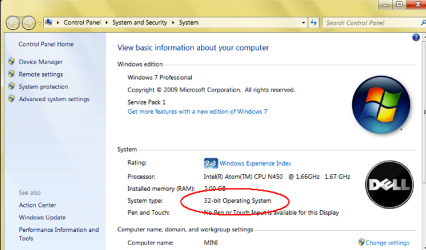
32-bit vs. 64-bit Windows doesn't matter. I meant the bittedness of the update patch must match the bittedness of your Windows installation. Note there are 32-bit (aka, x86) and 64-bit versions of both KB4474419 and KB4490628, so you need to pick the correct ones:

Code:
windows6.1-kb4474419-v3-x64_b5614c6cea5cb4e198717789633dca16308ef79c.msu
windows6.1-kb4474419-v3-x86_0f687d50402790f340087c576886501b3223bec6.msu
windows6.1-kb4490628-x64_d3de52d6987f7c8bdc2c015dca69eac96047c76e.msu
windows6.1-kb4490628-x86_3cdb3df55b9cd7ef7fcb24fc4e237ea287ad0992.msu


You can verify your Windows installation by checking Computer Properties:
1.png

You can verify what patches are already installed by opening a command-prompt window and cutting and pasting the following command:
C:\Windows\System32\wbem\wmic qfe list brief /format:htable >%temp%\u.html & %temp%\u.html

Press Enter and look for the two KBs in the list:
2.png

If you don't have them, visit the Windows Update Catalog and search for them by KB number. From the search results list select the one consistent with your OS version. Do the same for both KB numbers, as the SHA2 update consists of both patches. (If you use Bitlocker, there's also a third, KB3133977, that will be needed.)

The SHA2 updates shouldn't be needed for Macrium 7.x versions, but there's also no harm in applying them to avoid potential incompatibilities arising in something else in the future.
 

My Computer

Computer type
PC/Desktop
Computer Manufacturer/Model Number
Dell Optiplex 7050
OS
Windows 7/8.1/10 multiboot
CPU
Intel Core i7-7700
Motherboard
Dell, Intel Q270 chipset
Memory
48GB (2x16GB Crucial DDR4-3200 + 2x8GB Hynix DDR4-2400)
Graphics Card(s)
Intel HD630 + AMD Radeon R7 450 PCIe
Monitor(s) Displays
Asus VC279 (27")
Screen Resolution
1920x1080
Hard Drives
Toshiba M.2 NVMe (256GB),
Samsung 960 Evo (500GB),
WD Red Plus 80EFBX (8TB)
I still think I’ll update to 7.3 however. Do I need to uninstall the trial first or does the install automatically delete/overwrite the existing install?

It should make no difference as this will count as an upgrade. But it would do no harm to do so. If you uninstall there should be an option to leave all your settings in place, so any settings and backup definitions you may have set up will be retained for the new install.
 

My Computers

System One System Two

  • Computer type
    Laptop
    Computer Manufacturer/Model Number
    Toshiba satellite C650D
    OS
    Windows 7 Home Premium x64
    CPU
    AMD V120
    Memory
    4GB
    Internet Speed
    150 Mbps
    Antivirus
    MSE
    Browser
    IE11, Edge, Firefox
    Other Info
    I also have W7 Pro on my System Two, and several W7 Hyper-V VMs. My other machines run Windows 10/11. Their specs are in my Ten Forums & Eleven Forum profiles.
  • Computer type
    Laptop
    System Manufacturer/Model Number
    Lenovo Thinkpad T430
    OS
    Windows 7 Pro x64
    CPU
    Intel i5-3320M
    Memory
    8 GB
    Hard Drives
    250GB Samsung SSD 860 EVO
    Other Info
    Antivirus: MSE
Hi dg

Thanks for the reply.

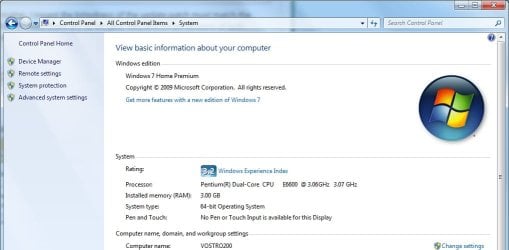
My Windows 7 type is 64-bit

Windows 7 version.jpg

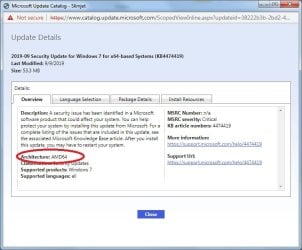
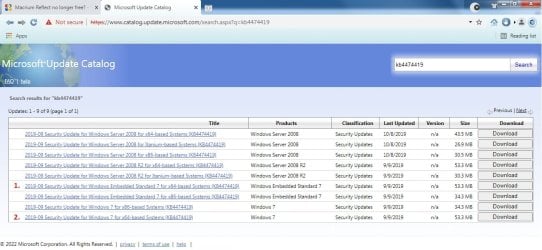
I've gone to the Windows Update Catalogue site for the first of these patches - KB4474419 and clicking on either patch 1 or patch 2(shown below) and looking at the details, it says that they are applicable AMD64 systems.

Windows Update Catalogue KB4474419.jpg

KB4474419 Update Details.jpg

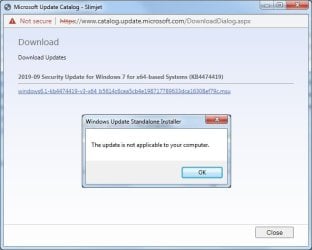
As mine is an Intel Core-2 Duo E6600 (see system picture above) it is no wonder I get the following error message when I try to apply either patch.

KB4474419 ms.jpg

As there doesn't seem to be a patch for Intel architecture, I'm rather stuffed!

Zaph
 

My Computer

Computer type
Laptop
Computer Manufacturer/Model Number
DELL Inspiron 1525 / Sony VAIO VGN FW21L / Zoostorm 7877-0095
OS
Windows 7 Home Premium SP1 64-bit (now looking at Linux Mint!)
CPU
Core2 Duo T5750 2GHz/Core2 Duo T5800 2GHz/Core i5 3300 3.1GH
Motherboard
DELL 0U990C / "SONY Corp VAIO" (??) / GA-H61M-DS2 DVI
Memory
4Gb / 4Gb / 8Gb
Graphics Card(s)
Intel 965 Express/ATi Mob Radeon HD 3400/AMD Radeon R7 200
Hard Drives
WD 750Gb Black (WD7500BPKT) - DELL
WD 1Tb Black (WD10JPLX) - SONY
ST 2Tb Barracuda (2000DM001) - Zoostorm
Internet Speed
VM Fibre 100 Mbps
Antivirus
Kaspersky IS 2019 / Kaspersky IS 2019 / Kaspersky IS 2019
Browser
Chrome 76.0.3809 / Chrome 79.0.3945 / Chrome 76.0.3809
In this context, "AMD64" refers to the 64-bit instruction set, not AMD the manufacturer. The CPU instruction sets are essentially identical so the term "x64" includes both manufacturers. You don't have "Windows Embedded Standard 7", so your "patch 2" is the one you want.

In image 4 of your post #10 it appears you are trying to do an over-the-air install of the patch (download and install in one fell swoop). As a general rule, I typically recommend users "save" the download instead of "install" and then click the downloaded file to install it -- i.e., make it two steps instead of one. That gives you better control of the process, and some troubleshooting clues if the process goes awry at some point.

Nevertheless, I don't think that's the issue in this case, but FWIW it's just a general rule of thumb I follow.

Re: image 1 in your post #10 ... Do you not have SP1 installed? If not, that's likely the culprit. The patch is expecting to apply itself to "Windows 7 SP1" and you have "Windows 7" -- not the same thing from the patch's perspective. SP1 has been out so long that most patches assume SP1 and a more recent Servicing Stack update, and I would expect that's the case with the SHA2 patches here.

If you need help on how to install SP1 and other recommended updates, perhaps you ought to start a new thread to get others involved.
 

My Computer

Computer type
PC/Desktop
Computer Manufacturer/Model Number
Dell Optiplex 7050
OS
Windows 7/8.1/10 multiboot
CPU
Intel Core i7-7700
Motherboard
Dell, Intel Q270 chipset
Memory
48GB (2x16GB Crucial DDR4-3200 + 2x8GB Hynix DDR4-2400)
Graphics Card(s)
Intel HD630 + AMD Radeon R7 450 PCIe
Monitor(s) Displays
Asus VC279 (27")
Screen Resolution
1920x1080
Hard Drives
Toshiba M.2 NVMe (256GB),
Samsung 960 Evo (500GB),
WD Red Plus 80EFBX (8TB)
Re: image 1 in your post #10 ... Do you not have SP1 installed? If not, that's likely the culprit. The patch is expecting to apply itself to "Windows 7 SP1" and you have "Windows 7" -- not the same thing from the patch's perspective. SP1 has been out so long that most patches assume SP1 and a more recent Servicing Stack update, and I would expect that's the case with the SHA2 patches here.

If you need help on how to install SP1 and other recommended updates, perhaps you ought to start a new thread to get others involved.
Hi again dg,

To my chagrin, no, this is a fresh install of a purchased retail copy before SP1 came out. I was more concerned at getting an OS installed (for some reason, the Win 10 installer couldn't see the partition on the hard drive - see this thread), so I loaded Win 7 and everything went okay. I forgot *blushes* to update to SP1 !

After installing Office and activating, I then tried to clone the successful (and activated) Windows installation to another (spare) HDD using the latest version of Macrium.

That's when I got the error.

I then tried an earlier version (7.1.3169) and was able to clone the installation successfully.

Now to try u/grading to Windows 10 (since I have just purchased a license). I have several PCs upgraded to Windows 10 and I don't know (or can't remember more like) which Win 7 key was in use with which machine - so easier to buy a new license then everything would be legit.

Thanks for you help, patience & understanding. I really appreciate the time and effort spent trying to help me understand/resolve the issue.

Cheers

Zaph
 

My Computer

Computer type
Laptop
Computer Manufacturer/Model Number
DELL Inspiron 1525 / Sony VAIO VGN FW21L / Zoostorm 7877-0095
OS
Windows 7 Home Premium SP1 64-bit (now looking at Linux Mint!)
CPU
Core2 Duo T5750 2GHz/Core2 Duo T5800 2GHz/Core i5 3300 3.1GH
Motherboard
DELL 0U990C / "SONY Corp VAIO" (??) / GA-H61M-DS2 DVI
Memory
4Gb / 4Gb / 8Gb
Graphics Card(s)
Intel 965 Express/ATi Mob Radeon HD 3400/AMD Radeon R7 200
Hard Drives
WD 750Gb Black (WD7500BPKT) - DELL
WD 1Tb Black (WD10JPLX) - SONY
ST 2Tb Barracuda (2000DM001) - Zoostorm
Internet Speed
VM Fibre 100 Mbps
Antivirus
Kaspersky IS 2019 / Kaspersky IS 2019 / Kaspersky IS 2019
Browser
Chrome 76.0.3809 / Chrome 79.0.3945 / Chrome 76.0.3809
I lost track on how to get an SP1 Windows 7 these days.
 

My Computer

Computer type
PC/Desktop
Computer Manufacturer/Model Number
Antec desktop; Acer Aspire laptops
OS
Windows 7 Professional 64-bit
CPU
Desktop i5; Acers i5 & i7
Memory
desktop 16GB; 1 Acer 8GB & 1 Acer 16GB
Hard Drives
1TB split into 2 equal partitions [OS and data] usable by RJS
Internet Speed
AT&T DSL
Browser
FF, GChrome, msIE
Other Info
Windows 7 Firewall, Emsisoft AM/AV, MSE [scan-only], SpywareBlaster, Ruiware/BillP combine
Thread update (06.April.22)

Thanks to @Bree's help, SP1 now installed.

For anyone else wanting to d/load & install SP1 - here is Bree's link : Microsoft Update Catalog KB976932

Now to try to install KB4474419 and KB4490628

Success!

Zaph
 

My Computer

Computer type
Laptop
Computer Manufacturer/Model Number
DELL Inspiron 1525 / Sony VAIO VGN FW21L / Zoostorm 7877-0095
OS
Windows 7 Home Premium SP1 64-bit (now looking at Linux Mint!)
CPU
Core2 Duo T5750 2GHz/Core2 Duo T5800 2GHz/Core i5 3300 3.1GH
Motherboard
DELL 0U990C / "SONY Corp VAIO" (??) / GA-H61M-DS2 DVI
Memory
4Gb / 4Gb / 8Gb
Graphics Card(s)
Intel 965 Express/ATi Mob Radeon HD 3400/AMD Radeon R7 200
Hard Drives
WD 750Gb Black (WD7500BPKT) - DELL
WD 1Tb Black (WD10JPLX) - SONY
ST 2Tb Barracuda (2000DM001) - Zoostorm
Internet Speed
VM Fibre 100 Mbps
Antivirus
Kaspersky IS 2019 / Kaspersky IS 2019 / Kaspersky IS 2019
Browser
Chrome 76.0.3809 / Chrome 79.0.3945 / Chrome 76.0.3809
recently mentioned this in Eleven forum

latest Macrium Reflect 7.x release was 7.3.6391.

direct link to the Macrium Reflect Free 7.3.6391 x64 setup package
 

My Computer

Computer type
PC/Desktop
Computer Manufacturer/Model Number
Dell Inspiron 620
OS
Windows 7 SP1 Home Premium 64bit [x64]
CPU
Intel(R) Core(TM) i5-2310 CPU @ 2.90GHz
Memory
6 GB
Graphics Card(s)
Intel HD Graphics 2000
Sound Card
Conexant CX20641 HD Audio
Hard Drives
Western Digital 1TB (1024GB) WD10EALX-759BA1
Internet Speed
Spectrum Cable Internet up to 100Mbps
Back
Top