Macrium Reflect opens instead of my desktop

Sweetp59

New member
Local time
4:57 AM
Messages
8
Sorry for piggy backing on this post but I'm working off a small phone. I just downloaded this program after an upgrade of Windows 10 messed up my computer (long story). I recovered Windows 7 thru Acer recovery. This morning I turned on my computer and it's like Macrium Reflect took over my computer. I can't get to my desktop. I tried hitting esc button when the window popped up but it still gives me the Macrium Reflect window. How do I get to my desktop? HELPPP
 

My Computer My Computer

At a glance

Windows Home Premium 64bit
Computer type
PC/Desktop
Computer Manufacturer/Model Number
Acer
OS
Windows Home Premium 64bit
Yesterday i downloaded the free version of Macrium Reflect after a nightmare with the upgrade to Windows 10. I had to do the eRecovery with Acer to get my Windows 7 back. I tried to do recovery disks after this but got an error that the third disk didnt take. I accidentally left that disk in my cd player. This morning I turned my computer on and Macrium Reflect opened up. I took the disk out and exited the program and rebooted. I've tried hitting the esc key while Macrium is booting but it doesn't take me to my desktop.What do I need to do to get past Macrium? Feel like this program hijacked my computer.
 

My Computer My Computer

At a glance

Windows Home Premium 64bit
Computer type
PC/Desktop
Computer Manufacturer/Model Number
Acer
OS
Windows Home Premium 64bit
You may need to get into your BIOS & change the boot order of your computer. It's possible that with all your problems Macrium has ended up as the first item to boot, so try changing the boot order so that your Windows 7 drive boots first.
 

My Computer My Computer

At a glance

Windows 7 Home Premium 64 bit sp1Intel i5 3570 3.4Ghz Ivy Bridge SKT 1155 quad...G-Skill Rip Jaws 16Gb (8x2) DDR3 -1600 PC3 12...Gigabyte NVIDIA GT610 1Gb DDR3 810/1200 PCI-E...
Computer type
PC/Desktop
Computer Manufacturer/Model Number
Self built using existing case
OS
Windows 7 Home Premium 64 bit sp1
CPU
Intel i5 3570 3.4Ghz Ivy Bridge SKT 1155 quad core
Motherboard
Gigabyte Z77-HD3 SKT 1155 2xSata 3, 4x USB 3.0
Memory
G-Skill Rip Jaws 16Gb (8x2) DDR3 -1600 PC3 12800 CL 10 red
Graphics Card(s)
Gigabyte NVIDIA GT610 1Gb DDR3 810/1200 PCI-E 2.0 Silent
Sound Card
NVIDIA High Definition & Realtech High Definition Audio
Monitor(s) Displays
2 x Philips 226V4L 16:9 aspect ratio
Screen Resolution
1920 x 1080 HD
Hard Drives
Samsung 840 Pro 256gb SSD, SATA 3.
Hitachi Touro Portable 1tb, USB 3.0 HDD used for image b/ups.
PSU
Corsair VS450
Case
Codeng
Cooling
PSU fan & CPU fan
Keyboard
Logitech
Mouse
Logitech Wireless trackball M570
Internet Speed
Wireless 3G. 3mg down & 550kb up.
Antivirus
Bitdefender Internet Security 2020
Browser
Opera (Current Version) & Firefox
Other Info
MS Office 2013 Pro. Davis weather station software. MGE Nova 600 avr UPS.
Thanks! I finally decided to just do Alt + F10 to reboot. Hoping that it doesnt do this again. If it does I'll be uninstalling Macrium Reflect.
 

My Computer My Computer

At a glance

Windows Home Premium 64bit
Computer type
PC/Desktop
Computer Manufacturer/Model Number
Acer
OS
Windows Home Premium 64bit
Well even after doing 2 factory resets, Macrium Reflect still opens up! I looked on the registry and it's not listed YET it comes up. I sent Macrium Reflect a message and they said it's not possible unless the disk is in the drive. It's not! Yet, it opens up. It's like this thing has hijacked my computer.
 

Attachments

  • 20150909_174658.jpg
    20150909_174658.jpg
    218.9 KB · Views: 1

My Computer My Computer

At a glance

Windows Home Premium 64bit
Computer type
PC/Desktop
Computer Manufacturer/Model Number
Acer
OS
Windows Home Premium 64bit
I have done two factory resets of my computer, looked on the hard drive and Macrium Reflect is no listed YET it opens up when I turn my computer on! I unhide the folders and did a search and it's not coming up BUT it's still on my computer! I feel like this program has hijacked my computer! HELP!
 

Attachments

  • 20150909_174658.jpg
    20150909_174658.jpg
    218.9 KB · Views: 0

My Computer My Computer

At a glance

Windows Home Premium 64bit
Computer type
PC/Desktop
Computer Manufacturer/Model Number
Acer
OS
Windows Home Premium 64bit
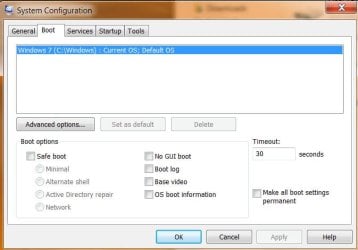
Can you tell us or preferably show us what is listed on the boot tab in msconfig.

To get there press :orb: Type, msconfig and open that, go to the boot tab like this,
47429d1406065592-system-configuration-msconfig-shortcuts-create-msconfig_boot_tab.png


That's a W8 pic, but yours will be similar.

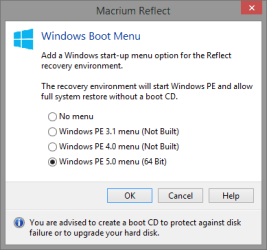
From the looks of it, it sure seems to be this option has been enabled and taken the place of default boot,

2015-09-09_17h00_07.png
 

My Computer My Computer

At a glance

Win 10 Pro x64Intel I5-2500K @3.3GHz16GB G.Skill Ripjaws X (4x4GB)EVGA GeForce 750 Ti SC 2GB
Computer type
PC/Desktop
Computer Manufacturer/Model Number
Self Built
OS
Win 10 Pro x64
CPU
Intel I5-2500K @3.3GHz
Motherboard
Asrock P67 Extreme4
Memory
16GB G.Skill Ripjaws X (4x4GB)
Graphics Card(s)
EVGA GeForce 750 Ti SC 2GB
Sound Card
ASUS Xonar DG 5.1 Channels 24-bit 96KHz PCI Interface Sound
Monitor(s) Displays
auria eq2367
Screen Resolution
1920 x 1080
Hard Drives
250GB Samsung 850 EVO SSD
1TB WD Blue
1TB Hitachi
PSU
SeaSonic X 650W 80 Plus Gold
Case
Corsair Obsidian 750D
Cooling
Corsair H60, Three 140mm case fans
Keyboard
Logitech Wireless Keyboard K520
Mouse
Logitech Wireless Mouse M310
Internet Speed
Wave Broadband ~ 100 dn 5 up
Antivirus
Windows Defender, Malwarebytes Premium
Browser
Edge, IE11, Chrome
Other Info
Laptop specs: HP g7-1365dx /
CPU: AMD A6-3420M APU with Radeon(tm) HD Graphics /
RAM: Crucial 8Gb (2x4Gb) /
SSD: Crucial M4-CT128M4SSD2 ATA Device/ FW 000F /
GFX: AMD Radeon HD 6520G /
OS: Windows 10 Pro x64
Here's what mine looks like and I can't find Macrium Reflect in the registry but it's THERE somewhere because it comes up. :(
 

Attachments

  • 9-9-2015 8-30-41 PM.jpg
    9-9-2015 8-30-41 PM.jpg
    33.7 KB · Views: 10

My Computer My Computer

At a glance

Windows Home Premium 64bit
Computer type
PC/Desktop
Computer Manufacturer/Model Number
Acer
OS
Windows Home Premium 64bit
OK, that clears that thought.

What happens if you just let it continue?

It could just be creating the rescue media.
 

My Computer My Computer

At a glance

Win 10 Pro x64Intel I5-2500K @3.3GHz16GB G.Skill Ripjaws X (4x4GB)EVGA GeForce 750 Ti SC 2GB
Computer type
PC/Desktop
Computer Manufacturer/Model Number
Self Built
OS
Win 10 Pro x64
CPU
Intel I5-2500K @3.3GHz
Motherboard
Asrock P67 Extreme4
Memory
16GB G.Skill Ripjaws X (4x4GB)
Graphics Card(s)
EVGA GeForce 750 Ti SC 2GB
Sound Card
ASUS Xonar DG 5.1 Channels 24-bit 96KHz PCI Interface Sound
Monitor(s) Displays
auria eq2367
Screen Resolution
1920 x 1080
Hard Drives
250GB Samsung 850 EVO SSD
1TB WD Blue
1TB Hitachi
PSU
SeaSonic X 650W 80 Plus Gold
Case
Corsair Obsidian 750D
Cooling
Corsair H60, Three 140mm case fans
Keyboard
Logitech Wireless Keyboard K520
Mouse
Logitech Wireless Mouse M310
Internet Speed
Wave Broadband ~ 100 dn 5 up
Antivirus
Windows Defender, Malwarebytes Premium
Browser
Edge, IE11, Chrome
Other Info
Laptop specs: HP g7-1365dx /
CPU: AMD A6-3420M APU with Radeon(tm) HD Graphics /
RAM: Crucial 8Gb (2x4Gb) /
SSD: Crucial M4-CT128M4SSD2 ATA Device/ FW 000F /
GFX: AMD Radeon HD 6520G /
OS: Windows 10 Pro x64
Just a thought.
Check msconfig/Startup and Services for Macrium checked marked.
 

My Computer My Computer

At a glance

Windows 10 Pro. 64/ version 1709 Windows 7 Pr...Intel i7-6800K @ 4.3Corsair Platinum 16 gig @2400EVGA GTX 1070 OC
Computer type
PC/Desktop
Computer Manufacturer/Model Number
Home made Desktop
OS
Windows 10 Pro. 64/ version 1709 Windows 7 Pro/64
CPU
Intel i7-6800K @ 4.3
Motherboard
ASUS X-99 Deluxe II
Memory
Corsair Platinum 16 gig @2400
Graphics Card(s)
EVGA GTX 1070 OC
Monitor(s) Displays
Asus 27" LED LCD/VE278Q
Screen Resolution
1920-1080 or 1280-720 HDMI
Hard Drives
INTEL SSD 730-240 Gb Sata 3.0/
PSU
EVGA Platium 1200W
Case
Phanteks Luxe Tempered Glass 8 fans/ one radiator
Cooling
XSPC/ Water Cooled CPU
Keyboard
Das 4 Professional
Mouse
Logitech M705/MX Anywhere 2-S
Internet Speed
100 mbits
Antivirus
Microsoft Security Essentials/ Malwarebytes Premium 3.0/ SAS
Browser
I.E. 11 default/Firefox/ ISP Time Warner Cable/Spectrum
Other Info
LG BluRay Burner/
Sound system-KLipsch-THX/
Icy Dock ssd Hot Swap bays.
OK, that clears that thought.

What happens if you just let it continue?

It could just be creating the rescue media.

Here's the thing, I was trying to make a backup disk and got an error message with it. Turned the computer off for the night (forgot that disk was in the drive) and when I went to turn it on, the disk activated the program. Just clicking Exit in the "free" version of Macrium Reflect doesn't exit you out of the program. They also don't offer support for the free version so I had to do the factory reset (twice I've wiped out my computer mind you!) and the booger doesn't get wiped out all the way. I know, hard to believe but it's still there somewhere. I don't know how! It's not listed in the Startup either. Can't find it in the registry either. Acer (manufacturer of the computer) is supposed to be sending me Windows 7 disk so I can hopefully get it back nice and clean! It's a puzzle and Macrium Reflect just keeps telling me that the disk has to be in the drive...it ain't! I have installed numerous programs using that drive today. Thanks for your help!
 

My Computer My Computer

At a glance

Windows Home Premium 64bit
Computer type
PC/Desktop
Computer Manufacturer/Model Number
Acer
OS
Windows Home Premium 64bit
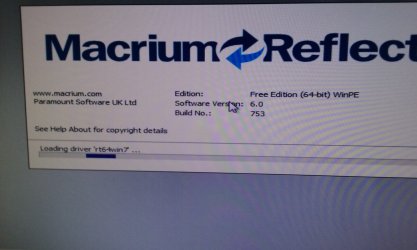
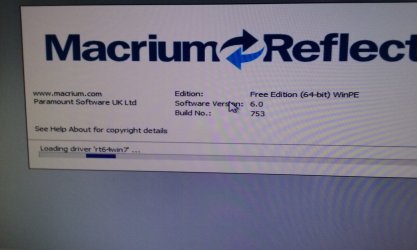
I understand that the disk is not in the drive, but from this pic,

371083d1441841622t-macrium-reflect-opens-instead-my-desktop-20150909_174658.jpg


You can see the WinPe and it loading a driver across the bottom.

The Macrium program doesn't do that when it starts, it's either creating or loading the rescue disk, both safe operations which is why I asked what happens if you let it continue?

It sounds like now that you shut down the computer while it was still creating or loading the rescue disc.
 

My Computer My Computer

At a glance

Win 10 Pro x64Intel I5-2500K @3.3GHz16GB G.Skill Ripjaws X (4x4GB)EVGA GeForce 750 Ti SC 2GB
Computer type
PC/Desktop
Computer Manufacturer/Model Number
Self Built
OS
Win 10 Pro x64
CPU
Intel I5-2500K @3.3GHz
Motherboard
Asrock P67 Extreme4
Memory
16GB G.Skill Ripjaws X (4x4GB)
Graphics Card(s)
EVGA GeForce 750 Ti SC 2GB
Sound Card
ASUS Xonar DG 5.1 Channels 24-bit 96KHz PCI Interface Sound
Monitor(s) Displays
auria eq2367
Screen Resolution
1920 x 1080
Hard Drives
250GB Samsung 850 EVO SSD
1TB WD Blue
1TB Hitachi
PSU
SeaSonic X 650W 80 Plus Gold
Case
Corsair Obsidian 750D
Cooling
Corsair H60, Three 140mm case fans
Keyboard
Logitech Wireless Keyboard K520
Mouse
Logitech Wireless Mouse M310
Internet Speed
Wave Broadband ~ 100 dn 5 up
Antivirus
Windows Defender, Malwarebytes Premium
Browser
Edge, IE11, Chrome
Other Info
Laptop specs: HP g7-1365dx /
CPU: AMD A6-3420M APU with Radeon(tm) HD Graphics /
RAM: Crucial 8Gb (2x4Gb) /
SSD: Crucial M4-CT128M4SSD2 ATA Device/ FW 000F /
GFX: AMD Radeon HD 6520G /
OS: Windows 10 Pro x64
I tried to do recovery disks after this but got an error that the third disk didnt take. I accidentally left that disk in my cd player.

To me it sounds like the OP was creating a Backup Image and saving it to optical disc when the problem started.
A bootable Rescue Disc fits on a single CD/DVD, it doesn't need 3 or more discs.
It's best to save Backup Images to a hard drive.

It sounds like some setting is stuck in BIOS now causing it to try and continue from where the error occurred when booting up.
I would try a BIOS Reset.
See if there are Bios Reset instructions in the Acer documentation for your specific PC model, or ask Acer for these instructions.

One way to reset Bios is to remove the CMOS battery for 10+ seconds and then replace it.
But that's not always the easiest way, depending on the PC.
 

My Computer My Computer

At a glance

Multi-Boot W7_Pro_x64 W8.1_Pro_x64 W10_Pro_x6...AMD Athlon II x4 6206GB GSkill DDR2 800AMD 4670 GPU + AMD 4200 IGP
Computer type
PC/Desktop
Computer Manufacturer/Model Number
home built
OS
Multi-Boot W7_Pro_x64 W8.1_Pro_x64 W10_Pro_x64 +Linux_VMs +Chromium_VM
CPU
AMD Athlon II x4 620
Motherboard
Gigabyte GA-MA785G-UD3H
Memory
6GB GSkill DDR2 800
Graphics Card(s)
AMD 4670 GPU + AMD 4200 IGP
Sound Card
on board Realtek ALC889A
Monitor(s) Displays
RCA 40" LCD TV, Insignia 32" LCD TV, HP 15" LCD monitor
Screen Resolution
1680 x 1050
Hard Drives
OCZ Vertex 3 120GB,
Samsung F3 1TB (3),
Several others - WD, Seagate, Hitachi, ...
PSU
Corsair 500 W
Case
Rosewill mid tower
Cooling
CM 90mm rifle
Keyboard
Gyration wireless, Logitech wireless, Dell USB wired
Mouse
Gyration wireless, Logitech wireless, V7 USB wired
Internet Speed
Spectrum - 100Mbps D / 10Mbps U
Antivirus
Avast, MBAM3, EMET, WinPatrol
Browser
Pale Moon, Firefox, IE
Other Info
2 multi-boot PC's
Mainly HTPC/Office/Gen purpose (no gaming).
Trendnet USB KVM.
LG DVD burner/Blue Ray Player.
Tray system for removable SATA backup drives.

Not currently OCd, under-volted.
I use Hybrid sleep, rarely re-boot or shutdown.

Hauppauge HD-PVR, Avermedia PCIe TV Tuner, Hauppauge PCI TV Tuner.
I tried to do recovery disks after this but got an error that the third disk didnt take. I accidentally left that disk in my cd player.

To me it sounds like the OP was creating a Backup Image and saving it to optical disc when the problem started.
A bootable Rescue Disc fits on a single CD/DVD, it doesn't need 3 or more discs.
It's best to save Backup Images to a hard drive.

It sounds like some setting is stuck in BIOS now causing it to try and continue from where the error occurred when booting up.
I would try a BIOS Reset.
See if there are Bios Reset instructions in the Acer documentation for your specific PC model, or ask Acer for these instructions.

One way to reset Bios is to remove the CMOS battery for 10+ seconds and then replace it.
But that's not always the easiest way, depending on the PC.

I was creating the Recovery Disk in the Acer Recovery when the third CD did not finish recording. :( I went in (F12) and looked at the Boot menu, changed it to P: and rebooted TWICE and it worked! Thank you so much for your help! As I told Macrium Reflect, there is no CD, no storage device hooked up BUT yet there's residue somewhere that was causing this issue. They finally got back to me last night after many attempts to get help and this was their reply:
"Please can you double check that there are no CD/DVD in your drives and any USB storage devices are disconnected from your computer. You could also enter your computer BIOS and make sure the hard drive is set to be the first boot device. Please be assured that Reflect is not capable of "Hijacking" a computer and if it was installed the factory reset you applied would have removed it.
We do have a utility which can completely remove Reflect but it will only work if you can get into Windows."
Here's what the Bio window looked like too! Not sure if that will show you what it was doing or not. Thanks again for your help! Awesome support here at Sevenforums!! :thumbsup:
 

Attachments

  • 20150910_074712.jpg
    20150910_074712.jpg
    274.9 KB · Views: 0

My Computer My Computer

At a glance

Windows Home Premium 64bit
Computer type
PC/Desktop
Computer Manufacturer/Model Number
Acer
OS
Windows Home Premium 64bit
Back
Top