
Macrium reflect or easeus professional backup?

sreedhav

Seasonal Bird
Guru
Local time
3:33 PM
Messages
612
Location
Seasonal Bird
I am a new member and hi to every one here! My previous Win. was XP Prof. and i was using Macrium Reflect(free) for B&R (using the Linux rescue disk) without a hiccup not even once. I have installed Win. 7 Professional and my restore process using the Linux rescue disk has failed every time! I usually take the backups onto a Seagate free Agent Pro (1 TB) external HD and as a test have taken backups(two) onto an internal disk partition-->C/,D/,E/, onto F DRIVE.Both methods have failed. I am very curious to know whether there are any other methods of "restore" other than the rescue disk in Macrium!Any help is most welcome as i am at my wit's end.Thanks a lot!
 

My Computer My Computer

Computer Manufacturer/Model Number
Sony Vaio C series VPCCB35FN laptop
OS
MS Windows 7 Home Premium 64-bit SP1
CPU
IntelCore [email protected]; Sandy Bridge 32nm Tech.
Motherboard
Sony Vaio Version:C609NJYJ
Memory
4096Mb RAM; Single ChannelDDR3@665MHz; DRAM Freq:662MHz
Graphics Card(s)
AMD Radeon HD 6630M; GPU:Whistler;BIOS Core&mem Clock:123.36
Sound Card
REALTEK High Definition Audio Device; INTEL Display Card
Monitor(s) Displays
Generic PnP Intel HD;Resolution:1920*1040 Pixels; BPP:32bits
Screen Resolution
Current Resolution:1920*1080 Pixels; Monitor Frequency:60Hz
Hard Drives
Internal HD:TOSHIBA MK5061GSY; Real Size:488 GB;NTFS; 3 Partitions; SATA; HEADS:16

External HDD: WD Elements 1023 PORTABLE; Estimated Size: 1TB; NTFS; 3 Partitions
Cooling
Lateral Exhaust with a Cooling Pad Placed Beneath.
Keyboard
Logitech Bluetooth+ Generic Integrated K-B
Mouse
Logitech Bluetooth
Internet Speed
2MBPS
Other Info
1)Trend Micro Titanium Maximum Security Suite Version:3
2)SAS-PRO

3)MBAM--PRO


4)WATERFOX+IE9 +WOT+LINKEXTEND+ DRWEBCUREIT LINK CHECKER

5)SPYWAREBLASTER

6) WINPATROL PLUS

7) SANDBOXIE and
8) A BIT OF COMMON SENSE.
I am a new member and hi to every one here! My previous Win. was XP Prof. and i was using Macrium Reflect(free) for B&R (using the Linux rescue disk) without a hiccup not even once. I have installed Win. 7 Professional and my restore process using the Linux rescue disk has failed every time! I usually take the backups onto a Seagate free Agent Pro (1 TB) external HD and as a test have taken backups(two) onto an internal disk partition-->C/,D/,E/, onto F DRIVE.Both methods have failed. I am very curious to know whether there are any other methods of "restore" other than the rescue disk in Macrium!Any help is most welcome as i am at my wit's end.Thanks a lot!

I am using Macrium without any problems. Could you post a screen shot of your Disk Management. That will give us a better idea of what we are dealing with. == Also, did it back up a few times and it stopped working or it just never backed up at all on Win 7?
 

My Computer My Computer

Computer type
PC/Desktop
Computer Manufacturer/Model Number
Custom Build
OS
Windows 7 Home Premium 32-Bit - Build 7600 SP1
CPU
Intel Core i3-2120 3.30Ghz
Motherboard
Asus P8Z68-V LX Intel Z68 Socket H2 ATX
Memory
Kingston 4 GB DDR3 1333 mhz
Graphics Card(s)
AMD Radeon HD6670
Sound Card
Sound Blaster Audigy SE 24-Bit
Monitor(s) Displays
Asus VE228
Screen Resolution
1440 X 900
Hard Drives
OCZ Vertex 3 120 GB Sata 3 SSD ==
Kingston SH103/S3 120 G Hyper X 120 GB SSD ==
Western Digital 500 GB Caviar Green 7200 RPM ==
PSU
Corsair CX600M == 600 Watt
Case
NZXT Apollo - Silver with Clear Side Panel
Cooling
Three 120 mm Fans
Keyboard
Microsoft Natural 4000
Mouse
Microsoft Custom Optical 3000
Internet Speed
AT&T Fiber Optic Wireless Network
Antivirus
Microsoft Security Essentials
Browser
Chrome
Other Info
120 mm Blue LED Fan -- Three Blue LED Lazer Light Sticks
I use Windows 7 inbuilt imaging and Macrium Reflect free. The linux Macrium boot disk has always worked for me but I recall Macrium stating that sometimes it doesn't work for some system configurations (I'm using Win7x64 Home Premium). Can you give a bit more info on specifics of the linux boot disk failures.

Given you also have XP I believe you should be able to make a BartPe rescue/boot CD.
Apart from someone else coming along from this forum have you looked the Macrium forum?
 

My Computer My Computer

Computer type
PC/Desktop
Computer Manufacturer/Model Number
Own build
OS
Windows 7x64 Home Premium SP1
CPU
Intel i7 2600k
Motherboard
ASUS P8Z68 Deluxe
Memory
G.Skill Ripjaws (DDR3-1600) 2x4GB
Graphics Card(s)
Nvidia GeForce GTS 450; Intel HD Graphics 3000(GT2+)
Monitor(s) Displays
Dell Ultrasharp IPS panel U2311H, Samsung SyncMaster P2350
Screen Resolution
1920x1080
Hard Drives
Samsung 850 Pro SSD 256GB, Samsung SSD 840 120GB, Seagates 1TB Barracuda ST31000528AS x2
PSU
Seasonic M12II 520W
Case
Lian Li Lancool PC-K60
Cooling
Case: 1x120mm, 3x140mm CPU: Hyper 212+
Keyboard
Logitech MK520 (wireless)
Mouse
Logitech MK520
Internet Speed
6-7 Mbps
Antivirus
Norton Security Premium, Malwarebytes on 2 (MSE on 3rd PC)
Browser
FireFox
Other Info
Audio: Logitech Z523 2.1
To, bigmck & mjf,
Thanks a lot for your replies! The error message was after successful booting of the "rescue disk"!"RESTORE NOT POSSIBLE". I always verify the backed up image. One thing i was doing differently was ,i was including the "100MB" space the Win.7 reserves for the system at the start. Could it have had an impact on the whole process?

I was mulling over whether to try 1) Easeus Master professional which i got for free, for the simple reason it too has an option of booting thru' a disk and/or 2) Seagate's own Disk Wizard .

Kindly view the attachment containing the Disk management.

Regards,
DR.Sreedhav.
 

Attachments

  • Disk Management.png
    Disk Management.png
    31.7 KB · Views: 75

My Computer My Computer

Computer Manufacturer/Model Number
Sony Vaio C series VPCCB35FN laptop
OS
MS Windows 7 Home Premium 64-bit SP1
CPU
IntelCore [email protected]; Sandy Bridge 32nm Tech.
Motherboard
Sony Vaio Version:C609NJYJ
Memory
4096Mb RAM; Single ChannelDDR3@665MHz; DRAM Freq:662MHz
Graphics Card(s)
AMD Radeon HD 6630M; GPU:Whistler;BIOS Core&mem Clock:123.36
Sound Card
REALTEK High Definition Audio Device; INTEL Display Card
Monitor(s) Displays
Generic PnP Intel HD;Resolution:1920*1040 Pixels; BPP:32bits
Screen Resolution
Current Resolution:1920*1080 Pixels; Monitor Frequency:60Hz
Hard Drives
Internal HD:TOSHIBA MK5061GSY; Real Size:488 GB;NTFS; 3 Partitions; SATA; HEADS:16

External HDD: WD Elements 1023 PORTABLE; Estimated Size: 1TB; NTFS; 3 Partitions
Cooling
Lateral Exhaust with a Cooling Pad Placed Beneath.
Keyboard
Logitech Bluetooth+ Generic Integrated K-B
Mouse
Logitech Bluetooth
Internet Speed
2MBPS
Other Info
1)Trend Micro Titanium Maximum Security Suite Version:3
2)SAS-PRO

3)MBAM--PRO


4)WATERFOX+IE9 +WOT+LINKEXTEND+ DRWEBCUREIT LINK CHECKER

5)SPYWAREBLASTER

6) WINPATROL PLUS

7) SANDBOXIE and
8) A BIT OF COMMON SENSE.
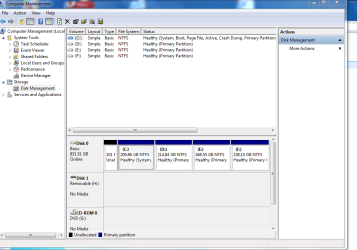
I don't know what has happened to your partition structure. I'd say this is the cause of your imaging problems. and you should fix this up first. I can only think your move from XP to Windows 7 is the basic cause of the problem. I don't think you have a fundamental problem with Macrium.

I can't see the size of the unallocated bit at the front but it looks like it used to be, or was supposed to be, the 100MB system reserved partition.
In addition you have 4 primary partitions. You can only have 4 primary partitions on a disk and this would be ok for XP. Normally for Windows 7, you would have the 100MB system reserved primary and at most 3 other primary partitions. Normally having and imaging the 100MB partition is not a problem but here it is. Did Macrium allow you to image the 100MB unallocated partition?

Is your PC still booting and working ok?
If yes then
(1) make sure you have all your personal files/folders backed up
(2) Make sure you have a valid and verified image of C: (don't worry about restore yet)
Then you need to decide
(1a) If you want the partition structure with a 100MB system reserved then it needs to be made a primary, system, active. If so then you have to lose one partition (D, E or F) making one of them unallocated. Then give that space to the partitions either side in whatever ratio you want.
OR
(1b) Same as (1a) except make E&F extended/logical
OR
(2) Merge the little unallocated with C: and not have a 100 MB system reserved.

If your PC is still working fine option (1b) or (2) are the easiest. (2) may be close to effectively effectively how your system is now running since C: is the system, active. The 100 MB is currently a vacant lot.
You need to make this decision & in the mean time download
Partition Wizard Bootable CD if you don't already have it because you will probably need it.
The other thing is have you Windows 7 installation disks or is there a recovery partition somewhere.
 
Last edited:

My Computer My Computer

Computer type
PC/Desktop
Computer Manufacturer/Model Number
Own build
OS
Windows 7x64 Home Premium SP1
CPU
Intel i7 2600k
Motherboard
ASUS P8Z68 Deluxe
Memory
G.Skill Ripjaws (DDR3-1600) 2x4GB
Graphics Card(s)
Nvidia GeForce GTS 450; Intel HD Graphics 3000(GT2+)
Monitor(s) Displays
Dell Ultrasharp IPS panel U2311H, Samsung SyncMaster P2350
Screen Resolution
1920x1080
Hard Drives
Samsung 850 Pro SSD 256GB, Samsung SSD 840 120GB, Seagates 1TB Barracuda ST31000528AS x2
PSU
Seasonic M12II 520W
Case
Lian Li Lancool PC-K60
Cooling
Case: 1x120mm, 3x140mm CPU: Hyper 212+
Keyboard
Logitech MK520 (wireless)
Mouse
Logitech MK520
Internet Speed
6-7 Mbps
Antivirus
Norton Security Premium, Malwarebytes on 2 (MSE on 3rd PC)
Browser
FireFox
Other Info
Audio: Logitech Z523 2.1
1. I assume you burnt the Linux CD with the Win7 Macrium.

2. I suggest you backup C and the 100MB partition seperately - each in it's own run.

3. There is really no reason to restore the 100MB partition unless it is damaged (which will be rare). But if you do, mark it as active and restore the MBR.

4. If you restore C, do not mark as active and do not restore the MBR. With the 100MB partition present, C is like any other data partition.

5. Have a peak at my Macrium video tutorial. It also describes the recovery process - and read the text at the beginning in the pink "Warning" box. http://www.sevenforums.com/tutorials/73828-imaging-free-macrium.html?ltr=I
 

My Computer My Computer

Computer Manufacturer/Model Number
HP, Dell, Gateway, Toshiba - 4 laptops and 2 desktops
OS
Vista, Windows7, Mint Mate, Zorin, Windows 8
CPU
from 1.6GHz Duo to i7
Monitor(s) Displays
2x HP w2207
Hard Drives
5x HDD, 7x SSD, 12x Externals
Keyboard
with trackball - no mices
Mouse
Trackball mice
Internet Speed
DSL 6000
I must disagree with whs because I back the 100 MB partition up all the time. What whs says about 100MB rarely needing to be restored is correct but because it is so small I believe a current copy should be kept with the backup set (just in case and for logistics). There is no need for multiple passes when making the image set. Notice I keep using the word "set".
The way Macrium Reflect (free) works is - you are presented with partitions to backup you are then presented with the same list/set to restore. You can restore one of them up to all of them. Macrium restores them one at a time then goes back and asks if you want to restore another one.

In a typical situation you may only need to restore c: (OS + programs, some data...). You don't need to replace the 100MB partition or the MBR.
In MS imaging they always include and replace the the 100MB and MBR with their imaging/reimaging wheteher you want to or not.

Sreedhav - your problem is understanding and fixing the partitions you currently have. I don't think you have a problem with Macrium or the rescue disk. At most the solution is a bit messy but no big deal.
 

My Computer My Computer

Computer type
PC/Desktop
Computer Manufacturer/Model Number
Own build
OS
Windows 7x64 Home Premium SP1
CPU
Intel i7 2600k
Motherboard
ASUS P8Z68 Deluxe
Memory
G.Skill Ripjaws (DDR3-1600) 2x4GB
Graphics Card(s)
Nvidia GeForce GTS 450; Intel HD Graphics 3000(GT2+)
Monitor(s) Displays
Dell Ultrasharp IPS panel U2311H, Samsung SyncMaster P2350
Screen Resolution
1920x1080
Hard Drives
Samsung 850 Pro SSD 256GB, Samsung SSD 840 120GB, Seagates 1TB Barracuda ST31000528AS x2
PSU
Seasonic M12II 520W
Case
Lian Li Lancool PC-K60
Cooling
Case: 1x120mm, 3x140mm CPU: Hyper 212+
Keyboard
Logitech MK520 (wireless)
Mouse
Logitech MK520
Internet Speed
6-7 Mbps
Antivirus
Norton Security Premium, Malwarebytes on 2 (MSE on 3rd PC)
Browser
FireFox
Other Info
Audio: Logitech Z523 2.1
I believe a current copy should be kept with the backup set
mjf, what you say is not wrong. But todays copy of the 100MB partition is the same as yesterdays - so why bother.
I always suggest to deal with the 100MB partition seperately to avoid any confusion regarding "active" and "restore MBR".
 

My Computer My Computer

Computer Manufacturer/Model Number
HP, Dell, Gateway, Toshiba - 4 laptops and 2 desktops
OS
Vista, Windows7, Mint Mate, Zorin, Windows 8
CPU
from 1.6GHz Duo to i7
Monitor(s) Displays
2x HP w2207
Hard Drives
5x HDD, 7x SSD, 12x Externals
Keyboard
with trackball - no mices
Mouse
Trackball mice
Internet Speed
DSL 6000
I believe a current copy should be kept with the backup set
mjf, what you say is not wrong. But todays copy of the 100MB partition is the same as yesterdays - so why bother.
I always suggest to deal with the 100MB partition seperately to avoid any confusion regarding "active" and "restore MBR".
Not dealing with it all at the same time causes confusion.
A virus can attack your MBR and your 100MB partition or youy BCD table in the 100MB partition can get damaged. Why go searching for an old separate image of the 100MB partition when you can have it as a part of the last clean image SET. That's making life simple.
 

My Computer My Computer

Computer type
PC/Desktop
Computer Manufacturer/Model Number
Own build
OS
Windows 7x64 Home Premium SP1
CPU
Intel i7 2600k
Motherboard
ASUS P8Z68 Deluxe
Memory
G.Skill Ripjaws (DDR3-1600) 2x4GB
Graphics Card(s)
Nvidia GeForce GTS 450; Intel HD Graphics 3000(GT2+)
Monitor(s) Displays
Dell Ultrasharp IPS panel U2311H, Samsung SyncMaster P2350
Screen Resolution
1920x1080
Hard Drives
Samsung 850 Pro SSD 256GB, Samsung SSD 840 120GB, Seagates 1TB Barracuda ST31000528AS x2
PSU
Seasonic M12II 520W
Case
Lian Li Lancool PC-K60
Cooling
Case: 1x120mm, 3x140mm CPU: Hyper 212+
Keyboard
Logitech MK520 (wireless)
Mouse
Logitech MK520
Internet Speed
6-7 Mbps
Antivirus
Norton Security Premium, Malwarebytes on 2 (MSE on 3rd PC)
Browser
FireFox
Other Info
Audio: Logitech Z523 2.1
I apologize for not viewing both your expert(i mean it!) advises. I know that excuses are redundant if the matter is serious ,like unable to take a B&R! All i can say in my defence is that i have a bout of COLD and i am dripping all over the lappy!

What i have done is downloaded an evaluation version of M-R and have just taken a backup of drive C ( not including the 100MB system allocated space. As i was progressing,(Destination drive-F:) instead of marking C: as PRIMARY, i marked it as ACTIVE. I have only succeeded after this small change! I will repeat the process tomorrow and if i succeed ,i owe a debt of gratitude to M-R! So, i will order a full version of it!
I am grateful to both of you for the help you have lent!

Regards,
Sreedhav.
 

My Computer My Computer

Computer Manufacturer/Model Number
Sony Vaio C series VPCCB35FN laptop
OS
MS Windows 7 Home Premium 64-bit SP1
CPU
IntelCore [email protected]; Sandy Bridge 32nm Tech.
Motherboard
Sony Vaio Version:C609NJYJ
Memory
4096Mb RAM; Single ChannelDDR3@665MHz; DRAM Freq:662MHz
Graphics Card(s)
AMD Radeon HD 6630M; GPU:Whistler;BIOS Core&mem Clock:123.36
Sound Card
REALTEK High Definition Audio Device; INTEL Display Card
Monitor(s) Displays
Generic PnP Intel HD;Resolution:1920*1040 Pixels; BPP:32bits
Screen Resolution
Current Resolution:1920*1080 Pixels; Monitor Frequency:60Hz
Hard Drives
Internal HD:TOSHIBA MK5061GSY; Real Size:488 GB;NTFS; 3 Partitions; SATA; HEADS:16

External HDD: WD Elements 1023 PORTABLE; Estimated Size: 1TB; NTFS; 3 Partitions
Cooling
Lateral Exhaust with a Cooling Pad Placed Beneath.
Keyboard
Logitech Bluetooth+ Generic Integrated K-B
Mouse
Logitech Bluetooth
Internet Speed
2MBPS
Other Info
1)Trend Micro Titanium Maximum Security Suite Version:3
2)SAS-PRO

3)MBAM--PRO


4)WATERFOX+IE9 +WOT+LINKEXTEND+ DRWEBCUREIT LINK CHECKER

5)SPYWAREBLASTER

6) WINPATROL PLUS

7) SANDBOXIE and
8) A BIT OF COMMON SENSE.
You are quite welcome. If you have further questions, don't hesitate to ask. A couple of comments:

1. the free M-R is a fully operational version. There would be no need to buy the Pro version if the function set of the free version suffices for your needs. That is all I use.
2. You have to be careful what you mark as "active". Look into Disk Management which of your partitions is active. Usually it is the 100MB boot partition. In that case you would not mark C as active during the recovery because it has no MBR and could not boot.
3. I suggest you post a picture of your Disk Management. Then we can have a look at it.
 

My Computer My Computer

Computer Manufacturer/Model Number
HP, Dell, Gateway, Toshiba - 4 laptops and 2 desktops
OS
Vista, Windows7, Mint Mate, Zorin, Windows 8
CPU
from 1.6GHz Duo to i7
Monitor(s) Displays
2x HP w2207
Hard Drives
5x HDD, 7x SSD, 12x Externals
Keyboard
with trackball - no mices
Mouse
Trackball mice
Internet Speed
DSL 6000
If your disk management partition structure is the same as in your post#4 then my comments in post#5 still apply. Four primary partitions C,D,E,F are the maximum number you can have and fine for your old XP. Windows 7 wanted to install a 100MB system partition which normally contains boot files and should be the only active partition. This little partition doesn't exist in XP and it has ended up unallocated.
If you want to run C: as active, system, Boot then you don't need the 100MB partition.
If your PC is running (surprisingly) then OK.
Otherwise you need to to fix up the MBR at the front of the disk and make sure the essential boot files are in C:. This is easily done if you run System Repair up to 3 times. You need to make sure C: is marked active.

Post#5 gives you all your options
 

My Computer My Computer

Computer type
PC/Desktop
Computer Manufacturer/Model Number
Own build
OS
Windows 7x64 Home Premium SP1
CPU
Intel i7 2600k
Motherboard
ASUS P8Z68 Deluxe
Memory
G.Skill Ripjaws (DDR3-1600) 2x4GB
Graphics Card(s)
Nvidia GeForce GTS 450; Intel HD Graphics 3000(GT2+)
Monitor(s) Displays
Dell Ultrasharp IPS panel U2311H, Samsung SyncMaster P2350
Screen Resolution
1920x1080
Hard Drives
Samsung 850 Pro SSD 256GB, Samsung SSD 840 120GB, Seagates 1TB Barracuda ST31000528AS x2
PSU
Seasonic M12II 520W
Case
Lian Li Lancool PC-K60
Cooling
Case: 1x120mm, 3x140mm CPU: Hyper 212+
Keyboard
Logitech MK520 (wireless)
Mouse
Logitech MK520
Internet Speed
6-7 Mbps
Antivirus
Norton Security Premium, Malwarebytes on 2 (MSE on 3rd PC)
Browser
FireFox
Other Info
Audio: Logitech Z523 2.1
If your PC is running (surprisingly) then OK.
I am wondering too how that could work.
 

My Computer My Computer

Computer Manufacturer/Model Number
HP, Dell, Gateway, Toshiba - 4 laptops and 2 desktops
OS
Vista, Windows7, Mint Mate, Zorin, Windows 8
CPU
from 1.6GHz Duo to i7
Monitor(s) Displays
2x HP w2207
Hard Drives
5x HDD, 7x SSD, 12x Externals
Keyboard
with trackball - no mices
Mouse
Trackball mice
Internet Speed
DSL 6000
The last two days were a mixed bag. The network LAN driver and the wireless LAN drivers went for a toss! I was real busy downloading the requires ones from Intel and Realtek. I had an error message "Windows SNMP is not installed", throughout the repair period.Googled around but could not get a hang of it! Any help please!

I finally decided to use the B&R of M-R (taken on the 12th) and repeated the same process while recovery.Sorry for the bold type (in my posts it's always purely for emphasis).Kindly don't feel i am rude!!
1) THE BACKUP WAS FOR C DRIVE.

2) AS BEFORE, I MARKED IT AS "ACTIVE"

3) DID NOT REPLACE THE MBR AS RECOMMENDED BY MAC-REF.

4) DID NOT INCLUDE THE 100 MB SYSTEM RESERVED SPACE IN THE PROCESS!

5)RESULT-- A SYSTEM RESTORED BACK, ALIVE AND KICKING LIKE THERE'S NO TOMORROW!

Thanks and regards,
Yours in Christmas spirit,
Sreedhav.
 

My Computer My Computer

Computer Manufacturer/Model Number
Sony Vaio C series VPCCB35FN laptop
OS
MS Windows 7 Home Premium 64-bit SP1
CPU
IntelCore [email protected]; Sandy Bridge 32nm Tech.
Motherboard
Sony Vaio Version:C609NJYJ
Memory
4096Mb RAM; Single ChannelDDR3@665MHz; DRAM Freq:662MHz
Graphics Card(s)
AMD Radeon HD 6630M; GPU:Whistler;BIOS Core&mem Clock:123.36
Sound Card
REALTEK High Definition Audio Device; INTEL Display Card
Monitor(s) Displays
Generic PnP Intel HD;Resolution:1920*1040 Pixels; BPP:32bits
Screen Resolution
Current Resolution:1920*1080 Pixels; Monitor Frequency:60Hz
Hard Drives
Internal HD:TOSHIBA MK5061GSY; Real Size:488 GB;NTFS; 3 Partitions; SATA; HEADS:16

External HDD: WD Elements 1023 PORTABLE; Estimated Size: 1TB; NTFS; 3 Partitions
Cooling
Lateral Exhaust with a Cooling Pad Placed Beneath.
Keyboard
Logitech Bluetooth+ Generic Integrated K-B
Mouse
Logitech Bluetooth
Internet Speed
2MBPS
Other Info
1)Trend Micro Titanium Maximum Security Suite Version:3
2)SAS-PRO

3)MBAM--PRO


4)WATERFOX+IE9 +WOT+LINKEXTEND+ DRWEBCUREIT LINK CHECKER

5)SPYWAREBLASTER

6) WINPATROL PLUS

7) SANDBOXIE and
8) A BIT OF COMMON SENSE.
I am glad you are a happy camper. Have a wonderful holiday season.
 

My Computer My Computer

Computer Manufacturer/Model Number
HP, Dell, Gateway, Toshiba - 4 laptops and 2 desktops
OS
Vista, Windows7, Mint Mate, Zorin, Windows 8
CPU
from 1.6GHz Duo to i7
Monitor(s) Displays
2x HP w2207
Hard Drives
5x HDD, 7x SSD, 12x Externals
Keyboard
with trackball - no mices
Mouse
Trackball mice
Internet Speed
DSL 6000
Sorry for the bold type (in my posts it's always purely for emphasis).Kindly don't feel i am rude!!
Bold I don't mind - just can't stand capitals - letters (in joke).

You're PCs working that's the main thing. The 100MB unallocated out of 1TB isn't much.
 
Last edited:

My Computer My Computer

Computer type
PC/Desktop
Computer Manufacturer/Model Number
Own build
OS
Windows 7x64 Home Premium SP1
CPU
Intel i7 2600k
Motherboard
ASUS P8Z68 Deluxe
Memory
G.Skill Ripjaws (DDR3-1600) 2x4GB
Graphics Card(s)
Nvidia GeForce GTS 450; Intel HD Graphics 3000(GT2+)
Monitor(s) Displays
Dell Ultrasharp IPS panel U2311H, Samsung SyncMaster P2350
Screen Resolution
1920x1080
Hard Drives
Samsung 850 Pro SSD 256GB, Samsung SSD 840 120GB, Seagates 1TB Barracuda ST31000528AS x2
PSU
Seasonic M12II 520W
Case
Lian Li Lancool PC-K60
Cooling
Case: 1x120mm, 3x140mm CPU: Hyper 212+
Keyboard
Logitech MK520 (wireless)
Mouse
Logitech MK520
Internet Speed
6-7 Mbps
Antivirus
Norton Security Premium, Malwarebytes on 2 (MSE on 3rd PC)
Browser
FireFox
Other Info
Audio: Logitech Z523 2.1
To mjf,
when you say capitals, do you by any chance mean the Capitals of the countries? Like,New Delhi(Asia), Washington(North America),Rio De Jenero (South America),London(Europe) and i am fogged out trying to remember an African country's capital! If you mean capital letters, i am game! (just jesting-it's December, remember!)

If the two seven gurus are happy,then i am happy!
down a Stoli Vodka and cheers,
Sreedhav.

PS: Stoli(chnaya) Gold Vodka. Produced in Russia's oldest distillery, its is considered the classic Russian vodka
 

My Computer My Computer

Computer Manufacturer/Model Number
Sony Vaio C series VPCCB35FN laptop
OS
MS Windows 7 Home Premium 64-bit SP1
CPU
IntelCore [email protected]; Sandy Bridge 32nm Tech.
Motherboard
Sony Vaio Version:C609NJYJ
Memory
4096Mb RAM; Single ChannelDDR3@665MHz; DRAM Freq:662MHz
Graphics Card(s)
AMD Radeon HD 6630M; GPU:Whistler;BIOS Core&mem Clock:123.36
Sound Card
REALTEK High Definition Audio Device; INTEL Display Card
Monitor(s) Displays
Generic PnP Intel HD;Resolution:1920*1040 Pixels; BPP:32bits
Screen Resolution
Current Resolution:1920*1080 Pixels; Monitor Frequency:60Hz
Hard Drives
Internal HD:TOSHIBA MK5061GSY; Real Size:488 GB;NTFS; 3 Partitions; SATA; HEADS:16

External HDD: WD Elements 1023 PORTABLE; Estimated Size: 1TB; NTFS; 3 Partitions
Cooling
Lateral Exhaust with a Cooling Pad Placed Beneath.
Keyboard
Logitech Bluetooth+ Generic Integrated K-B
Mouse
Logitech Bluetooth
Internet Speed
2MBPS
Other Info
1)Trend Micro Titanium Maximum Security Suite Version:3
2)SAS-PRO

3)MBAM--PRO


4)WATERFOX+IE9 +WOT+LINKEXTEND+ DRWEBCUREIT LINK CHECKER

5)SPYWAREBLASTER

6) WINPATROL PLUS

7) SANDBOXIE and
8) A BIT OF COMMON SENSE.
Back
Top