Samsung SSD gone rogue(raw) - Minitool or EaseUS for data recovery?

goopy

New member
Member
VIP
Local time
3:11 AM
Messages
138
Greetings. Help needed.

My 6 month old 500G Samsung SSD just decide to go rogue the other day and has become unformatted. A simple disk scan using free data recovery tools made by both Minitool and EaseUS suggested complete recovery of lost data could still be possible. Which of the two is the forum's favourite to perform the actual data recovery task? Or any other, perhaps free tools that you would like to recommend?


It seems both companies make partition and data recovery tools that include recovery function, and it's not clear what's the difference between the two, and which is the appropriate one to use for the task at hand. Appreciate if someone could kindly explain.


FYI, the SSD was formatted with with a single NTFS, most likely MBR partition. Used for data storage.


Many thanks and best regards,
 

My Computer My Computer

At a glance

Windows 7 Ultimate x86
Computer type
PC/Desktop
OS
Windows 7 Ultimate x86
Don't try to fix it.
The disk expert is jumanji. Wait for him.
 

My Computers My Computers

  • At a glance

    Windows 7 HP 64i5 6600K - 800MHz to 4200MHz4+4G GSkill DDR4 3000IG - Intel 530
    Computer type
    PC/Desktop
    Computer Manufacturer/Model Number
    custom build
    OS
    Windows 7 HP 64
    CPU
    i5 6600K - 800MHz to 4200MHz
    Motherboard
    GA-Z170-HD3P
    Memory
    4+4G GSkill DDR4 3000
    Graphics Card(s)
    IG - Intel 530
    Monitor(s) Displays
    Samsung 226BW
    Screen Resolution
    1680x1050
    Hard Drives
    (1) -1 SM951 – 128GB M.2 AHCI PCIe SSD drive for Windows 7 and Lubuntu
    (2) -1 WD SATA 3 - 1T for Data
    (3) -1 WD SATA 3 - 1T for backup
    PSU
    Thermaltake 450W TR2 gold
    Keyboard
    Old and good Chicony mechanical keyboard
    Mouse
    Logitech mX performance - 9 buttons (had to disable some)
    Internet Speed
    500Mb/s
    Browser
    Firefox 64
    Other Info
    TinyWall firewall
  • At a glance

    Windows 7 Proi7-4500U 800MHz to 3.0GHz(4+4)G DDR3 1600IG intel 4400 + NVIDIA GeForce GT 745M
    Computer type
    Laptop
    System Manufacturer/Model Number
    Asus Q550LF
    OS
    Windows 7 Pro
    CPU
    i7-4500U 800MHz to 3.0GHz
    Motherboard
    Asus Q550LF
    Memory
    (4+4)G DDR3 1600
    Graphics Card(s)
    IG intel 4400 + NVIDIA GeForce GT 745M
    Sound Card
    Realtek
    Monitor(s) Displays
    LG Display LP156WF4-SPH1
    Screen Resolution
    1920 x 1080
    Hard Drives
    BX500 120G SSD for Windows and programs +
    1T HDD for data
    Internet Speed
    500 Mb/s
    Browser
    Firefox
    Other Info
    TinyWall firewall
Hello mate


Recently i had a similar problem in a GPT SATA HDD that saw a partition become RAW and i still am in the process of recovering some lost data.
You can read a little bit of recover processes and about a few recover apps there. Check Recover a GPT Partition that became RAW in 3T Internal HDD.
Also take a time to read various topics provided along the posts.
However remind that you're working in a SSD disk with MBR partition. I dunno if the recovering/restoring process is the same in those type of disks.
As Megahertz said, you better wait for the disk expert @jumanji. The man helped me a lot, and i've also learned a bit more about this issues, despite my final results haven't been the desirable example for nobody...

As for the softwares you're trying to use, both are quite good or not so good, depending on the perspective. In my case Easus found more files than MT Power Data Recovery. But each case is a case and the final results can and for sure will be different. Beside those two you still have a few more options in windows environment. You can also try other recovering approaches by using DOS and Linux tools.
Good luck!
 
Last edited:

My Computer My Computer

At a glance

Windows 7 Ultimate x64Intel I7 920
Computer type
PC/Desktop
OS
Windows 7 Ultimate x64
CPU
Intel I7 920
Motherboard
Asus P6X58D-E
Hard Drives
1xSamsung 860 EVO 500G
2xWD Blue 1T
1xToshiba P300 3T
The only advice I can give at this point is to send the drive to a data recovery specialist. Any attempts to recover the data yourself could ruin any chances a specialist my have to recover the data.

However, i wouldn't hold your breath. Barring a controller failure or similar that allows the NAND to remain intact (which is highly unlikely), SSDs tend to fail irrecoverably. The chances of recovery is extremely slim. Also, professional DATA recovery is extremely expensive with no guarantee of success.

The ONLY way to reasonably ensure the safety of data is to have it exist in at least three, separate places. for most people, this means on the computer, on an onsite backup drive(s), and on an offsite backup drive(s). Fora drives to be true backup drives, they must b kept powered down, disconnected from the comnputer, and stored away from the computer except while updating the backup. Onsite and offsite backups must be swapped out as frequently as practical to keep the offsite backup as up to date as possible. This is a little late for you now but is someting to keep in mind for later to avoid losing your data again. It should also serve as a lesson for others.
 

My Computer My Computer

At a glance

Win 7 Ultimate 64 bitIntel i7-3930KKingston HyperX Genesis 32GB Kit (8x4GB Modul...MSI R7850 Twin Frozr 2GD5/OC Radeon HD 7850 2...
Computer type
PC/Desktop
Computer Manufacturer/Model Number
Custom Build
OS
Win 7 Ultimate 64 bit
CPU
Intel i7-3930K
Motherboard
ASUS P9X79 WS
Memory
Kingston HyperX Genesis 32GB Kit (8x4GB Modules) 1600MHz DDR
Graphics Card(s)
MSI R7850 Twin Frozr 2GD5/OC Radeon HD 7850 2GB 256-bit GDDR
Sound Card
Asus Xonar Essence STX
Monitor(s) Displays
3x Asus VG248QE 24", Vizio 32" TV
Screen Resolution
1920 x 1080, ?
Hard Drives
Samsung 128GB 840 Pro SSD (1),
Samsung 4TB 850 EVO SSDs (4)
Samsung 4TB 850 EVO SSDs (16) external backup drives used in 2.5" hot swap bays in the computer.
PSU
Corsair HX750w
Case
Antec Two Hundred v2 (modified)
Cooling
Cooler Master GeminII S524 120mm (fan replaced with a 140mm)
Keyboard
Logitech G510s
Mouse
Logitech M525 (two in use)
Internet Speed
=< 32Mbps down, 8Mbps up
Antivirus
AVAST!, MBAM, SAS, Spybot S&D (all but MBAM free) Glary Util
Browser
IE11
Other Info
LSI 9211-8i HBA card (8 SATA III ports), 2.5" & 3.5" Hot Swap Bays, HooToo HT-CR001 PCI-E to USB 3.0 Internal Hub + 6 Slot Card Reader, and LG Model CH12LS28 BD-ROM Optical Drive. Also, ScanSnap S1500 ADF duplexing scanner, Canon 9000F flat bed scanner, Corsair SP2500 2.1 speakers, Samsung CLP 415nw laser color printer, Cyberpower PP2200SW UPS
Greetings everyone. Thanks for the kind reply.

1. I'm not attempting to fix the SSD here. The tools I've tried were able to detect the folder structure and produce a list of files available for saving to another drive. My understanding is this process only involves reading the SSD and does not modify anything. Is this correct? (Well , I failed quantum theory in high school.)

So which tool offers higher successful recovery rate? And also should one get the Data Recovery Tool or Partition Wizard Tool? What's the difference?

2. I believe Mr Jumanj has written about fixing a raw disk using the hex editor to modify certain bytes, and it may work in my case. But relevant info is scattered in different posts, so I'd like to try this on a copy of the failed SSD. Can anyone recommend a tool, preferably free, that could perform sector-by sector copy of a raw disk?

Lost partitions!

Many thanks and best regards,
 

My Computer My Computer

At a glance

Windows 7 Ultimate x86
Computer type
PC/Desktop
OS
Windows 7 Ultimate x86
"However, i wouldn't hold your breath. Barring a controller failure or similar that allows the NAND to remain intact (which is highly unlikely), SSDs tend to fail irrecoverably. The chances of recovery is extremely slim. Also, professional DATA recovery is extremely expensive with no guarantee of success." - Lady Fitzgerald

I agree with the lady (and I believe she has a mountain of disks to build a Christmas tree :-) ) . That is what I have heard also. And I had in the past never attempted data recovery on a SSD. But since you said
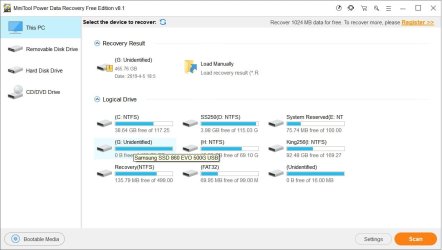
"The tools I've tried were able to detect the folder structure and produce a list of files available for saving to another drive." it is worth looking into.

What tools have you tried? Oh yes. you said MiniTool or Easus Data recovery. If Minitool PW did show your folders and files, please post a screenshot of your drives as MiniTool PW sees - the very first screen after you launch PW.Post a screenshot of of the Partitions found window. Post a screenshot of Partition Explorer showing your folders and files.
 
Last edited:

My Computer My Computer

At a glance

Windows 7 Home Premium 32 bit
OS
Windows 7 Home Premium 32 bit
Thanks for the kind reply, Jumanji.
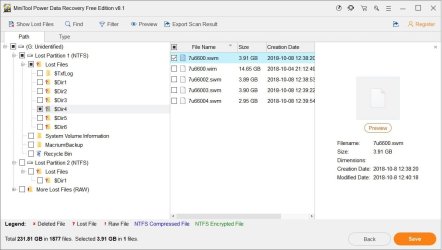
Attached are sample screenshots of PDR8.1.
 

Attachments

  • pdr82.jpg
    pdr82.jpg
    61.7 KB · Views: 0
  • pdr81.jpg
    pdr81.jpg
    72.5 KB · Views: 1

My Computer My Computer

At a glance

Windows 7 Ultimate x86
Computer type
PC/Desktop
OS
Windows 7 Ultimate x86
Hi,

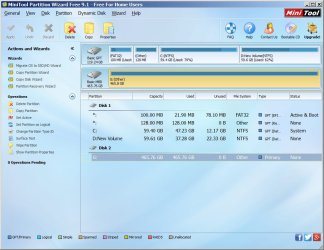
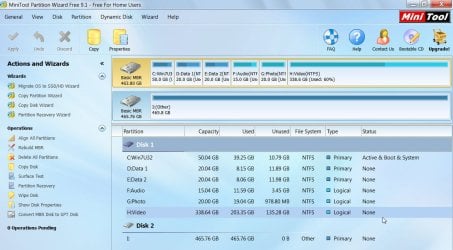
That is not what I actually wanted. I wanted MiniTool Partition Wizard Free screenshots. If it is only a partition loss, it will help restore the missing partition table in sector 0 and restore your disk.

Download and install Partition Wizard Free version 9.1 from MiniTool Partition Wizard Free 11 Download for Windows / Old Versions / FileHorse.com ( Uninstall any later version you may have now before installing this older version. In later versions Partition Recovery which we are going to try is not free )

Run version 9.1, and launch it. Say no if it asks you to update to a later version, and post a screenshot of how your drives look like in it - the very first screen after you launch it.

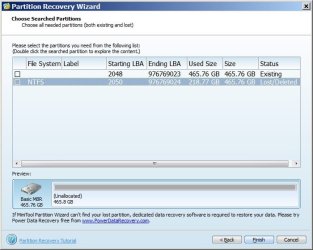
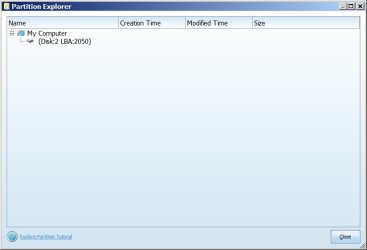
Next step, on the left Pane click on Partition Recovery Wizard > Next > Select your faulty SSD > Next > Full Disk > Next > QuickScan > Next. Allow the quick scan to complete. At the end of the quickscan you will get a window showing all the found partitions Post a screenshot of it ( only that Window. No need of any background). Double click on the found partition and it may open a Partition Explorer window. Does it show all your folders and files? Post a screenshot.

Once done click on the cancel button everywhere and close Partition Wizard. I shall check the screenshots and let you know the next step.
 

My Computer My Computer

At a glance

Windows 7 Home Premium 32 bit
OS
Windows 7 Home Premium 32 bit
Thanks Jumanji.
Can only double click on the NTFS partition. But did not show any folders/files.
If click Finish, programs seems to ask to delete one of the two partitions.
Did I do this right?
 

Attachments

  • pwf911.jpg
    pwf911.jpg
    92.6 KB · Views: 1
  • pwf912.jpg
    pwf912.jpg
    45.2 KB · Views: 18
  • pwf913.jpg
    pwf913.jpg
    19.2 KB · Views: 0

My Computer My Computer

At a glance

Windows 7 Ultimate x86
Computer type
PC/Desktop
OS
Windows 7 Ultimate x86
hmmm... It is not going to be as easy as I thought it would be. There is a strange anamoly here.

In an MBR drive the first partition always starts at LBA 2048. In PW this one shows as existing but with no proper File system. Disk Map shows it as "other."

There is a valid NTFS at LBA 2050. How come? It is shown as Lost/deleted. But it shouldn't be there at all. And that partition does not show any folders/files at all.

Now double click on the other partition which shows as Starting LBA 2048 Ending LBA976769023 existing . Let us see what it shows

My only question now is "Did you format your SAMSUNG SSD anytime after you bought it?"

"If click Finish, programs seems to ask to delete one of the two partitions.
Did I do this right?"


I told you very clearly that after you post the screenshots you should cancel and close PW.

"Once done click on the cancel button everywhere and close Partition Wizard. I shall check the screenshots and let you know the next step." - jumanji

If you click on finish it will write the wrong partition table, and delete the correct partition starting at LBA 2048.

Did you click on "Finish"?

If you had done that you have only made things more difficult.
 

My Computer My Computer

At a glance

Windows 7 Home Premium 32 bit
OS
Windows 7 Home Premium 32 bit
1. Not sure if I did a format. It may have come pre-formatted.
2. Can't double click on the LBA 2048 partition. Nothing.
3. Did click the Finish button, but did not proceed further.

Before doing that, was not able to double click LBA 2048, and double click on 2050 showed exactly the same.
That's why I thought it necessary to click Finish.
What's next?
 

My Computer My Computer

At a glance

Windows 7 Ultimate x86
Computer type
PC/Desktop
OS
Windows 7 Ultimate x86
Please rerun Partition Recovery Wizard and show me the Partitions found window. Once you have taken the screenshot, click on the cancel Button and close PW.

Please follow the instructions scrupulously.
 

My Computer My Computer

At a glance

Windows 7 Home Premium 32 bit
OS
Windows 7 Home Premium 32 bit
goopy This is why I recommend sending drives in for professional data recovery. It's just too darned easy for DIYers to do something to ensure data will not be recoverable, even by a pro.

If you decide to continue on this route, CAREFULLY follow jumanji's EXACTLY! I know of only two other people on various forums who know as much about drives as this man. If he tells you to scratch your ear before clicking on something, then, for the love whatever or whoever, scratch your ear before clicking! Don't skip or anticipate steps! If you get stumped, stop and ask before proceeding!
 

My Computer My Computer

At a glance

Win 7 Ultimate 64 bitIntel i7-3930KKingston HyperX Genesis 32GB Kit (8x4GB Modul...MSI R7850 Twin Frozr 2GD5/OC Radeon HD 7850 2...
Computer type
PC/Desktop
Computer Manufacturer/Model Number
Custom Build
OS
Win 7 Ultimate 64 bit
CPU
Intel i7-3930K
Motherboard
ASUS P9X79 WS
Memory
Kingston HyperX Genesis 32GB Kit (8x4GB Modules) 1600MHz DDR
Graphics Card(s)
MSI R7850 Twin Frozr 2GD5/OC Radeon HD 7850 2GB 256-bit GDDR
Sound Card
Asus Xonar Essence STX
Monitor(s) Displays
3x Asus VG248QE 24", Vizio 32" TV
Screen Resolution
1920 x 1080, ?
Hard Drives
Samsung 128GB 840 Pro SSD (1),
Samsung 4TB 850 EVO SSDs (4)
Samsung 4TB 850 EVO SSDs (16) external backup drives used in 2.5" hot swap bays in the computer.
PSU
Corsair HX750w
Case
Antec Two Hundred v2 (modified)
Cooling
Cooler Master GeminII S524 120mm (fan replaced with a 140mm)
Keyboard
Logitech G510s
Mouse
Logitech M525 (two in use)
Internet Speed
=< 32Mbps down, 8Mbps up
Antivirus
AVAST!, MBAM, SAS, Spybot S&D (all but MBAM free) Glary Util
Browser
IE11
Other Info
LSI 9211-8i HBA card (8 SATA III ports), 2.5" & 3.5" Hot Swap Bays, HooToo HT-CR001 PCI-E to USB 3.0 Internal Hub + 6 Slot Card Reader, and LG Model CH12LS28 BD-ROM Optical Drive. Also, ScanSnap S1500 ADF duplexing scanner, Canon 9000F flat bed scanner, Corsair SP2500 2.1 speakers, Samsung CLP 415nw laser color printer, Cyberpower PP2200SW UPS
Looks the same.
I was under the impression scanning the disk is non invasive?
 

Attachments

  • s4.jpg
    s4.jpg
    45.3 KB · Views: 24

My Computer My Computer

At a glance

Windows 7 Ultimate x86
Computer type
PC/Desktop
OS
Windows 7 Ultimate x86
Thats good. No changes have been made. Just scanning the disk does not write anything to disk.

Now just relax. Its bedtime for me and I am retiring. My trial HDD right now is more or less in the same condition except that it does not have a fake VBR at sector 2050. How it came on your SSD I do not know.

05-04-2019 22-37-53.jpg

I have to work on it further and decide what next to do. And that is going to take sometime. So keep watching.
 

My Computer My Computer

At a glance

Windows 7 Home Premium 32 bit
OS
Windows 7 Home Premium 32 bit
Do read my post #7 on how to use bootice in post #7 in the thread Lost partitions! Download the 36bit version and keep ready. Most probably we may use it to get rid of the fake VBR at sector 2050.

Is your SSD an internal drive?
 

My Computer My Computer

At a glance

Windows 7 Home Premium 32 bit
OS
Windows 7 Home Premium 32 bit
Thanks for you time, Jumanji.
The Samsung could have been damaged by the usb enclosure. But I was expecting it to be most robust than that.
 

My Computer My Computer

At a glance

Windows 7 Ultimate x86
Computer type
PC/Desktop
OS
Windows 7 Ultimate x86
That is a bit of information. Can you take it out of the enclosure and connect it as an internal drive on your desktop? That will eliminate the SATA to USB interface inside the enclosure in the chain. May be it caused the fake VBR. Give it a thought.
 

My Computer My Computer

At a glance

Windows 7 Home Premium 32 bit
OS
Windows 7 Home Premium 32 bit
OK, here is the first exercise for you.

Download bootice from Download Bootice 1.3.4.0

Extract it to the root of your system drive C:. You will find x86 and x64 versions of bootice.exe in the folder BOOTICE_2016.06.17_v1.3.4.0. Use the one appropriate to your bit version of Windows. (Create a short cut for that exe file on your desktop so that you can easily execute it.) Click/double click on it to run it.

Please safely remove all other external storage devices , keeping only your faulty external drive (SSD) plugged in.

Run bootice. Make sure you select the correct disk and not your system disk and click on Sector edit, Take a screenshot of sector 0. Then save it as LBA0.Go to sector 2048, take a screenshot and save it as LBA2048. Then to sector 2050, take a screenshot and save it as LBA 2050. Open the bootice folder and check those have been saved. The size of each file will be 512 bytes.Close bootice. Post the screenshots

Comments:
1. LBA 0 will tell me how many partition tables are present.
2. LBA 2048 will let me know whether it is corrupt.
3. LBA 2050: It may be a)the backup of sector 2048 b) an anamoly . Cause not known at the moment.

If you have any doubts do not hesitate to clarify.

This data recovery process can be long-drawn and we may be going back and forth many times trying many programs and methodology.But you can be rest assured that no data will be lost and your drive can be restored to the condition it was when we started this process.
 

My Computer My Computer

At a glance

Windows 7 Home Premium 32 bit
OS
Windows 7 Home Premium 32 bit
Greetings Jumanji.


1. Thanks for Bootice instructions. I'd like to try this on a duplicate of of the samsung. Is there a way to make a sector-by-sector duplicate?
2. What did the screenshots tell you about the status of the samsung?
3. Tried a direct sata connection. But no resurrection this time.

Many thanks and best regards,
 

My Computer My Computer

At a glance

Windows 7 Ultimate x86
Computer type
PC/Desktop
OS
Windows 7 Ultimate x86
Back
Top