
Solved Macrium Reflect Restore problems

...dos mode...

you're partly right, but not for the free version. (i've always used a pe os for recovering.)

it looks like you get a new boot entry for recovery only if you pay.
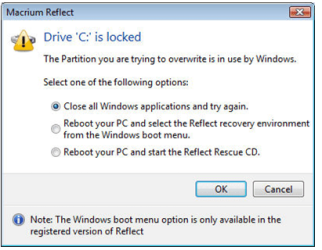
locked.PNG

so it looks like OnThe Ropes does need a cd after all.

===============================

@OnTheRopes - it looks like you've got two partitions on your pc - a 100mb system reserved boot partition and your main partition which contains windows.

i don't know much about the reserved partition, but to do a full backup, i think you need to image and restore them both.

as i'm not sure, i've asked for some help from some more exprienced macrium users.

i would wait for them to answer before doing anything drastic.
 

My Computer

Computer Manufacturer/Model Number
mickey megabyte 1234
OS
ultimate 64 sp1
CPU
i5 2500K [email protected]
Motherboard
MSI P67A-GD53
Memory
8 gigs GSkill Ripjaws 1600
Graphics Card(s)
amd hd6950
Sound Card
creative x-fi gamer
Monitor(s) Displays
samsung 24"
Screen Resolution
1920x1080
Hard Drives
ocz vertex 2e 60 gig, samsung f3 1tb, buffalo 2tb ext
PSU
antec 550
Case
antec three hundred
Cooling
i'm a cooling fan
Keyboard
saitek eclipse ii
Mouse
logitech g3
Internet Speed
about 4 Mbps
Other Info
i love win7
The drive letters can be changed after the install if necessary. C can be be put back on the OS.

Are you just practicing to check function or are you actually reimaging?

If just practicing. When done make an image of just the C only to have it available for future use.

Good idea Mickey as I never had this occur because I just imaged C.

@OnTheRopes - it looks like you've got two partitions on your pc - a 100mb system reserved boot partition and your main partition which contains windows.

i don't know much about the reserved partition, but to do a full backup, i think you need to image and restore them both.

as i'm not sure, i've asked for some help from some more exprienced macrium users.

i would wait for them to answer before doing anything drastic.
 

My Computer

Computer Manufacturer/Model Number
Hopalong/ Godzilla
OS
Windows7 Pro 64bit SP-1; Windows XP Pro 32bit
CPU
Intel Core i7-870 Lynnfield 2.93GHz LGA 1156 95W Quad-Core
Motherboard
ASUS P7P55D-E PRO
Memory
8GB@1400MHz Crucial Ballistix DDR3-1600 4x2GB
Graphics Card(s)
ASUS ENGTX460 DirectCU/2DI/1GD5 1GB 256-bit GDDR5
Sound Card
VIA Onboard
Monitor(s) Displays
Asus VS248H-P 24"; Samsung SyncMaster 941BW 19"ws
Screen Resolution
1920x1080; 1440x900
Hard Drives
Samsung 830 120GB SSD
Intel 320 120GB SSD
Western Digital Caviar Black WD7501AALS 750GB 7200 RPM SATA 3.0Gb/s
Western Digital Caviar Black WD6401AALS 640GB 7200 RPM SATA 3.0Gb/s
PSU
COOLER MASTER Silent Pro RS850-AMBAJ3-US 850W Modular
Case
COOLER MASTER HAF 932 RC-932-KKN5-GP Black
Cooling
Scythe "Mugen-2 Rev.B" (2 ScytheKaze-Jyuni PWM fans)
Keyboard
Logitech K-320
Mouse
Kensington
Antivirus
Avast Inernet Suite
Browser
IE 9 ; Chrome
Well I have managed a full recovery using the boot cd so at least I know it works, I do like the idea of being able to recover from within windows when its not a full crash Shadowprotect is too pricey for me. Whats your reasoning behind 'Stay away from Robo'?
 

My Computer

Computer type
PC/Desktop
Computer Manufacturer/Model Number
Self Build
OS
Windows Prox64
CPU
i5 760 2.8Ghz
Motherboard
Asus P7P55D-E
Memory
Corsair XTS 2x4 Gb
Graphics Card(s)
Asus GTX 460 1024Mb
Monitor(s) Displays
HP LP2475w
Hard Drives
Samsung HD103SJ Spinpoint F3 1TB
PSU
Corsair 600CX
Case
Corsair Graphite 600T
Antivirus
Kaspersky IS
Browser
Chrome
Robo. Nothing in particular.

I know what does work for myself and most of the rest of the forum members. Macrium, Paragon and Acronis.

Top three used for features and consistent behaviour of the software. Not glitchy.

You can use Robo it may be just fine. Just my opinion from what others here use and my use of Macrium.:)

Mike
 

My Computer

Computer Manufacturer/Model Number
Hopalong/ Godzilla
OS
Windows7 Pro 64bit SP-1; Windows XP Pro 32bit
CPU
Intel Core i7-870 Lynnfield 2.93GHz LGA 1156 95W Quad-Core
Motherboard
ASUS P7P55D-E PRO
Memory
8GB@1400MHz Crucial Ballistix DDR3-1600 4x2GB
Graphics Card(s)
ASUS ENGTX460 DirectCU/2DI/1GD5 1GB 256-bit GDDR5
Sound Card
VIA Onboard
Monitor(s) Displays
Asus VS248H-P 24"; Samsung SyncMaster 941BW 19"ws
Screen Resolution
1920x1080; 1440x900
Hard Drives
Samsung 830 120GB SSD
Intel 320 120GB SSD
Western Digital Caviar Black WD7501AALS 750GB 7200 RPM SATA 3.0Gb/s
Western Digital Caviar Black WD6401AALS 640GB 7200 RPM SATA 3.0Gb/s
PSU
COOLER MASTER Silent Pro RS850-AMBAJ3-US 850W Modular
Case
COOLER MASTER HAF 932 RC-932-KKN5-GP Black
Cooling
Scythe "Mugen-2 Rev.B" (2 ScytheKaze-Jyuni PWM fans)
Keyboard
Logitech K-320
Mouse
Kensington
Antivirus
Avast Inernet Suite
Browser
IE 9 ; Chrome
Okay Hopalong, was just curious, the good news is I have done a full recovery succesfully with Macrium now as well as with Acronis so its between those two and paragon then and I will buy one of them.

Thanks for all the help all of you :D
 

My Computer

Computer type
PC/Desktop
Computer Manufacturer/Model Number
Self Build
OS
Windows Prox64
CPU
i5 760 2.8Ghz
Motherboard
Asus P7P55D-E
Memory
Corsair XTS 2x4 Gb
Graphics Card(s)
Asus GTX 460 1024Mb
Monitor(s) Displays
HP LP2475w
Hard Drives
Samsung HD103SJ Spinpoint F3 1TB
PSU
Corsair 600CX
Case
Corsair Graphite 600T
Antivirus
Kaspersky IS
Browser
Chrome
You are quite welcome. :D

Mike
 

My Computer

Computer Manufacturer/Model Number
Hopalong/ Godzilla
OS
Windows7 Pro 64bit SP-1; Windows XP Pro 32bit
CPU
Intel Core i7-870 Lynnfield 2.93GHz LGA 1156 95W Quad-Core
Motherboard
ASUS P7P55D-E PRO
Memory
8GB@1400MHz Crucial Ballistix DDR3-1600 4x2GB
Graphics Card(s)
ASUS ENGTX460 DirectCU/2DI/1GD5 1GB 256-bit GDDR5
Sound Card
VIA Onboard
Monitor(s) Displays
Asus VS248H-P 24"; Samsung SyncMaster 941BW 19"ws
Screen Resolution
1920x1080; 1440x900
Hard Drives
Samsung 830 120GB SSD
Intel 320 120GB SSD
Western Digital Caviar Black WD7501AALS 750GB 7200 RPM SATA 3.0Gb/s
Western Digital Caviar Black WD6401AALS 640GB 7200 RPM SATA 3.0Gb/s
PSU
COOLER MASTER Silent Pro RS850-AMBAJ3-US 850W Modular
Case
COOLER MASTER HAF 932 RC-932-KKN5-GP Black
Cooling
Scythe "Mugen-2 Rev.B" (2 ScytheKaze-Jyuni PWM fans)
Keyboard
Logitech K-320
Mouse
Kensington
Antivirus
Avast Inernet Suite
Browser
IE 9 ; Chrome
glad it worked and didn't bork your system. ;)
 

My Computer

Computer Manufacturer/Model Number
mickey megabyte 1234
OS
ultimate 64 sp1
CPU
i5 2500K [email protected]
Motherboard
MSI P67A-GD53
Memory
8 gigs GSkill Ripjaws 1600
Graphics Card(s)
amd hd6950
Sound Card
creative x-fi gamer
Monitor(s) Displays
samsung 24"
Screen Resolution
1920x1080
Hard Drives
ocz vertex 2e 60 gig, samsung f3 1tb, buffalo 2tb ext
PSU
antec 550
Case
antec three hundred
Cooling
i'm a cooling fan
Keyboard
saitek eclipse ii
Mouse
logitech g3
Internet Speed
about 4 Mbps
Other Info
i love win7
Mickey

I knew it wouldn't "bork" the system.;) :D
 

My Computer

Computer Manufacturer/Model Number
Hopalong/ Godzilla
OS
Windows7 Pro 64bit SP-1; Windows XP Pro 32bit
CPU
Intel Core i7-870 Lynnfield 2.93GHz LGA 1156 95W Quad-Core
Motherboard
ASUS P7P55D-E PRO
Memory
8GB@1400MHz Crucial Ballistix DDR3-1600 4x2GB
Graphics Card(s)
ASUS ENGTX460 DirectCU/2DI/1GD5 1GB 256-bit GDDR5
Sound Card
VIA Onboard
Monitor(s) Displays
Asus VS248H-P 24"; Samsung SyncMaster 941BW 19"ws
Screen Resolution
1920x1080; 1440x900
Hard Drives
Samsung 830 120GB SSD
Intel 320 120GB SSD
Western Digital Caviar Black WD7501AALS 750GB 7200 RPM SATA 3.0Gb/s
Western Digital Caviar Black WD6401AALS 640GB 7200 RPM SATA 3.0Gb/s
PSU
COOLER MASTER Silent Pro RS850-AMBAJ3-US 850W Modular
Case
COOLER MASTER HAF 932 RC-932-KKN5-GP Black
Cooling
Scythe "Mugen-2 Rev.B" (2 ScytheKaze-Jyuni PWM fans)
Keyboard
Logitech K-320
Mouse
Kensington
Antivirus
Avast Inernet Suite
Browser
IE 9 ; Chrome
Nearly there I think, one last quetion for now ;)

I am in the restore wizard and have got to the 'Choose partition to overwrite screen.

When I backed up the image I selected the whole of C: but now C: is just the 100Mb system resreved partition and my Primary is now called D:
Is this just a temporary mane that the recovery software calls it?

One should not go by the drive letter when restoring. My C drive is named W7U32b and I always look to it when restoring. Again I do not know whether Macrium shows the drive names so that there is no confusion.

The System Reserved Partition is always one little confusion added. I had for this reason installed Windows without the SRP.

If you are going in for a paid software, then go for one which gives you a WINPE based Recovery CD.

I always prefer not to install any imaging software into the system and run both backup and restore from the ISO image of the recovery CD using EasyBCD. Have a look at my post http://www.sevenforums.com/software/116968-say-no-burning-bootable-cds-dvds-isos.html#post1005106.

You can also create a multiboot pendrive from which you can run the recovery CD as mentioned in the thread.

Also keep a copy of your image in another partition apart from the one on the external drive/DVD/BD

With all these in place, you will be ready to face any emergency.
 
Last edited:

My Computer

Computer Manufacturer/Model Number
self-assembled
OS
Windows 7 Ultimate 32bit
CPU
AMD Phenom II X3 720 Processor
Motherboard
Gigabyte GA-MA78GM-S2H Revision 1.0
Memory
Transcend DDR2 (PC2 6400) 4 X 1GB
Graphics Card(s)
Integrated + ATI Radeon 4550
Sound Card
Integrated Realtek ALC 889A
Monitor(s) Displays
DELL 1704 FPT
Screen Resolution
1280 x 1024
Hard Drives
Western Digital Caviar SE16 250 GB x2 in RAID 0
PSU
Coolermaster 400 W
Case
Zebronics Cube
Cooling
stock
Keyboard
Microsoft - wired
Mouse
Microsoft - wired
Internet Speed
ADSL 256-512Kbps
I do have one more 'last question'

Why not just use the windows backup and restore utility as opposed to payware, what disadvantages does it have apart from less features?
 

My Computer

Computer type
PC/Desktop
Computer Manufacturer/Model Number
Self Build
OS
Windows Prox64
CPU
i5 760 2.8Ghz
Motherboard
Asus P7P55D-E
Memory
Corsair XTS 2x4 Gb
Graphics Card(s)
Asus GTX 460 1024Mb
Monitor(s) Displays
HP LP2475w
Hard Drives
Samsung HD103SJ Spinpoint F3 1TB
PSU
Corsair 600CX
Case
Corsair Graphite 600T
Antivirus
Kaspersky IS
Browser
Chrome
payware (and some freeware) offer a few more features - such as reflect can save and restore your image files to/from a network location, for example.

and do you need payware, now that you have established that macrium reflect free works for you?
 

My Computer

Computer Manufacturer/Model Number
mickey megabyte 1234
OS
ultimate 64 sp1
CPU
i5 2500K [email protected]
Motherboard
MSI P67A-GD53
Memory
8 gigs GSkill Ripjaws 1600
Graphics Card(s)
amd hd6950
Sound Card
creative x-fi gamer
Monitor(s) Displays
samsung 24"
Screen Resolution
1920x1080
Hard Drives
ocz vertex 2e 60 gig, samsung f3 1tb, buffalo 2tb ext
PSU
antec 550
Case
antec three hundred
Cooling
i'm a cooling fan
Keyboard
saitek eclipse ii
Mouse
logitech g3
Internet Speed
about 4 Mbps
Other Info
i love win7
I don't use any pay ware.
I also use the Windows Backup and System Image and System Restore.
I also use the Free Macrium.


I have Windows System Images and backups. I used Windows System Image and recovered my C- Win 7 just a couple of weeks ago

Macrium
One full image of my hard drive. Unused yet.
Two images of C- Win 7. Older and new. Unused yet.
I use a dual boot with XP so I have two images of it seperately.
I had to reimage XP about a month ago.
One image wouldn't work. It was made when I first installed the XP. The second newer one worked like a charm.
I deleted the old bad one and made a new so I still have two.

My storage hard drive is 640GB internal so room is not a problem so why not use it.

I made it incremental of sorts by making multiple images. Full, Win7 and XP. Not as fancy as the payware but works for me.
Mike
 

My Computer

Computer Manufacturer/Model Number
Hopalong/ Godzilla
OS
Windows7 Pro 64bit SP-1; Windows XP Pro 32bit
CPU
Intel Core i7-870 Lynnfield 2.93GHz LGA 1156 95W Quad-Core
Motherboard
ASUS P7P55D-E PRO
Memory
8GB@1400MHz Crucial Ballistix DDR3-1600 4x2GB
Graphics Card(s)
ASUS ENGTX460 DirectCU/2DI/1GD5 1GB 256-bit GDDR5
Sound Card
VIA Onboard
Monitor(s) Displays
Asus VS248H-P 24"; Samsung SyncMaster 941BW 19"ws
Screen Resolution
1920x1080; 1440x900
Hard Drives
Samsung 830 120GB SSD
Intel 320 120GB SSD
Western Digital Caviar Black WD7501AALS 750GB 7200 RPM SATA 3.0Gb/s
Western Digital Caviar Black WD6401AALS 640GB 7200 RPM SATA 3.0Gb/s
PSU
COOLER MASTER Silent Pro RS850-AMBAJ3-US 850W Modular
Case
COOLER MASTER HAF 932 RC-932-KKN5-GP Black
Cooling
Scythe "Mugen-2 Rev.B" (2 ScytheKaze-Jyuni PWM fans)
Keyboard
Logitech K-320
Mouse
Kensington
Antivirus
Avast Inernet Suite
Browser
IE 9 ; Chrome
Thanks again guys, Hopalong that looks like a good strategy I think I will start out by following that until I know if I want anything else. :D
 

My Computer

Computer type
PC/Desktop
Computer Manufacturer/Model Number
Self Build
OS
Windows Prox64
CPU
i5 760 2.8Ghz
Motherboard
Asus P7P55D-E
Memory
Corsair XTS 2x4 Gb
Graphics Card(s)
Asus GTX 460 1024Mb
Monitor(s) Displays
HP LP2475w
Hard Drives
Samsung HD103SJ Spinpoint F3 1TB
PSU
Corsair 600CX
Case
Corsair Graphite 600T
Antivirus
Kaspersky IS
Browser
Chrome
.......My storage hard drive is 640GB internal so room is not a problem so why not use it....
Mike

While what backup software one would use and what strategy one would employ can depend upon the individual needs, his usage, requirements, whims and fancies, by virtue of the fact that an internal HDD is always on and hence likely to fail much earlier than an external HDD which is plugged in/run only when necessary, cannot be disputed.

Whether internal or external, catastrophic failures can always happen and this totally unpredictable happening can by no means be cited to put them on an equal footing for the backup. One has to only consider what will happen in the normal course.

I always retain one copy of the latest backup on another partition of the internal drive while the external holds atleast the last three. If one fails, I always have one on the other.

For the simple reason that the reads and writes on a CD/DVD/BD can be questionable, these should be avoided. Do not believe that your recovery CD is always going to read right.:) Make an ISO image of it and back it up too on your external drive if you are not using boot from ISOs method. The bootable pendrive - yes, I periodically check that I can run the recovery module from it so that at no time I am left in the lurch.
 

My Computer

Computer Manufacturer/Model Number
self-assembled
OS
Windows 7 Ultimate 32bit
CPU
AMD Phenom II X3 720 Processor
Motherboard
Gigabyte GA-MA78GM-S2H Revision 1.0
Memory
Transcend DDR2 (PC2 6400) 4 X 1GB
Graphics Card(s)
Integrated + ATI Radeon 4550
Sound Card
Integrated Realtek ALC 889A
Monitor(s) Displays
DELL 1704 FPT
Screen Resolution
1280 x 1024
Hard Drives
Western Digital Caviar SE16 250 GB x2 in RAID 0
PSU
Coolermaster 400 W
Case
Zebronics Cube
Cooling
stock
Keyboard
Microsoft - wired
Mouse
Microsoft - wired
Internet Speed
ADSL 256-512Kbps
Do not believe that your recovery CD is always going to read right.
smile.gif
Make an ISO image of it and back it up too on your external drive if you are not using boot from ISOs method.

Good idea:geek:
 

My Computer

Computer type
PC/Desktop
Computer Manufacturer/Model Number
Self Build
OS
Windows Prox64
CPU
i5 760 2.8Ghz
Motherboard
Asus P7P55D-E
Memory
Corsair XTS 2x4 Gb
Graphics Card(s)
Asus GTX 460 1024Mb
Monitor(s) Displays
HP LP2475w
Hard Drives
Samsung HD103SJ Spinpoint F3 1TB
PSU
Corsair 600CX
Case
Corsair Graphite 600T
Antivirus
Kaspersky IS
Browser
Chrome
Help!!

I encountered a similar error message to the OP.

No problem, I have my CD which boots fine. Except it will only give me the option of looking at drive c: or drive d: (DVDRW) for the relevant image.

That doesn't help, the image is on a logical drive (j:).

I've managed to restore all my other partitions but I'm stuck where c: is concerned......I did try and use the Macrium support forum but they seem to only want to give advice to people who've bought the product.

Fair enough but it doesn't help the rest of us!

I copied the image over onto the c: drive and tried again but no joy.

Any advice?

Many thanks.
 

My Computer

OS
Home Premium 64 bit
A couple of very important things to keep in mind before creating a system backup. One, you want a second internal or external hard drive. (DVD's are too slow and not as handy for an entire system backup). Secondly, you want to make certain that your C: Drive is free of infections before installing your backup software. Run two or three different anti-malware programs (malwarebytes.org) is a good place to start. If you find infections, don't bother to clean them. Reinstall your system, your programs, and get all Windows Updates manually (a much faster process then waiting for them to automatically download and install). Then make a Master copy of your C: Drive on a second hard drive.

I do this every week with computers around the world, Macrium is a good free product, but you do have to insert the recovery disk into your optical drive and boot to that disk.

On some computers, the boot screen will give you options to press a key and choose which device you want to boot from. Other's will have you press a key to enter BIOS to change your boot order. If you're lucky like me, I have an Acer that gives me 5 seconds to choose one of three keys, F12 allows me to choose which device I want to boot from, in this case, it would be my Optical Drive containing the Recovery Disk.

That's a lot of information I know, but as time goes by, this text tutorial will be convenient for you and others who are delving into the most important task all computer owners should do on a weekly, if not daily, basis. Backing-up the entire computer system.;)
 

My Computer

Computer Manufacturer/Model Number
My own Custom Build: Asus, Corsair, Transcend, AMD, PNY, Ultra
OS
W7 64 Bit
CPU
AMD Phenom x4 4000Mhz
Memory
8 GB DDR-2
Graphics Card(s)
PNY-NVIDIA GeForce GTX 460 1GB GDDR5 PCI-e
Monitor(s) Displays
Dual: Flatron L1942T
Hard Drives
C: Drive (Agility 2 Solid State Drive 60 GB)
D: Drive (HDD Internal Western Digital 640 GB)
PSU
650 Watt
Cooling
Corsair Hydro H6 Liquid Cooler
Internet Speed
25 mbps down - 3 mbps up
A couple of very important things to keep in mind before creating a system backup. One, you want a second internal or external hard drive. (DVD's are too slow and not as handy for an entire system backup). Secondly, you want to make certain that your C: Drive is free of infections before installing your backup software. Run two or three different anti-malware programs (malwarebytes.org) is a good place to start. If you find infections, don't bother to clean them. Reinstall your system, your programs, and get all Windows Updates manually (a much faster process then waiting for them to automatically download and install). Then make a Master copy of your C: Drive on a second hard drive.

I do this every week with computers around the world, Macrium is a good free product, but you do have to insert the recovery disk into your optical drive and boot to that disk.

On some computers, the boot screen will give you options to press a key and choose which device you want to boot from. Other's will have you press a key to enter BIOS to change your boot order. If you're lucky like me, I have an Acer that gives me 5 seconds to choose one of three keys, F12 allows me to choose which device I want to boot from, in this case, it would be my Optical Drive containing the Recovery Disk.

That's a lot of information I know, but as time goes by, this text tutorial will be convenient for you and others who are delving into the most important task all computer owners should do on a weekly, if not daily, basis. Backing-up the entire computer system.;)

Thank you for that but a generic copy-and-paste from a tutorial isn't going to be of much use I'm afraid.

Maybe I wasn't clear in describing my problem and I apologise if that is the case.

From the CD Recovery Disc, how do I get the program to "see" my drive j: which is where my c: drive image and xml file are saved?
 

My Computer

OS
Home Premium 64 bit
Back
Top