Macrium Reflect Verification

huffman

New member
Pro User
Local time
1:49 PM
Messages
715
I uninstalled Macrium Reflect then reinstalled it again. I then updated it to Version 4.2. I then created a backup image which for some reason I did NOT get to name.
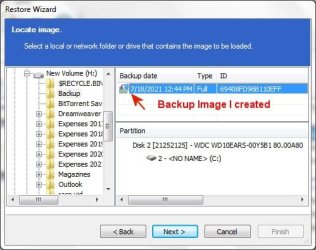
Macrium 1.jpg


After the backup image was created, I normally would Verify the image. This is normally done by select the backup image and there would be an option to verify. I don't see that anywhere.
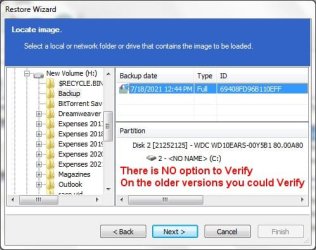
Macrium 2.jpg

Does anyone have a suggestion? Thanks
 

My Computer

OS
Windows 7 Pro
CPU
Intel(R) Pentium(R) Duel CPU E2200 2.20 Ghz
Motherboard
GA-G41M-ES2L
Memory
4 gb 2.96 Usable
Graphics Card(s)
Onboard
Sound Card
Onboard
Hard Drives
2 - 1TB WD Sata Drives
I uninstalled Macrium Reflect then reinstalled it again. I then updated it to Version 4.2. .... After the backup image was created, I normally would Verify the image. This is normally done by select the backup image and there would be an option to verify. I don't see that anywhere.
Does anyone have a suggestion? Thanks


Version 4.2 ? Seriously ? Why on earth are you using something that's nearly a decade old? Did you know that the current Reflect version 8 still supports all OS as far back as XP?

You can download Reflect Free v7.3 or the 30-day Trial of the newly released Reflect Home v8 (which reverts to Reflect Free v8 at the end of the trial) here:

Macrium Software | Reflect Free Edition

The download of Reflect Free v8 is expected to be released some time before the end of August. Oh, and verifying in v7 or v8, you can tick a box that will auto-verify immediately after making the backup.
 

My Computers

System One System Two

  • Computer type
    Laptop
    Computer Manufacturer/Model Number
    Toshiba satellite C650D
    OS
    Windows 7 Home Premium x64
    CPU
    AMD V120
    Memory
    4GB
    Internet Speed
    150 Mbps
    Antivirus
    MSE
    Browser
    IE11, Edge, Firefox
    Other Info
    I also have W7 Pro on my System Two, and several W7 Hyper-V VMs. My other machines run Windows 10/11. Their specs are in my Ten Forums & Eleven Forum profiles.
  • Computer type
    Laptop
    System Manufacturer/Model Number
    Lenovo Thinkpad T430
    OS
    Windows 7 Pro x64
    CPU
    Intel i5-3320M
    Memory
    8 GB
    Hard Drives
    250GB Samsung SSD 860 EVO
    Antivirus
    MSE
OK I download the latest version of Macrium Reflect (7.3) and installed and updated it.

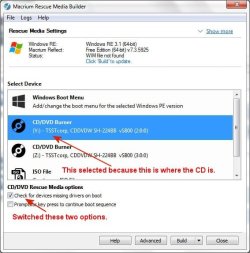
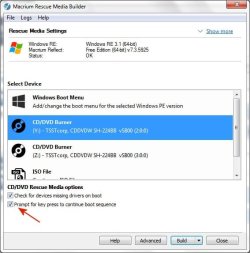
I went to create a Rescue Disk but did NOT understand the options. Here is what it looks like:

Macrium 3.jpg

Here you see what I selected, but now how do actually create the Rescue Disk? I click the Advance button and did NOT like those options. Do I click the Build button to create the Rescue disk.
 

My Computer

OS
Windows 7 Pro
CPU
Intel(R) Pentium(R) Duel CPU E2200 2.20 Ghz
Motherboard
GA-G41M-ES2L
Memory
4 gb 2.96 Usable
Graphics Card(s)
Onboard
Sound Card
Onboard
Hard Drives
2 - 1TB WD Sata Drives
Select the type you wish to make. The 'Boot menu' option will copy the rescue media to C:\Boot and add it as a second choice of OS at the start up boot menu, with your Windows as the default.

If you plug in a USB stick an option to make a 'Removable USB Flash Drive' will also appear in the list. If you want to make a CD/DVD you have two choices, either burn it directly to your optical drive, or make an ISO file that you can burn later.

Whichever type of media you choose, just click Build to start making it. I usually just accept the default options which should work well, no need to change any of the advanced options.

The 'Check for devices missing drivers at boot' option is only useful if you intend to restore to another PC with quite different hardware (eg: a RAID array). If you intend to restore to the same PC then all its own drivers are already included, along with the generic drivers that are already in the MS rescue environment that is used as the base environment for building the rescue media.

The Macrium Reflect Knowledgebase has full instructions for this, and all other functions.

Creating rescue media - KnowledgeBase v7.2 - Macrium Reflect Knowledgebase
 
Last edited:

My Computers

System One System Two

  • Computer type
    Laptop
    Computer Manufacturer/Model Number
    Toshiba satellite C650D
    OS
    Windows 7 Home Premium x64
    CPU
    AMD V120
    Memory
    4GB
    Internet Speed
    150 Mbps
    Antivirus
    MSE
    Browser
    IE11, Edge, Firefox
    Other Info
    I also have W7 Pro on my System Two, and several W7 Hyper-V VMs. My other machines run Windows 10/11. Their specs are in my Ten Forums & Eleven Forum profiles.
  • Computer type
    Laptop
    System Manufacturer/Model Number
    Lenovo Thinkpad T430
    OS
    Windows 7 Pro x64
    CPU
    Intel i5-3320M
    Memory
    8 GB
    Hard Drives
    250GB Samsung SSD 860 EVO
    Antivirus
    MSE
Macrium 4.jpg

That is how I set it up. I clicked the Build button and after a while, it said the Rescue Media was complete.

I hope it is how it is supposed to be. I hope never have to use it.

Now it is time to create a new image.

- - - Updated - - -

OK, I created an image file. I was surprised at the size. It was slightly smaller than my total C-drive. It took over 20 minutes to create the image.

I was able to Validate it. That was a relief.

As I said before, I hope I never have to use it.

Thanks for your patience.
 

My Computer

OS
Windows 7 Pro
CPU
Intel(R) Pentium(R) Duel CPU E2200 2.20 Ghz
Motherboard
GA-G41M-ES2L
Memory
4 gb 2.96 Usable
Graphics Card(s)
Onboard
Sound Card
Onboard
Hard Drives
2 - 1TB WD Sata Drives
Validate, verify -- there are two if not three good-sized threads over in Macrium forum, version 7 for sure, concerning verify / verification -- what such is and is not, and not everyone over in there is in complete agreement. Version 8 is so new, I have not found V8's verify explanation yet.
 

My Computer

Computer type
PC/Desktop
Computer Manufacturer/Model Number
Antec desktop; Acer Aspire laptops
OS
Windows 7 Professional 64-bit
CPU
Desktop i5; Acers i5 & i7
Memory
desktop 16GB; 1 Acer 8GB & 1 Acer 16GB
Hard Drives
1TB split into 2 equal partitions [OS and data] usable by RJS
Internet Speed
AT&T DSL
Browser
FF, GChrome, msIE
Other Info
Windows 7 Firewall, Emsisoft AM/AV, MSE [scan-only], SpywareBlaster, Ruiware/BillP combine
...I hope it is how it is supposed to be. I hope never have to use it.
OK, I created an image file. ... I was able to Validate it. That was a relief.
Well done. Yes, that recovery media should be fine.

I hope you don't need to use it too, but you should used it at least once, just to test that it is working and that you can boot from it successfully. To test that it can find and (potentially) restore your image, browse for the image you made and, rather than restoring it, you could try verifying it again.

- - - Updated - - -

Version 8 is so new, I have not found V8's verify explanation yet.
I have v8 Home on some of my machines and v7 Free on the rest. There have been no changes at all to the .mrimg format or the verification method between v8 or v7. Either one can restore/explore/validate an image made by the other (or v6 and earlier, come to that).

The major changes in v8 include an improved user interface (with a dark mode), support for making images of Flash drives and SD cards, and viBoot now supports using VirtualBox as well as Hyper-V.

Macrium said:
Can v8 read and restore images created with Macrium Reflect v6 or v7?
Yes, v8 is backwards compatible with all Images and File and Folder backups created with earlier versions of Macrium Reflect.

Upgrade FAQ - Knowledgebase 8.0 - Macrium Reflect Knowledgebase
 

My Computers

System One System Two

  • Computer type
    Laptop
    Computer Manufacturer/Model Number
    Toshiba satellite C650D
    OS
    Windows 7 Home Premium x64
    CPU
    AMD V120
    Memory
    4GB
    Internet Speed
    150 Mbps
    Antivirus
    MSE
    Browser
    IE11, Edge, Firefox
    Other Info
    I also have W7 Pro on my System Two, and several W7 Hyper-V VMs. My other machines run Windows 10/11. Their specs are in my Ten Forums & Eleven Forum profiles.
  • Computer type
    Laptop
    System Manufacturer/Model Number
    Lenovo Thinkpad T430
    OS
    Windows 7 Pro x64
    CPU
    Intel i5-3320M
    Memory
    8 GB
    Hard Drives
    250GB Samsung SSD 860 EVO
    Antivirus
    MSE
Back
Top