Macrium System Migration to nvme

nvmehelp

New member
Local time
9:50 PM
Messages
9
I have a Windows 7 image a very long time now. It is the active partition, ie there is no MSR partition. Macrium acknowledge the existance of Windows 7 installs without MSR partition. In any case the image has always worked, never any problem, and has even been migrated to a newer UEFI system (say 4 year old) with no problem. And still looks the same, ie no MSR partition.

I am trying to restore now to a Ryzen system with nvme whose motherboard has Windows 7 drivers. I have run a motherboard utility on the Windows 7 install media and I can install fresh no problem. And it works perfect, now as a GPT system. In addition, Macrium restore sees all drives, nvme, USB etc., and I can restore image no problem, but it won't boot, blue screens and reboot. Before you tell me redeploy, am I missing something? I don't even care if I have to run as GPT system, that's fine.
 

My Computer

Computer type
PC/Desktop
OS
Windows 7 Ultimate x64
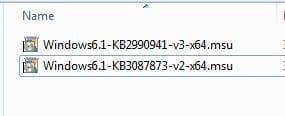
You probably need to add nvme support to the restored image.

The "motherboard utility" should contain the two necessary .msu files. You can install those into the applied image remotely, using dism++.

Unfortunately, you can't apply them retrospectively to the macrium image file, because unlike a vhd(x), macrium proprietary images are not serviceable.


I don't even care if I have to run as GPT system, that's fine.

Yes, you will have to use gpt to boot from nvme, unless you have a very special nvme disk with inbuilt oproms.
 

My Computers

System One System Two

  • Computer type
    PC/Desktop
    OS
    7 X64
    CPU
    i5 8400
    Motherboard
    gigabyte b365m ds3h
    Memory
    2x8gb 3200mhz
    Hard Drives
    various
    PSU
    pure power 11 400w cm
    Case
    Coolermaster
    Cooling
    cryorig m9i
  • Computer type
    PC/Desktop
    OS
    7x64
    CPU
    g5400
    Motherboard
    ga b365m ds3h
    Memory
    8gb ddr4 2400
    PSU
    xfx pro 450w
Well I don't know how that, the system already works on a fresh install.

You probably need to add nvme support to the restored image.

Is this what Macrium Redeploy is designed to do?
 

My Computer

Computer type
PC/Desktop
OS
Windows 7 Ultimate x64

My Computers

System One System Two

  • Computer type
    PC/Desktop
    OS
    7 X64
    CPU
    i5 8400
    Motherboard
    gigabyte b365m ds3h
    Memory
    2x8gb 3200mhz
    Hard Drives
    various
    PSU
    pure power 11 400w cm
    Case
    Coolermaster
    Cooling
    cryorig m9i
  • Computer type
    PC/Desktop
    OS
    7x64
    CPU
    g5400
    Motherboard
    ga b365m ds3h
    Memory
    8gb ddr4 2400
    PSU
    xfx pro 450w
Ahh yes, thank you. It seems they are .sys files. Should I use Intel or Samsung for WD nvme?
 

My Computer

Computer type
PC/Desktop
OS
Windows 7 Ultimate x64
They should be .msu files

nvme-msu.jpg

If you unpack the "motherboard utility" with 7-zip, they are probably in a folder called Hotfix or Updates.

There is no separate driver for WD consumer os nvme disks.
 

My Computers

System One System Two

  • Computer type
    PC/Desktop
    OS
    7 X64
    CPU
    i5 8400
    Motherboard
    gigabyte b365m ds3h
    Memory
    2x8gb 3200mhz
    Hard Drives
    various
    PSU
    pure power 11 400w cm
    Case
    Coolermaster
    Cooling
    cryorig m9i
  • Computer type
    PC/Desktop
    OS
    7x64
    CPU
    g5400
    Motherboard
    ga b365m ds3h
    Memory
    8gb ddr4 2400
    PSU
    xfx pro 450w
Thank you very much. I'll try to figure out dism now.
 

My Computer

Computer type
PC/Desktop
OS
Windows 7 Ultimate x64
Would you be able to steer me what I am trying to do now? Create a new Macrium image, or modify the restore or something else?
 

My Computer

Computer type
PC/Desktop
OS
Windows 7 Ultimate x64
If you install those two msu files in your running system, then you can creat a new image of that.

Or you can install those two msu files into the image you have already restored. You would need to do that from winpe using dism++ or similar.
 

My Computers

System One System Two

  • Computer type
    PC/Desktop
    OS
    7 X64
    CPU
    i5 8400
    Motherboard
    gigabyte b365m ds3h
    Memory
    2x8gb 3200mhz
    Hard Drives
    various
    PSU
    pure power 11 400w cm
    Case
    Coolermaster
    Cooling
    cryorig m9i
  • Computer type
    PC/Desktop
    OS
    7x64
    CPU
    g5400
    Motherboard
    ga b365m ds3h
    Memory
    8gb ddr4 2400
    PSU
    xfx pro 450w
No luck. I installed those 2 on the running system and made a new image (which uses Macrium V5). Maybe next I can try restoring without the master boot record, which is included in my image, but I gather is not the normal configuration of MBR system (there is no MSR partition).
 

My Computer

Computer type
PC/Desktop
OS
Windows 7 Ultimate x64
Back
Top