Macrium v6 Restore Destination w/ Win PE CD

CraigS26

New member
Local time
3:06 AM
Messages
12
Win 7-64 Hm Prem ...... v6 Forum failed to answer this and I'm not sure I qualify for a Macrium Sppt email answer requested.
Of the two v6 Image RESTOREs I've done the F12 Boot access to Macrium Reflect gave me a DESTINATION that MATCHED the SOURCE (ie) my 3 (C:\) Hd Drive Partitions (1) PQSERVICE (2) SYSTEM RESERVED (3) Gateway (C), with some Size Difference between the two logically noted;

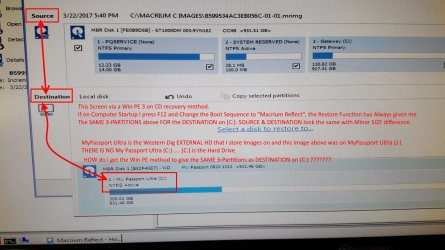
However, when I've tried a RESTORE via both a Win PE 3 and Win PE 5 CD, the DESTINATION shown is my Western Digital EXT Hd Drive that I store the backup Images on (ie) MyPassport (C) is shown as Destination. MyPassport (E) was the Ext Drive that the Image was on and the Win PE is substituting (C) on its own. It makes No Sense to me that I can BROWSE to a screen that shows the 3-Partitions that I presume must show as the Destination.

HOW is a Win PE on CD approach suppose to give me the correct DESTINATION of the Same 3-Partitions Vs. one that does Not Exist? Many Thanks.
 
Last edited:

My Computer My Computer

Computer Manufacturer/Model Number
Gateway DX4860-UB33P
OS
Windows 7 Home Premium 64bit
CPU
Intel 2nd Gen i5 3.3GHz
Motherboard
Gateway IPISB-VR 1.01 / BIOS: American Megatrends P02-A2
Memory
8 GB
Graphics Card(s)
Intel HD2000
Monitor(s) Displays
ASUS VS247H-P 23.6 in
Not sure if I am on the right track, but from what you have said it seems that you are confused by what your back up drives rae showing. If you access those drives by using F12, you are accessing them from your current Operating System, so the displayed info may be different.

When you are accessing then from a CD using PE3 or PE5 you are accessing those drives from the CD. This is what would happen if, for example, your hard drive failed & you had to reinstall an image from the backed up image on those hard drives.

Does this make sense for you.
 

My Computer My Computer

Computer type
PC/Desktop
Computer Manufacturer/Model Number
Self built using existing case
OS
Windows 7 Home Premium 64 bit sp1
CPU
Intel i5 3570 3.4Ghz Ivy Bridge SKT 1155 quad core
Motherboard
Gigabyte Z77-HD3 SKT 1155 2xSata 3, 4x USB 3.0
Memory
G-Skill Rip Jaws 16Gb (8x2) DDR3 -1600 PC3 12800 CL 10 red
Graphics Card(s)
Gigabyte NVIDIA GT610 1Gb DDR3 810/1200 PCI-E 2.0 Silent
Sound Card
NVIDIA High Definition & Realtech High Definition Audio
Monitor(s) Displays
2 x Philips 226V4L 16:9 aspect ratio
Screen Resolution
1920 x 1080 HD
Hard Drives
Samsung 840 Pro 256gb SSD, SATA 3.
Hitachi Touro Portable 1tb, USB 3.0 HDD used for image b/ups.
PSU
Corsair VS450
Case
Codeng
Cooling
PSU fan & CPU fan
Keyboard
Logitech
Mouse
Logitech Wireless trackball M570
Internet Speed
Wireless 3G. 3mg down & 550kb up.
Antivirus
Bitdefender Internet Security 2020
Browser
Opera (Current Version) & Firefox
Other Info
MS Office 2013 Pro. Davis weather station software. MGE Nova 600 avr UPS.
Thanks, Ranger 4. Since the Thread start I've made a JPG that better shows my issue.

If I am trying to RESTORE the 3-Partitions whose Image is Saved on MyPassport (J) AND described in post #1 (& JPG below) it is my belief that the DESTINATION section of the Macrium Restore Page must show the SAME 3 Partitions -- with some "currently used" size differences being logical. With Win PE I NEVER have problems selecting the Image I want as the Restore SOURCE; It is Win PE showing MyPassport (C) as the DESTINATION that's confusing me......

C: is My Hard Drive / The Imaged 3-Partitions SAVED on MyPassport (J) is the SOURCE. There is NO MyPassport (C)....
Surely I have to make the Destination section Show the SAME 3 Partitions .....

HOW do you make the Imaged 3-Partitions BE the DESTINATION via the Win PE Method?
 

Attachments

  • Win PE DESTINATION ISSUE 2.jpg
    Win PE DESTINATION ISSUE 2.jpg
    350 KB · Views: 1
Last edited:

My Computer My Computer

Computer Manufacturer/Model Number
Gateway DX4860-UB33P
OS
Windows 7 Home Premium 64bit
CPU
Intel 2nd Gen i5 3.3GHz
Motherboard
Gateway IPISB-VR 1.01 / BIOS: American Megatrends P02-A2
Memory
8 GB
Graphics Card(s)
Intel HD2000
Monitor(s) Displays
ASUS VS247H-P 23.6 in
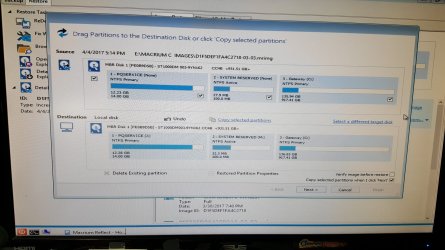
Ranger 4/ Others; for the first time today I got the Win PE 5 CD to produce what I posted about - the Source 3-Partitions MATCHING the DESTINATION 3-Partitions rather than seeing MyPassport (C) as the Destination. My only problem is not knowing WHY it worked today and not multi-times prior.

Wanted you to see what my dilemma was should someone ever raise the issue.
 

Attachments

  • PE SOURCE Match DEST.jpg
    PE SOURCE Match DEST.jpg
    281.9 KB · Views: 2

My Computer My Computer

Computer Manufacturer/Model Number
Gateway DX4860-UB33P
OS
Windows 7 Home Premium 64bit
CPU
Intel 2nd Gen i5 3.3GHz
Motherboard
Gateway IPISB-VR 1.01 / BIOS: American Megatrends P02-A2
Memory
8 GB
Graphics Card(s)
Intel HD2000
Monitor(s) Displays
ASUS VS247H-P 23.6 in
Back
Top