Solved Macrium

USB3 is so new that there is probably no support yet - especially in the Linux recovery program. This is ashame because the USB3 would lend itself particularily well for imaging. But I am sure given time, we will get it.
But if I understand you right, the image was initially written to the USB3 disk - right?

Would be interesting to know whether Win7 imaging supports it. Maybe jmf knows.
 

My Computer

Computer Manufacturer/Model Number
HP, Dell, Gateway, Toshiba - 4 laptops and 2 desktops
OS
Vista, Windows7, Mint Mate, Zorin, Windows 8
CPU
from 1.6GHz Duo to i7
Monitor(s) Displays
2x HP w2207
Hard Drives
5x HDD, 7x SSD, 12x Externals
Keyboard
with trackball - no mices
Mouse
Trackball mice
Internet Speed
DSL 6000
Yes Wolfgang, the drive has no problems saving the backup image through the 3.0 usb connection, Maybe its Linux that doesn't get along well with 3.0?
Bret
 

My Computer

Computer type
PC/Desktop
Computer Manufacturer/Model Number
Gateway GT 5676
OS
Windows 7 Home premium 64bit SP 1
CPU
AMD Phenom Quad Core 9600 2.3 GHz
Motherboard
4006272R - Foxconn (Bengal) RS780 Motherboard
Memory
8GB of DDR2
Graphics Card(s)
Integrated ATI Radeon HD 3200 video /Sapphire Radeon HD 3470
Sound Card
Integrated ALC888S HD codec 7.1
Monitor(s) Displays
19" Samsung SyncMaster
Screen Resolution
1440x900
Hard Drives
One Internal Samsung 500GB SSD 850EVO
One Internal 320 GB 7200 RPM SATA II hard drives
One Toshiba 1TB External
PSU
Ultra LSP 650W
Case
Gateway 5-Bay uATX Computer Case (Carbon Fiber)
Cooling
CPU - Arctic Cooler Freezer 64
Keyboard
HP
Mouse
Logitech Laser
Internet Speed
Down 54.0Mbps Up 5.8Mbps Charter (Spectrum)
Antivirus
avast Pro
Browser
FireFox 40.02
Yes Wolfgang, the drive has no problems saving the backup image through the 3.0 usb connection, Maybe its Linux that doesn't get along well with 3.0?
Bret
I think you are right. Linux is behind the times. Next week I get a new laptop with USB3. I guess I will experiment - also with Windows imaging. They probably do not use Linux but their own scheme (maybe BartPE). From the recovery disk I could not figure it out.
 

My Computer

Computer Manufacturer/Model Number
HP, Dell, Gateway, Toshiba - 4 laptops and 2 desktops
OS
Vista, Windows7, Mint Mate, Zorin, Windows 8
CPU
from 1.6GHz Duo to i7
Monitor(s) Displays
2x HP w2207
Hard Drives
5x HDD, 7x SSD, 12x Externals
Keyboard
with trackball - no mices
Mouse
Trackball mice
Internet Speed
DSL 6000
Next week I get a new laptop with USB3. I guess I will experiment - also with Windows imaging.

I'm very much looking forward to hearing about your experience Imaging with using USB3!

~Maxx~

Reflect_Logo_100-1.png
 

My Computer

Computer Manufacturer/Model Number
HP HPE 270f
OS
Windows 7 x64 Home Premium
CPU
Intel Core i7 930 @ 2.8 Ghz Socket 1366 LGA
Motherboard
Pegatron Truckee v1.04E41
Memory
8 GB 1366 Mhz DDR3 (PC3-10700) RAM
Graphics Card(s)
ATI Radeon 5770 1 GB DDR5 RAM
Sound Card
Realtech High Definition
Monitor(s) Displays
32" Sony Bravia
Screen Resolution
1366 X 768
Hard Drives
Intel 25nm 120 GB Series 320 SSD HD Tune- 265 MBps Read/ 130 MBps Write

LaCie 1TB + 1TB RAID 0 eSATA Drive HD Tune- 160 MBps Read/ 90 MBps Write
Keyboard
Logitech Illuminated
Mouse
Logitech MX Revolution
Internet Speed
36.4 Mbps Maximum on a 37 Mbps Motorola SB501 Modem
Next week I get a new laptop with USB3. I guess I will experiment - also with Windows imaging.

I'm very much looking forward to hearing about your experience Imaging with using USB3!

~Maxx~

Reflect_Logo_100-1.png
Well, as Bret says, the imaging part (with Macrium) seems to work. It's the Linux recovery CD that gives. Maybe the BartPE would work. Maybe SIW2 knows.
 

My Computer

Computer Manufacturer/Model Number
HP, Dell, Gateway, Toshiba - 4 laptops and 2 desktops
OS
Vista, Windows7, Mint Mate, Zorin, Windows 8
CPU
from 1.6GHz Duo to i7
Monitor(s) Displays
2x HP w2207
Hard Drives
5x HDD, 7x SSD, 12x Externals
Keyboard
with trackball - no mices
Mouse
Trackball mice
Internet Speed
DSL 6000
Linux o/s is not behind the times.

It is just that Paramount haven't built usb 3.0 support into the free boot disc yet.

They soon will.
 

My Computers

System One System Two

  • Computer type
    PC/Desktop
    OS
    7 X64
    CPU
    i5 8400
    Motherboard
    gigabyte b365m ds3h
    Memory
    2x8gb 3200mhz
    Hard Drives
    various
    PSU
    pure power 11 400w cm
    Case
    Coolermaster
    Cooling
    cryorig m9i
  • Computer type
    PC/Desktop
    OS
    7x64
    CPU
    g5400
    Motherboard
    ga b365m ds3h
    Memory
    8gb ddr4 2400
    PSU
    xfx pro 450w
Good for me, that the new USB3 system I purchased is backward compatible!
Bret
 

My Computer

Computer type
PC/Desktop
Computer Manufacturer/Model Number
Gateway GT 5676
OS
Windows 7 Home premium 64bit SP 1
CPU
AMD Phenom Quad Core 9600 2.3 GHz
Motherboard
4006272R - Foxconn (Bengal) RS780 Motherboard
Memory
8GB of DDR2
Graphics Card(s)
Integrated ATI Radeon HD 3200 video /Sapphire Radeon HD 3470
Sound Card
Integrated ALC888S HD codec 7.1
Monitor(s) Displays
19" Samsung SyncMaster
Screen Resolution
1440x900
Hard Drives
One Internal Samsung 500GB SSD 850EVO
One Internal 320 GB 7200 RPM SATA II hard drives
One Toshiba 1TB External
PSU
Ultra LSP 650W
Case
Gateway 5-Bay uATX Computer Case (Carbon Fiber)
Cooling
CPU - Arctic Cooler Freezer 64
Keyboard
HP
Mouse
Logitech Laser
Internet Speed
Down 54.0Mbps Up 5.8Mbps Charter (Spectrum)
Antivirus
avast Pro
Browser
FireFox 40.02
Linux o/s is not behind the times.

It is just that Paramount haven't built usb 3.0 support into the free boot disc yet.

They soon will.
Thanks Siw, that is good to know. So in the interim we will image with USB3 and restore with USB2. Progress is coming - slowly. :D
 

My Computer

Computer Manufacturer/Model Number
HP, Dell, Gateway, Toshiba - 4 laptops and 2 desktops
OS
Vista, Windows7, Mint Mate, Zorin, Windows 8
CPU
from 1.6GHz Duo to i7
Monitor(s) Displays
2x HP w2207
Hard Drives
5x HDD, 7x SSD, 12x Externals
Keyboard
with trackball - no mices
Mouse
Trackball mice
Internet Speed
DSL 6000
Well, as Bret says, the imaging part (with Macrium) seems to work.

I'm also wondering if USB3 is as fast as eSATA when Imaging with Macrium Reflect...

~Maxx~

LaCie100_S.png
 

Attachments

  • Reflect 609 Mbps.jpg
    Reflect 609 Mbps.jpg
    26.2 KB · Views: 2

My Computer

Computer Manufacturer/Model Number
HP HPE 270f
OS
Windows 7 x64 Home Premium
CPU
Intel Core i7 930 @ 2.8 Ghz Socket 1366 LGA
Motherboard
Pegatron Truckee v1.04E41
Memory
8 GB 1366 Mhz DDR3 (PC3-10700) RAM
Graphics Card(s)
ATI Radeon 5770 1 GB DDR5 RAM
Sound Card
Realtech High Definition
Monitor(s) Displays
32" Sony Bravia
Screen Resolution
1366 X 768
Hard Drives
Intel 25nm 120 GB Series 320 SSD HD Tune- 265 MBps Read/ 130 MBps Write

LaCie 1TB + 1TB RAID 0 eSATA Drive HD Tune- 160 MBps Read/ 90 MBps Write
Keyboard
Logitech Illuminated
Mouse
Logitech MX Revolution
Internet Speed
36.4 Mbps Maximum on a 37 Mbps Motorola SB501 Modem

My Computer

Computer Manufacturer/Model Number
HP, Dell, Gateway, Toshiba - 4 laptops and 2 desktops
OS
Vista, Windows7, Mint Mate, Zorin, Windows 8
CPU
from 1.6GHz Duo to i7
Monitor(s) Displays
2x HP w2207
Hard Drives
5x HDD, 7x SSD, 12x Externals
Keyboard
with trackball - no mices
Mouse
Trackball mice
Internet Speed
DSL 6000
whs- Thanks for the specs, but as we all know maximum R&W benchmark specs and the actual bandwidth that an interface operates at in use on a computer are much different. For example USB 2 has usually always operated at <1/3 of its rated bandwidth on my computer which is why I'd be interested in seeing an actual screenshot of an Image backup being made with Reflect while using USB 3.

~Maxx~

Reflect_Logo_100-1.png
 

My Computer

Computer Manufacturer/Model Number
HP HPE 270f
OS
Windows 7 x64 Home Premium
CPU
Intel Core i7 930 @ 2.8 Ghz Socket 1366 LGA
Motherboard
Pegatron Truckee v1.04E41
Memory
8 GB 1366 Mhz DDR3 (PC3-10700) RAM
Graphics Card(s)
ATI Radeon 5770 1 GB DDR5 RAM
Sound Card
Realtech High Definition
Monitor(s) Displays
32" Sony Bravia
Screen Resolution
1366 X 768
Hard Drives
Intel 25nm 120 GB Series 320 SSD HD Tune- 265 MBps Read/ 130 MBps Write

LaCie 1TB + 1TB RAID 0 eSATA Drive HD Tune- 160 MBps Read/ 90 MBps Write
Keyboard
Logitech Illuminated
Mouse
Logitech MX Revolution
Internet Speed
36.4 Mbps Maximum on a 37 Mbps Motorola SB501 Modem
I will make one in a couple of weeks when I have my new Laptop up and running. Remind me then.
Btw: those were real test figures.
 

My Computer

Computer Manufacturer/Model Number
HP, Dell, Gateway, Toshiba - 4 laptops and 2 desktops
OS
Vista, Windows7, Mint Mate, Zorin, Windows 8
CPU
from 1.6GHz Duo to i7
Monitor(s) Displays
2x HP w2207
Hard Drives
5x HDD, 7x SSD, 12x Externals
Keyboard
with trackball - no mices
Mouse
Trackball mice
Internet Speed
DSL 6000
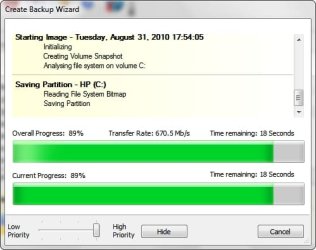
With my ASUS pcie usb3 card and the Iomega eGo usb3 drive, I'm getting an average transfer rate of 397.9 mb/s. with 37.1 gb of the C: drive data being imaged in around 5.5 minutes.
Which now leads me to believe the Macrium software is not utilizing the full potential of the backup media system?
Bret
 

My Computer

Computer type
PC/Desktop
Computer Manufacturer/Model Number
Gateway GT 5676
OS
Windows 7 Home premium 64bit SP 1
CPU
AMD Phenom Quad Core 9600 2.3 GHz
Motherboard
4006272R - Foxconn (Bengal) RS780 Motherboard
Memory
8GB of DDR2
Graphics Card(s)
Integrated ATI Radeon HD 3200 video /Sapphire Radeon HD 3470
Sound Card
Integrated ALC888S HD codec 7.1
Monitor(s) Displays
19" Samsung SyncMaster
Screen Resolution
1440x900
Hard Drives
One Internal Samsung 500GB SSD 850EVO
One Internal 320 GB 7200 RPM SATA II hard drives
One Toshiba 1TB External
PSU
Ultra LSP 650W
Case
Gateway 5-Bay uATX Computer Case (Carbon Fiber)
Cooling
CPU - Arctic Cooler Freezer 64
Keyboard
HP
Mouse
Logitech Laser
Internet Speed
Down 54.0Mbps Up 5.8Mbps Charter (Spectrum)
Antivirus
avast Pro
Browser
FireFox 40.02
With my ASUS pcie usb3 card and the Iomega eGo usb3 drive, I'm getting an average transfer rate of 397.9 mb/s. with 37.1 gb of the C: drive data being imaged in around 5.5 minutes.
Which now leads me to believe the Macrium software is not utilizing the full potential of the backup media system?
Bret

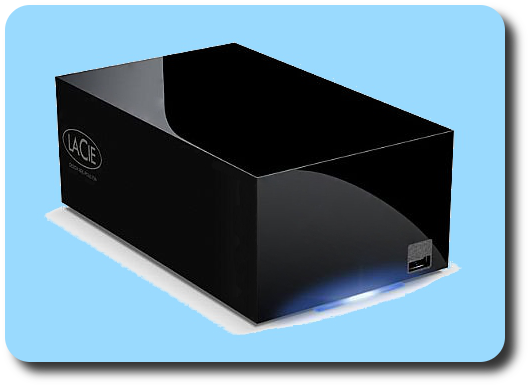
Reflect only uses about 1/2 as much potential speed as my LaCie eSATA drive shows on benchmarks.

LaCieeSATA.png


~Maxx~


Reflect_Logo_100-1.png
 

Attachments

  • Reflect 2010-08-31_.jpg
    Reflect 2010-08-31_.jpg
    25.8 KB · Views: 3
Last edited:

My Computer

Computer Manufacturer/Model Number
HP HPE 270f
OS
Windows 7 x64 Home Premium
CPU
Intel Core i7 930 @ 2.8 Ghz Socket 1366 LGA
Motherboard
Pegatron Truckee v1.04E41
Memory
8 GB 1366 Mhz DDR3 (PC3-10700) RAM
Graphics Card(s)
ATI Radeon 5770 1 GB DDR5 RAM
Sound Card
Realtech High Definition
Monitor(s) Displays
32" Sony Bravia
Screen Resolution
1366 X 768
Hard Drives
Intel 25nm 120 GB Series 320 SSD HD Tune- 265 MBps Read/ 130 MBps Write

LaCie 1TB + 1TB RAID 0 eSATA Drive HD Tune- 160 MBps Read/ 90 MBps Write
Keyboard
Logitech Illuminated
Mouse
Logitech MX Revolution
Internet Speed
36.4 Mbps Maximum on a 37 Mbps Motorola SB501 Modem
Hi All,

Been following this topic with interest and decided to give Macrium a quick twirl. I have a few questions:

1. Im interested in imaging my C: drive - this contains my OS and Apps. When I select the drive, do I also need to select the 100MB System Reserved Partition? It appaers to be slightly greyed out, so I'm guessing (without actually trying it) that I can't actually select it, and don't need to?

2. Assuming I can successfully image my C: drive (and create a Linux boot disk), can I reintsall the image to a brand new SSD that has never been used? Is it better to install fresh to an SSD the long way, or does the image restoration do just as good a job : note, this is a brand new SSD, nothing has yet been installed on it.

As you can guess, Im moving from HDD's to SSD's, and wonder whether a fresh installation is the way to go, or whether image restoration is just as good. This is a Windows 7 Ultimate x64 system.

What say you?
Golden
 

My Computer

Computer type
PC/Desktop
Computer Manufacturer/Model Number
Golden Mk. I.4
OS
Windows 10 Pro x64 ; Xubuntu x64
CPU
Intel i7 860 @ 2.80 GHz O/C'ed to 4.0GHz
Motherboard
Gigabyte P55A-UD3R Rev.1. Award BIOS F13
Memory
16GB Corsair Vengance DDR3 @ 661 MHz Dual Channel (9-9-9-24)
Graphics Card(s)
EVGA NVidia GTX 560 1024MB
Sound Card
Realtek Integrated
Monitor(s) Displays
Dual Samsung SyncMaster 2494HS
Screen Resolution
1920*1080 and 1920*1080
Hard Drives
1*Samsung 840 EVO 120GB SSD;
1*OCZ Vertex 2 60GB SSD;
2*Samsung F3 SpinPoint 1TB in RAID0;
1*Samsung F1 SpinPoint 1TB;
2*Western Digital 1TB External USB 3.0
1*Western Digital 500GB External USB 3.0
1*Seagate 500GB External USB 2.0
PSU
Thermaltake ToughPower QFan 750W
Case
Thermaltake Element S VK60001W2Z
Cooling
Corsair H60 Water Cooling, 2*230mm and 2*80mm case fans
Keyboard
Logitech G110
Mouse
Logitech MX518
Hi All,

Been following this topic with interest and decided to give Macrium a quick twirl. I have a few questions:

1. Im interested in imaging my C: drive - this contains my OS and Apps. When I select the drive, do I also need to select the 100MB System Reserved Partition? It appaers to be slightly greyed out, so I'm guessing (without actually trying it) that I can't actually select it, and don't need to?

2. Assuming I can successfully image my C: drive (and create a Linux boot disk), can I reintsall the image to a brand new SSD that has never been used? Is it better to install fresh to an SSD the long way, or does the image restoration do just as good a job : note, this is a brand new SSD, nothing has yet been installed on it.

As you can guess, Im moving from HDD's to SSD's, and wonder whether a fresh installation is the way to go, or whether image restoration is just as good. This is a Windows 7 Ultimate x64 system.

What say you?
Golden
ad1) I suggest to image the 100MB partition only once and keep it in a seperate folder - just in case. That partition really never changes (unless you decide e.g. for a double boot) and need not be imaged every time.
But yes, you can image several partitions together but recover only one at a time (for good reason)

ad2) yes you can do that. But there are a few things you have to remember:

1. free Macrium can only recover to a partition of equal or larger size. So your imaged partition must have been equal or smaller in size thn the SSD - and I mean partition, not actual data or size of the image.
If you want to install an image of a big partition to a smaller SSD, you need Macrium Pro, but free Paragon can do that too

2. You first need to define a partition primary (for the active partition) on the SSD and align that. Here is how. When you do a fresh install of Win7, the installer does that for you. With the 100MB partition present, it gets a bit messy. It is a little easier with the Win7 imaging in that case because it drags the 100MB partition along. I am not sure though how Win7 imaging deals with recovery of a "large" partition to a "small" SSD.

Bottom line, it is easier if you did a fresh installation provided you have the installation disk. However, the imaging path is the best way to go if you have a preinstalled OEM operating system and no installation disk.
 

My Computer

Computer Manufacturer/Model Number
HP, Dell, Gateway, Toshiba - 4 laptops and 2 desktops
OS
Vista, Windows7, Mint Mate, Zorin, Windows 8
CPU
from 1.6GHz Duo to i7
Monitor(s) Displays
2x HP w2207
Hard Drives
5x HDD, 7x SSD, 12x Externals
Keyboard
with trackball - no mices
Mouse
Trackball mice
Internet Speed
DSL 6000

My Computers

System One System Two

  • Computer type
    PC/Desktop
    OS
    7 X64
    CPU
    i5 8400
    Motherboard
    gigabyte b365m ds3h
    Memory
    2x8gb 3200mhz
    Hard Drives
    various
    PSU
    pure power 11 400w cm
    Case
    Coolermaster
    Cooling
    cryorig m9i
  • Computer type
    PC/Desktop
    OS
    7x64
    CPU
    g5400
    Motherboard
    ga b365m ds3h
    Memory
    8gb ddr4 2400
    PSU
    xfx pro 450w
Paragon sent me an app. called Migrate to ssd - haven't tried it yet, but it looks good.

Paragon Migrate OS to SSD - Overview
That looks good, but they want $20 for it. I wonder whether the Win7 native imaging would not do the same thing (because they drag the 10MB partition along). If it was not for the 100MB partition, any old imaging program should do.
 

My Computer

Computer Manufacturer/Model Number
HP, Dell, Gateway, Toshiba - 4 laptops and 2 desktops
OS
Vista, Windows7, Mint Mate, Zorin, Windows 8
CPU
from 1.6GHz Duo to i7
Monitor(s) Displays
2x HP w2207
Hard Drives
5x HDD, 7x SSD, 12x Externals
Keyboard
with trackball - no mices
Mouse
Trackball mice
Internet Speed
DSL 6000
Not exactly, the Paragon app. will migrate to a smaller ssd or HD , and let you exclude folders, as well as aligning during the migration.
 

My Computers

System One System Two

  • Computer type
    PC/Desktop
    OS
    7 X64
    CPU
    i5 8400
    Motherboard
    gigabyte b365m ds3h
    Memory
    2x8gb 3200mhz
    Hard Drives
    various
    PSU
    pure power 11 400w cm
    Case
    Coolermaster
    Cooling
    cryorig m9i
  • Computer type
    PC/Desktop
    OS
    7x64
    CPU
    g5400
    Motherboard
    ga b365m ds3h
    Memory
    8gb ddr4 2400
    PSU
    xfx pro 450w
SIW and WHS:

Is there an over-riding reason NOT to image from an HDD to an SSD when migrating to SSD technology---rather than doing a clean install to the SSD?

I will be facing this issue within months. I have an install disc and have always done clean installs, but if I can get by with imaging, why not?

I have seen people imply clean is preferred, but is imaging more problematic when the destination is SSD rather than HDD? Any problems other than possibly alignment--which I understand can be corrected after the fact?

I do NOT have the 100 MB system partition.

I would likely use Macrium Free, but have access to Acronis as well.
 

My Computer

Computer type
PC/Desktop
Computer Manufacturer/Model Number
Ignatz Special; 4 speed manual gearbox; factory air conditioning; one of one
OS
Windows 7 Home Premium SP1, 64-bit
CPU
Intel Skylake i5-6600K, not overclocked
Motherboard
AsRock Z170M Extreme 4, micro ATX
Memory
8 GB HyperX DDR4-2666 (2 x 4 GB)
Graphics Card(s)
none; graphics are integrated on CPU
Sound Card
onboard: Realtek ALC1150; external: USB Behringer UF0-202
Monitor(s) Displays
Dell S2340M 23 inch IPS
Screen Resolution
1600 x 900
Hard Drives
System: Crucial MX100 series SSD, 128 GB;
Data: Samsung Spinpoint 103SJ, 1 TB;
Backup: WD Caviar Green WD30EZRX-00D8PB0, 3 TB
PSU
Rosewill SilentNight 500 watt fanless, semi-modular
Case
Antec Solo II
Cooling
Noctua NH-U12S; Noctua F12 intake, Noctua S12A exhaust
Keyboard
Microsoft 200 6JH-00001 USB
Mouse
Dell or Microsoft optical wired; USB
Antivirus
Microsoft Security Essentials and Malwarebytes Premium
Browser
Pale Moon
Other Info
All fans PWM; speeds at idle: CPU circa 500 rpm; intake circa 600 rpm; exhaust circa 600 rpm; CPU temps 27 idle and 47 C load in a warm room (27 C/81 F) when running Intel Extreme Tuning Utility stress test.
Back
Top