Solved Macrium

N2Abyss

New member
Member
VIP
Local time
3:08 PM
Messages
172
Location
Central Wyoming
Apologies if this is an improper location for this post, I received help here before.

I recently re-formatted my vista pc to WIn7. I had posted asking about an imaging program (WIn7/Macrium) and decided to go with Macrium Free, but I just noticed I don't have the option to do an "Incremental" back up, If using the free addition. Is my only choice to do a "complete disk image" every time? Unless I'm missing something.

I printed the tutorial at Macrium's site, but the walk through screen shots don't look exactly like the program I'm using, I believe they are for the full edition.
I'm I better off to purchase the full product and schedule an "Incremental" back up to run on a regular basis?

So far using Macrium Free, I have - 1. made a "Rescue CD" in the Linux recovery environment. I'm hesitant to test this CD for fear It will screw something up, I know I need to, but don't understand exactly how to do it, or what to expect!

The instructions say to power machine completely down before using (Testing?) the "Rescue CD" ?? How am I supposed to get the disc into the tray with the machine off ? Can I insert the disc, then power down, then re-power?
what do I need to look for and where do I stop the process to just check the "Rescue CD" for a working copy, before it moves the image to my fully functional pc?
2. I went ahead and created a "Disc Image" in it's own folder on an external HD.

Thanks in advance.. for any help!
Bret
 

My Computer

Computer type
PC/Desktop
Computer Manufacturer/Model Number
Gateway GT 5676
OS
Windows 7 Home premium 64bit SP 1
CPU
AMD Phenom Quad Core 9600 2.3 GHz
Motherboard
4006272R - Foxconn (Bengal) RS780 Motherboard
Memory
8GB of DDR2
Graphics Card(s)
Integrated ATI Radeon HD 3200 video /Sapphire Radeon HD 3470
Sound Card
Integrated ALC888S HD codec 7.1
Monitor(s) Displays
19" Samsung SyncMaster
Screen Resolution
1440x900
Hard Drives
One Internal Samsung 500GB SSD 850EVO
One Internal 320 GB 7200 RPM SATA II hard drives
One Toshiba 1TB External
PSU
Ultra LSP 650W
Case
Gateway 5-Bay uATX Computer Case (Carbon Fiber)
Cooling
CPU - Arctic Cooler Freezer 64
Keyboard
HP
Mouse
Logitech Laser
Internet Speed
Down 54.0Mbps Up 5.8Mbps Charter (Spectrum)
Antivirus
avast Pro
Browser
FireFox 40.02
1. There are no incrementals in free Macrium - only in the Pro version. As far as I am concerned, that is the better deal anyhow. If you make incrementals and lose any incremental in the middle of the chain, you lost the whole chain. Whilst with independent images, you are always safe- at best you lose one but still have all the others. At the low price of disks these days, i rather go with that.

2. Free Paragon makes incrementals - but as I said, I warn against incrementals.

3. For the purposes of testing, see my procedure below. That is safe and you risk nothing. You may also watch my Macrium video tutorial and read the text in the pink box: http://www.sevenforums.com/tutorials/73828-imaging-free-macrium.html?ltr=I

Macrium test

1. Shrink 2GBs from C and define a simple volume (partition) - let's call it Y
2. Move some files (any files) into Y - I always also move the sample picture folder in (you'll see why)
3. Define a test folder on your external backup disk - call it Mtest
4. Make an image of Y to Mtest - requires that you make a new definition
5. Delete a couple of pictures from the sample picture folder on Y (I always use the 2 animals)
6. Reboot and tap (ESC, F2 or whatever it is on your system) to get into the BIOS boot sequence
7. Set your boot sequence to CD/DVD reader
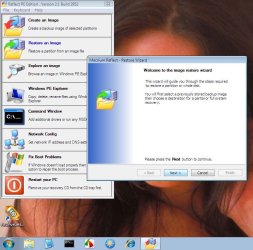
8. Throw in the Macrium recovery CD and let it run, then hit Enter
9. Now you are in the recovery wizard, set it to Mtest where it says "Locate Image" and to Y where it says "Choose partition to overwrite with the image data".
Note: the partition letters may not be the same as on your system. Macrium uses its own lettering. Best is to go by the size of the partitions and open it with the little + in the front.
10. Watch out when it asks whether to replace the Master Boot Record - in this case say "do not replace" because this is only a data partition. If that were your system partition, you would replace the MBR provided you do not have a separate boot partition.
11. When you get the little window saying "Your computer will now reboot", you have to hit "Cancel" (on the bottom" to get it to reboot. That's a little strange way to end the session, but that's the way it is.
12. Check whether the 2 animals in the sample picture folder are back. That shows you that the recovery worked.

When you have done these steps, you did the whole cycle and have learned

1. That your recovery disk works
2. How to recover
3. That things work

Now you can delete the little 2GB partition and add it back to it's originating partition.
If you are not familiar with the creation and deletion of partitions, watch this tutorial: http://www.sevenforums.com/tutorials/72427-data-partition.html
 

My Computer

Computer Manufacturer/Model Number
HP, Dell, Gateway, Toshiba - 4 laptops and 2 desktops
OS
Vista, Windows7, Mint Mate, Zorin, Windows 8
CPU
from 1.6GHz Duo to i7
Monitor(s) Displays
2x HP w2207
Hard Drives
5x HDD, 7x SSD, 12x Externals
Keyboard
with trackball - no mices
Mouse
Trackball mice
Internet Speed
DSL 6000
Thanks WHS, I really enjoy your tutorials they are very well done!
I still have questions about testing the "Rescue Disc" as mentioned in my first post?
Thanks again
Bret
 

My Computer

Computer type
PC/Desktop
Computer Manufacturer/Model Number
Gateway GT 5676
OS
Windows 7 Home premium 64bit SP 1
CPU
AMD Phenom Quad Core 9600 2.3 GHz
Motherboard
4006272R - Foxconn (Bengal) RS780 Motherboard
Memory
8GB of DDR2
Graphics Card(s)
Integrated ATI Radeon HD 3200 video /Sapphire Radeon HD 3470
Sound Card
Integrated ALC888S HD codec 7.1
Monitor(s) Displays
19" Samsung SyncMaster
Screen Resolution
1440x900
Hard Drives
One Internal Samsung 500GB SSD 850EVO
One Internal 320 GB 7200 RPM SATA II hard drives
One Toshiba 1TB External
PSU
Ultra LSP 650W
Case
Gateway 5-Bay uATX Computer Case (Carbon Fiber)
Cooling
CPU - Arctic Cooler Freezer 64
Keyboard
HP
Mouse
Logitech Laser
Internet Speed
Down 54.0Mbps Up 5.8Mbps Charter (Spectrum)
Antivirus
avast Pro
Browser
FireFox 40.02
Thanks WHS, I really enjoy your tutorials they are very well done!
I still have questions about testing the "Rescue Disc" as mentioned in my first post?
Thanks again
Bret
Why don't you use the little test procedure I posted. It may sound like a lot, but it is actually very simple. I demo that in less than 10 minutes in my classes. The advantage is that you run no risk at all and then you learned a lot and know that things work. Please let us know how you make out. You can always refer to the tutorials when you get stuck - or ask here.
 

My Computer

Computer Manufacturer/Model Number
HP, Dell, Gateway, Toshiba - 4 laptops and 2 desktops
OS
Vista, Windows7, Mint Mate, Zorin, Windows 8
CPU
from 1.6GHz Duo to i7
Monitor(s) Displays
2x HP w2207
Hard Drives
5x HDD, 7x SSD, 12x Externals
Keyboard
with trackball - no mices
Mouse
Trackball mice
Internet Speed
DSL 6000
I guess maybe I wasn't clear, I recently had a pc crash due to operating system errors, and would, in that specific case need to use the "Rescue Disc" for start up. The "rescue disc" is what I need help with on testing.
I don't want to foul up anything on my re-formatted system.
Thanks
Bret
 

My Computer

Computer type
PC/Desktop
Computer Manufacturer/Model Number
Gateway GT 5676
OS
Windows 7 Home premium 64bit SP 1
CPU
AMD Phenom Quad Core 9600 2.3 GHz
Motherboard
4006272R - Foxconn (Bengal) RS780 Motherboard
Memory
8GB of DDR2
Graphics Card(s)
Integrated ATI Radeon HD 3200 video /Sapphire Radeon HD 3470
Sound Card
Integrated ALC888S HD codec 7.1
Monitor(s) Displays
19" Samsung SyncMaster
Screen Resolution
1440x900
Hard Drives
One Internal Samsung 500GB SSD 850EVO
One Internal 320 GB 7200 RPM SATA II hard drives
One Toshiba 1TB External
PSU
Ultra LSP 650W
Case
Gateway 5-Bay uATX Computer Case (Carbon Fiber)
Cooling
CPU - Arctic Cooler Freezer 64
Keyboard
HP
Mouse
Logitech Laser
Internet Speed
Down 54.0Mbps Up 5.8Mbps Charter (Spectrum)
Antivirus
avast Pro
Browser
FireFox 40.02
Bret, I do understand completely. With my little Macrium test, you will test the recovery CD. Understand that this CD contains a little program running under Linux that will pull the image in - any Macrium image. An if it works properly with my little test procedure, it will work for the "real thing" too.

Another question, of course, is whether your image is whole. There is always the possibility that one has a bum image (although I have never seen that). The best way to protect yourself against that is to make and keep many images. Maybe you want to read my little tutorial on imaging strategies.
 

My Computer

Computer Manufacturer/Model Number
HP, Dell, Gateway, Toshiba - 4 laptops and 2 desktops
OS
Vista, Windows7, Mint Mate, Zorin, Windows 8
CPU
from 1.6GHz Duo to i7
Monitor(s) Displays
2x HP w2207
Hard Drives
5x HDD, 7x SSD, 12x Externals
Keyboard
with trackball - no mices
Mouse
Trackball mice
Internet Speed
DSL 6000
Ok WHS, I'll give your instructions a complete try. You have already been a big help in getting my first image shot and made using this program very easy! Thanks for all your help.
Best Regards
Bret
 

My Computer

Computer type
PC/Desktop
Computer Manufacturer/Model Number
Gateway GT 5676
OS
Windows 7 Home premium 64bit SP 1
CPU
AMD Phenom Quad Core 9600 2.3 GHz
Motherboard
4006272R - Foxconn (Bengal) RS780 Motherboard
Memory
8GB of DDR2
Graphics Card(s)
Integrated ATI Radeon HD 3200 video /Sapphire Radeon HD 3470
Sound Card
Integrated ALC888S HD codec 7.1
Monitor(s) Displays
19" Samsung SyncMaster
Screen Resolution
1440x900
Hard Drives
One Internal Samsung 500GB SSD 850EVO
One Internal 320 GB 7200 RPM SATA II hard drives
One Toshiba 1TB External
PSU
Ultra LSP 650W
Case
Gateway 5-Bay uATX Computer Case (Carbon Fiber)
Cooling
CPU - Arctic Cooler Freezer 64
Keyboard
HP
Mouse
Logitech Laser
Internet Speed
Down 54.0Mbps Up 5.8Mbps Charter (Spectrum)
Antivirus
avast Pro
Browser
FireFox 40.02
You can test that the linux boot disk works and you can get to the stage were it sees images before pulling the plug if you're worried about checking for full images. But WHS's test should be convincing enough.
I don't think you will ever be fully confident until you restore your first full system image - at least I wasn't.

Also double click on one of the *.mrimg images and Macrium will mount it to view the contents.
 

My Computer

Computer type
PC/Desktop
Computer Manufacturer/Model Number
Own build
OS
Windows 7x64 Home Premium SP1
CPU
Intel i7 2600k
Motherboard
ASUS P8Z68 Deluxe
Memory
G.Skill Ripjaws (DDR3-1600) 2x4GB
Graphics Card(s)
Nvidia GeForce GTS 450; Intel HD Graphics 3000(GT2+)
Monitor(s) Displays
Dell Ultrasharp IPS panel U2311H, Samsung SyncMaster P2350
Screen Resolution
1920x1080
Hard Drives
Samsung 850 Pro SSD 256GB, Samsung SSD 840 120GB, Seagates 1TB Barracuda ST31000528AS x2
PSU
Seasonic M12II 520W
Case
Lian Li Lancool PC-K60
Cooling
Case: 1x120mm, 3x140mm CPU: Hyper 212+
Keyboard
Logitech MK520 (wireless)
Mouse
Logitech MK520
Internet Speed
6-7 Mbps
Antivirus
Norton Security Premium, Malwarebytes on 2 (MSE on 3rd PC)
Browser
FireFox
Other Info
Audio: Logitech Z523 2.1
I don't think you will ever be fully confident until you restore your first full system image - at least I wasn't.

+1

~Maxx~

Reflect_Logo_100-1.png
 

My Computer

Computer Manufacturer/Model Number
HP HPE 270f
OS
Windows 7 x64 Home Premium
CPU
Intel Core i7 930 @ 2.8 Ghz Socket 1366 LGA
Motherboard
Pegatron Truckee v1.04E41
Memory
8 GB 1366 Mhz DDR3 (PC3-10700) RAM
Graphics Card(s)
ATI Radeon 5770 1 GB DDR5 RAM
Sound Card
Realtech High Definition
Monitor(s) Displays
32" Sony Bravia
Screen Resolution
1366 X 768
Hard Drives
Intel 25nm 120 GB Series 320 SSD HD Tune- 265 MBps Read/ 130 MBps Write

LaCie 1TB + 1TB RAID 0 eSATA Drive HD Tune- 160 MBps Read/ 90 MBps Write
Keyboard
Logitech Illuminated
Mouse
Logitech MX Revolution
Internet Speed
36.4 Mbps Maximum on a 37 Mbps Motorola SB501 Modem

My Computer

Computer Manufacturer/Model Number
HP, Dell, Gateway, Toshiba - 4 laptops and 2 desktops
OS
Vista, Windows7, Mint Mate, Zorin, Windows 8
CPU
from 1.6GHz Duo to i7
Monitor(s) Displays
2x HP w2207
Hard Drives
5x HDD, 7x SSD, 12x Externals
Keyboard
with trackball - no mices
Mouse
Trackball mice
Internet Speed
DSL 6000
Once I had successfully completed that first Macrium Reflect backup it completely changed my whole attitude toward how I run my computer with the strengthened confidence that 3 complete sets of Image Backups on 3 different inert disks can inspire.

~Maxx~

Reflect_Logo_100-1.png
 

My Computer

Computer Manufacturer/Model Number
HP HPE 270f
OS
Windows 7 x64 Home Premium
CPU
Intel Core i7 930 @ 2.8 Ghz Socket 1366 LGA
Motherboard
Pegatron Truckee v1.04E41
Memory
8 GB 1366 Mhz DDR3 (PC3-10700) RAM
Graphics Card(s)
ATI Radeon 5770 1 GB DDR5 RAM
Sound Card
Realtech High Definition
Monitor(s) Displays
32" Sony Bravia
Screen Resolution
1366 X 768
Hard Drives
Intel 25nm 120 GB Series 320 SSD HD Tune- 265 MBps Read/ 130 MBps Write

LaCie 1TB + 1TB RAID 0 eSATA Drive HD Tune- 160 MBps Read/ 90 MBps Write
Keyboard
Logitech Illuminated
Mouse
Logitech MX Revolution
Internet Speed
36.4 Mbps Maximum on a 37 Mbps Motorola SB501 Modem
Yes indeed, many hours of work can be lost to the stroke of a key!!
Although not a pro by any means, I have been using a computer for many years for many things, and due to my busy schedule, Backups are often let go, (you know, Ill get to it later). The last crash with Vista was the last straw.
I lost the desktop first and couldn't get it back, so I chose to repair with data and lost everything I had! months and months of work! oh yes, most of it was backed up, but not current!
That's when I decided to give Macrium a try and as soon as I re-formatted, it's one of the first programs I loaded!
 

My Computer

Computer type
PC/Desktop
Computer Manufacturer/Model Number
Gateway GT 5676
OS
Windows 7 Home premium 64bit SP 1
CPU
AMD Phenom Quad Core 9600 2.3 GHz
Motherboard
4006272R - Foxconn (Bengal) RS780 Motherboard
Memory
8GB of DDR2
Graphics Card(s)
Integrated ATI Radeon HD 3200 video /Sapphire Radeon HD 3470
Sound Card
Integrated ALC888S HD codec 7.1
Monitor(s) Displays
19" Samsung SyncMaster
Screen Resolution
1440x900
Hard Drives
One Internal Samsung 500GB SSD 850EVO
One Internal 320 GB 7200 RPM SATA II hard drives
One Toshiba 1TB External
PSU
Ultra LSP 650W
Case
Gateway 5-Bay uATX Computer Case (Carbon Fiber)
Cooling
CPU - Arctic Cooler Freezer 64
Keyboard
HP
Mouse
Logitech Laser
Internet Speed
Down 54.0Mbps Up 5.8Mbps Charter (Spectrum)
Antivirus
avast Pro
Browser
FireFox 40.02
The last crash with Vista was the last straw.
I lost the desktop first and couldn't get it back, so I chose to repair with data and lost everything I had! months and months of work! oh yes, most of it was backed up, but not current!

My story is much the same with Vista System Restore failing 4 times in a row! It took me nearly 100 hours to reconstruct the Factory Image into what I was using at the time. Just 3 weeks after I found Macrium Reflect the computer crashed again, but this time I was prepared and Macrium Reflect had it up and running perfectly as though nothing had happened in just a few short minutes!

~Maxx~

Reflect_Logo_100-1.png
 

My Computer

Computer Manufacturer/Model Number
HP HPE 270f
OS
Windows 7 x64 Home Premium
CPU
Intel Core i7 930 @ 2.8 Ghz Socket 1366 LGA
Motherboard
Pegatron Truckee v1.04E41
Memory
8 GB 1366 Mhz DDR3 (PC3-10700) RAM
Graphics Card(s)
ATI Radeon 5770 1 GB DDR5 RAM
Sound Card
Realtech High Definition
Monitor(s) Displays
32" Sony Bravia
Screen Resolution
1366 X 768
Hard Drives
Intel 25nm 120 GB Series 320 SSD HD Tune- 265 MBps Read/ 130 MBps Write

LaCie 1TB + 1TB RAID 0 eSATA Drive HD Tune- 160 MBps Read/ 90 MBps Write
Keyboard
Logitech Illuminated
Mouse
Logitech MX Revolution
Internet Speed
36.4 Mbps Maximum on a 37 Mbps Motorola SB501 Modem
That's when I decided to give Macrium a try and as soon as I re-formatted, it's one of the first programs I loaded!

Then, you should consider looking into the purchased version. It provides the option of writing the rescue boot info to your hard drive -- when then allows you to do restore without needing a rescue CD. This can come in very handy when you either (1) do not have the CD handy, or (2) have a machine that does not have an optical drive.
 

My Computer

Computer type
PC/Desktop
Computer Manufacturer/Model Number
Custom
OS
Win7 Pro 32-bit, Win8 Pro 32-bit
CPU
AMD Phenom II X6 1090T
Motherboard
Gigabyte
Memory
4GB ddr3 1300
Graphics Card(s)
AMD HD 4290 onboard
Sound Card
Builtin Realtek HD Audio
Monitor(s) Displays
Samsung 24" widescreen, LG 23" widescreen
Screen Resolution
1920x1200/1920x1080
Hard Drives
Kingston 256GB SSD
Keyboard
Logitech Illuminated Keyboard
Mouse
Logitech M705 wireless mouse
Antivirus
Norton Av 2013
Browser
IE v10
It provides the option of writing the rescue boot info to your hard drive
Mark, I never saw that option and how is that supposed to work when your harddrive dies? Are you talking about writing the .iso to your harddrive which you then can e.g. transfer to a USB stick? You need some type of "external" device to start the recovery process. I would appreciate if you pointed me to the relevant paragraph on their website.
 

My Computer

Computer Manufacturer/Model Number
HP, Dell, Gateway, Toshiba - 4 laptops and 2 desktops
OS
Vista, Windows7, Mint Mate, Zorin, Windows 8
CPU
from 1.6GHz Duo to i7
Monitor(s) Displays
2x HP w2207
Hard Drives
5x HDD, 7x SSD, 12x Externals
Keyboard
with trackball - no mices
Mouse
Trackball mice
Internet Speed
DSL 6000
WHS, a quick question, I have Macrium set to run at log on, is it better to leave the computer alone while it's making an image? It makes me nervous running other tasks while it is making it's image.
Thanks
Bret
 

My Computer

Computer type
PC/Desktop
Computer Manufacturer/Model Number
Gateway GT 5676
OS
Windows 7 Home premium 64bit SP 1
CPU
AMD Phenom Quad Core 9600 2.3 GHz
Motherboard
4006272R - Foxconn (Bengal) RS780 Motherboard
Memory
8GB of DDR2
Graphics Card(s)
Integrated ATI Radeon HD 3200 video /Sapphire Radeon HD 3470
Sound Card
Integrated ALC888S HD codec 7.1
Monitor(s) Displays
19" Samsung SyncMaster
Screen Resolution
1440x900
Hard Drives
One Internal Samsung 500GB SSD 850EVO
One Internal 320 GB 7200 RPM SATA II hard drives
One Toshiba 1TB External
PSU
Ultra LSP 650W
Case
Gateway 5-Bay uATX Computer Case (Carbon Fiber)
Cooling
CPU - Arctic Cooler Freezer 64
Keyboard
HP
Mouse
Logitech Laser
Internet Speed
Down 54.0Mbps Up 5.8Mbps Charter (Spectrum)
Antivirus
avast Pro
Browser
FireFox 40.02
It will be quicker if you don't attempt to do anything else while it's imaging.

BTW Paragon makes differential drive images - not incremental.

A differential image contains all the changes since the first full image.

You need either the first full image to restore to the time that was made, or the first full image any one differential to restore to the time that differential was made.

Incrementals include the changes only since the last incremental - not all the changes since the first full image.

The Macrium Bartpe plugin ( now called pebuilder) works in pe2 and pe3.

This is my pe3 media :

macriumpe.jpg


The macrium boot menu option adds an entry to boot a pe2 .wim including the macrium program from the hard drive .

Similar to the option to boot windows winre.wim from the HD - you will see that on the advanced boot menu, if you have the 100mb system partition.

You can add any .wim to the regular boot menu very easily.

You can also use an F key to boot any .wim from the HD, but that's a bit fiddly for beginners.

The purpose of the boot menu option is convenience - you may not have external boot media ( e.g. cd) with you.

The downside is it depends on bcd working - so is not a proper substitute for external bootable recovery media.
 

My Computers

System One System Two

  • Computer type
    PC/Desktop
    OS
    7 X64
    CPU
    i5 8400
    Motherboard
    gigabyte b365m ds3h
    Memory
    2x8gb 3200mhz
    Hard Drives
    various
    PSU
    pure power 11 400w cm
    Case
    Coolermaster
    Cooling
    cryorig m9i
  • Computer type
    PC/Desktop
    OS
    7x64
    CPU
    g5400
    Motherboard
    ga b365m ds3h
    Memory
    8gb ddr4 2400
    PSU
    xfx pro 450w
WHS, a quick question, I have Macrium set to run at log on, is it better to leave the computer alone while it's making an image? It makes me nervous running other tasks while it is making it's image.
Thanks
Bret
I hide Macrium when it is imaging and run other tasks on Duo and Quad cores. Never had a problem.

My suggestion: Instead of scheduling it at boot time I suggest to schedule it on a day (or every day of the week) at a certain time. And check the box on the bottom of the little window saying:" If missed, run at next boot". Then it does not come up when you reboot during the day - e.g. because updates were installed.
 

My Computer

Computer Manufacturer/Model Number
HP, Dell, Gateway, Toshiba - 4 laptops and 2 desktops
OS
Vista, Windows7, Mint Mate, Zorin, Windows 8
CPU
from 1.6GHz Duo to i7
Monitor(s) Displays
2x HP w2207
Hard Drives
5x HDD, 7x SSD, 12x Externals
Keyboard
with trackball - no mices
Mouse
Trackball mice
Internet Speed
DSL 6000
That's when I decided to give Macrium a try and as soon as I re-formatted, it's one of the first programs I loaded!

Then, you should consider looking into the purchased version. It provides the option of writing the rescue boot info to your hard drive -- when then allows you to do restore without needing a rescue CD. This can come in very handy when you either (1) do not have the CD handy, or (2) have a machine that does not have an optical drive.
It's easy of course to make a recovery boot USB to cover the lack of optical drive.
I used to do a lot of international travelling with work and if I was doing it now one of the very small portable HDDs would have been essential baggage - size of a pack of cards! Put images & lots of other documents etc. But it would be nice to use it as a boot recovery device for both Macrium (including linux boot) and Windows imaging as well.
 

My Computer

Computer type
PC/Desktop
Computer Manufacturer/Model Number
Own build
OS
Windows 7x64 Home Premium SP1
CPU
Intel i7 2600k
Motherboard
ASUS P8Z68 Deluxe
Memory
G.Skill Ripjaws (DDR3-1600) 2x4GB
Graphics Card(s)
Nvidia GeForce GTS 450; Intel HD Graphics 3000(GT2+)
Monitor(s) Displays
Dell Ultrasharp IPS panel U2311H, Samsung SyncMaster P2350
Screen Resolution
1920x1080
Hard Drives
Samsung 850 Pro SSD 256GB, Samsung SSD 840 120GB, Seagates 1TB Barracuda ST31000528AS x2
PSU
Seasonic M12II 520W
Case
Lian Li Lancool PC-K60
Cooling
Case: 1x120mm, 3x140mm CPU: Hyper 212+
Keyboard
Logitech MK520 (wireless)
Mouse
Logitech MK520
Internet Speed
6-7 Mbps
Antivirus
Norton Security Premium, Malwarebytes on 2 (MSE on 3rd PC)
Browser
FireFox
Other Info
Audio: Logitech Z523 2.1
Well, I tried my Macrium test file today, finally!
I'm imaging to a Iomega eGo 500GB portable HDD, so I made a little picture folder and placed on my second internal HDD, made an image, deleted some of the pictures and rebooted with the rescue disk.

All worked fine with the Linux image recovery disc, but I wasn't able to locate the Iomega drive in the drive tree! (this is a USB 3.0 drive and I recently installed a new 3.0 external card on the PC for it)
I went back through my image steps from the beginning, to make sure I was doing everything correctly, Then it dawned on me to switch USB ports this time. So I switched the Iomega drive to a 2.0 port in the front of the PC and wala! it worked! I restored the pictures I had deleted!
I don't understand why the Iomega drive isn't recognized when plugged into the 3.0 card? The drive performs and functions perfectly for imaging,transferring and reading data when attached to the 3.0 card? Oh well, at least I have a work around.
 

My Computer

Computer type
PC/Desktop
Computer Manufacturer/Model Number
Gateway GT 5676
OS
Windows 7 Home premium 64bit SP 1
CPU
AMD Phenom Quad Core 9600 2.3 GHz
Motherboard
4006272R - Foxconn (Bengal) RS780 Motherboard
Memory
8GB of DDR2
Graphics Card(s)
Integrated ATI Radeon HD 3200 video /Sapphire Radeon HD 3470
Sound Card
Integrated ALC888S HD codec 7.1
Monitor(s) Displays
19" Samsung SyncMaster
Screen Resolution
1440x900
Hard Drives
One Internal Samsung 500GB SSD 850EVO
One Internal 320 GB 7200 RPM SATA II hard drives
One Toshiba 1TB External
PSU
Ultra LSP 650W
Case
Gateway 5-Bay uATX Computer Case (Carbon Fiber)
Cooling
CPU - Arctic Cooler Freezer 64
Keyboard
HP
Mouse
Logitech Laser
Internet Speed
Down 54.0Mbps Up 5.8Mbps Charter (Spectrum)
Antivirus
avast Pro
Browser
FireFox 40.02
Back
Top