Solved Macros in Word Documents

Powell41

New member
Member
Local time
2:32 PM
Messages
97
Location
Red Deer County, Alberta, Canada
Hello Good People of the Forum:

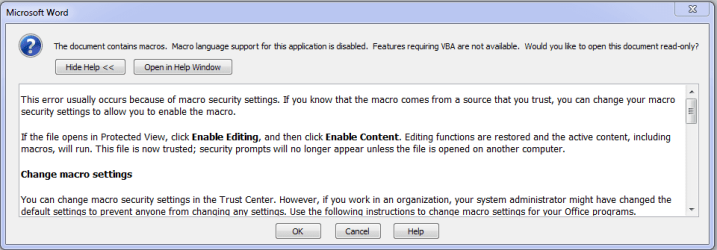
Whenever I attempted to open a Word file I get the attached message. I have no idea what a macro is. Thanks in advance for any help.

Regards
Powell Lucas
 

Attachments

  • Capture.PNG
    Capture.PNG
    15.2 KB · Views: 2

My Computer

Computer Manufacturer/Model Number
Dell Inspiron 620s
OS
Windows Home Premium, 64 4.096 bit
CPU
i3-2100
Motherboard
Dell 0DGGBY
Memory
Dimm0, Samsung 64 bit, 4.096 Mb; Dimm1, Hyundai 64 bit, 2.04
Graphics Card(s)
Intel HD Graphics Family
Sound Card
?
Monitor(s) Displays
Dell E197FP
Hard Drives
?
PSU
?
Case
?
Cooling
?
Did you create these Word files or did you download them from somewhere or did somebody send them to you?
 

My Computer

Computer type
PC/Desktop
Computer Manufacturer/Model Number
Dell
OS
Win 7 x64
CPU
Core I5
I created them and had them stored on a backup drive and disks.
 

My Computer

Computer Manufacturer/Model Number
Dell Inspiron 620s
OS
Windows Home Premium, 64 4.096 bit
CPU
i3-2100
Motherboard
Dell 0DGGBY
Memory
Dimm0, Samsung 64 bit, 4.096 Mb; Dimm1, Hyundai 64 bit, 2.04
Graphics Card(s)
Intel HD Graphics Family
Sound Card
?
Monitor(s) Displays
Dell E197FP
Hard Drives
?
PSU
?
Case
?
Cooling
?
ALL WORD documents have this problem? WORD 2007, 2010 or .... ?
Please post 1 file with problems as a example
 

My Computer

Computer type
Laptop
Computer Manufacturer/Model Number
ACER ASPIRE 5742G
OS
Microsoft Windows 7 Home Premium 64-bits 7601 Multiprocessor Free Service Pack 1
CPU
Intel(R) Core(TM) i3 CPU M 370 @ 2.40GHz
Motherboard
Acer Aspire 5742G
Memory
4,00 GB
Graphics Card(s)
ATI Mobility Radeon HD 5400 Series
Sound Card
(1) AMD High Definition Audio Device (2) Realtek High Defi
Screen Resolution
1366 x 768 x 32 bits (4294967296 colors) @ 60 Hz
Hard Drives
WDC WD5000BEVT-22ZAT0
ALL WORD documents have this problem? WORD 2007, 2010 or .... ?
Please post 1 file with problems as a example

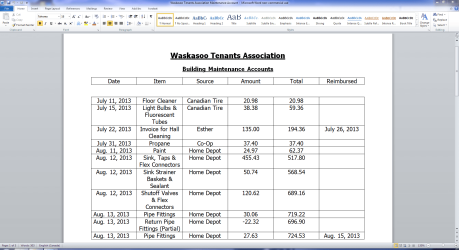
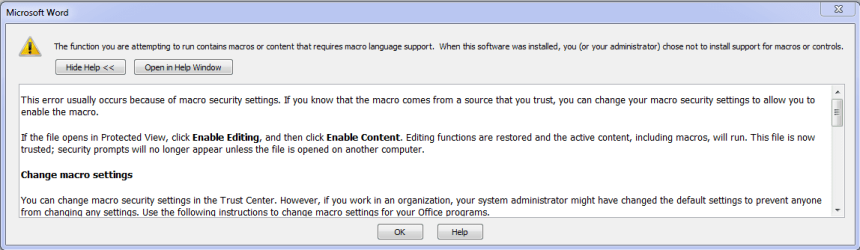
Attached is partial page from the document I am attempting to open. For your further information: after I click O.K. in the first window I get a second window as shown in the second attachment. I f I click O.K. on this window a couple of times and X it out, the file will open.
 

Attachments

  • Capture-2.PNG
    Capture-2.PNG
    78.2 KB · Views: 4
  • Capture-3.PNG
    Capture-3.PNG
    15.2 KB · Views: 1

My Computer

Computer Manufacturer/Model Number
Dell Inspiron 620s
OS
Windows Home Premium, 64 4.096 bit
CPU
i3-2100
Motherboard
Dell 0DGGBY
Memory
Dimm0, Samsung 64 bit, 4.096 Mb; Dimm1, Hyundai 64 bit, 2.04
Graphics Card(s)
Intel HD Graphics Family
Sound Card
?
Monitor(s) Displays
Dell E197FP
Hard Drives
?
PSU
?
Case
?
Cooling
?
Still don't know if you're using WORD 2007, 2010 or ....?
You didn't post a WORD file... but a screenshot!
ALL WORD documents have this problem?
 

My Computer

Computer type
Laptop
Computer Manufacturer/Model Number
ACER ASPIRE 5742G
OS
Microsoft Windows 7 Home Premium 64-bits 7601 Multiprocessor Free Service Pack 1
CPU
Intel(R) Core(TM) i3 CPU M 370 @ 2.40GHz
Motherboard
Acer Aspire 5742G
Memory
4,00 GB
Graphics Card(s)
ATI Mobility Radeon HD 5400 Series
Sound Card
(1) AMD High Definition Audio Device (2) Realtek High Defi
Screen Resolution
1366 x 768 x 32 bits (4294967296 colors) @ 60 Hz
Hard Drives
WDC WD5000BEVT-22ZAT0
I'm running Office 2010. I hope the attachment is what you're looking for.
 

Attachments

My Computer

Computer Manufacturer/Model Number
Dell Inspiron 620s
OS
Windows Home Premium, 64 4.096 bit
CPU
i3-2100
Motherboard
Dell 0DGGBY
Memory
Dimm0, Samsung 64 bit, 4.096 Mb; Dimm1, Hyundai 64 bit, 2.04
Graphics Card(s)
Intel HD Graphics Family
Sound Card
?
Monitor(s) Displays
Dell E197FP
Hard Drives
?
PSU
?
Case
?
Cooling
?
I'm running Office 2010. I hope the attachment is what you're looking for.

If I save it ... it saves as .doc instead of .docx...... very strange. Can you zip the file first and post again
 

My Computer

Computer type
Laptop
Computer Manufacturer/Model Number
ACER ASPIRE 5742G
OS
Microsoft Windows 7 Home Premium 64-bits 7601 Multiprocessor Free Service Pack 1
CPU
Intel(R) Core(TM) i3 CPU M 370 @ 2.40GHz
Motherboard
Acer Aspire 5742G
Memory
4,00 GB
Graphics Card(s)
ATI Mobility Radeon HD 5400 Series
Sound Card
(1) AMD High Definition Audio Device (2) Realtek High Defi
Screen Resolution
1366 x 768 x 32 bits (4294967296 colors) @ 60 Hz
Hard Drives
WDC WD5000BEVT-22ZAT0
I'll install a zip app and send the file to you.
 

My Computer

Computer Manufacturer/Model Number
Dell Inspiron 620s
OS
Windows Home Premium, 64 4.096 bit
CPU
i3-2100
Motherboard
Dell 0DGGBY
Memory
Dimm0, Samsung 64 bit, 4.096 Mb; Dimm1, Hyundai 64 bit, 2.04
Graphics Card(s)
Intel HD Graphics Family
Sound Card
?
Monitor(s) Displays
Dell E197FP
Hard Drives
?
PSU
?
Case
?
Cooling
?

My Computer

Computer type
Laptop
Computer Manufacturer/Model Number
ACER ASPIRE 5742G
OS
Microsoft Windows 7 Home Premium 64-bits 7601 Multiprocessor Free Service Pack 1
CPU
Intel(R) Core(TM) i3 CPU M 370 @ 2.40GHz
Motherboard
Acer Aspire 5742G
Memory
4,00 GB
Graphics Card(s)
ATI Mobility Radeon HD 5400 Series
Sound Card
(1) AMD High Definition Audio Device (2) Realtek High Defi
Screen Resolution
1366 x 768 x 32 bits (4294967296 colors) @ 60 Hz
Hard Drives
WDC WD5000BEVT-22ZAT0
According to the information for managing attachments the maximum .zip file size is 8 MB and the file I have zipped is 12 MB. Is there any way around this?
 

My Computer

Computer Manufacturer/Model Number
Dell Inspiron 620s
OS
Windows Home Premium, 64 4.096 bit
CPU
i3-2100
Motherboard
Dell 0DGGBY
Memory
Dimm0, Samsung 64 bit, 4.096 Mb; Dimm1, Hyundai 64 bit, 2.04
Graphics Card(s)
Intel HD Graphics Family
Sound Card
?
Monitor(s) Displays
Dell E197FP
Hard Drives
?
PSU
?
Case
?
Cooling
?
According to the information for managing attachments the maximum .zip file size is 8 MB and the file I have zipped is 12 MB. Is there any way around this?

Post on skydrive, dropbox... anywhere you want. Post a link to where you dumped it
 

My Computer

Computer type
Laptop
Computer Manufacturer/Model Number
ACER ASPIRE 5742G
OS
Microsoft Windows 7 Home Premium 64-bits 7601 Multiprocessor Free Service Pack 1
CPU
Intel(R) Core(TM) i3 CPU M 370 @ 2.40GHz
Motherboard
Acer Aspire 5742G
Memory
4,00 GB
Graphics Card(s)
ATI Mobility Radeon HD 5400 Series
Sound Card
(1) AMD High Definition Audio Device (2) Realtek High Defi
Screen Resolution
1366 x 768 x 32 bits (4294967296 colors) @ 60 Hz
Hard Drives
WDC WD5000BEVT-22ZAT0
Sorry my friend, but I'm not familiar with any of these applications. I thank you for help but I think I'll just uninstall and reinstall Office and see if that clears it up. I do appreciate the time you have spent trying to give me a hand.

Best Regards
Powell Lucas
 

My Computer

Computer Manufacturer/Model Number
Dell Inspiron 620s
OS
Windows Home Premium, 64 4.096 bit
CPU
i3-2100
Motherboard
Dell 0DGGBY
Memory
Dimm0, Samsung 64 bit, 4.096 Mb; Dimm1, Hyundai 64 bit, 2.04
Graphics Card(s)
Intel HD Graphics Family
Sound Card
?
Monitor(s) Displays
Dell E197FP
Hard Drives
?
PSU
?
Case
?
Cooling
?
I asked you twice: ALL WORD documents have this problem?... why don't you answer it?
If all WORD documents have this problems... make a new very small documents and post that docx document
 

My Computer

Computer type
Laptop
Computer Manufacturer/Model Number
ACER ASPIRE 5742G
OS
Microsoft Windows 7 Home Premium 64-bits 7601 Multiprocessor Free Service Pack 1
CPU
Intel(R) Core(TM) i3 CPU M 370 @ 2.40GHz
Motherboard
Acer Aspire 5742G
Memory
4,00 GB
Graphics Card(s)
ATI Mobility Radeon HD 5400 Series
Sound Card
(1) AMD High Definition Audio Device (2) Realtek High Defi
Screen Resolution
1366 x 768 x 32 bits (4294967296 colors) @ 60 Hz
Hard Drives
WDC WD5000BEVT-22ZAT0
Goto folder C:\Users\YourAccount\AppData\Roaming\Microsoft\Templates

Delete file normal.dotm in that folder. Open a WORD document and test. Post results.
 

My Computer

Computer type
Laptop
Computer Manufacturer/Model Number
ACER ASPIRE 5742G
OS
Microsoft Windows 7 Home Premium 64-bits 7601 Multiprocessor Free Service Pack 1
CPU
Intel(R) Core(TM) i3 CPU M 370 @ 2.40GHz
Motherboard
Acer Aspire 5742G
Memory
4,00 GB
Graphics Card(s)
ATI Mobility Radeon HD 5400 Series
Sound Card
(1) AMD High Definition Audio Device (2) Realtek High Defi
Screen Resolution
1366 x 768 x 32 bits (4294967296 colors) @ 60 Hz
Hard Drives
WDC WD5000BEVT-22ZAT0
I assume that in place of "your Account" I would insert my name.
 

My Computer

Computer Manufacturer/Model Number
Dell Inspiron 620s
OS
Windows Home Premium, 64 4.096 bit
CPU
i3-2100
Motherboard
Dell 0DGGBY
Memory
Dimm0, Samsung 64 bit, 4.096 Mb; Dimm1, Hyundai 64 bit, 2.04
Graphics Card(s)
Intel HD Graphics Family
Sound Card
?
Monitor(s) Displays
Dell E197FP
Hard Drives
?
PSU
?
Case
?
Cooling
?

My Computer

Computer type
Laptop
Computer Manufacturer/Model Number
ACER ASPIRE 5742G
OS
Microsoft Windows 7 Home Premium 64-bits 7601 Multiprocessor Free Service Pack 1
CPU
Intel(R) Core(TM) i3 CPU M 370 @ 2.40GHz
Motherboard
Acer Aspire 5742G
Memory
4,00 GB
Graphics Card(s)
ATI Mobility Radeon HD 5400 Series
Sound Card
(1) AMD High Definition Audio Device (2) Realtek High Defi
Screen Resolution
1366 x 768 x 32 bits (4294967296 colors) @ 60 Hz
Hard Drives
WDC WD5000BEVT-22ZAT0
Good Morning:

You're a patient man for hanging in so long and I appreciate it.

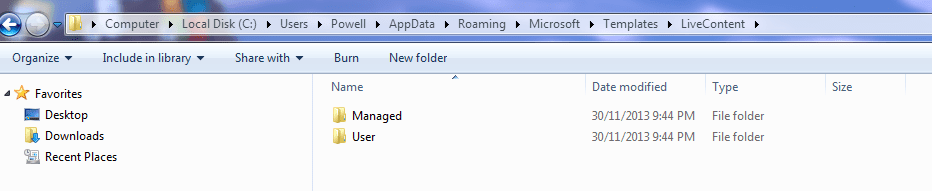
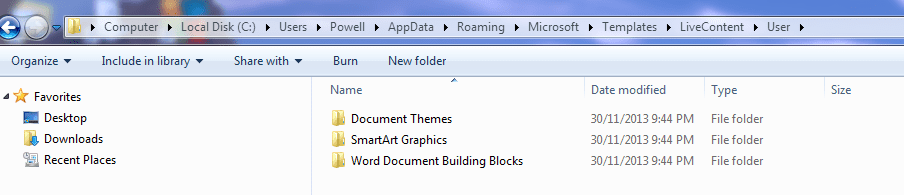
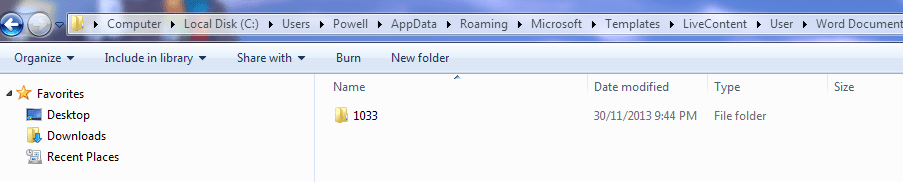
In answer to your question: no it did not work. I have attached a series of snips to show you the path I followed.

Just to make sure I'm not sending you on a wild goose chase: It's not that the Word application won't function; it does but only after I jump through some hoops to get rid to the messages about macros. After that I can edit, enter new data, and save as per normal. Everything works fine except for those goofy macro information windows.

I appreciate all the time you have expended on this issue. I will download SkyDrive and attempt to load in the zip file. Right now I'm in the middle of a raging blizzard so I've got all day to mess with this thing, but I don't want to take any more of your time than is necessary. If push comes to shove, I'll simply purchase a newer version of Word and go from there.

Best Regards
Powell Lucas

 

My Computer

Computer Manufacturer/Model Number
Dell Inspiron 620s
OS
Windows Home Premium, 64 4.096 bit
CPU
i3-2100
Motherboard
Dell 0DGGBY
Memory
Dimm0, Samsung 64 bit, 4.096 Mb; Dimm1, Hyundai 64 bit, 2.04
Graphics Card(s)
Intel HD Graphics Family
Sound Card
?
Monitor(s) Displays
Dell E197FP
Hard Drives
?
PSU
?
Case
?
Cooling
?
Sorry about that, I forgot the attachments.
 

Attachments

  • Capture.PNG
    Capture.PNG
    16.4 KB · Views: 0
  • Capture-1.PNG
    Capture-1.PNG
    16.4 KB · Views: 0
  • Capture-2.PNG
    Capture-2.PNG
    18 KB · Views: 0
  • Capture-3.PNG
    Capture-3.PNG
    16 KB · Views: 0

My Computer

Computer Manufacturer/Model Number
Dell Inspiron 620s
OS
Windows Home Premium, 64 4.096 bit
CPU
i3-2100
Motherboard
Dell 0DGGBY
Memory
Dimm0, Samsung 64 bit, 4.096 Mb; Dimm1, Hyundai 64 bit, 2.04
Graphics Card(s)
Intel HD Graphics Family
Sound Card
?
Monitor(s) Displays
Dell E197FP
Hard Drives
?
PSU
?
Case
?
Cooling
?
In WORD 2007 the folder name is C:\Users\YourName\AppData\Roaming\Microsoft\Templates\Normal.dotm
In WORD 2010 the folder name is C:\Users\YourName\AppData\Roaming\Microsoft\Templates\Normal.dotm

Did you delete that file???
 

My Computer

Computer type
Laptop
Computer Manufacturer/Model Number
ACER ASPIRE 5742G
OS
Microsoft Windows 7 Home Premium 64-bits 7601 Multiprocessor Free Service Pack 1
CPU
Intel(R) Core(TM) i3 CPU M 370 @ 2.40GHz
Motherboard
Acer Aspire 5742G
Memory
4,00 GB
Graphics Card(s)
ATI Mobility Radeon HD 5400 Series
Sound Card
(1) AMD High Definition Audio Device (2) Realtek High Defi
Screen Resolution
1366 x 768 x 32 bits (4294967296 colors) @ 60 Hz
Hard Drives
WDC WD5000BEVT-22ZAT0
Back
Top