Solved Magnifier does not respond

frustratedagain

New member
Local time
2:36 AM
Messages
6
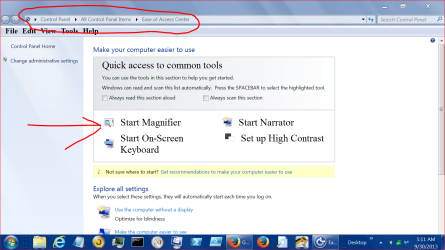
Though magnifier.exe has disappeared from Accessories, I do know how to find it. However, it does not work as it should; it stalls everything until I stop it in Task Manager, which clearly states magnifier is "not responding." How can I get it fixed?
 

My Computer

Computer type
PC/Desktop
Computer Manufacturer/Model Number
Dell Optyplex 990
OS
Windows 7 Professional 64bit
CPU
Core i5-2500 3.3Ghz
Motherboard
?
Memory
8 GB
Graphics Card(s)
512MB AMD Radion HD 6350 Dual DVI, FH
Hard Drives
2 500GB SATA 6.0Gb/s and 16MB Data Burst Cache
Antivirus
Norton
Browser
Firefox

My Computers

System One System Two

  • Computer type
    PC/Desktop
    Computer Manufacturer/Model Number
    HP Pavilion 6751c
    OS
    Win7, Win10, Win11
    Internet Speed
    100 Mbps
    Antivirus
    Norton 360
    Browser
    IE 11
  • Computer type
    PC/Desktop
    System Manufacturer/Model Number
    HP ENVY 750-514 & Dell XPS 8960
    OS
    Win7, Win10, Win11
    Antivirus
    Norton 360

My Computer

Computer Manufacturer/Model Number
HP, Dell, Gateway, Toshiba - 4 laptops and 2 desktops
OS
Vista, Windows7, Mint Mate, Zorin, Windows 8
CPU
from 1.6GHz Duo to i7
Monitor(s) Displays
2x HP w2207
Hard Drives
5x HDD, 7x SSD, 12x Externals
Keyboard
with trackball - no mices
Mouse
Trackball mice
Internet Speed
DSL 6000
Though magnifier.exe has disappeared from Accessories, I do know how to find it. However, it does not work as it should; it stalls everything until I stop it in Task Manager, which clearly states magnifier is "not responding." How can I get it fixed?


Welcome to the forum,

Just out of curiosity to see what may be causing it to not respond, while in task manager

when it is not responding, right click on it and choose, create dump file.

It will be created here, C:\Users\UserName\AppData\Local\Temp

AppData is a hidden file so you need to unhide it,

http://www.sevenforums.com/tutorials/394-hidden-files-folders-show-hide.html

Copy/Paste the dump to your desktop, you can then upload it here to be analyzed.

http://www.sevenforums.com/tutorials/9733-screenshots-files-upload-post-seven-forums.html
 

My Computer

Computer type
PC/Desktop
Computer Manufacturer/Model Number
Self Built
OS
Win 10 Pro x64
CPU
Intel I5-2500K @3.3GHz
Motherboard
Asrock P67 Extreme4
Memory
16GB G.Skill Ripjaws X (4x4GB)
Graphics Card(s)
EVGA GeForce 750 Ti SC 2GB
Sound Card
ASUS Xonar DG 5.1 Channels 24-bit 96KHz PCI Interface Sound
Monitor(s) Displays
auria eq2367
Screen Resolution
1920 x 1080
Hard Drives
250GB Samsung 850 EVO SSD
1TB WD Blue
1TB Hitachi
PSU
SeaSonic X 650W 80 Plus Gold
Case
Corsair Obsidian 750D
Cooling
Corsair H60, Three 140mm case fans
Keyboard
Logitech Wireless Keyboard K520
Mouse
Logitech Wireless Mouse M310
Internet Speed
Wave Broadband ~ 100 dn 5 up
Antivirus
Windows Defender, Malwarebytes Premium
Browser
Edge, IE11, Chrome
Other Info
Laptop specs: HP g7-1365dx /
CPU: AMD A6-3420M APU with Radeon(tm) HD Graphics /
RAM: Crucial 8Gb (2x4Gb) /
SSD: Crucial M4-CT128M4SSD2 ATA Device/ FW 000F /
GFX: AMD Radeon HD 6520G /
OS: Windows 10 Pro x64
Unfortunately, I tried system restore before derekimo's suggestion. My PC will not boot up. Dell's Gold Support couldn't fix it. Thanks for trying to help.
 

My Computer

Computer type
PC/Desktop
Computer Manufacturer/Model Number
Dell Optyplex 990
OS
Windows 7 Professional 64bit
CPU
Core i5-2500 3.3Ghz
Motherboard
?
Memory
8 GB
Graphics Card(s)
512MB AMD Radion HD 6350 Dual DVI, FH
Hard Drives
2 500GB SATA 6.0Gb/s and 16MB Data Burst Cache
Antivirus
Norton
Browser
Firefox
Can you get it to boot in Safe Mode?

Run Repair Install.

If you have multiple start up problems, you need to run the repair multiple times.
 

My Computers

System One System Two

  • Computer type
    PC/Desktop
    Computer Manufacturer/Model Number
    HP Pavilion 6751c
    OS
    Win7, Win10, Win11
    Internet Speed
    100 Mbps
    Antivirus
    Norton 360
    Browser
    IE 11
  • Computer type
    PC/Desktop
    System Manufacturer/Model Number
    HP ENVY 750-514 & Dell XPS 8960
    OS
    Win7, Win10, Win11
    Antivirus
    Norton 360
Are you saying you no longer have this?

MAGNIFIER 9 30.PNG
 

My Computer

Computer type
PC/Desktop
Computer Manufacturer/Model Number
Home made Desktop
OS
Windows 10 Pro. 64/ version 1709 Windows 7 Pro/64
CPU
Intel i7-6800K @ 4.3
Motherboard
ASUS X-99 Deluxe II
Memory
Corsair Platinum 16 gig @2400
Graphics Card(s)
EVGA GTX 1070 OC
Monitor(s) Displays
Asus 27" LED LCD/VE278Q
Screen Resolution
1920-1080 or 1280-720 HDMI
Hard Drives
INTEL SSD 730-240 Gb Sata 3.0/
PSU
EVGA Platium 1200W
Case
Phanteks Luxe Tempered Glass 8 fans/ one radiator
Cooling
XSPC/ Water Cooled CPU
Keyboard
Das 4 Professional
Mouse
Logitech M705/MX Anywhere 2-S
Internet Speed
100 mbits
Antivirus
Microsoft Security Essentials/ Malwarebytes Premium 3.0/ SAS
Browser
I.E. 11 default/Firefox/ ISP Time Warner Cable/Spectrum
Other Info
LG BluRay Burner/
Sound system-KLipsch-THX/
Icy Dock ssd Hot Swap bays.
No, that is not what I said. I said: Though magnifier.exe has disappeared from Accessories, I do know how to find it. However, it does not work as it should; it stalls everything until I stop it in Task Manager, which clearly states magnifier is "not responding.

The Dell tech found numerous similar complaints. The only noted solution was to create a new identity/profile.
 

My Computer

Computer type
PC/Desktop
Computer Manufacturer/Model Number
Dell Optyplex 990
OS
Windows 7 Professional 64bit
CPU
Core i5-2500 3.3Ghz
Motherboard
?
Memory
8 GB
Graphics Card(s)
512MB AMD Radion HD 6350 Dual DVI, FH
Hard Drives
2 500GB SATA 6.0Gb/s and 16MB Data Burst Cache
Antivirus
Norton
Browser
Firefox
Back
Top