Solved Magnifier is ON each time PC boots - How to prevent this ?

thenoo

New member
Member
VIP
Local time
10:59 AM
Messages
140
I ha
 

My Computer My Computer

At a glance

Windows 7 Home Premium x64AMD 3000+ 2.00gHZ2048 MbsRAEDON 9800 PRO
Computer Manufacturer/Model Number
Home Built
OS
Windows 7 Home Premium x64
CPU
AMD 3000+ 2.00gHZ
Motherboard
ASUSTeK k8vsedx
Memory
2048 Mbs
Graphics Card(s)
RAEDON 9800 PRO
Monitor(s) Displays
Sony SDM-HS95P 19.1"vis
Hard Drives
2x500 Gbts
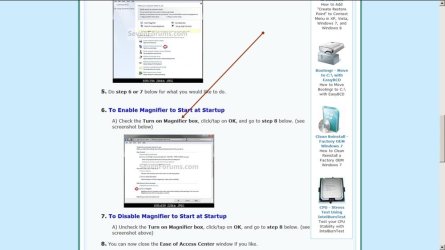
In the options of the magnifier, the gear icon, clik the link that says 'Control whether magnifier starts when I sign in'
 

My Computer My Computer

At a glance

Win7 Home Premium x64 W10Pro&HomeA12 9720p 4+8 TurionII M5206GB 8GBR7
Computer type
Laptop
Computer Manufacturer/Model Number
HP 17-ak0xx, dv7 3173nr
OS
Win7 Home Premium x64 W10Pro&Home
CPU
A12 9720p 4+8 TurionII M520
Motherboard
HP 3839
Memory
6GB 8GB
Graphics Card(s)
R7
Monitor(s) Displays
24" sa550
Screen Resolution
1600x900 1920x1080
Mouse
Logitechx2
Internet Speed
120Mb/s down 12up
I have the same problem, except it's worse : it scrambles the desktop icons.

Re the solution : I could not find the Option button for the magnifier. Need help to find it.
 

My Computer My Computer

At a glance

windows 77 home premium 64bitsi5 252 m cpu @250GHz4GB RamNVIDIA NVS 4200M DRIVER 268.71 --- DIRECTX SU...
Computer Manufacturer/Model Number
Lenovo T520 AC-Think
OS
windows 77 home premium 64bits
CPU
i5 252 m cpu @250GHz
Memory
4GB Ram
Graphics Card(s)
NVIDIA NVS 4200M DRIVER 268.71 --- DIRECTX SUPPORT 11--

My Computer My Computer

At a glance

64-bit Windows 11 Pro for WorkstationsIntel i7-8700K OC'd to 5 GHz64 GB (4x16GB) G.SKILL TridentZ RGB DDR4 3600...ASUS ROG-STRIX-GTX1080TI-O11G-GAMING
Computer type
PC/Desktop
Computer Manufacturer/Model Number
Self built custom
OS
64-bit Windows 11 Pro for Workstations
CPU
Intel i7-8700K OC'd to 5 GHz
Motherboard
ASUS ROG Maximus XI Formula Z390
Memory
64 GB (4x16GB) G.SKILL TridentZ RGB DDR4 3600 MHz
Graphics Card(s)
ASUS ROG-STRIX-GTX1080TI-O11G-GAMING
Sound Card
Integrated
Monitor(s) Displays
2 x Samsung Odyssey G7 27"
Screen Resolution
2560x1440
Hard Drives
1TB Samsung 990 PRO M.2,
4TB Samsung 990 PRO PRO M.2,
TerraMaster F8 SSD Plus NAS
PSU
Seasonic Prime Titanium 850W
Case
Thermaltake Core P3
Cooling
Corsair Hydro H115i
Keyboard
Logitech wireless K800
Mouse
Logitech MX Master 4
Internet Speed
2 Gb/s Download and 100 Mb/s Upload
Antivirus
Malwarebyte Anti-Malware Premium
Browser
Google Chrome
Other Info
Logitech Z625 speaker system,
Logitech BRIO 4K Pro webcam,
HP Color LaserJet Pro MFP M477fdn,
APC SMART-UPS RT 1000 XL - SURT1000XLI,
Galaxy S23 Plus phone
Yes it did. Thank you. Although I must say that the instructions in the tutorial did not match exactly the content of the Control Panel to which it referred. I had to hunt around a bit before finding what to do. (I am mentioning this not at all to complain but in case someone else with the same problems tries to follow the same path).

Your reference made it possible to solve my problem and I appreciate your help very much.
 

My Computer My Computer

At a glance

windows 77 home premium 64bitsi5 252 m cpu @250GHz4GB RamNVIDIA NVS 4200M DRIVER 268.71 --- DIRECTX SU...
Computer Manufacturer/Model Number
Lenovo T520 AC-Think
OS
windows 77 home premium 64bits
CPU
i5 252 m cpu @250GHz
Memory
4GB Ram
Graphics Card(s)
NVIDIA NVS 4200M DRIVER 268.71 --- DIRECTX SUPPORT 11--
Brink, I was foiled again in my attempt to use the ''add to your reputation'' button. I am asked to 'spread my compliments' around before re-complimenting you !
 

My Computer My Computer

At a glance

windows 77 home premium 64bitsi5 252 m cpu @250GHz4GB RamNVIDIA NVS 4200M DRIVER 268.71 --- DIRECTX SU...
Computer Manufacturer/Model Number
Lenovo T520 AC-Think
OS
windows 77 home premium 64bits
CPU
i5 252 m cpu @250GHz
Memory
4GB Ram
Graphics Card(s)
NVIDIA NVS 4200M DRIVER 268.71 --- DIRECTX SUPPORT 11--
No worries about the rep Pantagruel. You getting it sorted is reward enough for me. :)

It sounds like you may not have had the Control Panel in "icons view", but in category view instead.
 

My Computer My Computer

At a glance

64-bit Windows 11 Pro for WorkstationsIntel i7-8700K OC'd to 5 GHz64 GB (4x16GB) G.SKILL TridentZ RGB DDR4 3600...ASUS ROG-STRIX-GTX1080TI-O11G-GAMING
Computer type
PC/Desktop
Computer Manufacturer/Model Number
Self built custom
OS
64-bit Windows 11 Pro for Workstations
CPU
Intel i7-8700K OC'd to 5 GHz
Motherboard
ASUS ROG Maximus XI Formula Z390
Memory
64 GB (4x16GB) G.SKILL TridentZ RGB DDR4 3600 MHz
Graphics Card(s)
ASUS ROG-STRIX-GTX1080TI-O11G-GAMING
Sound Card
Integrated
Monitor(s) Displays
2 x Samsung Odyssey G7 27"
Screen Resolution
2560x1440
Hard Drives
1TB Samsung 990 PRO M.2,
4TB Samsung 990 PRO PRO M.2,
TerraMaster F8 SSD Plus NAS
PSU
Seasonic Prime Titanium 850W
Case
Thermaltake Core P3
Cooling
Corsair Hydro H115i
Keyboard
Logitech wireless K800
Mouse
Logitech MX Master 4
Internet Speed
2 Gb/s Download and 100 Mb/s Upload
Antivirus
Malwarebyte Anti-Malware Premium
Browser
Google Chrome
Other Info
Logitech Z625 speaker system,
Logitech BRIO 4K Pro webcam,
HP Color LaserJet Pro MFP M477fdn,
APC SMART-UPS RT 1000 XL - SURT1000XLI,
Galaxy S23 Plus phone
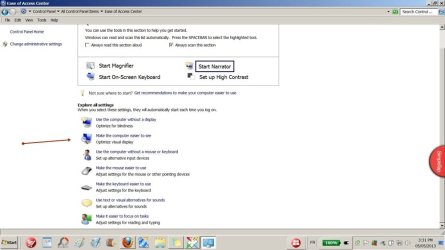
Brink, I've made screenshots to show what happens when I follow the tutorial instructions. I first of all clicked on the link in the tutorial to bring me to the appropriate section of CP...

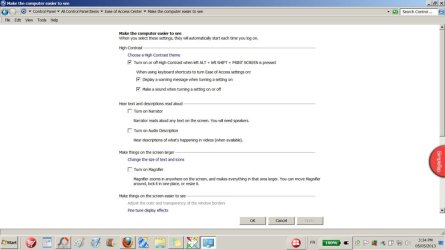
These should be viewed in this sequence: screenshot-controlPanel-ease......screenshot-magnifier.....screenshot-magnifier2

These is no '' turn on magnifier box'' that I can see...

Now to be honest I don't remember what I did next, but the magnifier does not turn on at start-up anymore!
 

Attachments

  • screenshot-controlPanel-ease.jpg
    screenshot-controlPanel-ease.jpg
    46.8 KB · Views: 1
  • screenshot-magnifier.jpg
    screenshot-magnifier.jpg
    46.3 KB · Views: 1
  • screenshot-magnifier2.jpg
    screenshot-magnifier2.jpg
    42.2 KB · Views: 6

My Computer My Computer

At a glance

windows 77 home premium 64bitsi5 252 m cpu @250GHz4GB RamNVIDIA NVS 4200M DRIVER 268.71 --- DIRECTX SU...
Computer Manufacturer/Model Number
Lenovo T520 AC-Think
OS
windows 77 home premium 64bits
CPU
i5 252 m cpu @250GHz
Memory
4GB Ram
Graphics Card(s)
NVIDIA NVS 4200M DRIVER 268.71 --- DIRECTX SUPPORT 11--
The "Turn on Magnifier" check box is in your bottom screenshot below. Unchecking it is what turned Magnifier off.


266904d1367783385-magnifier-each-time-pc-boots-how-prevent-screenshot-magnifier2.jpg
 

My Computer My Computer

At a glance

64-bit Windows 11 Pro for WorkstationsIntel i7-8700K OC'd to 5 GHz64 GB (4x16GB) G.SKILL TridentZ RGB DDR4 3600...ASUS ROG-STRIX-GTX1080TI-O11G-GAMING
Computer type
PC/Desktop
Computer Manufacturer/Model Number
Self built custom
OS
64-bit Windows 11 Pro for Workstations
CPU
Intel i7-8700K OC'd to 5 GHz
Motherboard
ASUS ROG Maximus XI Formula Z390
Memory
64 GB (4x16GB) G.SKILL TridentZ RGB DDR4 3600 MHz
Graphics Card(s)
ASUS ROG-STRIX-GTX1080TI-O11G-GAMING
Sound Card
Integrated
Monitor(s) Displays
2 x Samsung Odyssey G7 27"
Screen Resolution
2560x1440
Hard Drives
1TB Samsung 990 PRO M.2,
4TB Samsung 990 PRO PRO M.2,
TerraMaster F8 SSD Plus NAS
PSU
Seasonic Prime Titanium 850W
Case
Thermaltake Core P3
Cooling
Corsair Hydro H115i
Keyboard
Logitech wireless K800
Mouse
Logitech MX Master 4
Internet Speed
2 Gb/s Download and 100 Mb/s Upload
Antivirus
Malwarebyte Anti-Malware Premium
Browser
Google Chrome
Other Info
Logitech Z625 speaker system,
Logitech BRIO 4K Pro webcam,
HP Color LaserJet Pro MFP M477fdn,
APC SMART-UPS RT 1000 XL - SURT1000XLI,
Galaxy S23 Plus phone
Now it's coming back to me....

What puzzled me was that the box was unchecked but the magnifier was coming on at start-up. I don't remember what I did, if anything, (I did not uncheck it because it was already unchecked) but the problem is now solved. Sorry about my slightly confused and incorrect input...
 

My Computer My Computer

At a glance

windows 77 home premium 64bitsi5 252 m cpu @250GHz4GB RamNVIDIA NVS 4200M DRIVER 268.71 --- DIRECTX SU...
Computer Manufacturer/Model Number
Lenovo T520 AC-Think
OS
windows 77 home premium 64bits
CPU
i5 252 m cpu @250GHz
Memory
4GB Ram
Graphics Card(s)
NVIDIA NVS 4200M DRIVER 268.71 --- DIRECTX SUPPORT 11--
No worries. I'm just happy you got it sorted. :)
 

My Computer My Computer

At a glance

64-bit Windows 11 Pro for WorkstationsIntel i7-8700K OC'd to 5 GHz64 GB (4x16GB) G.SKILL TridentZ RGB DDR4 3600...ASUS ROG-STRIX-GTX1080TI-O11G-GAMING
Computer type
PC/Desktop
Computer Manufacturer/Model Number
Self built custom
OS
64-bit Windows 11 Pro for Workstations
CPU
Intel i7-8700K OC'd to 5 GHz
Motherboard
ASUS ROG Maximus XI Formula Z390
Memory
64 GB (4x16GB) G.SKILL TridentZ RGB DDR4 3600 MHz
Graphics Card(s)
ASUS ROG-STRIX-GTX1080TI-O11G-GAMING
Sound Card
Integrated
Monitor(s) Displays
2 x Samsung Odyssey G7 27"
Screen Resolution
2560x1440
Hard Drives
1TB Samsung 990 PRO M.2,
4TB Samsung 990 PRO PRO M.2,
TerraMaster F8 SSD Plus NAS
PSU
Seasonic Prime Titanium 850W
Case
Thermaltake Core P3
Cooling
Corsair Hydro H115i
Keyboard
Logitech wireless K800
Mouse
Logitech MX Master 4
Internet Speed
2 Gb/s Download and 100 Mb/s Upload
Antivirus
Malwarebyte Anti-Malware Premium
Browser
Google Chrome
Other Info
Logitech Z625 speaker system,
Logitech BRIO 4K Pro webcam,
HP Color LaserJet Pro MFP M477fdn,
APC SMART-UPS RT 1000 XL - SURT1000XLI,
Galaxy S23 Plus phone
Back
Top