C cocoda New member Local time 4:04 AM Messages 7 Nov 8, 2013 #1 How do I get rid of it? Always on screen. No instruction on: "Turn magnifier on and off" Infuriating! cocoda My Computer OS7 64bit
How do I get rid of it? Always on screen. No instruction on: "Turn magnifier on and off" Infuriating! cocoda
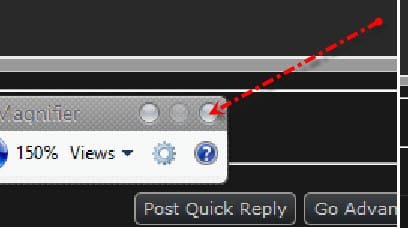
boohbah New member Guru Gold Member Local time 11:04 AM Messages 14,252 Location cornwall UK Nov 8, 2013 #2 you need to look on screen for the little magnifier icon , click it and then the small window will appear with the close x button My Computer Computer Manufacturer/Model NumberHewlett packard/p6512ukOSMicrosoft Windows 7 Home Premium 64-bit 7600CPUIIx4 amd athelon 635 processorMotherboardFOXCONN 2AA9Memory2x2gbGraphics Card(s)ati radeon HD 5450Sound Card(1) Realtek High Definition Audio (2) AMD High DefinitionMonitor(s) Displayssamsung lcd tv 32"Screen Resolution1360x 768Hard Drives(1) WDC WD10 01FAES-60Z2A0 SATA Disk Device (2) Maxtor OneTouch USB Device (3) ST310003 33AS USB Device (4) WD My Book 1111 USB DevicePSU?Coolingair!Keyboardwireless hpMousewireless Hp,opticalInternet Speed1.10mb/sAntivirusMSEBrowserFirefox
you need to look on screen for the little magnifier icon , click it and then the small window will appear with the close x button
C cocoda New member Thread Starter Local time 4:04 AM Messages 7 Nov 8, 2013 #3 magnifier Seen and done that..........but it still comes back on screen every time I switch on p.c. My Computer OS7 64bit
D derekimo New member SF Team Local time 3:04 AM Messages 16,779 Location Shasta County Nov 8, 2013 #4 This may help with that, http://www.sevenforums.com/tutorials/38827-magnifier-starts-startup-enable-disable.html My Computer Computer typePC/DesktopComputer Manufacturer/Model NumberSelf BuiltOSWin 10 Pro x64CPUIntel I5-2500K @3.3GHzMotherboardAsrock P67 Extreme4Memory16GB G.Skill Ripjaws X (4x4GB)Graphics Card(s)EVGA GeForce 750 Ti SC 2GBSound CardASUS Xonar DG 5.1 Channels 24-bit 96KHz PCI Interface SoundMonitor(s) Displaysauria eq2367Screen Resolution1920 x 1080Hard Drives250GB Samsung 850 EVO SSD 1TB WD Blue 1TB HitachiPSUSeaSonic X 650W 80 Plus GoldCaseCorsair Obsidian 750DCoolingCorsair H60, Three 140mm case fansKeyboardLogitech Wireless Keyboard K520MouseLogitech Wireless Mouse M310Internet SpeedWave Broadband ~ 100 dn 5 upAntivirusWindows Defender, Malwarebytes PremiumBrowserEdge, IE11, ChromeOther InfoLaptop specs: HP g7-1365dx / CPU: AMD A6-3420M APU with Radeon(tm) HD Graphics / RAM: Crucial 8Gb (2x4Gb) / SSD: Crucial M4-CT128M4SSD2 ATA Device/ FW 000F / GFX: AMD Radeon HD 6520G / OS: Windows 10 Pro x64
This may help with that, http://www.sevenforums.com/tutorials/38827-magnifier-starts-startup-enable-disable.html
boohbah New member Guru Gold Member Local time 11:04 AM Messages 14,252 Location cornwall UK Nov 8, 2013 #5 ah, the clue was in the start up then. My Computer Computer Manufacturer/Model NumberHewlett packard/p6512ukOSMicrosoft Windows 7 Home Premium 64-bit 7600CPUIIx4 amd athelon 635 processorMotherboardFOXCONN 2AA9Memory2x2gbGraphics Card(s)ati radeon HD 5450Sound Card(1) Realtek High Definition Audio (2) AMD High DefinitionMonitor(s) Displayssamsung lcd tv 32"Screen Resolution1360x 768Hard Drives(1) WDC WD10 01FAES-60Z2A0 SATA Disk Device (2) Maxtor OneTouch USB Device (3) ST310003 33AS USB Device (4) WD My Book 1111 USB DevicePSU?Coolingair!Keyboardwireless hpMousewireless Hp,opticalInternet Speed1.10mb/sAntivirusMSEBrowserFirefox