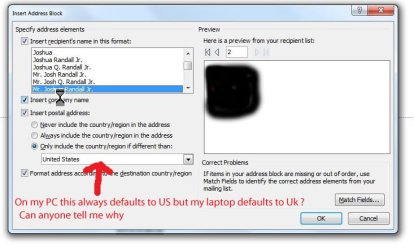
Hi I am just trying to learn how to mail merge with word 2010
I start Word then click on Mailings, then click on start mail merge, then click on envelopes, then select the size of envelope, then select recipients, and all works ok except the address block is almost at the bottom of the envelope no matter what setting I use.
I know I can grab this address block and move it anywhere.
But is there not a way to make the default position higher on the envelope please
Also I see using this method it prints the City County and post code on the same line
Is there a better way to select addresses and print without having to alter every ones position please
I start Word then click on Mailings, then click on start mail merge, then click on envelopes, then select the size of envelope, then select recipients, and all works ok except the address block is almost at the bottom of the envelope no matter what setting I use.
I know I can grab this address block and move it anywhere.
But is there not a way to make the default position higher on the envelope please
Also I see using this method it prints the City County and post code on the same line
Is there a better way to select addresses and print without having to alter every ones position please
My Computer
At a glance
Windows 7 Professional 64 BitIntel Core I7 920 @ 2.6 GHz12 Meg Triple Channel DDR3Nvidia Gforce GTX 260
- Computer Manufacturer/Model Number
- Custom Made
- OS
- Windows 7 Professional 64 Bit
- CPU
- Intel Core I7 920 @ 2.6 GHz
- Motherboard
- Asus P6T SE
- Memory
- 12 Meg Triple Channel DDR3
- Graphics Card(s)
- Nvidia Gforce GTX 260
- Sound Card
- On Board
- Monitor(s) Displays
- DGM
- Hard Drives
- 500 gig Sata
- PSU
- Not sure
- Case
- Thermalite
- Cooling
- Standard cooling
- Keyboard
- Usb
- Mouse
- Usb
- Internet Speed
- 7meg