I thought I had posted a thread about four hours ago but obviously it did not send.
So quick version my main machine - Ivy Bridge with an Asus P8Z77-V with an i5 3660K 8GB RAM (2400) SSD boot drive NVidia GTX 650Ti card etc running 7 Home.
I started it up today after a very ling break and it booted eventually but in a very strange way into Windows. Now the machine has been acting strange for a while so I decided to run SFC and a chkdsk on it and now all I can get on power up is the screen telling me to go into the BIOS and that the CPU fan has an error and it keeps automatically changing the boot option to the optical drive and not the Windows boot manager or just the SSD which is the only drive I have hooked up at the moment .
I have been in the BIOS - not that I understand it a great deal enough to clock and stuff but everything seemed to be as I left them. I told it to ignore the CPU fan speed because the CPU is obviously running because the cooling rad and cooler head are just warm to the touch.
Have tried setting to the default BIOS settings.
However whatever I have tried like changing fast boot and bits I sort of understand a bit it still boots to that screen telling me to go into the BIOS. RAM is ok I think because I just get the one beep for it likes always.
Any ideas greatly appreciated because I am at a loss as to what to try and the only option it seems is to clean install and I do have a lot of stuff on this machine plus accessing a replacement baord would be about impossible as I can imagine as also with that CPU.
My Computer
At a glance
Desk1 7 Home Prem / Desk2 10 Pro / Main lap A...Desk1 i5 3750K / Laptop i7 GTX 860M / Desk2 i...Desk1 8GB (1866) / Desk2 16GB (1333) / Laptop...Desk 1& 2NVidia GTX 650 & Laptops on board Intel
Computer type
PC/Desktop
Computer Manufacturer/Model Number
Own build (new) Desk1 / Asus ROG Win 7 / Desk2 1st build
OS
Desk1 7 Home Prem / Desk2 10 Pro / Main lap Asus ROG 10 Pro 2 laptop Toshiba 7 Pro Asus P2520 7 & 10
One other Desktop (tester) and spare Toshba laptop both with SSD's
Running Kaspersky 2016 ISS on all machines config'd identically
Logitec audio stereo systems on each machine (x3)
Canon MG5250MFC
Router/modem TP-Link running WPA2SK
Hi,
Have you installed Linux on this machine ever ?
My Computer
At a glance
Win-7-Pro64bit 7-H-Prem-64biti7-5930K 2nd i9-9940x both water blocked VRM'...Trident-z 3200C14 2nd Trident-z 3600C16EVGA 1080ti ftw3 2nd Titan Xp both water blocked
Computer type
PC/Desktop
Computer Manufacturer/Model Number
Custom assembled by me :}
OS
Win-7-Pro64bit 7-H-Prem-64bit
CPU
i7-5930K 2nd i9-9940x both water blocked VRM's too
2nd ASUS X299 Apex/Intel i9-9940x with Custom water loop/7H-Prem-x64/Corsair 450D case/Ram Trident-z 3600C16 4x8gb / Samsung970Evo plus 500gb SSD/Dual ssd EZ swap evo/PSU EVGA SuperNova 1200w-P2 80+Platinum/GPU Titan Xp /8-ML-140 on push-pull on 2-280GTX rads
One other Desktop (tester) and spare Toshba laptop both with SSD's
Running Kaspersky 2016 ISS on all machines config'd identically
Logitec audio stereo systems on each machine (x3)
Canon MG5250MFC
Router/modem TP-Link running WPA2SK
Bios wise default should be fine
The cpu fan deal is pretty interesting
Does your board have other cpu fan ports or just one ?
I imagine the fan is running on it is why you said you set it to ignore ?
You also mentioned "rad" does that mean you're using a liquid cpu cooler ?
If so which brand and model and how old is it ?
My Computer
At a glance
Win-7-Pro64bit 7-H-Prem-64biti7-5930K 2nd i9-9940x both water blocked VRM'...Trident-z 3200C14 2nd Trident-z 3600C16EVGA 1080ti ftw3 2nd Titan Xp both water blocked
Computer type
PC/Desktop
Computer Manufacturer/Model Number
Custom assembled by me :}
OS
Win-7-Pro64bit 7-H-Prem-64bit
CPU
i7-5930K 2nd i9-9940x both water blocked VRM's too
2nd ASUS X299 Apex/Intel i9-9940x with Custom water loop/7H-Prem-x64/Corsair 450D case/Ram Trident-z 3600C16 4x8gb / Samsung970Evo plus 500gb SSD/Dual ssd EZ swap evo/PSU EVGA SuperNova 1200w-P2 80+Platinum/GPU Titan Xp /8-ML-140 on push-pull on 2-280GTX rads
Hmm well thinking about it I cannot remember seeing anything a about a secure boot in the BIOS although when I first got this board it was that which had to be set to something I cannot remember to get the machine going.
Now the fan speed if I leave it at anything than ignore it squeals an alarm and yet the BIOS is telling me that the CPU is only at 22C?? Oh and just the one fan port but I shall check tomorrow when I get home.
Cooling is via an Intel liquid cooling system - a fairly basic one but has never given me any cause for concern.
I'll check out that update too when I get home because I have not been downloading any for some time now not wanting all that 10 stuff that was floating around and which I kept the machine clear of with the GWX Control panel because I did not want 10 on this machine.
My Computer
At a glance
Desk1 7 Home Prem / Desk2 10 Pro / Main lap A...Desk1 i5 3750K / Laptop i7 GTX 860M / Desk2 i...Desk1 8GB (1866) / Desk2 16GB (1333) / Laptop...Desk 1& 2NVidia GTX 650 & Laptops on board Intel
Computer type
PC/Desktop
Computer Manufacturer/Model Number
Own build (new) Desk1 / Asus ROG Win 7 / Desk2 1st build
OS
Desk1 7 Home Prem / Desk2 10 Pro / Main lap Asus ROG 10 Pro 2 laptop Toshiba 7 Pro Asus P2520 7 & 10
One other Desktop (tester) and spare Toshba laptop both with SSD's
Running Kaspersky 2016 ISS on all machines config'd identically
Logitec audio stereo systems on each machine (x3)
Canon MG5250MFC
Router/modem TP-Link running WPA2SK
Hi,
That update did cause a few different booting errors depending on how windows was installed
No 100 mb system reserved partitions got different errors than secure boot as the description says I can't remeber the exact error or if there was one at all the machines just did not boot.
The cooler should be connected to the cpu port or at the least the single fan should be attached to the radiator possibly that needs to be reseated ?
My Computer
At a glance
Win-7-Pro64bit 7-H-Prem-64biti7-5930K 2nd i9-9940x both water blocked VRM'...Trident-z 3200C14 2nd Trident-z 3600C16EVGA 1080ti ftw3 2nd Titan Xp both water blocked
Computer type
PC/Desktop
Computer Manufacturer/Model Number
Custom assembled by me :}
OS
Win-7-Pro64bit 7-H-Prem-64bit
CPU
i7-5930K 2nd i9-9940x both water blocked VRM's too
2nd ASUS X299 Apex/Intel i9-9940x with Custom water loop/7H-Prem-x64/Corsair 450D case/Ram Trident-z 3600C16 4x8gb / Samsung970Evo plus 500gb SSD/Dual ssd EZ swap evo/PSU EVGA SuperNova 1200w-P2 80+Platinum/GPU Titan Xp /8-ML-140 on push-pull on 2-280GTX rads
ASUSTeK COMPUTER INC. SABERTOOTH 990FX R2.0 (Socket 942)
Memory
G Skill 32.0GB Dual-Channel DDR3 @ 1204MHz (11-13-13-31)
Graphics Card(s)
EVGA GeForce GTX 960 4GB Super SC ACX 2.0+ with Back Plate
Sound Card
Creative X-Fi Titanium HD Audiophile PCIe
Monitor(s) Displays
LG L227WTG x 3
Screen Resolution
1680 x 1050 16:10
Hard Drives
238GB Samsung850 PRO SATA Disk Device (SSD)
1863GB Seagate ST2000DM 001-1CH164 (SATA)
1397GB Seagate ST1500DL 003-9VT16L(SATA)
466GB Western Digital WDC WD50 03AZEX-00K1GA0 (SATA) x 2
932GB Seagate ST310005 28AS SATA Disk Device (SATA)
PSU
Enermax Revolution87+ 1000 Watts Gold Certified Power Supply
Case
Rocketfish Full Tower
Cooling
Cooler Master Hyper 212 EVO Push Pull 120mm Fans
Keyboard
Logitech K740
Mouse
Logitech G100S Laser LED + Logitech Gamepad F310
Internet Speed
500 mbs down and 30mbs up
Antivirus
Malwarebytes Pro & Avast and MSE on certain Virtual Machines
Browser
Firefox (Main) Chrome, Internet Explorer (Back Up)
Other Info
Logitech X 230 2.1 Stereo System and 5.1 Yamaha RX V2090
B&W DM6 Monitor Speakers + Center and Surround Speakers
Using Mouse Without Borders (Google it)
Ok mate I will try reseating everything tomorrow the fans GPU RAM etc the only thing I don't want to touch is the thermal on the CPU.
That CPU fan port is the dedicated one for it but like I said it did from day one squeal if it wasn't set to ignore because even the highest setting at 600 rpm was not high enough and yet this machine has never got real hot at all.
The install was done as per normal on each occasion and each one done before the shenanigans of the 10 release.
The thing that gets me is it will not accept the default BIOS settings and I am beginning to think maybe this could be malware? I could try a run with the Kaspersky rescue disk I suppose - any thoughts??
My Computer
At a glance
Desk1 7 Home Prem / Desk2 10 Pro / Main lap A...Desk1 i5 3750K / Laptop i7 GTX 860M / Desk2 i...Desk1 8GB (1866) / Desk2 16GB (1333) / Laptop...Desk 1& 2NVidia GTX 650 & Laptops on board Intel
Computer type
PC/Desktop
Computer Manufacturer/Model Number
Own build (new) Desk1 / Asus ROG Win 7 / Desk2 1st build
OS
Desk1 7 Home Prem / Desk2 10 Pro / Main lap Asus ROG 10 Pro 2 laptop Toshiba 7 Pro Asus P2520 7 & 10
One other Desktop (tester) and spare Toshba laptop both with SSD's
Running Kaspersky 2016 ISS on all machines config'd identically
Logitec audio stereo systems on each machine (x3)
Canon MG5250MFC
Router/modem TP-Link running WPA2SK
Hi,
Unless you remember how your disk looked after the install or posted a disk management screen shot here it's hard to say mate
Indiana that process is posted in post #5 direct to asus instructions
My Computer
At a glance
Win-7-Pro64bit 7-H-Prem-64biti7-5930K 2nd i9-9940x both water blocked VRM'...Trident-z 3200C14 2nd Trident-z 3600C16EVGA 1080ti ftw3 2nd Titan Xp both water blocked
Computer type
PC/Desktop
Computer Manufacturer/Model Number
Custom assembled by me :}
OS
Win-7-Pro64bit 7-H-Prem-64bit
CPU
i7-5930K 2nd i9-9940x both water blocked VRM's too
2nd ASUS X299 Apex/Intel i9-9940x with Custom water loop/7H-Prem-x64/Corsair 450D case/Ram Trident-z 3600C16 4x8gb / Samsung970Evo plus 500gb SSD/Dual ssd EZ swap evo/PSU EVGA SuperNova 1200w-P2 80+Platinum/GPU Titan Xp /8-ML-140 on push-pull on 2-280GTX rads
ASUSTeK COMPUTER INC. SABERTOOTH 990FX R2.0 (Socket 942)
Memory
G Skill 32.0GB Dual-Channel DDR3 @ 1204MHz (11-13-13-31)
Graphics Card(s)
EVGA GeForce GTX 960 4GB Super SC ACX 2.0+ with Back Plate
Sound Card
Creative X-Fi Titanium HD Audiophile PCIe
Monitor(s) Displays
LG L227WTG x 3
Screen Resolution
1680 x 1050 16:10
Hard Drives
238GB Samsung850 PRO SATA Disk Device (SSD)
1863GB Seagate ST2000DM 001-1CH164 (SATA)
1397GB Seagate ST1500DL 003-9VT16L(SATA)
466GB Western Digital WDC WD50 03AZEX-00K1GA0 (SATA) x 2
932GB Seagate ST310005 28AS SATA Disk Device (SATA)
PSU
Enermax Revolution87+ 1000 Watts Gold Certified Power Supply
Case
Rocketfish Full Tower
Cooling
Cooler Master Hyper 212 EVO Push Pull 120mm Fans
Keyboard
Logitech K740
Mouse
Logitech G100S Laser LED + Logitech Gamepad F310
Internet Speed
500 mbs down and 30mbs up
Antivirus
Malwarebytes Pro & Avast and MSE on certain Virtual Machines
Browser
Firefox (Main) Chrome, Internet Explorer (Back Up)
Other Info
Logitech X 230 2.1 Stereo System and 5.1 Yamaha RX V2090
B&W DM6 Monitor Speakers + Center and Surround Speakers
Using Mouse Without Borders (Google it)
Hi,
Probably true but asus played to a different drum and allowed 7 to be installed with uefi compatibility mode on.
Not sure that was the case on this machine though.
My Computer
At a glance
Win-7-Pro64bit 7-H-Prem-64biti7-5930K 2nd i9-9940x both water blocked VRM'...Trident-z 3200C14 2nd Trident-z 3600C16EVGA 1080ti ftw3 2nd Titan Xp both water blocked
Computer type
PC/Desktop
Computer Manufacturer/Model Number
Custom assembled by me :}
OS
Win-7-Pro64bit 7-H-Prem-64bit
CPU
i7-5930K 2nd i9-9940x both water blocked VRM's too
2nd ASUS X299 Apex/Intel i9-9940x with Custom water loop/7H-Prem-x64/Corsair 450D case/Ram Trident-z 3600C16 4x8gb / Samsung970Evo plus 500gb SSD/Dual ssd EZ swap evo/PSU EVGA SuperNova 1200w-P2 80+Platinum/GPU Titan Xp /8-ML-140 on push-pull on 2-280GTX rads
One other Desktop (tester) and spare Toshba laptop both with SSD's
Running Kaspersky 2016 ISS on all machines config'd identically
Logitec audio stereo systems on each machine (x3)
Canon MG5250MFC
Router/modem TP-Link running WPA2SK
Update mike and Indianatone I reseated the components jiggled a few cables and made sure the secure boot was set to the EUFI option and first try no go. I then changed the secure boot to other OS and still no go. So went over the whole process again setting the secure boot to EUFI and checked frequencies etc etc even left only the SSD hooked up and still no go.
Now I am thinking the board has gone to board heaven I hooked upthe optical again took the SSD out to see if there any scorch marks or if it was hot but it was ok hooked up again rechecked all the cables and BIOS settings and powered up.
Same thing so I just sat back in the chair thinking well that's that and as I watched the screen telling me to go into the BIOS yet again out of the blue the screen went black and the chkdsk I had started yesterday after that peculiar start sequence fired up - it has initially stopped. It ran for about three seconds when the machine booted into Windows?? Now the machine is running as normal so what the problem was I have no idea but I shall go look for that update and remove it my main concern now is having to shut down at some stage am I going to be left with the original problem??
My Computer
At a glance
Desk1 7 Home Prem / Desk2 10 Pro / Main lap A...Desk1 i5 3750K / Laptop i7 GTX 860M / Desk2 i...Desk1 8GB (1866) / Desk2 16GB (1333) / Laptop...Desk 1& 2NVidia GTX 650 & Laptops on board Intel
Computer type
PC/Desktop
Computer Manufacturer/Model Number
Own build (new) Desk1 / Asus ROG Win 7 / Desk2 1st build
OS
Desk1 7 Home Prem / Desk2 10 Pro / Main lap Asus ROG 10 Pro 2 laptop Toshiba 7 Pro Asus P2520 7 & 10
One other Desktop (tester) and spare Toshba laptop both with SSD's
Running Kaspersky 2016 ISS on all machines config'd identically
Logitec audio stereo systems on each machine (x3)
Canon MG5250MFC
Router/modem TP-Link running WPA2SK
Further update and the machine is still booting into Windows on restart and power up but it does start with that message re accessing the BIOS for a few seconds before it does.
The good thing is the machine is now running a good deal faster than before because it was getting sluggish.
That message think I can turn off in the BIOS but I won't do anything for a while seeing that things are good right now.
Thanks again for the help both of you and oh I searched for that KB but it was never installed or at least a visual and entered search say not.
My Computer
At a glance
Desk1 7 Home Prem / Desk2 10 Pro / Main lap A...Desk1 i5 3750K / Laptop i7 GTX 860M / Desk2 i...Desk1 8GB (1866) / Desk2 16GB (1333) / Laptop...Desk 1& 2NVidia GTX 650 & Laptops on board Intel
Computer type
PC/Desktop
Computer Manufacturer/Model Number
Own build (new) Desk1 / Asus ROG Win 7 / Desk2 1st build
OS
Desk1 7 Home Prem / Desk2 10 Pro / Main lap Asus ROG 10 Pro 2 laptop Toshiba 7 Pro Asus P2520 7 & 10
One other Desktop (tester) and spare Toshba laptop both with SSD's
Running Kaspersky 2016 ISS on all machines config'd identically
Logitec audio stereo systems on each machine (x3)
Canon MG5250MFC
Router/modem TP-Link running WPA2SK
Hi,
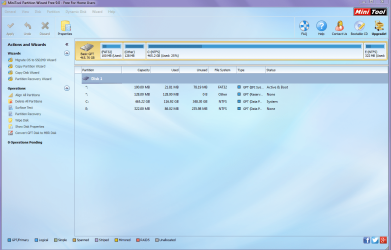
Post a disk management screen shot
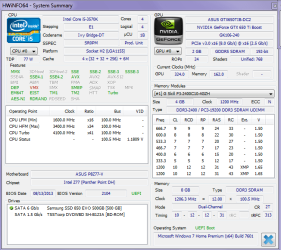
If you have system spec's for this machine posted show where or post them separately here
Could be the board or the ssd ?
Got any system images you can put on a new or other ssd to test ?
My Computer
At a glance
Win-7-Pro64bit 7-H-Prem-64biti7-5930K 2nd i9-9940x both water blocked VRM'...Trident-z 3200C14 2nd Trident-z 3600C16EVGA 1080ti ftw3 2nd Titan Xp both water blocked
Computer type
PC/Desktop
Computer Manufacturer/Model Number
Custom assembled by me :}
OS
Win-7-Pro64bit 7-H-Prem-64bit
CPU
i7-5930K 2nd i9-9940x both water blocked VRM's too
2nd ASUS X299 Apex/Intel i9-9940x with Custom water loop/7H-Prem-x64/Corsair 450D case/Ram Trident-z 3600C16 4x8gb / Samsung970Evo plus 500gb SSD/Dual ssd EZ swap evo/PSU EVGA SuperNova 1200w-P2 80+Platinum/GPU Titan Xp /8-ML-140 on push-pull on 2-280GTX rads
Hello Mike mate I have no spare SSD's large enough here with me right now most are at my new partners place. Images are quite old now so haven't got much faith in them now
I have posted the HW Info specs if those are enough and two disk management pics again which are slightly different for some reason but if you want anything more let me know.
Machine is running as I said a little faster than it did the only difference is that screen prompting me going into the BIOS for a few seconds before it does boot into Windows. I will try to snap a pic with he camera and let you see what it looks like.
Attachments
DISK 1.PNG
29.7 KB
· Views: 2
DISK 2.PNG
285 KB
· Views: 2
DISK 3.PNG
30.6 KB
· Views: 24
My Computer
At a glance
Desk1 7 Home Prem / Desk2 10 Pro / Main lap A...Desk1 i5 3750K / Laptop i7 GTX 860M / Desk2 i...Desk1 8GB (1866) / Desk2 16GB (1333) / Laptop...Desk 1& 2NVidia GTX 650 & Laptops on board Intel
Computer type
PC/Desktop
Computer Manufacturer/Model Number
Own build (new) Desk1 / Asus ROG Win 7 / Desk2 1st build
OS
Desk1 7 Home Prem / Desk2 10 Pro / Main lap Asus ROG 10 Pro 2 laptop Toshiba 7 Pro Asus P2520 7 & 10
One other Desktop (tester) and spare Toshba laptop both with SSD's
Running Kaspersky 2016 ISS on all machines config'd identically
Logitec audio stereo systems on each machine (x3)
Canon MG5250MFC
Router/modem TP-Link running WPA2SK
Back to square one by the looks of things the machine has a mind of it's own I set the BIOS to boot from the SSD and set ignore CPU fan speed etc and after quite a attempts at fixing the BIOS the machine will boot.
The problem comes back after the machine has been powered off the BIOS it looks to me resets itself to whatever it feels like it never stays on the same settings as I have set.
In the boot option I have two drive options one is Windows boot manager EUFI and the other is the straight SSD now I am at a loss as to explain why when there is only one drive installed I should get these two options and how in the name of heaven is the CPU fan speed setting being reverted back to auto when I have set it to ignore. It is getting a little more than boring now and frankly I think maybe the BIOS chip is corrupted somehow but how does one check that??
For the record I am on the latest BIOS version which I set a little while after building the machine.
Is it worth running a Kaspersky rescue disk? to check out if I have any nasties sitting where they shouldn't be because I have run all the usual scans MBAM, SAS ADW and Kaspersky of course.
Edit I meant to ask should I try a chkdsk and I only ask because the last time I tried it the machine just powered off.
My Computer
At a glance
Desk1 7 Home Prem / Desk2 10 Pro / Main lap A...Desk1 i5 3750K / Laptop i7 GTX 860M / Desk2 i...Desk1 8GB (1866) / Desk2 16GB (1333) / Laptop...Desk 1& 2NVidia GTX 650 & Laptops on board Intel
Computer type
PC/Desktop
Computer Manufacturer/Model Number
Own build (new) Desk1 / Asus ROG Win 7 / Desk2 1st build
OS
Desk1 7 Home Prem / Desk2 10 Pro / Main lap Asus ROG 10 Pro 2 laptop Toshiba 7 Pro Asus P2520 7 & 10
One other Desktop (tester) and spare Toshba laptop both with SSD's
Running Kaspersky 2016 ISS on all machines config'd identically
Logitec audio stereo systems on each machine (x3)
Canon MG5250MFC
Router/modem TP-Link running WPA2SK
Hi,
Very strange :/
Was the bios update really necessary ?
Might be worth rolling back to the original bios.
My Computer
At a glance
Win-7-Pro64bit 7-H-Prem-64biti7-5930K 2nd i9-9940x both water blocked VRM'...Trident-z 3200C14 2nd Trident-z 3600C16EVGA 1080ti ftw3 2nd Titan Xp both water blocked
Computer type
PC/Desktop
Computer Manufacturer/Model Number
Custom assembled by me :}
OS
Win-7-Pro64bit 7-H-Prem-64bit
CPU
i7-5930K 2nd i9-9940x both water blocked VRM's too
2nd ASUS X299 Apex/Intel i9-9940x with Custom water loop/7H-Prem-x64/Corsair 450D case/Ram Trident-z 3600C16 4x8gb / Samsung970Evo plus 500gb SSD/Dual ssd EZ swap evo/PSU EVGA SuperNova 1200w-P2 80+Platinum/GPU Titan Xp /8-ML-140 on push-pull on 2-280GTX rads
Hello Mike well I did the update at the time of the build and as I was having issues with setting the EUFI BIOS and Gary (Britton) was helping me through it and suggested that I do the update because it actually said it fixed known bugs in the BIOS and up to about 12 months ago the machine has worked so well.
What I don't understand is why the BIOS settings change /revert back to whatever it takes a mind to when I leave the machine powered off for any length of time - plus why there there are those two boot "drives" listed.
I suppose I could try going back an update for the BIOS and see what happens but I would like to find an answer if there is one before I do thta.
Now earlier in the thread the question was asked if I had the CPU cooling g=fan plugged into the right spot and when I checked today in the manual it showed CPU fan_OPT and CPU fan - meaning there were two outputs for the fan.
The fan lead I had was plugged into the OPT one and I did shut down and resite the CPU fan lead to the other outlet. Now it booted ok but whether this was the problem with having to set the fan speed to ignore because of that warning I am not sure - will soon see when I power up tomorrow from cold but the lead has always been in that OPT one and why it should all of a sudden cause a problem like this is a bit of a mystery to me as I am thinking that the fan supply points are interchangeable if one ceases to work?? .
My Computer
At a glance
Desk1 7 Home Prem / Desk2 10 Pro / Main lap A...Desk1 i5 3750K / Laptop i7 GTX 860M / Desk2 i...Desk1 8GB (1866) / Desk2 16GB (1333) / Laptop...Desk 1& 2NVidia GTX 650 & Laptops on board Intel
Computer type
PC/Desktop
Computer Manufacturer/Model Number
Own build (new) Desk1 / Asus ROG Win 7 / Desk2 1st build
OS
Desk1 7 Home Prem / Desk2 10 Pro / Main lap Asus ROG 10 Pro 2 laptop Toshiba 7 Pro Asus P2520 7 & 10
One other Desktop (tester) and spare Toshba laptop both with SSD's
Running Kaspersky 2016 ISS on all machines config'd identically
Logitec audio stereo systems on each machine (x3)
Canon MG5250MFC
Router/modem TP-Link running WPA2SK
Hi,
Ha okay yea the opt would be for a second fan not the primary
No telling why it took so long to cause a warning it should of right away
My Computer
At a glance
Win-7-Pro64bit 7-H-Prem-64biti7-5930K 2nd i9-9940x both water blocked VRM'...Trident-z 3200C14 2nd Trident-z 3600C16EVGA 1080ti ftw3 2nd Titan Xp both water blocked
Computer type
PC/Desktop
Computer Manufacturer/Model Number
Custom assembled by me :}
OS
Win-7-Pro64bit 7-H-Prem-64bit
CPU
i7-5930K 2nd i9-9940x both water blocked VRM's too
2nd ASUS X299 Apex/Intel i9-9940x with Custom water loop/7H-Prem-x64/Corsair 450D case/Ram Trident-z 3600C16 4x8gb / Samsung970Evo plus 500gb SSD/Dual ssd EZ swap evo/PSU EVGA SuperNova 1200w-P2 80+Platinum/GPU Titan Xp /8-ML-140 on push-pull on 2-280GTX rads