Make bootable iso from student d/l

How to Create a Bootable ISO from a Student Windows 7 Download


If you get the student d/l and have 3 files :


Here's how:

1. Rt click each file, Properties > Unblock>Apply>OK.
NOTE: Make sure read only boxes are clear.

2. Rt click and run as admin on the .exe. You will get a folder called expandedsetup on your dektop with these inside:

EXPANDEDSETUPCONTENTS-2009-10-22_061340.jpg
   Note

If you receive this error:

We are unable to create or save new files in the folder in which this application was downloaded. Please check the folder properties to make sure that you have security permission on the folder to write files and that the folder is not read-only.

Continue.


3. D/L this zip, extract it and copy/move oscdimg.exe into C:\Windows\system32.
View attachment oscdimg.zip
4. Assuming expandedsetup is on your Desktop:

Vista/7 users open an elevated command prompt ( rt click cmd and run as admin) and type :

Code:
Oscdimg.exe –u2 –b"C:\Users\your_username\Desktop\expandedSetup\boot\etfsboot.com" –h "C:\Users\your_username\Desktop\expandedSetup" C:\7.iso


XP users commands are:

Code:
cd /d C:\windows\system32


Code:
oscdimg -u2 -b"C:\Documents and Settings\USER\Desktop\expandedSetup\boot\etfsboot.com" -h "C:\Documents and Settings\USER\Desktop\expandedSetup" C:\7.iso


5. You can copy and paste the above into elevated cmd.

Vista/7 users- replace your_username with your actual username.

XP users - replace USER with your actual username

6. Then press enter. Xp users press enter after each of their two commands.

7. If the expandedsetup folder is not on your desktop, replace with appropriate paths.

   Tip
You may wish to copy the expandedsetup folder directly onto the root of C:

The paths will be shorter and the command will be:

Code:
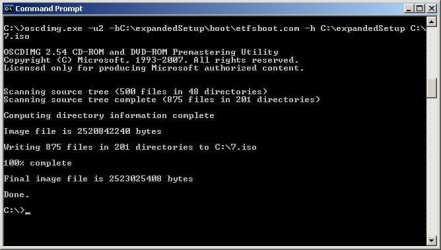
Oscdimg.exe –u2 –bC:\expandedSetup\boot\etfsboot.com –h C:\expandedSetup C:\7.iso

If your folder is elsewhere, to get the paths easily, press shift and rt click on etfsboot.com - select copy as path ( paste into notepad )

Shift and rt click on expanded setup - select copy as path - paste into notepad ) Use those instead of the above.

The spacing needs to be exact.
   Warning
When the .iso is created you will get this message:

WARNING: This image contains UDF file system structures.

That is normal as you are creating the udf filesystem.


8. A) You can burn the .iso to dvd as an image with an isoburner.
View attachment isoburner.zip
OR

B) You can use the Microsoft DVD/USB tool to burn the .iso to dvd or to use the .iso to make a bootable flash drive. Download the tool:
View attachment Windows7-USB-DVD-tool.exe
   Tip
To make a copy of your Windows 7 ISO file:

1. Click the Start button, and click Windows 7 USB/DVD Download tool in the All Programs list to open the USB/DVD Download tool.
2. Click Browse and select the file in the Open dialog box.
3. Select USB to create a copy on a USB flash drive or DVD to create a copy on a DVD disk, then click Next.
4. If you are copying the file to a USB flash drive, select your USB device in the dropdown list and click Begin copying. If you are copying the file up to a DVD, click Begin burning.

Microsoft Store: Download Manager Help

   Note

Microsoft’s ISO Image for Windows 7 Now Available

There is additional information regarding the Windows 7 64-bit download process. For those customers of the Student Offer, who wish to install the 64-bit version of Windows 7, but are currently running a 32-bit Operating System, there is now an optional downloadable ISO file of Windows 7 64-bit to allow for install.

- If you have already purchased the 64-bit version of Windows 7 from the Windows 7 Student Offer Online Store, please contact Digital River at the following link: http://windows7.digitalriver.com/servlet/PromoServlet/promoID.46354000
· In the Web form select the Download Option in the drop down menu and include "64-bit Windows 7 Solution" in the first line of your problem description.


Have fun.


Last edited by a moderator:
May I just add that I am one of these people running 32bit XP Pro and it won't let me extract 64bit pro. I get the error about permissions. People in this thread have said to try creating the boot image regardless, but I don't have this oscdimg.exe file anywhere in the expandedSetup folder.

Any ideas?
 

My Computer

OS
Windows XP 32bit PRO
May I just add that I am one of these people running 32bit XP Pro and it won't let me extract 64bit pro. I get the error about permissions. People in this thread have said to try creating the boot image regardless, but I don't have this oscdimg.exe file anywhere in the expandedSetup folder.

Any ideas?

I think you need to read more carefully. Thats an idea. oscdimg.exe was provided in OP's first post and it goes into system32 folder.
 

My Computer

OS
Xp 32
May I just add that I am one of these people running 32bit XP Pro and it won't let me extract 64bit pro. I get the error about permissions. People in this thread have said to try creating the boot image regardless, but I don't have this oscdimg.exe file anywhere in the expandedSetup folder.

Any ideas?

I think you need to read more carefully. Thats an idea. oscdimg.exe was provided in OP's first post and it goes into system32 folder.

Apologies :)! Let's give it a go!
 

My Computer

OS
Windows XP 32bit PRO
Great thanks.

For the xp users, (Im using XP pro 32 bit and its working for me) I used this command prompt:

oscdimg -u2 -b"C:\Documents and Settings\USER\Desktop\expandedSetup\boot\etfsboot.com" -h "C:\Documents and Settings\USER\Desktop\expandedSetup" C:\7.iso

This created an image for me perfectly. I will try booting off it this evening :)
 

My Computer

OS
Windows XP 32bit PRO
Can anybody help me out? I've tried pretty much everything & got almost every error message in the command prompt everybody else seemed to get. I'm pretty much stuck.
 

My Computer

OS
Vista
I was able to create an iso using the OP's method successfully. I mounted the ISO and unfortunately since I'm on 32 it wouldn't let me run the installer since I bought x64, duh haha its getting late thats my excuse. Although since it brought up that error at all it leads me to believe the ISO works correctly.

Well I think I've had enough fun for tonight. Tomorrow I'll burn the iso on a disk and try booting off it. I will report my results afterward. Thanks for the help everyone.

Can anybody help me out? I've tried pretty much everything & got almost every error message in the command prompt everybody else seemed to get. I'm pretty much stuck.

Make sure the root directory to which you are pointing oscdimg to is correct. In other words, wherever your expandedsetup directory is, you need to adjust the path accordingly.
 

My Computer

OS
Win 7 64bit
a little confused, i have win 7 rc installed at the moment, i was going to re-install xp-home to upgrade but if i follow the instructions above can i produce a bootable iso and upgrade from win 7 rc?

Actually, if you activated the RC, you're supposed to be able to install from the upgrade discs as-is. You shouldn't have to reinstall XP.
 

My Computer

OS
Windows7
a little confused, i have win 7 rc installed at the moment, i was going to re-install xp-home to upgrade but if i follow the instructions above can i produce a bootable iso and upgrade from win 7 rc?

Actually, if you activated the RC, you're supposed to be able to install from the upgrade discs as-is. You shouldn't have to reinstall XP.

I would love to have some confirmation of this, would make life so much easier.
 

My Computer

OS
Windows 7 RC1
Okay, I successfully installed Win7 64bit in a virtual machine without any hiccup at all. The iso file I've created using SIW2's instructions worked perfectly. Aside from the problem I encounter from the unloading process, it didn't make much of the difference. I was able to boot into Win7 perfectly fine.

So people with the unloading problem, just go ahead and make the iso file and burn it onto a DVD if you like. The boot file should be good to go and you'll be enjoying Windows 7 in no time!

Thanks again to SIW2 for the help!
 

My Computer

OS
Windows Vista 32Bit
It would be nice to have some confirmation from someone who has actually managed to go from 32bit XP/Vista to 64bit Win7 via the bootable ISO method, and actually activated it and accepted serial etc. From what I'm hearing it rejects your serial.
 

My Computer

OS
Windows XP 32bit PRO
Thank you microsoft

Used the OP's method to make a bootable iso and burned it to a dvd. Thanks for all the info, great thread.

Booted from the dvd and did a custom install. So far the bootable disc has worked. Went from 32 bit vista home premium to 64 bit windows 7 professional almost successfully.

Got to the point where the installer is asking for my windows product key, (which I purchased from digital river) and it's saying my product key is invalid. I've re typed and double checked it at least 10 times. I also tried my vista key.

Any idea's?

THANK YOU MICROSOFT :mad:
 

My Computer

OS
Windows 7
Used the OP's method to make a bootable iso and burned it to a dvd. Thanks for all the info, great thread.

Booted from the dvd and did a custom install. So far the bootable disc has worked. Went from 32 bit vista home premium to 64 bit windows 7 professional almost successfully.

Got to the point where the installer is asking for my windows product key, (which I purchased from digital river) and it's saying my product key is invalid. I've re typed and double checked it at least 10 times. I also tried my vista key.

Any idea's?

THANK YOU MICROSOFT :mad:

HotUKDeals Forum - View Single Post - Windows 7 Home Premium or Professional - £30 for UK Students

See this post. It explains that if you format first, it won't work.
 

My Computer

OS
Windows XP 32bit PRO
Just to follow up with what everyone else has been suggesting:

1. My download, including the "setup1.box, setup2.box, and Win7-P-Retail-en-us-x64.exe" files all came through fine.

2. The files extracted without error to the "expandedSetup" folder wihtout error as well. I'm sorry I cannot help anyone having that particular problem.

So, has anyone got a solution to the error: "We are unable to create or save new files in the folder in which this application was downloaded. Please check the folder properties to make sure that you have security permission on the folder to write files and that the folder is not read-only"

Failing that, has anyone got a contact number for Digital River, preferably in the UK?
 

My Computer

Computer Manufacturer/Model Number
Homebrew
OS
Windows 7 Professional x64
CPU
Intel Core i5-2500K @ 3.3GHz
Motherboard
Fatal1ty P67 Professional
Memory
8GB
Graphics Card(s)
Zotac ZONE GeForce GT 240 1GB [ZT-20404-20L]
Sound Card
On board
Monitor(s) Displays
2x Samsung SyncMaster 203B
Screen Resolution
1400 x 1050
Case
CoolerMaster Elite
Cooling
Zalman
Keyboard
Microsoft Natural Wireless Ergonomic 7000
Mouse
Microsoft Natural Wireless Laser 7000
kk I am trying to do what post #1 says when I am in command prompt it gives me this error

ERROR: could not delete existing file "ubC:\User\Greg\Desktop\expandedSetup\boot\etfsboot.com"

Error 123: The filename, directory name or volumbe label syntax is inccorect

when I open command prompt I am typing into C:\documents and settings\Greg>

is that correct? not sure why I am having problems
 

My Computer

Computer Manufacturer/Model Number
Dell Vostro 400
OS
Windows 7 Professional 64 bit
CPU
Intel Core 2 Duo E8500 @ 3.16 GHz
Memory
4GB Dual Channel DDR2 SDRAM 800MHz - 4DIMMs
Graphics Card(s)
512MB NVIDIA GeForce 8800 GT
Sound Card
Integrated 7.1 Channel Audio
Monitor(s) Displays
Dell 22 inch Widescreen E228WFP Analog Flat Panel Display
Screen Resolution
1680x1050
Hard Drives
250GB Serial ATA Hard Drive (7200RPM) w/DataBurst Cache
80GB Serial ATA Hard Drive (7200RPM) w/DataBurst Cache
Used the OP's method to make a bootable iso and burned it to a dvd. Thanks for all the info, great thread.

Booted from the dvd and did a custom install. So far the bootable disc has worked. Went from 32 bit vista home premium to 64 bit windows 7 professional almost successfully.

Got to the point where the installer is asking for my windows product key, (which I purchased from digital river) and it's saying my product key is invalid. I've re typed and double checked it at least 10 times. I also tried my vista key.

Any idea's?

THANK YOU MICROSOFT :mad:

HotUKDeals Forum - View Single Post - Windows 7 Home Premium or Professional - £30 for UK Students

See this post. It explains that if you format first, it won't work.

Yet on the MS order page, under windows 7 pro, it says,

You can also choose to buy Windows 7 Professional Upgrade for £30, however this may require you to perform a clean install. Please refer to the FAQ's. for more details.
which implies you can ???
 

My Computer

OS
win 7
Okay, I'm upgrading from Vista Home Premium 32bit to Windows 7 Professional 64bit and I've managed to make the .ISO file using this command:

oscdimg -n -m -b"C:\Users\USERNAME\Desktop\expandedSetup\boot\etfsboot.com" C:\Users\USERNAME\Desktop\expandedSetup C:\7.iso

Change directories accordingly! It works for me and I hope it works for you !


Sources:
http://community.dynamics.com/blogs/cesardalatorre/comments/20345.aspx
http://www.hotukdeals.com/item/4824...rofessio/showpost.php?p=6650637&postcount=555

According to the second link you must NOT format C: but to install Windows 7 Upgrade straight into the drive where Vista is found which commence an auto clean install format I THINK
 

My Computer

OS
Windows Vista
Yet on the MS order page, under windows 7 pro, it says,


You can also choose to buy Windows 7 Professional Upgrade for £30, however this may require you to perform a clean install. Please refer to the FAQ's. for more details.

which implies you can ???

I spoke to Microsoft support earlier. It seems they're not quite up to date with this 'student' downloadable version of Windows 7, and more familiar with anything purchased through the official MS Shop (as opposed to Digital River).

And I think their interpretation of 'perform a clean install' literally just means select the option to do a clean install during the UPGRADE. I don't think this means booting from a DVD image to install on a new hard disk.

So I guess this means spending another '39 minutes' installing XP onto a new hard disk just so that I can perform the Windows 7 upgrade.

Oh, and my advice for anyone still struggling with creating an ISO image,
carefully read the first thread in this topic and don't skip anything - but if you have problems with running oscdimg.exe it's porbably just related to incorrect filepaths, so try the following to simplify things:

Download the OS files (setup1.box setup2.box & Win7-P-Retail-en-us-x86.exe) double click on the .exe and wait for the expandedSetup directory to be created. Then cut and paste this into C:\ and also cut and paste oscdimg.exe into C:\windows\System32

Then follow the command as shown in the attached screen shot taken from my command prompt. If it works you should get the same confirmation, and a new file called '7.iso' will be in C:\ about 2.5GB in size.

I then used Roxio Media Creator 9 and selected 'Burn Image to Disc' and selected this 7.iso file. This gave me a nice bootable DVD.
 

Attachments

  • make-iso.JPG
    make-iso.JPG
    46 KB · Views: 906

My Computer

OS
Windows 7 Professional 32 Bit
CPU
AMD Athlon X2 4000
Motherboard
Asrock AM2NF3-VSTA
Memory
Crucial Ballistix DDR2-800
Graphics Card(s)
GeForce 6200 AGP (256MB)
Screen Resolution
1600 x 1200
Hard Drives
Seagate Barracuda SATAII 250GB & 500GB
Case
Thermaltake Sonata
Help

Ok, I just need one more question answered and I think i'll be clear on how to do this

When I create the ISO file and use it to boot, is there any way that I can have my harddrive format and use my KEY validly? I purchased from digital river using my student discount but the above poster said he couldn't get his key to work. So I'm scared that I will have no OS on my system as my Vista CD is with my brother 3 hours away.

I am upgrading from Vista Ultimate 32 bit to Windows 7 professional 64 bit. I want to know how to do this with the boot DVD and still be able to use my key, please help me before I make my computer unusable.
 

My Computer

OS
Vista 32 bit ultimate
Ok, I just need one more question answered and I think i'll be clear on how to do this

When I create the ISO file and use it to boot, is there any way that I can have my harddrive format and use my KEY validly? I purchased from digital river using my student discount but the above poster said he couldn't get his key to work. So I'm scared that I will have no OS on my system as my Vista CD is with my brother 3 hours away.

I am upgrading from Vista Ultimate 32 bit to Windows 7 professional 64 bit. I want to know how to do this with the boot DVD and still be able to use my key, please help me before I make my computer unusable.

I'm quite sure this should work for you - the license key you've purchased is exactly for upgrading from Vista. You should be able to choose the 'upgrade' option so none of your data will be lost (but back everything up first - I'm sure you know that already !)
 

My Computer

OS
Windows 7 Professional 32 Bit
CPU
AMD Athlon X2 4000
Motherboard
Asrock AM2NF3-VSTA
Memory
Crucial Ballistix DDR2-800
Graphics Card(s)
GeForce 6200 AGP (256MB)
Screen Resolution
1600 x 1200
Hard Drives
Seagate Barracuda SATAII 250GB & 500GB
Case
Thermaltake Sonata
But I'm wanting to do a complete format of my drive and get a fresh start, I am upgrading my computer hard ware as well. Is there no way to have my hard drive formatted and still install using this Boot DVD if i purchased the key from digital river? If not then I'll just upgrade, no biggy, but one last last question, Should i install my new hardware and then run the 7 upgrade or run the 7 upgrade and then install new hardware?
 

My Computer

OS
Vista 32 bit ultimate
Back
Top