Make bootable iso from student d/l

How to Create a Bootable ISO from a Student Windows 7 Download


If you get the student d/l and have 3 files :


Here's how:

1. Rt click each file, Properties > Unblock>Apply>OK.
NOTE: Make sure read only boxes are clear.

2. Rt click and run as admin on the .exe. You will get a folder called expandedsetup on your dektop with these inside:

EXPANDEDSETUPCONTENTS-2009-10-22_061340.jpg
   Note

If you receive this error:

We are unable to create or save new files in the folder in which this application was downloaded. Please check the folder properties to make sure that you have security permission on the folder to write files and that the folder is not read-only.

Continue.


3. D/L this zip, extract it and copy/move oscdimg.exe into C:\Windows\system32.
View attachment oscdimg.zip
4. Assuming expandedsetup is on your Desktop:

Vista/7 users open an elevated command prompt ( rt click cmd and run as admin) and type :

Code:
Oscdimg.exe –u2 –b"C:\Users\your_username\Desktop\expandedSetup\boot\etfsboot.com" –h "C:\Users\your_username\Desktop\expandedSetup" C:\7.iso


XP users commands are:

Code:
cd /d C:\windows\system32


Code:
oscdimg -u2 -b"C:\Documents and Settings\USER\Desktop\expandedSetup\boot\etfsboot.com" -h "C:\Documents and Settings\USER\Desktop\expandedSetup" C:\7.iso


5. You can copy and paste the above into elevated cmd.

Vista/7 users- replace your_username with your actual username.

XP users - replace USER with your actual username

6. Then press enter. Xp users press enter after each of their two commands.

7. If the expandedsetup folder is not on your desktop, replace with appropriate paths.

   Tip
You may wish to copy the expandedsetup folder directly onto the root of C:

The paths will be shorter and the command will be:

Code:
Oscdimg.exe –u2 –bC:\expandedSetup\boot\etfsboot.com –h C:\expandedSetup C:\7.iso

If your folder is elsewhere, to get the paths easily, press shift and rt click on etfsboot.com - select copy as path ( paste into notepad )

Shift and rt click on expanded setup - select copy as path - paste into notepad ) Use those instead of the above.

The spacing needs to be exact.
   Warning
When the .iso is created you will get this message:

WARNING: This image contains UDF file system structures.

That is normal as you are creating the udf filesystem.


8. A) You can burn the .iso to dvd as an image with an isoburner.
View attachment isoburner.zip
OR

B) You can use the Microsoft DVD/USB tool to burn the .iso to dvd or to use the .iso to make a bootable flash drive. Download the tool:
View attachment Windows7-USB-DVD-tool.exe
   Tip
To make a copy of your Windows 7 ISO file:

1. Click the Start button, and click Windows 7 USB/DVD Download tool in the All Programs list to open the USB/DVD Download tool.
2. Click Browse and select the file in the Open dialog box.
3. Select USB to create a copy on a USB flash drive or DVD to create a copy on a DVD disk, then click Next.
4. If you are copying the file to a USB flash drive, select your USB device in the dropdown list and click Begin copying. If you are copying the file up to a DVD, click Begin burning.

Microsoft Store: Download Manager Help

   Note

Microsoft’s ISO Image for Windows 7 Now Available

There is additional information regarding the Windows 7 64-bit download process. For those customers of the Student Offer, who wish to install the 64-bit version of Windows 7, but are currently running a 32-bit Operating System, there is now an optional downloadable ISO file of Windows 7 64-bit to allow for install.

- If you have already purchased the 64-bit version of Windows 7 from the Windows 7 Student Offer Online Store, please contact Digital River at the following link: http://windows7.digitalriver.com/servlet/PromoServlet/promoID.46354000
· In the Web form select the Download Option in the drop down menu and include "64-bit Windows 7 Solution" in the first line of your problem description.


Have fun.


Last edited by a moderator:
Product Key a no go

So, I made my d/l into a ISO, booted from dvd, blah blah blah. Now my product key is "invalid"! The program for 64 bit win 7 pro doesnt work on 32 bit xp, what gives? I guess I am unlucky, seems like everyone else got it to work. What should I do?
 

My Computer

OS
windows 7
CPU
AMD 2.01 ghz x2 64 bit
Motherboard
foxconn nf4sk8aa
Memory
2 gb pc3200
Graphics Card(s)
geforce 9500 512 mb
Sound Card
realtek
Monitor(s) Displays
samsung syncmaster
Hard Drives
western digital 320 gb
If i delete the quotes I get this.

C:\>oscdimg.exe -u2 -b C:\expandedSetup\boot\etfsboot.com -h C:\expandedSetup\boot\expandedSetup C:\7.iso

OSCDIMG 2.54 CD-ROM and DVD-ROM Premastering Utility
Copyright (C) Microsoft, 1993-2007. All rights reserved.
Licensed only for producing Microsoft authorized content.


Scanning source tree
ERROR: Failure enumerating files in directory "C:\ûU2\"
Error 3: The system cannot find the path specified.


HELP!
 

My Computer

OS
XP Pro
So, I made my d/l into a ISO, booted from dvd, blah blah blah. Now my product key is "invalid"! The program for 64 bit win 7 pro doesnt work on 32 bit xp, what gives? I guess I am unlucky, seems like everyone else got it to work. What should I do?

I heard that if you type in the key during installation the key became invalid, you need to enter the key inside Windows 7.
 

My Computer

Computer Manufacturer/Model Number
custom
OS
windows 7 Pro 64Bit
CPU
Q9650
Motherboard
Gigabyte P45 UD3P
Memory
Mushkin Ascent DDR2-1066 4GB
Graphics Card(s)
GTX 260
Sound Card
HT Omega Claro Plus
Monitor(s) Displays
NEC 20WGMX2
Screen Resolution
1680 X 1050
Hard Drives
WD 1TB
PSU
Seasonic X-650
Case
Silverstone TJ07
Cooling
Water Cooling
Keyboard
Deck Legend Ice Linear
Mouse
Logitech G500

Attachments

  • Untitled.jpg
    Untitled.jpg
    59.6 KB · Views: 435

My Computer

OS
vista 32 basic
Ok so after doing all the Cmd Promt stuff. The ISO file is suppose to show up on my Desktop correct? Because it is not doing so.:sarc:
 

My Computer

Computer Manufacturer/Model Number
Cutsom
OS
Vista
CPU
3.ghz
http://img63.imageshack.us/img63/7197/problem1p.jpg

I can't figure out what I did wrong, any help would be appreciated.

I find the answer to my own question.

http://www.microsoft.com/DOWNLOADS/...65-9F76-4177-A811-39C26D3B3B34&displaylang=en
Download and extract the file, open the Deployment Tools Command Prompt and copy all those command lines:

oscdimg -bC:\Users\your_username\Desktop\expandedSetup\boot\etfsboot.com -h -u2 -m -lWIN_EN_DVD C:\Users\your_username\Desktop\expandedSetup\ C:\Users\your_username\Desktop\7.iso

Good luck everyone
 

My Computer

Computer Manufacturer/Model Number
custom
OS
windows 7 Pro 64Bit
CPU
Q9650
Motherboard
Gigabyte P45 UD3P
Memory
Mushkin Ascent DDR2-1066 4GB
Graphics Card(s)
GTX 260
Sound Card
HT Omega Claro Plus
Monitor(s) Displays
NEC 20WGMX2
Screen Resolution
1680 X 1050
Hard Drives
WD 1TB
PSU
Seasonic X-650
Case
Silverstone TJ07
Cooling
Water Cooling
Keyboard
Deck Legend Ice Linear
Mouse
Logitech G500
this thread is huge and im not sure i read on here how to burn the 3 files that i have on my desktop to a dvd so that i can boot from the dvd and install a clean version of windows 7 and format and get rid of vista.
 

My Computer

OS
vista
THANK YOU!!!

So, I made my d/l into a ISO, booted from dvd, blah blah blah. Now my product key is "invalid"! The program for 64 bit win 7 pro doesnt work on 32 bit xp, what gives? I guess I am unlucky, seems like everyone else got it to work. What should I do?

I heard that if you type in the key during installation the key became invalid, you need to enter the key inside Windows 7.

I was about to start breaking things. You are a lifesaver.
 

My Computer

OS
windows 7
CPU
AMD 2.01 ghz x2 64 bit
Motherboard
foxconn nf4sk8aa
Memory
2 gb pc3200
Graphics Card(s)
geforce 9500 512 mb
Sound Card
realtek
Monitor(s) Displays
samsung syncmaster
Hard Drives
western digital 320 gb
JEFFK!

oscdimg -bC:\expandedSetup\boot\etfsboot.com -h -u2 -m -lWIN_EN_DVD C:\expandedSetup\ C:\7.iso

works now.
 

My Computer

OS
XP Pro
Hi, this created the iso. Not sure if it works yet, but at least I'm further than before :)

oscdimg -bC:\expandedSetup\boot\etfsboot.com -h -u2 -m -lWIN_EN_DVD C:\expandedSetup\ C:\7.iso


If i delete the quotes I get this.

C:\>oscdimg.exe -u2 -b C:\expandedSetup\boot\etfsboot.com -h C:\expandedSetup\boot\expandedSetup C:\7.iso

OSCDIMG 2.54 CD-ROM and DVD-ROM Premastering Utility
Copyright (C) Microsoft, 1993-2007. All rights reserved.
Licensed only for producing Microsoft authorized content.


Scanning source tree
ERROR: Failure enumerating files in directory "C:\ûU2\"
Error 3: The system cannot find the path specified.


HELP!
 

My Computer

OS
Windows XP
CPU
P4 3.2ghz
Motherboard
Asus P5AD2
Memory
3GB
diskissues

I made the iso file, i put it on a disk, i rebooted. i have disk as priority over my HD in bios but it just boots bios. i burned two disks and put em in both my cd drives. i tried it in my laptop too, just boots from hard drive. when i look at the disk it shows the win7.iso file is that right?
 

My Computer

OS
vista 32
Can I save the left over programs to a disc so if I re-upgrade I can install vista again and the re-upgrade? the folder is like 4gb I would like to remove it.

I wonder if I need to re-upgrade in the future will my key still work?


^ ^ ^ ^ ^ NO idea about this ? ? ? ? ?
 

My Computer

Computer Manufacturer/Model Number
HP dv6910
OS
Windows 7 home pre
CPU
2 GHz AMD Turion X2 TL-60
Motherboard
phenoix ?
Memory
3 GB
Graphics Card(s)
NVIDIA GeForce Go 7150M
Sound Card
on board
Hard Drives
200 GB + Western Digi 260 GB
Cooling
Targus chill pad
Internet Speed
quick !
I formatted and it worked!
Vista 32bit to Win 7 Pro 64bit (Student Digital River DL)

1. Ok, I made the ISO from the instructions on 1st page and burned it
2. rebooted with DVD, ran setup
3. chose CUSTOM (ADVANCED) install
4. picked my original C partition (the one with Vista 32)
5. clicked DRIVE OPTIONS (ADVANCED)
6. clicked FORMAT, wiped C drive (VISTA now GONE)
7. Installed, rebooted
8. asked for key, put in Digital River STUDENT 64bit Pro key, went to desktop
9. Went to get updates from MS automatically
10. clicked start, typed ACTIVATE - chose the ACTIVATE WINDOWS menu option that popped up
11. said it was verifying key....valid - all is good.
 

My Computer

OS
Win 7 Pro
Thanks for bringing that up.

Try this:

oscdimg.exe -h -u1 -b"C:\Users\USERNAME\Desktop\expandedSetup\boot\etfsboot.com" -o -m "C:\Users\USERNAME\Desktop\expandedSetup" C:\7.iso

Please post back the result.

Thanks.

Thanks for the directions to making a UDF only image.
That is much more than Digital River or Microsoft has done.

My son has an older AsRock mobo (K7VT4A) with a BIOS which
does not support booting from UDF format DVDs. It gives the
beloved "Error Code 5" message when trying to read the DVD.

I understand that it is possible to create an ISO9660 / UDF image
for windows 7. One such solution can be found at:

UNAWAVE - Code 5 Error whilst booting Windows 7 DVD

How would one use the oscdimg program and the files downloaded
from Digital River to create a DVD compatible with the older BIOS?

I noticed that oscdimg.exe does have a -u1 option.
 

My Computers

System One System Two

  • Computer type
    PC/Desktop
    OS
    7 X64
    CPU
    i5 8400
    Motherboard
    gigabyte b365m ds3h
    Memory
    2x8gb 3200mhz
    Hard Drives
    various
    PSU
    pure power 11 400w cm
    Case
    Coolermaster
    Cooling
    cryorig m9i
  • Computer type
    PC/Desktop
    OS
    7x64
    CPU
    g5400
    Motherboard
    ga b365m ds3h
    Memory
    8gb ddr4 2400
    PSU
    xfx pro 450w
All I'm getting is some sort of menu after I type in the prompt. Gives me the copyright stuff for OSCDIMG 2.54 followed by Usage: OSCDIMG [options] sourceroot targetfile.

Then it gies me:

For option information, use -help with on of the following categories.

I'm not able to get this program to run.

Help.
 

My Computer

OS
Vista
I made the iso file, i put it on a disk, i rebooted. i have disk as priority over my HD in bios but it just boots bios. i burned two disks and put em in both my cd drives. i tried it in my laptop too, just boots from hard drive. when i look at the disk it shows the win7.iso file is that right?
You have to burn the iso file with a program like Imgburn, which make a bootable DVD out of the file.
 

My Computer

Computer Manufacturer/Model Number
Shuttle SD39P2 SFF XPC
OS
Windows 7 Professional 64-Bit
CPU
Intel Core 2 Duo E6600 320 MB
Motherboard
Intel 975X + ICH7R
Memory
4 GB Crucial Ballistix
Graphics Card(s)
NVIDIA GeForce 8800 GTS
Sound Card
Realtek ALC888
Monitor(s) Displays
Sumsung 22" LCD
Screen Resolution
1680x1050
Hard Drives
Maxtor 320 GB SATA II (7200 RPM, 16MB cache, AHCI mode)
PSU
400W
Case
Shuttle XPC
Cooling
I.C.E. Technology CPU heat-pipe
Keyboard
IBM Model M
Mouse
Razer DeathAdder
Internet Speed
DSL
Ok…this has been said a few times in this forum, but let me write-up a detail of what has worked for me, and I believe a lot of other people in this thread as well…
First, my setup: I have Vista 32-bit Ultimate installed on C drive…which I use all the time. On my 1TB D drive, I had a Windows 7 Ultimate 32-bit RTC installed…I used it sporadically and the license was about to expire. I bought a student license for 64-bit Windows 7 Professional. Yes, this is an upgrade software, but you can do a clean install over any previous version of Vista or Windows 7 as long as you have Vista or Windows 7 installed on the drive you’re trying to use the upgrade software for.
Let me repeat. If you bought a new blank hard drive, or formatted one of your hard drives, and are trying to install this UPGRADE version of Windows 7, regardless of whether you use the upgrade or clean install method, it WILL NOT WORK. You may have no issue installing Windows 7 on the drive, but you’ll have a problem with the activation key.
So, you MUST have a working or non-working copy of Vista (and I assume XP works too) on this hard drive…again, DO NOT format the drive…let Windows 7 take care of that for you during the installation.

When you get the e-mail from Digital River, click on the link and download the files… you will end up with 3 files:
setup1.box
setup2.box
Windows 7-P-Retail-en-us-x86.exe (My folder was 3,319,083,754 bytes and 875 files in 199 folders)

Click on the last file (the .exe). it will create a folder called ‘expandedSetup’ (with no quotes of course).
At this juncture you may get an error saying: ‘We are unable to create or save new files in the folder in which this application was downloaded. Please check the folder properties to make sure that you have security permission on the folder to write files and that the folder is not read-only’…IGNORE THIS ERROR… your folder called ‘expandedSetup’ has most likely been created successfully. Now you need to BURN this folder to a bootbale DVD.
1- Copy the entire folder of ‘expandedSetup’ to your C:\ drive.
2- Download oscdimg.zip (posted by OP) http://www.sevenforums.com/attachme...124-make-bootable-iso-student-d-l-oscdimg.zip
3- When you unzip the oscdimg.zip file, it will create a .exe file of the same name called ‘oscdimg.exe’ copy this file to your C:\ drive.

So, Copy two files/folders into your C:\ drive
a. Oscdimg.exe
b. The entire folder of ‘expandedSetup’
4- Go to Start then Run then type ‘cmd’…this will give you the good old fashioned DOS prompt
5- Type this after the C:\ prompt:

oscdimg.exe -u2 -bC:\expandedSetup\boot\etfsboot.com -h C:\expandedSetup C:\7.iso

type the above exactly as is…for example, there is a space before -u2 -bC and -h
(there is a picture of this posted by Sharivari a few pages before this post, I think page 8)
Once the process is complete, you should see something like: Final image is xxxxxxxx bytes, Done. This means the image for your Windows 7 has been completed and now you need to burn that image on a DVD. The image file is called 7.iso and should be on your C:\ drive.
6- I used Nero Express. Fire it up, and this may be different for various devices, but it didn’t allow me to burn at high speed…I had to try it a couple of times, and finally I set the burn speed at a very low rate of 4x and the image was burnt on the DVD
7- Restart your computer and the installation should start from the DVD. If it doesn’t, you may have to press something like an F8 to get a menu to start from the CD/DVD drive, but this is highly dependent on the PC/BIOS you have.
8- When installation begins, make sure you pick the second option on the list, which is a ‘clean install’. After 30 minutes you should be up and running
 

My Computer

OS
Windows 7
poweriso

I made the iso file, i put it on a disk, i rebooted. i have disk as priority over my HD in bios but it just boots bios. i burned two disks and put em in both my cd drives. i tried it in my laptop too, just boots from hard drive. when i look at the disk it shows the win7.iso file is that right?
You have to burn the iso file with a program like Imgburn, which make a bootable DVD out of the file.

I used poweriso just selected the file and hit burn. is there more?
 

My Computer

OS
vista 32
Thanks for bringing that up.

Try this:

oscdimg.exe -h -u1 -b"C:\Users\USERNAME\Desktop\expandedSetup\boot\etfsboot.com" -o -m "C:\Users\USERNAME\Desktop\expandedSetup" C:\7.iso

Please post back the result.

Thanks.

Thanks for the directions to making a UDF only image.
That is much more than Digital River or Microsoft has done.

My son has an older AsRock mobo (K7VT4A) with a BIOS which
does not support booting from UDF format DVDs. It gives the
beloved "Error Code 5" message when trying to read the DVD.

I understand that it is possible to create an ISO9660 / UDF image
for windows 7. One such solution can be found at:

UNAWAVE - Code 5 Error whilst booting Windows 7 DVD

How would one use the oscdimg program and the files downloaded
from Digital River to create a DVD compatible with the older BIOS?

I noticed that oscdimg.exe does have a -u1 option.

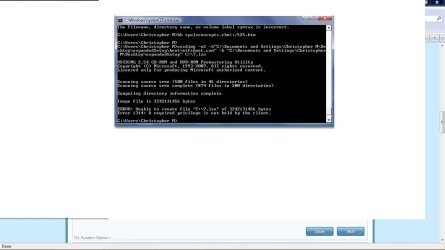
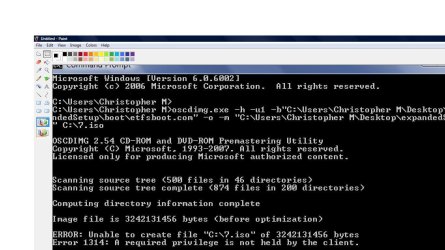
I tried but this is what i got
 

Attachments

  • Untitled.jpg
    Untitled.jpg
    125.8 KB · Views: 326

My Computer

OS
vista 32 basic
Use this to burn the .iso as an image to dvd.

View attachment isoburner.zip

Do not format the dvd. If Autoplay pops up, just close it.

I made the iso file, i put it on a disk, i rebooted. i have disk as priority over my HD in bios but it just boots bios. i burned two disks and put em in both my cd drives. i tried it in my laptop too, just boots from hard drive. when i look at the disk it shows the win7.iso file is that right?
 

My Computers

System One System Two

  • Computer type
    PC/Desktop
    OS
    7 X64
    CPU
    i5 8400
    Motherboard
    gigabyte b365m ds3h
    Memory
    2x8gb 3200mhz
    Hard Drives
    various
    PSU
    pure power 11 400w cm
    Case
    Coolermaster
    Cooling
    cryorig m9i
  • Computer type
    PC/Desktop
    OS
    7x64
    CPU
    g5400
    Motherboard
    ga b365m ds3h
    Memory
    8gb ddr4 2400
    PSU
    xfx pro 450w
Back
Top