Make folders/subfolders on external for image files?

ssmith

New member
Local time
2:27 PM
Messages
32
Hi. Curious.
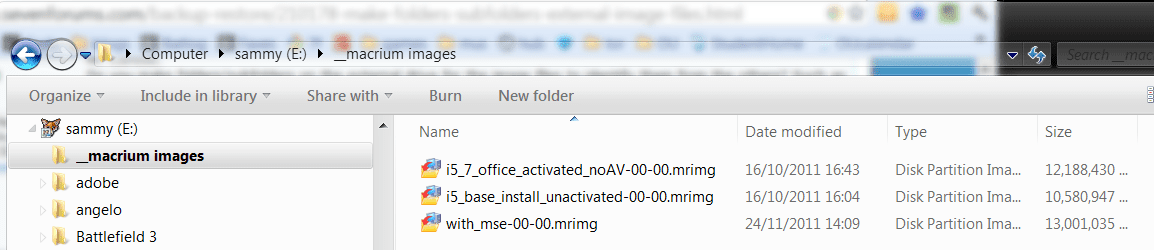
Do you make folders/subfolders on the external drive for the image files to identify them from the others? Such as month/date/partition, etc..? I know macrium dates and label them as well.
Dont plan on putting anything else on the extrernal..yet.

Can I move the ones I've already created into folders and macrium will find them using browse?

thanks
 

My Computer My Computer

At a glance

Window 7 Pro 32bit, XP Pro 32 bit
OS
Window 7 Pro 32bit, XP Pro 32 bit
yes, you can put macrium images anywhere.

as you say, you just have to browse to them.

i like to name mine as well.

mack.PNG
 

My Computer My Computer

At a glance

ultimate 64 sp1i5 2500K [email protected]8 gigs GSkill Ripjaws 1600amd hd6950
Computer Manufacturer/Model Number
mickey megabyte 1234
OS
ultimate 64 sp1
CPU
i5 2500K [email protected]
Motherboard
MSI P67A-GD53
Memory
8 gigs GSkill Ripjaws 1600
Graphics Card(s)
amd hd6950
Sound Card
creative x-fi gamer
Monitor(s) Displays
samsung 24"
Screen Resolution
1920x1080
Hard Drives
ocz vertex 2e 60 gig, samsung f3 1tb, buffalo 2tb ext
PSU
antec 550
Case
antec three hundred
Cooling
i'm a cooling fan
Keyboard
saitek eclipse ii
Mouse
logitech g3
Internet Speed
about 4 Mbps
Other Info
i love win7
nice, wish I had done that at too at the beginning, kept a paper list though.
I did all partitions in the first one. Would have been nice to label them.
 

My Computer My Computer

At a glance

Window 7 Pro 32bit, XP Pro 32 bit
OS
Window 7 Pro 32bit, XP Pro 32 bit
you should still be able to rename the image files after they've been created.
 

My Computer My Computer

At a glance

ultimate 64 sp1i5 2500K [email protected]8 gigs GSkill Ripjaws 1600amd hd6950
Computer Manufacturer/Model Number
mickey megabyte 1234
OS
ultimate 64 sp1
CPU
i5 2500K [email protected]
Motherboard
MSI P67A-GD53
Memory
8 gigs GSkill Ripjaws 1600
Graphics Card(s)
amd hd6950
Sound Card
creative x-fi gamer
Monitor(s) Displays
samsung 24"
Screen Resolution
1920x1080
Hard Drives
ocz vertex 2e 60 gig, samsung f3 1tb, buffalo 2tb ext
PSU
antec 550
Case
antec three hundred
Cooling
i'm a cooling fan
Keyboard
saitek eclipse ii
Mouse
logitech g3
Internet Speed
about 4 Mbps
Other Info
i love win7
I keep a text log of all the changes made to my system excluding daily updates for anti-virus and other such updates but including all software installs and updates and software removal and any other tweaks or hardware changes. The filenames of my images, which are done every 1-2 weeks, reflect whether they are after OS updates, general software updates or just new images. The frequency really depends upon how easy it would be to reverse any changes made. I can always find an image going back about two months but mostly restoring the last image solves any problems I have had. I have restored many times using Macrium Refect free and all have been successful - not malware related I might add.

:) :D ;)

ps I have a separate partition just for images - on internal second drive and on external USB drive.
 
Last edited:

My Computer My Computer

At a glance

Windows 7 x64 SP1Athlon II x2 2154.0 GBOnboard
Computer Manufacturer/Model Number
Compaq desktop
OS
Windows 7 x64 SP1
CPU
Athlon II x2 215
Memory
4.0 GB
Graphics Card(s)
Onboard
Sound Card
Creative SB X-Fi Titanium HD (nice)
Monitor(s) Displays
24" Dell LCD
Screen Resolution
1900 x 1200
Hard Drives
320 GB, 500 GB and 750 GB 7200 rpm
PSU
430w
Keyboard
USB
Mouse
USB
Internet Speed
approx 10 Mbps
Back
Top