Make Windows 7 bootable after motherboard swap

Make Windows 7 bootable after motherboard swap, or bootable after swapping hard drive to new machine. Software described Paragon P2P Adjust OS.


This procedure describes how to do it. Procedure can be used in case of:
  1. Download "Paragon Adaptive Restore 2010" from Paragon Adaptive Restore 2010 on my DROPBOX.
  2. Burn the ISO to CD/DVD using Windows Disc Image Burner or ImgBurn.
  3. Set CD/DVD as first boot device in BIOS.
Do the following:
  1. Boot the computer from Paragon Windows PE 3.0 based CD/DVD.
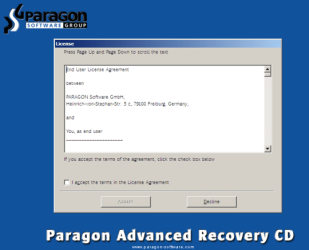
  2. Accept the end user license agreement, otherwise you are not able to use the tool.
    1.png
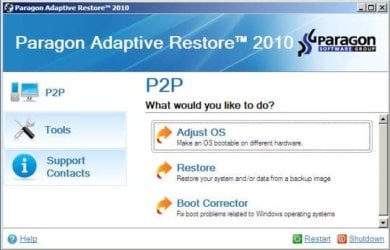
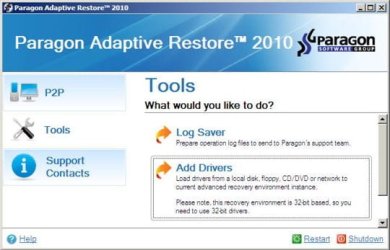
  3. Launch P2P Adjust OS.
    2.jpg
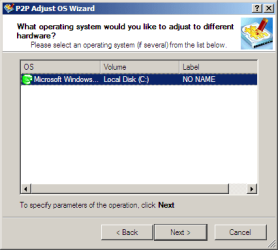
  4. Select the operating system you need to adjust to your new hardware.
    3.png
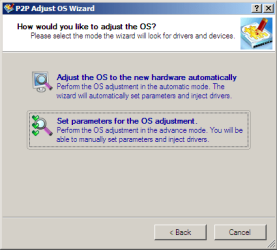
  5. Choose whether you want to add third-party drivers or not, and the way to do it.
    4.png
  6. If you chose "Adjust the OS to the new hardware automatically", the P2P Adjust OS Wizard will automatically accomplish all the necessary actions.
    5.png
  7. The only thing that might need your interaction is to specify additional driver repository.
    6.png
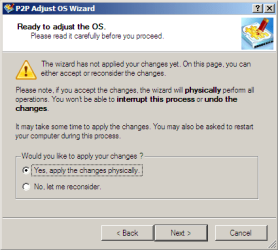
  8. At last, choose "Yes, apply the changes physically" and then restart your computer after operations are done. Do remember, you cannot interrupt the process or undo the changes.
    7.png
Compelete pdf manual: Paragon Adaptive Restore 2010 on my DROPBOX.

Just before the OS adjustment, you can additionally:
extra.JPG


   Warning
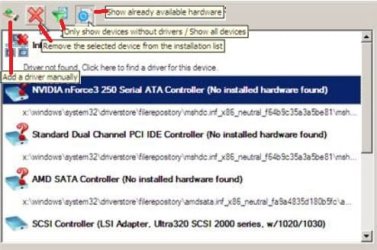
Sometimes the internal hard drive is not recognized in Paragon P2P Adjust OS due to missing SATA or RAID driver. In that case add specific drivers to Windows PE based Paragon Recovery Environment.
  1. Click to open Add Drivers dialog.
    a.jpg
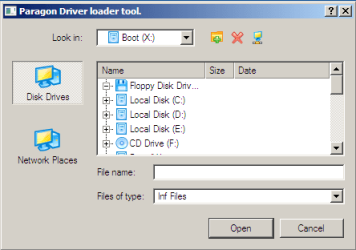
  2. Browse for an .INF file of the required driver, then click the Open button to initiate the process.
    b.png
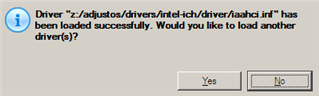
  3. Click Yes to confirm the operation.
    c.png
   Information
You can only add third-party drivers in INF file. If they are zipped, you need to unpack them before processing the steps. The Windows PE environment is 32bit-based, so you need to use 32-bit drivers for injection.
After procedure has finished succesfully and system boots fine, first check if Enable hardware auto-updating via Windows Update (Set to Automatic) is on so it will query Windows Update. After that:

  1. Uninstall Device and Device Driver for devices no longer attached to system. Uninstall associated software as well.
  2. Install all of your device drivers, then Windows Updates.
  3. Refresh your Windows Experience Index (WEI) score.
  4. When done, all you will need to do is to activate Windows 7.
After rebooting from disk, drivers should start swapping out in a cascade you can monitor by clicking on the system tray animation. Wait until all are finished before doing the requested restart. After reboot, go immediately to Check for Updates and install all Important and Optional Updates which may include critical drivers and patches for the OS to run on that hardware.

You must reactivate at the Change Product Key link on System page. If it's not present you can insert Product Key and then Activate using SLMgr Commands

On some systems you see "setup is preparing your computer for first use" on every reboot. Read this to fix that issue: Fix "Setup is Preparing Your Computer for First Use" on Every Reboot


Last edited:
That never works. Didn't work this time. Because it's that stupid system reserved partition. Shouldn't this be the same?
 

My Computer My Computer

At a glance

Windows 7 Pro x64
Computer type
PC/Desktop
OS
Windows 7 Pro x64
You didn't explain how you cloned it.

If you are using mbr scheme, you can mark the windows partition active and then use bcdboot command to create boot files on the windows partition.

In theory startup repair should fix the problem, but it is often better to use the commands manually.

E.G If your windows partition is labelled D: (as seen from booted winpe ):

diskpart
sel vol d:
act
exi
bcdboot d:\windows /s d:
bootsect /nt60 /mbr ALL
 

My Computers My Computers

  • At a glance

    7 X64i5 84002x8gb 3200mhz
    Computer type
    PC/Desktop
    OS
    7 X64
    CPU
    i5 8400
    Motherboard
    gigabyte b365m ds3h
    Memory
    2x8gb 3200mhz
    Hard Drives
    various
    PSU
    pure power 11 400w cm
    Case
    Coolermaster
    Cooling
    cryorig m9i
  • At a glance

    7x64g54008gb ddr4 2400
    Computer type
    PC/Desktop
    OS
    7x64
    CPU
    g5400
    Motherboard
    ga b365m ds3h
    Memory
    8gb ddr4 2400
    PSU
    xfx pro 450w
I've used Acronis, but in the last year or so I've been using Macrium. In both cases, this has been an issue, and I forget how I fixed it last time.....but it has to do with 7 and the oem mobo. Doesn't matter whether it's just 7 or dual-boot 7/XP as in this case, the hardware error pops up when booting 7. What's weird is, only with the oem drives is there that 100mb system reserved partition. One of the three same machines I have has an Hitachi aftermarket drive, no apparent srp (not in Disk Management, nor Partition Wizard), and boots both OSs fine. The back-up/replacement Hitachi (both are 1TB) ginks. By the way, this is probably not relevant to this topic I'm thinking.
 

My Computer My Computer

At a glance

Windows 7 Pro x64
Computer type
PC/Desktop
OS
Windows 7 Pro x64
You didn't explain how you cloned it.

If you are using mbr scheme, you can mark the windows partition active and then use bcdboot command to create boot files on the windows partition.

In theory startup repair should fix the problem, but it is often better to use the commands manually.

E.G If your windows partition is labelled D: (as seen from booted winpe ):

diskpart
sel vol d:
act
exi
bcdboot d:\windows /s d:
bootsect /nt60 /mbr ALL

it only showed as D: in the motherboard swap utility and the windows install / repair utility. I have no idea if them obbo swap util changed it to D: as it saw it that way or if it's just windows PE doing it. i'm having hard time getting the boot rebuilt, i'm sure part of it was the fact it's a dual boot. i don't care about getting linux working since it was old version anyways. rebuilding the BCD should seta fresh windows bootloader and it should be the default as grub would either be written and or new active makers set anyways.


EDIT: well i wasn't scientific as i punched all sorts of commands but, i did your last and it works and it's C:\ once booted ! Thank you much ! Now I know it's just the way PE sees it.

Slightly off topics in the XP days you could have the windows install to D:, some card readers caused that if they were plugged in during installation of XP.
 

My Computer My Computer

At a glance

64 bit Windows 7 Ultimate
Computer type
PC/Desktop
Computer Manufacturer/Model Number
more than you can count
OS
64 bit Windows 7 Ultimate
Antivirus
Avast + Mbam
I need some help with my setup. I have a hp 15-db0011dx laptop. And after changing the boot order to cd/dvd/ usb drive above the laptop hard drive, it still won't let me boot from the cd with the paragon image mounted on it.

Can anyone help me with this?

Imgur: The magic of the Internet

shows the content of the paragon iso i'm trying to boot from. it says files ready to be written and shows a desktop.ini Not sure if that's the cause.
 

My Computer My Computer

At a glance

windows 7 64 bit but died. now i'm on windows...
Computer type
Laptop
OS
windows 7 64 bit but died. now i'm on windows 10 64 bit
it still won't let me boot from the cd with the paragon image mounted on it.

What does that mean? Does it go straight past the dvdrom drive ? Is there a message ?

What did you use to burn the iso image to cd ?
 

My Computers My Computers

  • At a glance

    7 X64i5 84002x8gb 3200mhz
    Computer type
    PC/Desktop
    OS
    7 X64
    CPU
    i5 8400
    Motherboard
    gigabyte b365m ds3h
    Memory
    2x8gb 3200mhz
    Hard Drives
    various
    PSU
    pure power 11 400w cm
    Case
    Coolermaster
    Cooling
    cryorig m9i
  • At a glance

    7x64g54008gb ddr4 2400
    Computer type
    PC/Desktop
    OS
    7x64
    CPU
    g5400
    Motherboard
    ga b365m ds3h
    Memory
    8gb ddr4 2400
    PSU
    xfx pro 450w
What does that mean? Does it go straight past the dvdrom drive ? Is there a message ?

What did you use to burn the iso image to cd ?

Yes. that's what it does. It displays no message at all.

I've used the windows 10's default "burn disc image" right below "mount" on the context menu when I right clicked on it.
 

My Computer My Computer

At a glance

windows 7 64 bit but died. now i'm on windows...
Computer type
Laptop
OS
windows 7 64 bit but died. now i'm on windows 10 64 bit
Did you try the one time boot menu and select dvdrom drive?

I think on that machine , it might be - press ESC continously until the startup menu appears. then F9 to go to boot menu, then select dvdrom drive. Check your manual to be sure - there will be some key combo that pulls up a one time boot menu.
 

My Computers My Computers

  • At a glance

    7 X64i5 84002x8gb 3200mhz
    Computer type
    PC/Desktop
    OS
    7 X64
    CPU
    i5 8400
    Motherboard
    gigabyte b365m ds3h
    Memory
    2x8gb 3200mhz
    Hard Drives
    various
    PSU
    pure power 11 400w cm
    Case
    Coolermaster
    Cooling
    cryorig m9i
  • At a glance

    7x64g54008gb ddr4 2400
    Computer type
    PC/Desktop
    OS
    7x64
    CPU
    g5400
    Motherboard
    ga b365m ds3h
    Memory
    8gb ddr4 2400
    PSU
    xfx pro 450w

My Computers My Computers

  • At a glance

    7 X64i5 84002x8gb 3200mhz
    Computer type
    PC/Desktop
    OS
    7 X64
    CPU
    i5 8400
    Motherboard
    gigabyte b365m ds3h
    Memory
    2x8gb 3200mhz
    Hard Drives
    various
    PSU
    pure power 11 400w cm
    Case
    Coolermaster
    Cooling
    cryorig m9i
  • At a glance

    7x64g54008gb ddr4 2400
    Computer type
    PC/Desktop
    OS
    7x64
    CPU
    g5400
    Motherboard
    ga b365m ds3h
    Memory
    8gb ddr4 2400
    PSU
    xfx pro 450w
If you prefer, there is a giveaway of O&O diskimage pro, which has the required function. If you install it on a 64 bit windows system, it can create efi and bios bootable media.

O&O Diskimage12 Pro
Register:
Registrieren Sie sich hier fur Ihre kostenlose Vollversion von O&O DiskImage 12

They send an email. Click the link in the email they sent you and you will receive another email with your license key

Download English version:
Download Archive

Thank you I'll give it a try
 

My Computer My Computer

At a glance

windows 7 64 bit but died. now i'm on windows...
Computer type
Laptop
OS
windows 7 64 bit but died. now i'm on windows 10 64 bit
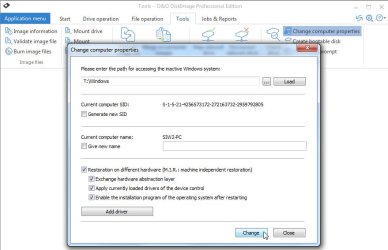
Boot up the media it creates.
Click Tools > Change computer properties.
Click the dots and Browse to windows folder on your hard drive.
Click Load.

Tick the boxes as in the photo and click Change

O&O-newhardware.jpg
 

My Computers My Computers

  • At a glance

    7 X64i5 84002x8gb 3200mhz
    Computer type
    PC/Desktop
    OS
    7 X64
    CPU
    i5 8400
    Motherboard
    gigabyte b365m ds3h
    Memory
    2x8gb 3200mhz
    Hard Drives
    various
    PSU
    pure power 11 400w cm
    Case
    Coolermaster
    Cooling
    cryorig m9i
  • At a glance

    7x64g54008gb ddr4 2400
    Computer type
    PC/Desktop
    OS
    7x64
    CPU
    g5400
    Motherboard
    ga b365m ds3h
    Memory
    8gb ddr4 2400
    PSU
    xfx pro 450w
Boot up the media it creates.
Click Tools > Change computer properties.
Click the dots and Browse to windows folder on your hard drive.
Click Load.

Tick the boxes as in the photo and click Change

View attachment 407627

I still haven't received the install code. should I try it again? or does it matter if I'm not in germany?
 

My Computer My Computer

At a glance

windows 7 64 bit but died. now i'm on windows...
Computer type
Laptop
OS
windows 7 64 bit but died. now i'm on windows 10 64 bit
should I try it again?

Yes. Also check your spam folder
 

My Computers My Computers

  • At a glance

    7 X64i5 84002x8gb 3200mhz
    Computer type
    PC/Desktop
    OS
    7 X64
    CPU
    i5 8400
    Motherboard
    gigabyte b365m ds3h
    Memory
    2x8gb 3200mhz
    Hard Drives
    various
    PSU
    pure power 11 400w cm
    Case
    Coolermaster
    Cooling
    cryorig m9i
  • At a glance

    7x64g54008gb ddr4 2400
    Computer type
    PC/Desktop
    OS
    7x64
    CPU
    g5400
    Motherboard
    ga b365m ds3h
    Memory
    8gb ddr4 2400
    PSU
    xfx pro 450w
Got it this time around i'm currently installing it.

do i have to make the efi (?) of the old windows 7 or my current windows 10?
 

My Computer My Computer

At a glance

windows 7 64 bit but died. now i'm on windows...
Computer type
Laptop
OS
windows 7 64 bit but died. now i'm on windows 10 64 bit

My Computer My Computer

At a glance

windows 7 64 bit but died. now i'm on windows...
Computer type
Laptop
OS
windows 7 64 bit but died. now i'm on windows 10 64 bit
It needs to be run from another Operating system and pointed at the target. Therefore, you can run it from windows 10 and point it at the windows 7 partition.

Presumably, that is what you did.


The other way is to run it from from the boot media it creates. The boot media is another Operating system.

From your screenshot, it has completed the adjustment only by using the drivers already present in your windows 7 filerepository.

It is possible your windows 7 filerepository may not have all the drivers needed by the machine you transferred it to. That is why it asked for that inf file. It has probably decided to use the microsoft AHCI driver.


See if it boots up.
 

My Computers My Computers

  • At a glance

    7 X64i5 84002x8gb 3200mhz
    Computer type
    PC/Desktop
    OS
    7 X64
    CPU
    i5 8400
    Motherboard
    gigabyte b365m ds3h
    Memory
    2x8gb 3200mhz
    Hard Drives
    various
    PSU
    pure power 11 400w cm
    Case
    Coolermaster
    Cooling
    cryorig m9i
  • At a glance

    7x64g54008gb ddr4 2400
    Computer type
    PC/Desktop
    OS
    7x64
    CPU
    g5400
    Motherboard
    ga b365m ds3h
    Memory
    8gb ddr4 2400
    PSU
    xfx pro 450w
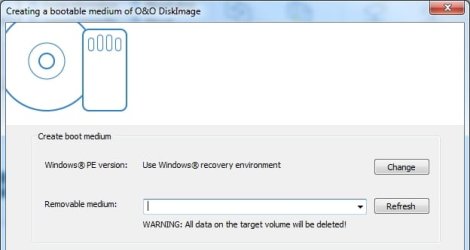
I suggest you create boot media for future use.

Assuming you have installed O&O on your windows10 system:

Click Tools tab > click Create bootable disc

O&Obootmedia.jpg


Select your removable media in the dropdown, then click Create.

O&Obootmedia2.jpg
 

My Computers My Computers

  • At a glance

    7 X64i5 84002x8gb 3200mhz
    Computer type
    PC/Desktop
    OS
    7 X64
    CPU
    i5 8400
    Motherboard
    gigabyte b365m ds3h
    Memory
    2x8gb 3200mhz
    Hard Drives
    various
    PSU
    pure power 11 400w cm
    Case
    Coolermaster
    Cooling
    cryorig m9i
  • At a glance

    7x64g54008gb ddr4 2400
    Computer type
    PC/Desktop
    OS
    7x64
    CPU
    g5400
    Motherboard
    ga b365m ds3h
    Memory
    8gb ddr4 2400
    PSU
    xfx pro 450w
If you are using a 7th gen amd processor ,you will need graphics drivers for windows 7.

You might also need a bios update ( if available for that machine).

I don't know if it is available for that machine. If not, then win7 will not run on that hardware.

I don't see anything useful on the HP site. Looks like it is not possible to run win 7 on that particular machine because of graphics incompatibility.
 
Last edited:

My Computers My Computers

  • At a glance

    7 X64i5 84002x8gb 3200mhz
    Computer type
    PC/Desktop
    OS
    7 X64
    CPU
    i5 8400
    Motherboard
    gigabyte b365m ds3h
    Memory
    2x8gb 3200mhz
    Hard Drives
    various
    PSU
    pure power 11 400w cm
    Case
    Coolermaster
    Cooling
    cryorig m9i
  • At a glance

    7x64g54008gb ddr4 2400
    Computer type
    PC/Desktop
    OS
    7x64
    CPU
    g5400
    Motherboard
    ga b365m ds3h
    Memory
    8gb ddr4 2400
    PSU
    xfx pro 450w
If you are using a 7th gen amd processor ,you will need graphics drivers for windows 7.

You might also need a bios update ( if available for that machine).

I don't know if it is available for that machine. If not, then win7 will not run on that hardware.

I don't see anything useful on the HP site. Looks like it is not possible to run win 7 on that particular machine because of graphics incompatibility.

i've tried rebooting and it doesn't give me the option to reboot into windows 7 using efi of any kind. is there a way to reboot into windows 7 from windows 10 using that program?
 

My Computer My Computer

At a glance

windows 7 64 bit but died. now i'm on windows...
Computer type
Laptop
OS
windows 7 64 bit but died. now i'm on windows 10 64 bit

My Computers My Computers

  • At a glance

    7 X64i5 84002x8gb 3200mhz
    Computer type
    PC/Desktop
    OS
    7 X64
    CPU
    i5 8400
    Motherboard
    gigabyte b365m ds3h
    Memory
    2x8gb 3200mhz
    Hard Drives
    various
    PSU
    pure power 11 400w cm
    Case
    Coolermaster
    Cooling
    cryorig m9i
  • At a glance

    7x64g54008gb ddr4 2400
    Computer type
    PC/Desktop
    OS
    7x64
    CPU
    g5400
    Motherboard
    ga b365m ds3h
    Memory
    8gb ddr4 2400
    PSU
    xfx pro 450w
Back
Top