- Local time
- 3:21 PM
- Messages
- 661
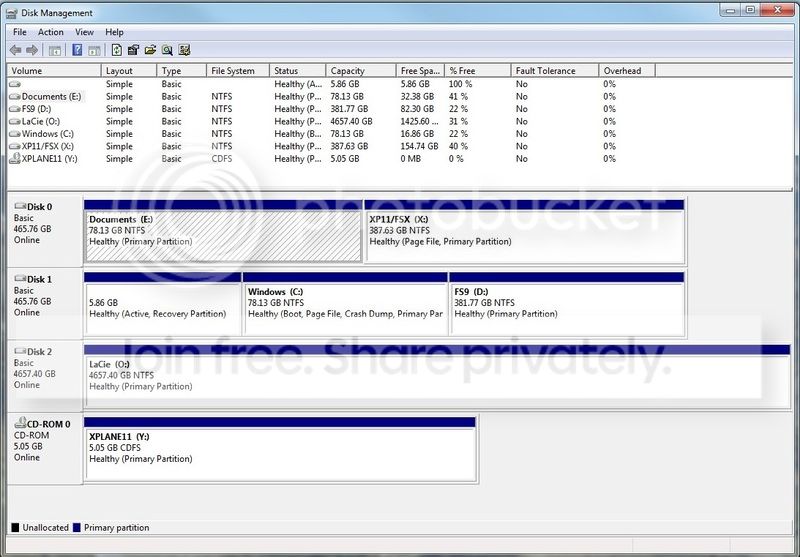
I know there is a lot on the forums here about multi-boot and might just be able to go ahead and achieve this without further advice. Or I might just make a mess of it (and I don't want to do that!)...
Basically, I want to have a clone of my boot partition on C on another physical drive, so that if one disc failed, the other is there to take over immediately. The screenshot above shows my current disc setup. I never managed to get the main boot onto Disc 0, it's on Disc 1, but it's been like that for three years with no ill effects. Both of those discs are SSDs.
I simply want to use the partition shown as E as a copy boot drive, for emergency use. I don't necessarily need to see both in a menu at boot, though that might be the most 'reassuring' option, set with a brief timeout. Or I could just use the boot menu as and when necessary. I assume that if I set the boot menu so that one active partition is in first position and the second active partition is in second position, then in the event of a disc failure, the other drive would take over automatically? I that doable in Windows 7?
What about the recovery partition on Disc 1 though, if that disc failed? Does there need to be a copy of that on Disc 0? I am not even sure what is in that partition. Was it created at Windows 7 (x64) setup? Is it needed to boot? Or is it just a 'reset to defaults' thing?
I would appreciate some advice on the best way to go here. The drives are both Evo 850s, pretty reliable (I'm about to install an Evo 860 2TB drive as well), but I can't afford to have this machine down whilst I repair it, should anything go wrong.
Thanks,
Martin
My Computer
At a glance
Windows 7 Home Premium SP1 64-bitIntel Core i7-4790K CPU @ 4.5GHz16GB KINGSTON HYPER-X FURY DUAL-DDR3 1600MHz8GB NVIDIA GEFORCE GTX 1070
- Computer type
- PC/Desktop
- Computer Manufacturer/Model Number
- Custom Build
- OS
- Windows 7 Home Premium SP1 64-bit
- CPU
- Intel Core i7-4790K CPU @ 4.5GHz
- Motherboard
- Asus H97I-PLUS
- Memory
- 16GB KINGSTON HYPER-X FURY DUAL-DDR3 1600MHz
- Graphics Card(s)
- 8GB NVIDIA GEFORCE GTX 1070
- Monitor(s) Displays
- HannsG 28" & Dell 24"
- Screen Resolution
- 1920x1200
- Hard Drives
- 1 x 2TB Samsung Evo 860 SSD
2 x 500GB Samsung Evo 850 SSD
- PSU
- CORSAIR 650W CS SERIES
- Case
- Thermaltake Core V1 Mini ITX Cube
- Cooling
- NOCTUA NH-L12
- Browser
- Firefox
- Other Info
- Custom PC used for X-Plane 11