

My PC System has a:
2TB SSD with the O/S on it: Windows-7 Pro.
and had a:
6TB HDD with four Logical Partitions on it.
I backed up the entire PC to an external 10TB USB HD that has two equal size Logical Partitions on it.
The first Logical Partition has historic / prior Backup's on it.
The second Logical Partition started out empty but has about +-1.5TB's of used capacity on it.
For my Backup, I used Acronis's Western Digital Version I owned, as I have all WD disk drives.
The 2TB Systems drive was manufactured by SanDisk who is owned by WD.
The 6TB drive Data drive is a WD Black Drive.
With the Backup and Validation complete, I used 'diskpart' to clean the 6TB Drive.
My intent was to Restore the 'entire' System to the 6TB Drive.
Once Restored in this fashion, I would have the entire System on one highly reliable device.
First, the Bootable O/S, followed by the four Logical Partitions.
Now the problems begin!
I tried to start the Restore however the WD Restore function could not find / recognize a Backup.
I contacted Acronis and spent over four hours, utilizing multiple Acronis Agents attempting to Restore.
Like myself, they each ran the Validation process which worked each time under the W7 Version.
Then, each asked that I create a Restore Disc or Thumb Drive Version of their Bootable Recovery System.
Their Bootable Recovery System has multiple 'flavors' / 'variants'.
I tried to create each of them, watching all but the last fail to Boot when used.
The one that booted and would run was their Linux Version, on a Thumb Drive.
While it would run, it did exactly what the W7 Version did, not find a Restore but would Validate the Backup.
The last Agent had me download a new Version of Acronis.
I had the 2020 Full Version and he had me download the 2021 Trial Version.
I did so and had the exact same results as I did with the 2020 Version.
That Agent did something however, with my permission, that appears to have complicated a Recovery.
He initialized the 6TB Drive assigning it the letter D: with just one Partition on it.
At that point, he tried to start the Restore and again it failed.
Frustrated, he gave up, downloading two pages of instructions for a potential / maybe fix.
I follow them but was unable to as they required multiple restart, downloads, read a Site, on and on, failure!
My question, based upon the status of my System: C: intact, D: one 'empty' Partition, Backup, who knows?
Are there any 'know' Software products that 'can' reverse the condition of the D: Drive?
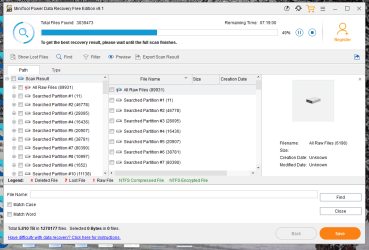
I stumble across MiniTool Power Data Recovery last night.
After contacting MiniTool Chat by accident, the Agent recommended trying the Trial Version which I did.
It indicated it could not reverse the D: Drive Partition situation however it might be able to recover Photos.
I started it running about six hours ago and it still reports seven more hours to go.
It is finding 'stuff' but not displaying any Images as this function is only part of a paid Subscription.
With that I mind, it's running, I'm waiting and when it finishes I do not know what my options are.
Will it 'save' the scan and allow me to purchase a paid Subscription if its successful?
If it proves to work, GREAT!
If not, are there ANY proven software products that are known to work in this situation?
Bottom line: I Backed Up my data, I Validated the Backup, I prepared the drive to receive the Restore.
So much for Backups!
I am in the corner and there doesn't appear to be a way out, UNLESS a Forum User has seen this before.
YIKES!
HELP!
2TB SSD with the O/S on it: Windows-7 Pro.
and had a:
6TB HDD with four Logical Partitions on it.
I backed up the entire PC to an external 10TB USB HD that has two equal size Logical Partitions on it.
The first Logical Partition has historic / prior Backup's on it.
The second Logical Partition started out empty but has about +-1.5TB's of used capacity on it.
For my Backup, I used Acronis's Western Digital Version I owned, as I have all WD disk drives.
The 2TB Systems drive was manufactured by SanDisk who is owned by WD.
The 6TB drive Data drive is a WD Black Drive.
With the Backup and Validation complete, I used 'diskpart' to clean the 6TB Drive.
My intent was to Restore the 'entire' System to the 6TB Drive.
Once Restored in this fashion, I would have the entire System on one highly reliable device.
First, the Bootable O/S, followed by the four Logical Partitions.
Now the problems begin!
I tried to start the Restore however the WD Restore function could not find / recognize a Backup.
I contacted Acronis and spent over four hours, utilizing multiple Acronis Agents attempting to Restore.
Like myself, they each ran the Validation process which worked each time under the W7 Version.
Then, each asked that I create a Restore Disc or Thumb Drive Version of their Bootable Recovery System.
Their Bootable Recovery System has multiple 'flavors' / 'variants'.
I tried to create each of them, watching all but the last fail to Boot when used.
The one that booted and would run was their Linux Version, on a Thumb Drive.
While it would run, it did exactly what the W7 Version did, not find a Restore but would Validate the Backup.
The last Agent had me download a new Version of Acronis.
I had the 2020 Full Version and he had me download the 2021 Trial Version.
I did so and had the exact same results as I did with the 2020 Version.
That Agent did something however, with my permission, that appears to have complicated a Recovery.
He initialized the 6TB Drive assigning it the letter D: with just one Partition on it.
At that point, he tried to start the Restore and again it failed.
Frustrated, he gave up, downloading two pages of instructions for a potential / maybe fix.
I follow them but was unable to as they required multiple restart, downloads, read a Site, on and on, failure!
My question, based upon the status of my System: C: intact, D: one 'empty' Partition, Backup, who knows?
Are there any 'know' Software products that 'can' reverse the condition of the D: Drive?
I stumble across MiniTool Power Data Recovery last night.
After contacting MiniTool Chat by accident, the Agent recommended trying the Trial Version which I did.
It indicated it could not reverse the D: Drive Partition situation however it might be able to recover Photos.
I started it running about six hours ago and it still reports seven more hours to go.
It is finding 'stuff' but not displaying any Images as this function is only part of a paid Subscription.
With that I mind, it's running, I'm waiting and when it finishes I do not know what my options are.
Will it 'save' the scan and allow me to purchase a paid Subscription if its successful?
If it proves to work, GREAT!
If not, are there ANY proven software products that are known to work in this situation?
Bottom line: I Backed Up my data, I Validated the Backup, I prepared the drive to receive the Restore.
So much for Backups!
I am in the corner and there doesn't appear to be a way out, UNLESS a Forum User has seen this before.
YIKES!
HELP!
Attachments

My Computer
At a glance
Microsoft Windows 7 Professional 64-bit 7601 ...Intel(R) Core(TM) i7-3770 CPU @ 3.40GHz8.00 GBIntel(R) HD Graphics 4000
- Computer type
- PC/Desktop
- Computer Manufacturer/Model Number
- Two HP Desktops. One in the Laundry Room / Bed Room.
- OS
- Microsoft Windows 7 Professional 64-bit 7601 Multiprocessor Free Service Pack 1
- CPU
- Intel(R) Core(TM) i7-3770 CPU @ 3.40GHz
- Motherboard
- Hewlett-Packard 3396
- Memory
- 8.00 GB
- Graphics Card(s)
- Intel(R) HD Graphics 4000
- Sound Card
- (1) Realtek High Definition Audio (2) Intel(R) Display Aud
- Monitor(s) Displays
- Hanns-G
- Screen Resolution
- 1440 x 900 x 32 bits (4294967296 colors) @ 59 Hz
- Hard Drives
- (1) ATA WDC WD40EZRX-00S SCSI Disk Device (2) HP Officejet Pro 86 USB Device (3) WD My Book 1230 USB Device
- PSU
- Whatever came with the CMT.
- Case
- HP CMT Black.
- Cooling
- Whatever came with the CMT.
- Keyboard
- Logitech K740.
- Mouse
- Microsoft Optical Mouse 1000.
- Internet Speed
- Spectrum 25Mbs.
- Antivirus
- WebRoot, Microsoft Security Essentials.
- Browser
- EDGE
- Other Info
- HP Officejet Pro 8600 Plus.
WD MyBook 4TB.


