Making Hotmail default in Windows 7

chicken legs

New member
Local time
6:40 AM
Messages
3
I've been using Windows Live Mail for my Tiscali account. I've now left Tiscali and am using hotmail but when I click on an email link in a website, it opens my Tiscali window. How can I make it open a hotmail window for me, please?
 

My Computer

OS
Windows 7
Hi chicken legs, Welcome to the forum.

Quick question, your post is a little ambigous,

Do you want Windows Live Mail to open and load your Hotmail account? Or do you want a browser window to open and go to Hotmail?
 

My Computer

Computer type
PC/Desktop
Computer Manufacturer/Model Number
Medion Erazer (note to self: insert model number) - with custom additions
OS
Windows 10 Pro x64
CPU
Intel Core i5 7400 @ 3.00GHz
Motherboard
OEM supllied with PC
Memory
8GB 2133Mhz DDR4 (OEM supplied)
Graphics Card(s)
Gygabyte Windforce GTX 1050Ti (Factory Overclocked)
Sound Card
Realtek
Monitor(s) Displays
Acer Al1980 + HKC
Screen Resolution
1360*768(HKC) / 1280*1024(Acer)
Hard Drives
1TB Toshiba
1TB WD Caviar Green
120GB Samsung Evo 840
PSU
OEM supplied (no power rating on case)
Case
OEM Supplied
Cooling
Stock
Keyboard
Logitech Wireless
Mouse
Logitect Wireless
Internet Speed
40Mb/s Down 10Mb/s Up
Antivirus
Defender
Browser
Firefox
If you mean the homepage you go to internet options -> Homepage -- type in the box Sign In
If you want your live mail opens automatically, get messenger setup and install windows live mail with it, when it is downloaded, take the .exe of windows live mail (copy) and go to start menu, all programs, startup, open the folder and paste it in there, this will make your computer to open your hotmail account automatically when you start the computer, or open the program.
 

My Computer

OS
Windows 7 Home Premium 64bit
I have Hotmail on my favourites bar of IE so that's no problem. Once I open it each day, it stays open. What I would like is for a Hotmail New to open if I click on a Contact button on a website. At the moment, a Windows Live New opens, which is linked to Tiscali.

I'm probably not very good at explaining. Is that better?
 

My Computer

OS
Windows 7
I think this will do what you want:

1. Open Windows Live Mail.
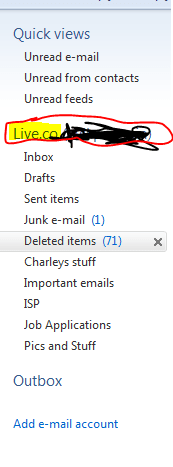
2. Right click the "Account Name" in the left hand side bar (If you haven't changed it, it will probably have a stupid name like "Tiscalli.co" (see attached image, excuse the mess, was obscuring my email address)
Snip.PNG
3. Click Remove Account.
4. Click "Add a New Account" at the bottom of the sidebar. (probably up where you clicked "Remove Account" now)
5. Input Hotmail details.
6. Restart Windows Live Mail to double check it's being used as default Email client. (If it doesn't ask, it is)
7. Right click the new account (Like your going to remove it) and make sure "Set as Default Account" is checked. If it's not, then check it.
8. Enjoy :)
 

My Computer

Computer type
PC/Desktop
Computer Manufacturer/Model Number
Medion Erazer (note to self: insert model number) - with custom additions
OS
Windows 10 Pro x64
CPU
Intel Core i5 7400 @ 3.00GHz
Motherboard
OEM supllied with PC
Memory
8GB 2133Mhz DDR4 (OEM supplied)
Graphics Card(s)
Gygabyte Windforce GTX 1050Ti (Factory Overclocked)
Sound Card
Realtek
Monitor(s) Displays
Acer Al1980 + HKC
Screen Resolution
1360*768(HKC) / 1280*1024(Acer)
Hard Drives
1TB Toshiba
1TB WD Caviar Green
120GB Samsung Evo 840
PSU
OEM supplied (no power rating on case)
Case
OEM Supplied
Cooling
Stock
Keyboard
Logitech Wireless
Mouse
Logitect Wireless
Internet Speed
40Mb/s Down 10Mb/s Up
Antivirus
Defender
Browser
Firefox
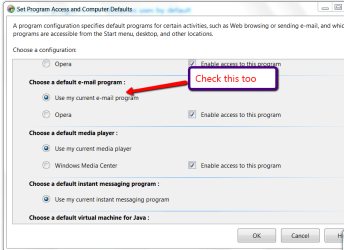
See picture:
 

Attachments

  • 2011-04-11_1735.png
    2011-04-11_1735.png
    24.4 KB · Views: 48

My Computer

Computer Manufacturer/Model Number
HP, Dell, Gateway, Toshiba - 4 laptops and 2 desktops
OS
Vista, Windows7, Mint Mate, Zorin, Windows 8
CPU
from 1.6GHz Duo to i7
Monitor(s) Displays
2x HP w2207
Hard Drives
5x HDD, 7x SSD, 12x Externals
Keyboard
with trackball - no mices
Mouse
Trackball mice
Internet Speed
DSL 6000
Thank you very much severedsolo. That's worked fine and I now have Hotmail coming through into Windows Live.
 

My Computer

OS
Windows 7
Back
Top