Making Windows 7 install a driver for an old printer

450125

New member
Power User
Local time
4:33 AM
Messages
281
I have now successfully configured most of a new laptop's functionality under Windows 7 (that came preinstalled).

However, I'm bogging down on getting my network printer to work with it. It's an HP 920C deskjet - pretty old computer.

The printer is hardwired to a machine running XP, and all the other computers (all XP) in my home can print to it over our wireless network.

The W7 laptop is FINDING the printer okay, but can't find drivers for it.

Installing the Product with the USB Cable and Using the Windows Update Driver or the Driver Located in the Windows 7 Operating System - HP Customer Care (United States - English) tells me that "I'm all set because Windows update has the drivers." But I can't figure out how to get those drivers onto my computer and make the printer work.

X86-all-4189_1228a7cf7b1aac21346b20cb6e21db409dde9e72 is a cabinet file I downloaded from Microsoft, that purports to have the 920C driver file(s) I need for Windows 7. But I don't know what I do with this file to make the O/S know about the drivers.

Any ideas?
 

My Computer

Computer Manufacturer/Model Number
custom-built
OS
Win7 Professional 64
CPU
Intel I3 550 (3.2 GHz)
Motherboard
GIGABYTE|GA-H55M-S2V H55 1156 R
Memory
8 gig (2x4gig Kingston DDR 3)
Graphics Card(s)
Intel HD graphics (from CPU)
Sound Card
Realtek ALC888B
Monitor(s) Displays
ViewSonic
Screen Resolution
1280x1024
Hard Drives
Seagate ST3250310CS (250 gig C drive for OS and programs)
WDC WD5000AAKS-00V1A0 (2x500 gig drives, software mirrored in a RAID 1 configuration, as a D drive, for documents and data)
Internet Speed
download > 15 mbps; upload approx 1 mbps
It should work if you follow these steps:

In Seven:
  • Go to Devices and Printers (Start > Devices and Printers)
  • Click Add a printer
  • Click Add a local printer
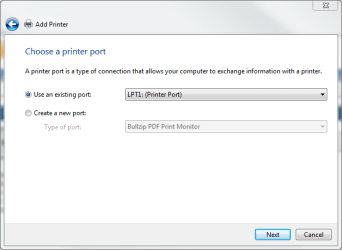
  • Choose Use an existing port: LPT1:

    1.PNG
    .
  • Click Next
  • Choose Manufacturer HP and Printer HP DeskJet 920C:

    2.png
    .
  • Click Next
  • Follow the instructions given on screen
  • Connect the printer to the Seven machine when asked to do that

When the printer is locally installed to Seven, reconnect it back to the XP Machine.

In Seven:
  • Go to Devices and Printers (Start > Devices and Printers)
  • Click Add a printer
  • Click Add a local printer
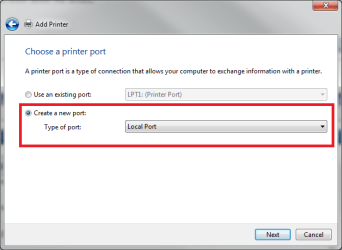
  • Choose Create a new port: Local port:

    3.png
    .
  • Click Next
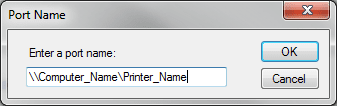
  • Give the port a name. Format is \\Computer_Name\Printer_Name, where Computer_Name is the network name of your XP computer and Printer_Name is the name printer is shared with:

    4.PNG
    .
  • Click OK
  • Follow the instructions given on screen

It should work now.

Kari
 

My Computer

Computer type
Laptop
Computer Manufacturer/Model Number
HP ENVY 17-1150eg
OS
Windows 10 Pro x64 EN-GB
CPU
1.6 GHz Intel Core i7-720QM Processor
Memory
6 GB
Graphics Card(s)
ATI Mobility Radeon HD 5850 Graphics
Sound Card
Beats sound system with integrated subwoofer
Monitor(s) Displays
17" laptop display, 22" LED and 32" Full HD TV through HDMI
Screen Resolution
1600*900 (1), 1920*1080 (2&3)
Hard Drives
Internal: 2 x 500 GB SATA Hard Disk Drive 7200 rpm
External: 2TB for backups, 3TB USB3 network drive for media
Cooling
As Envy runs a bit warm, I have it on a Cooler Master pad
Keyboard
Logitech diNovo Media Desktop Laser (bluetooth)
Mouse
Logitech Performance Mouse MX
Internet Speed
50/10 Mbps VDSL
Antivirus
Windows Defender 4.3.9431.0
Browser
Maxthon 3.5.2., IE11
Thanks Kari - next problem

Hi Kari,

Your solution worked perfectly. Followed the instructions to the letter, and all was well. I could print to the printer wirelessly; it found it on the network.

But just because I know that sometimes it's best to restart a computer and see if changes REALLY took, I did just that. And my printer is still there, as the default printer, but there are printer errors (or error) that prevents me from printing.

I have tried removing the printer then adding it back in. All goes okay, it tells me I've added the printer, but then the test page won't print.

The printer troubleshooter finds nothing wrong (except for "there's another item in the print queue" - well, duh!).

What might have happened between my successfully printing a test page wirelessly and then my failure to do so after restarting the computer? Other than, of course, the fact that I restarted the computer. Obviously I don't want to have to physically attach the printer to the computer every time I use it, then follow the steps Kari outlined so I can print wirelessly, each time I restart the computer.
 

My Computer

Computer Manufacturer/Model Number
custom-built
OS
Win7 Professional 64
CPU
Intel I3 550 (3.2 GHz)
Motherboard
GIGABYTE|GA-H55M-S2V H55 1156 R
Memory
8 gig (2x4gig Kingston DDR 3)
Graphics Card(s)
Intel HD graphics (from CPU)
Sound Card
Realtek ALC888B
Monitor(s) Displays
ViewSonic
Screen Resolution
1280x1024
Hard Drives
Seagate ST3250310CS (250 gig C drive for OS and programs)
WDC WD5000AAKS-00V1A0 (2x500 gig drives, software mirrored in a RAID 1 configuration, as a D drive, for documents and data)
Internet Speed
download > 15 mbps; upload approx 1 mbps
Strange.

First, in any case you should only be forced to do the latter part again, the drivers installed in the first part should still be there also after reboot.

Two things you could check (both machines, images from Seven):

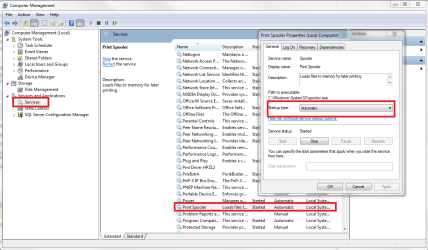
First, check that Print Spooler is running (started) and that is starts automatically:

print_spooler.png

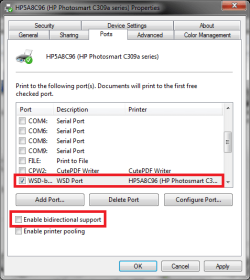
Then, disable bidirectional support (Printer properties > Port tab). Bidirectional support on HP printers sometimes messes with the print queue and spooling.

Choose the right port and printer, uncheck the checkbox:

bidirectional.png

Try if this fixes the issue. Come back to tell how it went.

Kari
 

My Computer

Computer type
Laptop
Computer Manufacturer/Model Number
HP ENVY 17-1150eg
OS
Windows 10 Pro x64 EN-GB
CPU
1.6 GHz Intel Core i7-720QM Processor
Memory
6 GB
Graphics Card(s)
ATI Mobility Radeon HD 5850 Graphics
Sound Card
Beats sound system with integrated subwoofer
Monitor(s) Displays
17" laptop display, 22" LED and 32" Full HD TV through HDMI
Screen Resolution
1600*900 (1), 1920*1080 (2&3)
Hard Drives
Internal: 2 x 500 GB SATA Hard Disk Drive 7200 rpm
External: 2TB for backups, 3TB USB3 network drive for media
Cooling
As Envy runs a bit warm, I have it on a Cooler Master pad
Keyboard
Logitech diNovo Media Desktop Laser (bluetooth)
Mouse
Logitech Performance Mouse MX
Internet Speed
50/10 Mbps VDSL
Antivirus
Windows Defender 4.3.9431.0
Browser
Maxthon 3.5.2., IE11
The spooler was started automatically already. And bi-directional support was grayed out, and unchecked.

This is driving me nuts! I tried just deleting the port, and when I did, I got a message saying the requested resource was in use. Is there a way I could FORCE the deletion of the port?

I don't want to "roll back" the system. And maybe I could just try again plugging the printer in, then doing as I did before. But still, it was working, I restarted, and then it wasn't working.
 

My Computer

Computer Manufacturer/Model Number
custom-built
OS
Win7 Professional 64
CPU
Intel I3 550 (3.2 GHz)
Motherboard
GIGABYTE|GA-H55M-S2V H55 1156 R
Memory
8 gig (2x4gig Kingston DDR 3)
Graphics Card(s)
Intel HD graphics (from CPU)
Sound Card
Realtek ALC888B
Monitor(s) Displays
ViewSonic
Screen Resolution
1280x1024
Hard Drives
Seagate ST3250310CS (250 gig C drive for OS and programs)
WDC WD5000AAKS-00V1A0 (2x500 gig drives, software mirrored in a RAID 1 configuration, as a D drive, for documents and data)
Internet Speed
download > 15 mbps; upload approx 1 mbps
You can not delete the port from Printer Properties > Port? Maybe turning the XP off and rebooting Seven?

This method normally always works, if the networked computers can see each other. My 'big' printer (ISO A3) is an old one with no Seven drivers, so I have it connected to virtual machine running XP and installed in Seven following this routine. Works.

My next try would be to delete the port in Seven, uninstall all 920C related drivers and software (only in Seven) and after reboot try again, only this time forgetting the phase one, going directly to port setup and see if the system can find the drivers itself.

I'm sorry, I can not think anything else at the moment. I'll be back if I'll find something.

Kari
 
Last edited:

My Computer

Computer type
Laptop
Computer Manufacturer/Model Number
HP ENVY 17-1150eg
OS
Windows 10 Pro x64 EN-GB
CPU
1.6 GHz Intel Core i7-720QM Processor
Memory
6 GB
Graphics Card(s)
ATI Mobility Radeon HD 5850 Graphics
Sound Card
Beats sound system with integrated subwoofer
Monitor(s) Displays
17" laptop display, 22" LED and 32" Full HD TV through HDMI
Screen Resolution
1600*900 (1), 1920*1080 (2&3)
Hard Drives
Internal: 2 x 500 GB SATA Hard Disk Drive 7200 rpm
External: 2TB for backups, 3TB USB3 network drive for media
Cooling
As Envy runs a bit warm, I have it on a Cooler Master pad
Keyboard
Logitech diNovo Media Desktop Laser (bluetooth)
Mouse
Logitech Performance Mouse MX
Internet Speed
50/10 Mbps VDSL
Antivirus
Windows Defender 4.3.9431.0
Browser
Maxthon 3.5.2., IE11
I figured it out.

The first time that I ran the printer wirelessly, I was forced to log in remotely from the Windows 7 computer to the XP computer where the printer is plugged in. I must have forgotten to check the box saying "remember my credentials."

So after a restart, the problem was that the Windows 7 laptop was no longer logged into the XP printer host. Logging in again, and checking the "remember my credentials" box, appears to have solved the problem - after several restarts, and after several shut downs, then start agains.

Thanks!
 

My Computer

Computer Manufacturer/Model Number
custom-built
OS
Win7 Professional 64
CPU
Intel I3 550 (3.2 GHz)
Motherboard
GIGABYTE|GA-H55M-S2V H55 1156 R
Memory
8 gig (2x4gig Kingston DDR 3)
Graphics Card(s)
Intel HD graphics (from CPU)
Sound Card
Realtek ALC888B
Monitor(s) Displays
ViewSonic
Screen Resolution
1280x1024
Hard Drives
Seagate ST3250310CS (250 gig C drive for OS and programs)
WDC WD5000AAKS-00V1A0 (2x500 gig drives, software mirrored in a RAID 1 configuration, as a D drive, for documents and data)
Internet Speed
download > 15 mbps; upload approx 1 mbps
Nice!
 

My Computer

Computer type
Laptop
Computer Manufacturer/Model Number
HP ENVY 17-1150eg
OS
Windows 10 Pro x64 EN-GB
CPU
1.6 GHz Intel Core i7-720QM Processor
Memory
6 GB
Graphics Card(s)
ATI Mobility Radeon HD 5850 Graphics
Sound Card
Beats sound system with integrated subwoofer
Monitor(s) Displays
17" laptop display, 22" LED and 32" Full HD TV through HDMI
Screen Resolution
1600*900 (1), 1920*1080 (2&3)
Hard Drives
Internal: 2 x 500 GB SATA Hard Disk Drive 7200 rpm
External: 2TB for backups, 3TB USB3 network drive for media
Cooling
As Envy runs a bit warm, I have it on a Cooler Master pad
Keyboard
Logitech diNovo Media Desktop Laser (bluetooth)
Mouse
Logitech Performance Mouse MX
Internet Speed
50/10 Mbps VDSL
Antivirus
Windows Defender 4.3.9431.0
Browser
Maxthon 3.5.2., IE11
Good work Kari! I'd give you rep if I could so instead I'll give you props here :)
 

My Computer

Computer Manufacturer/Model Number
tw33k
OS
Windows 7 Ultimate (x64) SP1
CPU
Intel 3770k 4.6GHz
Motherboard
ASUS Maximus V Formula
Memory
8GB (2x 4GB) Crucial Ballistix
Graphics Card(s)
Sapphire 7950 (1060/1600)
Sound Card
On Board Realtek HD Audio
Monitor(s) Displays
27" Acer B273HU (via HDMI)
Screen Resolution
2048 x 1152
Hard Drives
Crucial M4 128GB
2TB WD Black
1TB Samsung F3 SATA
1TB WD Elite External
2TB WD USB 3.0
PSU
Corsair AX750 Gold
Case
Corsair Obsidian 800DW
Cooling
Corsair H100 (2x AP-121/2x UK-3000 push/pull)
Keyboard
Microsoft Wireless 5000
Mouse
Microsoft Wireless 5000
Internet Speed
5mb/s
Other Info
Logitech z-2300 2.1 speakers
Lamptron FC-5 v2
Thanks tw33k!
 

My Computer

Computer type
Laptop
Computer Manufacturer/Model Number
HP ENVY 17-1150eg
OS
Windows 10 Pro x64 EN-GB
CPU
1.6 GHz Intel Core i7-720QM Processor
Memory
6 GB
Graphics Card(s)
ATI Mobility Radeon HD 5850 Graphics
Sound Card
Beats sound system with integrated subwoofer
Monitor(s) Displays
17" laptop display, 22" LED and 32" Full HD TV through HDMI
Screen Resolution
1600*900 (1), 1920*1080 (2&3)
Hard Drives
Internal: 2 x 500 GB SATA Hard Disk Drive 7200 rpm
External: 2TB for backups, 3TB USB3 network drive for media
Cooling
As Envy runs a bit warm, I have it on a Cooler Master pad
Keyboard
Logitech diNovo Media Desktop Laser (bluetooth)
Mouse
Logitech Performance Mouse MX
Internet Speed
50/10 Mbps VDSL
Antivirus
Windows Defender 4.3.9431.0
Browser
Maxthon 3.5.2., IE11
Back
Top