malicious? "Host process for windows tasks" in notification area icons

Keyes

New member
Member
VIP
Local time
12:23 PM
Messages
122
malicious? "Host process for windows tasks" in notification area icons

When I view my notification area icons, I see an entry for "host process for windows tasks". I believe it is related to either rundll32 or task host, both of which are all in their legitimate folders.

is there any reason why this would be here? It is set to show only notifications. What notifications would taskhost make?
 

My Computer My Computer

Computer type
PC/Desktop
OS
Windows 7 Home Premium 64 bit

My Computer My Computer

Computer type
PC/Desktop
Computer Manufacturer/Model Number
Self built using existing case
OS
Windows 7 Home Premium 64 bit sp1
CPU
Intel i5 3570 3.4Ghz Ivy Bridge SKT 1155 quad core
Motherboard
Gigabyte Z77-HD3 SKT 1155 2xSata 3, 4x USB 3.0
Memory
G-Skill Rip Jaws 16Gb (8x2) DDR3 -1600 PC3 12800 CL 10 red
Graphics Card(s)
Gigabyte NVIDIA GT610 1Gb DDR3 810/1200 PCI-E 2.0 Silent
Sound Card
NVIDIA High Definition & Realtech High Definition Audio
Monitor(s) Displays
2 x Philips 226V4L 16:9 aspect ratio
Screen Resolution
1920 x 1080 HD
Hard Drives
Samsung 840 Pro 256gb SSD, SATA 3.
Hitachi Touro Portable 1tb, USB 3.0 HDD used for image b/ups.
PSU
Corsair VS450
Case
Codeng
Cooling
PSU fan & CPU fan
Keyboard
Logitech
Mouse
Logitech Wireless trackball M570
Internet Speed
Wireless 3G. 3mg down & 550kb up.
Antivirus
Bitdefender Internet Security 2020
Browser
Opera (Current Version) & Firefox
Other Info
MS Office 2013 Pro. Davis weather station software. MGE Nova 600 avr UPS.
I understand taskhost is a legitimate file, but what causes it to appear in the notification area icons? Currently I dont see an icon, but I see it under the custmise button in the image I posted
 

My Computer My Computer

Computer type
PC/Desktop
OS
Windows 7 Home Premium 64 bit
So does anyone have any idea? I really need help with this.
 

My Computer My Computer

Computer type
PC/Desktop
OS
Windows 7 Home Premium 64 bit
Reset notification area?

So does anyone have any idea? I really need help with this.

It will probably disappear if you reset the notification area. It's probably an old item if you don't see the active icon in your system tray.

What I usually do is kill Explorer using task manager then File > New Task > Run

type ie4uinit.exe -ClearIconCache and press enter.

File > New Task > Run

type explorer.exe then press enter

Exit Task Manager

Right click a blank part of your Desktop and choose "Refresh"

That rebuilds the icon cache (it's the best and most reliable method for me)

Following that I proceed to run the batch file in Brink's tutorial to reset the notification area:

http://www.sevenforums.com/tutorials/13102-notification-area-icons-reset.html

Then after the reboot re-customise by right clicking Start > Properties > Taskbar > "Notification Area > Customize"

In theory you won't see "Host process for windows tasks" in the list.

Edit: Reading your post on another forum it would appear that you reset the notification area already. Are you saying that it still shows up? And if so have you plugged in any external devices?
 
Last edited:

My Computer My Computer

Computer type
Laptop
Computer Manufacturer/Model Number
ASUS
OS
Microsoft Windows 7 Home Premium 64-bit 7601 Multiprocessor Free Service Pack 1
CPU
AMD C-60 APU with Radeon(tm) HD Graphics
Motherboard
ASUSTeK COMPUTER INC. X501U
Memory
4.00 GB
Graphics Card(s)
AMD Radeon HD 6290 Graphics
Sound Card
(1) AMD High Definition Audio Device (2) Realtek High Defi
Screen Resolution
1366 x 768 x 32 bits (4294967296 colors) @ 60 Hz
Hard Drives
Hitachi HTS545050A7E380 SATA Disk Device
Antivirus
Comodo CIS & FW, SecureAplus App Whitelisting, Threatfire
Browser
Cyberfox 64bit, Opera 64bit, Airfox
Other Info
Spy-The-Spy, HitmanPro.Alert, Norton Connect Safe, MJRegWatcher, BitDefender TrafficLight, Voodoo Shield, Zemana AntiMalware
Yes, I deleted two registry keys.


HKEY_CURRENT_USER\Software\Classes\Local Settings\Software\Microsoft\Windows\CurrentVersion\TrayNotify


Iconstream and pasticonstreams and reset explorer via task manager.


Its gone, but I want to find the origin. I did a system restore so I could get it back to investigate. Is it malicious? I dont see why host process for windows tasks would be there. I have my headphones, keyboard, mouse and installed a new gpu few weeks ago.
 

My Computer My Computer

Computer type
PC/Desktop
OS
Windows 7 Home Premium 64 bit
taskhost.exe

Well this is a tough one. Apparently it can relate to plugging external drives into USB 3 ports - at least according to a little research but yes it can also be malware related. The best information that I can find suggests searching your windows partition for "taskhost.exe"

It should show up in "C:\Windows\System32\taskhost.exe" - that's normal.

If it shows up in:

%Windir% - copy and paste into explorer address bar. If it shows up here then it's suspect.

As for tracking down possible malware I'm pretty confident with my own machine but not so confident providing advice to others. Personally I'd keep an eye on connections and look for anything dodgy.

This utility does that:

CrowdInspect

If you choose "Run as Admin" when running the executable then toggle "Show full path" and "Live/ History" and see if anything suspicious shows up. If it does - ask about it in the System Security section.
[/B][/URL]

Alternatively you can leave this running overnight:

ThreatCheck

There's more info on both utilities here and they can both pick up suspicious activity that your AV might miss. Note: suspicious does not always mean malicious.

http://www.sevenforums.com/software/348608-threatcheck-released.html

Note: If using ThreatCheck - use a disposable email address if you wish to avoid marketing emails from the company. They don't flood you with emails but you can expect one or two!

If anything suspicious shows up - again the advice is to post it in the System Security section.
 
Last edited:

My Computer My Computer

Computer type
Laptop
Computer Manufacturer/Model Number
ASUS
OS
Microsoft Windows 7 Home Premium 64-bit 7601 Multiprocessor Free Service Pack 1
CPU
AMD C-60 APU with Radeon(tm) HD Graphics
Motherboard
ASUSTeK COMPUTER INC. X501U
Memory
4.00 GB
Graphics Card(s)
AMD Radeon HD 6290 Graphics
Sound Card
(1) AMD High Definition Audio Device (2) Realtek High Defi
Screen Resolution
1366 x 768 x 32 bits (4294967296 colors) @ 60 Hz
Hard Drives
Hitachi HTS545050A7E380 SATA Disk Device
Antivirus
Comodo CIS & FW, SecureAplus App Whitelisting, Threatfire
Browser
Cyberfox 64bit, Opera 64bit, Airfox
Other Info
Spy-The-Spy, HitmanPro.Alert, Norton Connect Safe, MJRegWatcher, BitDefender TrafficLight, Voodoo Shield, Zemana AntiMalware
Well actually I have been connecting and reconnecting various devices into my usb 3.0 ports lately, and only used began to use them in the last week. I keep my system secure, infact I rarely use an internet browser other than youtube, and when it comes to downloading, I usually just get sysinternal tools, like autoruns and tcpvew. I don't see anything lately that I have done that would cause a malicious action, but it seems odd.


I can give a go at messing around with usb 3.0 ports and see if it makes the icon active. Also, a full mbam scan is clean.
 

My Computer My Computer

Computer type
PC/Desktop
OS
Windows 7 Home Premium 64 bit
I have 4 taskhost.exe files.

1 in system32, and 3 in winsxs, which I believe are all legit. As I said, mbam detects no bad network activity and the scans are clean.
 

My Computer My Computer

Computer type
PC/Desktop
OS
Windows 7 Home Premium 64 bit
Taskhost.exe

I have 4 taskhost.exe files.

1 in system32, and 3 in winsxs, which I believe are all legit. As I said, mbam detects no bad network activity and the scans are clean.

That's how it should be. Nothing to worry about then. About the only other thing I might be able to suggest is to run ProcessExplorer. (Right click the executable) and choose "Run as adminstrator"

See the tutorial here:

http://www.sevenforums.com/tutorial...er-virustotal-check-all-processes-50-avs.html

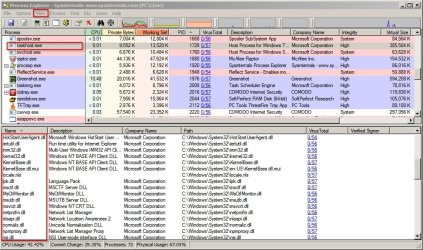
Once you've got it set up to scan processes with VirusTotal take a look at the processes running as .dll's under taskhost.exe

Change View to "Show Lower Pane" and change "Lower Pane View" to "Show DLL's"

Highlight taskhost.exe in the list of running processes and check the VirusTotal scores for the listed DLL's.

If the icon reappears any time soon post again and there's another tool that can check all executables that were run or created during the last 30 days.

Process Explorer.jpg
 
Last edited:

My Computer My Computer

Computer type
Laptop
Computer Manufacturer/Model Number
ASUS
OS
Microsoft Windows 7 Home Premium 64-bit 7601 Multiprocessor Free Service Pack 1
CPU
AMD C-60 APU with Radeon(tm) HD Graphics
Motherboard
ASUSTeK COMPUTER INC. X501U
Memory
4.00 GB
Graphics Card(s)
AMD Radeon HD 6290 Graphics
Sound Card
(1) AMD High Definition Audio Device (2) Realtek High Defi
Screen Resolution
1366 x 768 x 32 bits (4294967296 colors) @ 60 Hz
Hard Drives
Hitachi HTS545050A7E380 SATA Disk Device
Antivirus
Comodo CIS & FW, SecureAplus App Whitelisting, Threatfire
Browser
Cyberfox 64bit, Opera 64bit, Airfox
Other Info
Spy-The-Spy, HitmanPro.Alert, Norton Connect Safe, MJRegWatcher, BitDefender TrafficLight, Voodoo Shield, Zemana AntiMalware
Will try some methods soon, just rerunning mbam and did a process explorer dll and handle search for taskhost.


I see one entry under system, as a process.
Onder under csrss.exe as a process, 10 as threads.
1 taskhost process under services.exe
1 process under lsass.exe
1 process under svchost
20 or so threadscof taskhost.exe as itself.
 

My Computer My Computer

Computer type
PC/Desktop
OS
Windows 7 Home Premium 64 bit
Process Explorer

What you want to see is a list of DLL's shown in the lower pane being scanned by VirusTotal when you highlight taskhost.exe. It's just as well to check the rest of the running processes.

I have a very vague memory that I might have seen your problem notification area entry on my own machine once before after Windows installed updates. I'm not 100% sure though!
 

My Computer My Computer

Computer type
Laptop
Computer Manufacturer/Model Number
ASUS
OS
Microsoft Windows 7 Home Premium 64-bit 7601 Multiprocessor Free Service Pack 1
CPU
AMD C-60 APU with Radeon(tm) HD Graphics
Motherboard
ASUSTeK COMPUTER INC. X501U
Memory
4.00 GB
Graphics Card(s)
AMD Radeon HD 6290 Graphics
Sound Card
(1) AMD High Definition Audio Device (2) Realtek High Defi
Screen Resolution
1366 x 768 x 32 bits (4294967296 colors) @ 60 Hz
Hard Drives
Hitachi HTS545050A7E380 SATA Disk Device
Antivirus
Comodo CIS & FW, SecureAplus App Whitelisting, Threatfire
Browser
Cyberfox 64bit, Opera 64bit, Airfox
Other Info
Spy-The-Spy, HitmanPro.Alert, Norton Connect Safe, MJRegWatcher, BitDefender TrafficLight, Voodoo Shield, Zemana AntiMalware
I did have a new .net framework update. Was it a recent one, or many updates ago this memory comes from?


Just tried out virustotal, and just one program had 1/57 - iusb3mon.exe. its a signed file, and seems to be labled as a generic w32 hfs.adware 2048 by Bkav. Must be a false positive. (Running intel chip, file has existed for years.)


Im not sure if I understand how to get virsutotal to scan .dlls though.
 

My Computer My Computer

Computer type
PC/Desktop
OS
Windows 7 Home Premium 64 bit
False Positive

I did have a new .net framework update. Was it a recent one, or many updates ago this memory comes from?


Just tried out virustotal, and just one program had 1/57 - iusb3mon.exe. its a signed file, and seems to be labled as a generic w32 hfs.adware 2048 by Bkav. Must be a false positive. (Running intel chip, file has existed for years.)


Im not sure if I understand how to get virsutotal to scan .dlls though.

1/57 detection sure does look like a false positive.

If you click the "View" tab in the Process Explorer toolbar then select "Show Lower Pane" then under the "View" tab the next entry is "Lower Pane View" - set that to "Show DLL's" then highlight taskhost.exe in te process list.

It probably won't show any detections but it's best to check.

Re: Windows updates. It was ages ago that's why my memory isn't clear. I just thought that I'd mention it!

The other thing is that I have a habit of regularly reseting notification area icons and clearing icon cache anyway!
 

My Computer My Computer

Computer type
Laptop
Computer Manufacturer/Model Number
ASUS
OS
Microsoft Windows 7 Home Premium 64-bit 7601 Multiprocessor Free Service Pack 1
CPU
AMD C-60 APU with Radeon(tm) HD Graphics
Motherboard
ASUSTeK COMPUTER INC. X501U
Memory
4.00 GB
Graphics Card(s)
AMD Radeon HD 6290 Graphics
Sound Card
(1) AMD High Definition Audio Device (2) Realtek High Defi
Screen Resolution
1366 x 768 x 32 bits (4294967296 colors) @ 60 Hz
Hard Drives
Hitachi HTS545050A7E380 SATA Disk Device
Antivirus
Comodo CIS & FW, SecureAplus App Whitelisting, Threatfire
Browser
Cyberfox 64bit, Opera 64bit, Airfox
Other Info
Spy-The-Spy, HitmanPro.Alert, Norton Connect Safe, MJRegWatcher, BitDefender TrafficLight, Voodoo Shield, Zemana AntiMalware
Currently have the .dll lower pane tab set, it also shows .exes and .mui, .db, .nls, etc, but mainly .dlls. Only file with a detection is the iusbmon, which is a false poaitiv3. Spent 10-15 mins or looking at each process, and all related dlls and files above were clean.

How does it sound?
 

My Computer My Computer

Computer type
PC/Desktop
OS
Windows 7 Home Premium 64 bit
No detections?

Currently have the .dll lower pane tab set, it also shows .exes and .mui, .db, .nls, etc, but mainly .dlls. Only file with a detection is the iusbmon, which is a false poaitiv3. Spent 10-15 mins or looking at each process, and all related dlls and files above were clean.

How does it sound?

It sounds okay to me. Just post again if that notification area entry ever reappears. As far as malware and stuff goes - it's only a big problem if it's sending your data to a server somewhere or asking you for money to fix something. If there's no malicious ip address connections detected and no dodgy running processes then I wouldn't worry about it!
 

My Computer My Computer

Computer type
Laptop
Computer Manufacturer/Model Number
ASUS
OS
Microsoft Windows 7 Home Premium 64-bit 7601 Multiprocessor Free Service Pack 1
CPU
AMD C-60 APU with Radeon(tm) HD Graphics
Motherboard
ASUSTeK COMPUTER INC. X501U
Memory
4.00 GB
Graphics Card(s)
AMD Radeon HD 6290 Graphics
Sound Card
(1) AMD High Definition Audio Device (2) Realtek High Defi
Screen Resolution
1366 x 768 x 32 bits (4294967296 colors) @ 60 Hz
Hard Drives
Hitachi HTS545050A7E380 SATA Disk Device
Antivirus
Comodo CIS & FW, SecureAplus App Whitelisting, Threatfire
Browser
Cyberfox 64bit, Opera 64bit, Airfox
Other Info
Spy-The-Spy, HitmanPro.Alert, Norton Connect Safe, MJRegWatcher, BitDefender TrafficLight, Voodoo Shield, Zemana AntiMalware
Thanks. Im going to reset the icons now (its still there since I did a restore to get it back to investigate. )


Is the method of deleting the iconstreams and pasticonsteams the recommended way? I apologise for any mispellings, using an android.
 

My Computer My Computer

Computer type
PC/Desktop
OS
Windows 7 Home Premium 64 bit

My Computer My Computer

Computer type
Laptop
Computer Manufacturer/Model Number
ASUS
OS
Microsoft Windows 7 Home Premium 64-bit 7601 Multiprocessor Free Service Pack 1
CPU
AMD C-60 APU with Radeon(tm) HD Graphics
Motherboard
ASUSTeK COMPUTER INC. X501U
Memory
4.00 GB
Graphics Card(s)
AMD Radeon HD 6290 Graphics
Sound Card
(1) AMD High Definition Audio Device (2) Realtek High Defi
Screen Resolution
1366 x 768 x 32 bits (4294967296 colors) @ 60 Hz
Hard Drives
Hitachi HTS545050A7E380 SATA Disk Device
Antivirus
Comodo CIS & FW, SecureAplus App Whitelisting, Threatfire
Browser
Cyberfox 64bit, Opera 64bit, Airfox
Other Info
Spy-The-Spy, HitmanPro.Alert, Norton Connect Safe, MJRegWatcher, BitDefender TrafficLight, Voodoo Shield, Zemana AntiMalware
I've seen it come up again, and I believe it is related totto the pop up that comes up when when windows detects "slow performance" and tries to switch aero. I recently saw that pop up, and it also shares the same yellow exclamation mark, which now appears in the notification bar.
 

My Computer My Computer

Computer type
PC/Desktop
OS
Windows 7 Home Premium 64 bit
Back
Top