

Hey guys.
So my PC has been on now for approximately 50 minutes and when it logged on and connected to my wireless network, Kaspersky Internet Security starts to download it's updates. Next thing I see if Kaspersky's Network Security Map pop up with 3 infection detections...when in fact these "files" were not on my PC last night, at all.. I tweet to Kaspersky on Twitter and they claim that it's something I've downloaded.. Now, me being me, I'm a freak for security and will do and prevent anything from causing a security risk on my system. I just won't allow it. I have strict network filters set up through the Kaspersky Internet Security program so that I am alerted of anything coming in and/or going out. If there's something coming in or out, whether it's Internet traffic or not I want to know about it so I can keep an eye on it if need be.
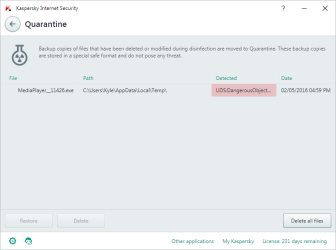
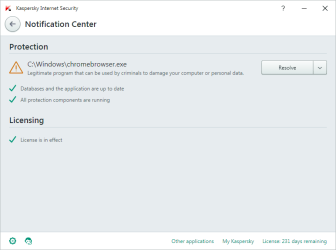
First of all, the security map from Kaspersky appears and says it detected some "MediaPlayer" exe file in my Temporary Internet Files. For a start, no such file was present in my TIFs last night.. I have my KIS scan my system daily..and nothing gets detected, thus it saying my system is clean. (right?) Yet when I boot up at 5:00 PM (London time) Kaspersky detects this MediaPlayer file. So it disinfects/removes it. (well, so it claims) and then as KIS is still downloading it's usual updates, another 2 things are detected/downloaded to my PC. "chromebrowser.exe" and 2 other things..
Here's the logs:
Scanning reports:
System Watcher:
What do you guys make of this?
https://twitter.com/nsanityhd/status/727178737314320386
So my PC has been on now for approximately 50 minutes and when it logged on and connected to my wireless network, Kaspersky Internet Security starts to download it's updates. Next thing I see if Kaspersky's Network Security Map pop up with 3 infection detections...when in fact these "files" were not on my PC last night, at all.. I tweet to Kaspersky on Twitter and they claim that it's something I've downloaded.. Now, me being me, I'm a freak for security and will do and prevent anything from causing a security risk on my system. I just won't allow it. I have strict network filters set up through the Kaspersky Internet Security program so that I am alerted of anything coming in and/or going out. If there's something coming in or out, whether it's Internet traffic or not I want to know about it so I can keep an eye on it if need be.
First of all, the security map from Kaspersky appears and says it detected some "MediaPlayer" exe file in my Temporary Internet Files. For a start, no such file was present in my TIFs last night.. I have my KIS scan my system daily..and nothing gets detected, thus it saying my system is clean. (right?) Yet when I boot up at 5:00 PM (London time) Kaspersky detects this MediaPlayer file. So it disinfects/removes it. (well, so it claims) and then as KIS is still downloading it's usual updates, another 2 things are detected/downloaded to my PC. "chromebrowser.exe" and 2 other things..
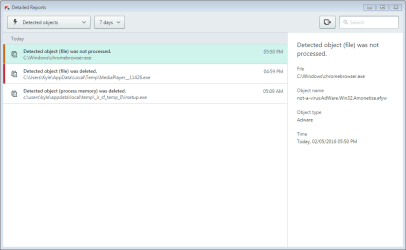
Here's the logs:
Code:
02.05.2016 17.52.51;Detected object (file) was deleted.;C:\Windows\chromebrowser.exe;C:\Windows\chromebrowser.exe;not-a-virus:AdWare.Win32.Amonetize.efyw;Adware;05/02/2016 17:52:51
02.05.2016 16.59.37;Detected object (file) was deleted.;C:\Users\Kyle\AppData\Local\Temp\MediaPlayer__11426.exe;C:\Users\Kyle\AppData\Local\Temp\MediaPlayer__11426.exe;UDS:DangerousObject.Multi.Generic;Unknown threat;05/02/2016 16:59:37
02.05.2016 05.09.06;Detected object (process memory) was deleted.;c:\users\kyle\appdata\local\temp\_ir_sf_temp_0\irsetup.exe;c:\users\kyle\appdata\local\temp\_ir_sf_temp_0\irsetup.exe;;Unknown threat;05/02/2016 05:09:06
Scanning reports:
02.05.2016 17.54.53;Rootkit Scan;Scanning...;0;0;0;Today, 02/05/2016 04:02 PM;5 minutes, 43 seconds;05/02/2016 17:54:53
02.05.2016 17.08.58;Full Scan;Threats detected: 1, neutralized: 0, not fixed: 1;1;0;1;Today, 02/05/2016 03:51 AM;45 minutes, 53 seconds;Today, 02/05/2016 05:54 PM
02.05.2016 16.59.15;Advanced Disinfection;Threats detected: 1, neutralized: 1, not fixed: 0;1;1;0;Today, 02/05/2016 03:51 AM;3 minutes, 23 seconds;Today, 02/05/2016 05:02 PM
01.05.2016 16.42.06;Rootkit Scan;No threats detected;0;0;0;Yesterday, 01/05/2016 02:34 PM;10 minutes, 45 seconds;Yesterday, 01/05/2016 04:52 PM
29.04.2016 22.29.34;Full Scan;No threats detected;0;0;0;29/04/2016 03:15 PM;2 hours, 4 minutes;30/04/2016 12:34 AM
29.04.2016 19.26.43;Rootkit Scan;No threats detected;0;0;0;28/04/2016 06:00 PM;7 minutes, 15 seconds;29/04/2016 07:33 PM
27.04.2016 14.38.52;Rootkit Scan;No threats detected;0;0;0;27/04/2016 11:38 AM;7 minutes, 12 seconds;27/04/2016 02:46 PM
25.04.2016 18.47.45;Rootkit Scan;No threats detected;0;0;0;25/04/2016 10:30 AM;28 minutes, 35 seconds;25/04/2016 07:16 PM
25.04.2016 17.51.57;Selective Scan;No threats detected;0;0;0;25/04/2016 10:30 AM;0 seconds;04/25/2016 17:51:57
24.04.2016 18.47.44;Rootkit Scan;No threats detected;0;0;0;24/04/2016 11:48 AM;7 minutes, 8 seconds;24/04/2016 06:54 PM
23.04.2016 18.46.57;Rootkit Scan;No threats detected;0;0;0;23/04/2016 03:48 PM;8 minutes, 7 seconds;23/04/2016 06:55 PM
System Watcher:
See how it seems these detections are from today? from 5:00 PM when KIS started it's updating/downloading? Yeah...02.05.2016 17.05.13;Task started;System Watcher;05/02/2016 17:05:13
02.05.2016 16.49.34;Task started;System Watcher;05/02/2016 16:49:34
02.05.2016 05.08.25;Malicious program terminated;PDM:Trojan.Win32.Generic;Setup Application;C:\Users\Kyle\AppData\Local\Temp\_ir_sf_temp_1\irsetup.exe;05/02/2016 05:08:25
02.05.2016 05.08.25;Malicious program terminated;PDM:Trojan.Win32.Generic;Setup Application;C:\Users\Kyle\AppData\Local\Temp\_ir_sf_temp_2\irsetup.exe;05/02/2016 05:08:25
02.05.2016 05.08.25;Malicious program terminated;PDM:Trojan.Win32.Generic;Setup Application;C:\Users\Kyle\AppData\Local\Temp\acc.exe;05/02/2016 05:08:25
02.05.2016 05.08.25;Malicious program detected;PDM:Trojan.Win32.Generic;Setup Application;c:\users\kyle\appdata\local\temp\appstart.exe;05/02/2016 05:08:25
02.05.2016 05.08.25;Malicious program detected;PDM:Trojan.Win32.Generic;Setup Application;c:\users\kyle\appdata\local\temp\_ir_sf_temp_1\irsetup.exe;05/02/2016 05:08:25
02.05.2016 05.08.25;Malicious program detected;PDM:Trojan.Win32.Generic;Setup Application;c:\users\kyle\appdata\local\temp\ads.exe;05/02/2016 05:08:25
02.05.2016 05.08.25;Malicious program detected;PDM:Trojan.Win32.Generic;Setup Application;c:\users\kyle\appdata\local\temp\_ir_sf_temp_0\irsetup.exe;05/02/2016 05:08:25
02.05.2016 05.08.25;Malicious program detected;PDM:Trojan.Win32.Generic;Setup Application;c:\users\kyle\downloads\adobe illustrator cc 2015 19.0.0 (64-bit) + crack\setup.exe;05/02/2016 05:08:25
02.05.2016 05.08.25;Malicious program detected;PDM:Trojan.Win32.Generic;Setup Application;c:\users\kyle\appdata\local\temp\acc.exe;05/02/2016 05:08:25
02.05.2016 05.08.25;Malicious program detected;PDM:Trojan.Win32.Generic;Setup Application;c:\users\kyle\appdata\local\temp\_ir_sf_temp_2\irsetup.exe;05/02/2016 05:08:25
01.05.2016 16.12.49;Task started;System Watcher;05/01/2016 16:12:49
30.04.2016 13.57.01;Task started;System Watcher;04/30/2016 13:57:01
29.04.2016 18.57.29;Task started;System Watcher;04/29/2016 18:57:29
28.04.2016 23.42.54;Task started;System Watcher;04/28/2016 23:42:54
28.04.2016 16.25.14;Task started;System Watcher;04/28/2016 16:25:14
28.04.2016 00.50.12;Task started;System Watcher;04/28/2016 00:50:12
27.04.2016 19.39.40;Task started;System Watcher;04/27/2016 19:39:40
27.04.2016 14.09.43;Task started;System Watcher;04/27/2016 14:09:43
27.04.2016 12.30.40;Task started;System Watcher;04/27/2016 12:30:40
27.04.2016 02.42.35;Task started;System Watcher;04/27/2016 02:42:35
26.04.2016 17.00.02;Task started;System Watcher;04/26/2016 17:00:02
25.04.2016 17.04.28;Task started;System Watcher;04/25/2016 17:04:28
24.04.2016 14.11.23;Task started;System Watcher;04/24/2016 14:11:23
24.04.2016 13.38.42;Task started;System Watcher;04/24/2016 13:38:42
23.04.2016 18.18.25;Task started;System Watcher;04/23/2016 18:18:25
What do you guys make of this?
https://twitter.com/nsanityhd/status/727178737314320386
Attachments
My Computer
- Computer type
- PC/Desktop
- Computer Manufacturer/Model Number
- Custom Built
- OS
- Windows 10 Pro x64 (UPGRADED - 10/20/2016)
- CPU
- AMD FX 8350 (OC: 4.48GHz)
- Motherboard
- ASUS Crosshair V Formula-Z AM3+
- Memory
- 14GB DDR3 Corsair Vengeance
- Graphics Card(s)
- Asus AMD Radeon R9 280X 3GB
- Sound Card
- N/A
- Monitor(s) Displays
- BenQ G2420HD
- Screen Resolution
- 1920x1080
- Hard Drives
- Internal: 1x 500GB WD Blue SSD | 1TB WD Caviar Black | 3x 500GB WD Caviar Green
External: 500GB Seagate
- PSU
- Corsair AX1200i
- Case
- CoolerMaster HAF X
- Cooling
- Corsair Hydro H90 Water Cooling
- Keyboard
- Microsoft SideWinder X6 Keyboard
- Mouse
- Microsoft SideWinder X8 Mouse
- Antivirus
- MSE / Malwarebytes Anti-Malware
- Browser
- Mozilla Firefox + Google Chrome


