Malware/Virus/Problems if not start updates

Insomn1a

New member
Member
Local time
7:52 AM
Messages
56
For several months I have some problems with Windows 7 Ultimate x64.
I didn't know so for where it can be, I checked if is not from some programs, drivers, router, some virus/malware etc and seems to be from Windows.
When I do a fresh install of Windows 7 and I stop updates will appear that problems.
More exactly that problems it manifests itself so:
First, I receive a BSOD(BlueScreen Error) about srv.sys, page_fault_in_nonpaged_area, dumping hard-disk files... and count.
After create some administrator account in Windows named "admin$" and put me choose when I start Windows.
Is and another symptoms, change DNS server in Local Area Connection, IP: 223.5.5.5 and alternative 8.8.8.8 and if I want to disable firewall from Windows to can run some game servers to can connect and another players that firewall will activate itself automatically.

I don't want to do that Windows updates because I'm not a big fan of them.Why?Because used all resources of my PC when I run updates, and load my hard-disk with data from updates.I must to wait everytime when I do that updates, and I lose half a day to wait for the updates, to download them, to install them and to shutdown PC to complete them.I don't want this, I don't really need it.
Before I didn't have any problem with this, I stopped updates everytime when I reinstall Windows.
Procesor and Memory Ram's will be loaded continually when run updates.

My configuration:
Procesor AMD Athlon X2 2.8Ghz
4GB of RAM DDR2 800Mhz
Video card: AMD ATI HD 4670
Hard-disk 1TB
 

Attachments

Last edited:

My Computer

Computer type
PC/Desktop
OS
Windows 7 Ultimate x64
CPU
AMD Athlon(tm) II X2 240 Processor
Motherboard
ASRock N68PV-GS
Memory
4.00 GB / 4.00 GB
Graphics Card(s)
ATI Radeon HD 4600 Series
Sound Card
(1) AMD High Definition Audio Device (2) Realtek High Defi
Hard Drives
SAMSUNG HD103SJ ATA Device
PSU
Segotep SG-600B, 80+ Bronze, 500W
Hi Insomn1a-

I'm don't intend to be rude but have you read your post? I can't understand most of what you're saying except some of the parts about not wanting to do updates.

In regards to the updates, why don't you do a few at a time or whatever number is acceptable to you? I won't harp on the importance of the updates.
 

My Computer

Computer type
Laptop
Computer Manufacturer/Model Number
Dell M6500 Precision Work Station
OS
Windows 7 Pro SP1 64 bit
Memory
8 GB
Screen Resolution
1920x
Internet Speed
30 Mbps
Antivirus
Norton Security
Browser
IE 11
Sorry if you don't understand my english, but otherwise I can't explain that issue if I run updates.
I have detailed why I don't want to install updates, it's not just about the time, is and resources consumed when I run the updates.Please read my topic, I specified how that issue as it happens.
 

My Computer

Computer type
PC/Desktop
OS
Windows 7 Ultimate x64
CPU
AMD Athlon(tm) II X2 240 Processor
Motherboard
ASRock N68PV-GS
Memory
4.00 GB / 4.00 GB
Graphics Card(s)
ATI Radeon HD 4600 Series
Sound Card
(1) AMD High Definition Audio Device (2) Realtek High Defi
Hard Drives
SAMSUNG HD103SJ ATA Device
PSU
Segotep SG-600B, 80+ Bronze, 500W
I don't know exactly what problems you're experiencing. Your post seems to only indicate some things you've done which I don't clearly understand.

From your description of the BSOD, it looks like you need to clean up your hard drive. To do that, go to Start, All Programs, Accessories, System Tools. Run the Disk Cleanup utility. When it tells you how much space it can recover, check the boxes for Temporary Files and Empty Recycle Bin. Let it run. When it's done, reboot. That should help you with the resources problem when running updates.
 

My Computer

Computer type
Laptop
Computer Manufacturer/Model Number
Dell M6500 Precision Work Station
OS
Windows 7 Pro SP1 64 bit
Memory
8 GB
Screen Resolution
1920x
Internet Speed
30 Mbps
Antivirus
Norton Security
Browser
IE 11
Not exactly how you say.
That issues appear when I do a fresh Windows install, everything on clean install(I delete all data from HDD and format all partitions).If I stop updates the problems appear.
I specified why I don't want to do updates.I reinstall Windows frequently and I must to wait much time to do updates, load data on hard-disk, used too much resources, my PC will be slowed down etc.
 

My Computer

Computer type
PC/Desktop
OS
Windows 7 Ultimate x64
CPU
AMD Athlon(tm) II X2 240 Processor
Motherboard
ASRock N68PV-GS
Memory
4.00 GB / 4.00 GB
Graphics Card(s)
ATI Radeon HD 4600 Series
Sound Card
(1) AMD High Definition Audio Device (2) Realtek High Defi
Hard Drives
SAMSUNG HD103SJ ATA Device
PSU
Segotep SG-600B, 80+ Bronze, 500W
When you finish doing updates, download the free Macrium Reflect. Make an image of your C: drive and save it to an external device such as a thumb drive. You'll need to make it bootable or create a bootable CD needed for recovery. I've never done it with a thumb drive so you'd have to look at the instructions in the help files.

I still don't know what the problems are that prompted you to take the measures you mentioned. As a result, I can't attempt to help you.
 

My Computer

Computer type
Laptop
Computer Manufacturer/Model Number
Dell M6500 Precision Work Station
OS
Windows 7 Pro SP1 64 bit
Memory
8 GB
Screen Resolution
1920x
Internet Speed
30 Mbps
Antivirus
Norton Security
Browser
IE 11
Simply, this issues appear if I don't do updates...I don't run updates before, but now I don't know what is happen to appear that problems.Updates there may not be for me.
 

My Computer

Computer type
PC/Desktop
OS
Windows 7 Ultimate x64
CPU
AMD Athlon(tm) II X2 240 Processor
Motherboard
ASRock N68PV-GS
Memory
4.00 GB / 4.00 GB
Graphics Card(s)
ATI Radeon HD 4600 Series
Sound Card
(1) AMD High Definition Audio Device (2) Realtek High Defi
Hard Drives
SAMSUNG HD103SJ ATA Device
PSU
Segotep SG-600B, 80+ Bronze, 500W
Simply, this issues appear if I don't do updates...I don't run updates before, but now I don't know what is happen to appear that problems.Updates there may not be for me.

I don't know what "this issues" means. You need to explain the exact problem.

If the updates remedy the issue, then do the updates. I don't know why you're repeatedly installing Win 7.
 

My Computer

Computer type
Laptop
Computer Manufacturer/Model Number
Dell M6500 Precision Work Station
OS
Windows 7 Pro SP1 64 bit
Memory
8 GB
Screen Resolution
1920x
Internet Speed
30 Mbps
Antivirus
Norton Security
Browser
IE 11
I explain in topic, I don't know how to say in other words.
If I don't run updates I have this issues:
- do BSOD error when I set updates to off, "srv.sys, page_fault_in_nonpaged_area, dumping hard-disk files... and count to 100%"
- make some admin account named "admin$" and I must to choose when I logon Windows
- when I disable firewall for some game server to can connect another players the firewall will be activated again
 

My Computer

Computer type
PC/Desktop
OS
Windows 7 Ultimate x64
CPU
AMD Athlon(tm) II X2 240 Processor
Motherboard
ASRock N68PV-GS
Memory
4.00 GB / 4.00 GB
Graphics Card(s)
ATI Radeon HD 4600 Series
Sound Card
(1) AMD High Definition Audio Device (2) Realtek High Defi
Hard Drives
SAMSUNG HD103SJ ATA Device
PSU
Segotep SG-600B, 80+ Bronze, 500W
Updates fix many problems, although the most of them since 2015 have been security updates.

If you want me to look into this further, I suggest that you go to the BSOD section of the forum and follow the instructions for getting all the required files in a .zip file and then post that .zip file here.
 

My Computer

Computer type
Laptop
Computer Manufacturer/Model Number
Dell M6500 Precision Work Station
OS
Windows 7 Pro SP1 64 bit
Memory
8 GB
Screen Resolution
1920x
Internet Speed
30 Mbps
Antivirus
Norton Security
Browser
IE 11
I did and there a topic about this.


Since appear to me that BSOD's since then my HDD it's noisy.
 

My Computer

Computer type
PC/Desktop
OS
Windows 7 Ultimate x64
CPU
AMD Athlon(tm) II X2 240 Processor
Motherboard
ASRock N68PV-GS
Memory
4.00 GB / 4.00 GB
Graphics Card(s)
ATI Radeon HD 4600 Series
Sound Card
(1) AMD High Definition Audio Device (2) Realtek High Defi
Hard Drives
SAMSUNG HD103SJ ATA Device
PSU
Segotep SG-600B, 80+ Bronze, 500W

My Computer

Computer type
PC/Desktop
Computer Manufacturer/Model Number
HP Desktop & Compaq Laptop
OS
Win 10 x64, Linux Lite, Win 7 x64, BlackArch, & Kali
Hard Drives
Samsung 850 Pro 256Gb,
Hitachi HDD 1Tb,
Crucial MX SSD 250Gb
Segate 3Tb USB 3.0 Ext. Backup HDD
Internet Speed
150Mbps dn, 20Mbps up
Antivirus
Avast Free, Malwarebytes Anti-Exploit & Anti-Ransomware
Browser
Firefox, Chrome, Opera, & VPN
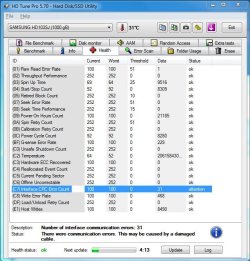
I checked for bad sectors with HDD Regenerator, with HD Tune Pro and nothing seems to be suspicious.
HD Tune found something about damaged cable.I changed the Serial ATA cable and now is more issues.
BSOD's over BSOD's, I check now and with DTI Surface Scanner which is in the video of Britec and I press click "Mount" but doesn't appear my hdd.Now I write from this PC, so Hard-disk work.


The cable is installed correctly, I boungt a new power supply and since then I thing my HDD is noisy sometimes.I don't know if before was so noisy.Maybe is from some drivers, I use the latest drivers from the official manufacturer.
 

Attachments

  • attention.JPG
    attention.JPG
    103.2 KB · Views: 25

My Computer

Computer type
PC/Desktop
OS
Windows 7 Ultimate x64
CPU
AMD Athlon(tm) II X2 240 Processor
Motherboard
ASRock N68PV-GS
Memory
4.00 GB / 4.00 GB
Graphics Card(s)
ATI Radeon HD 4600 Series
Sound Card
(1) AMD High Definition Audio Device (2) Realtek High Defi
Hard Drives
SAMSUNG HD103SJ ATA Device
PSU
Segotep SG-600B, 80+ Bronze, 500W
In the other thread, I asked you to post your .zip file here. In one of the .dmp files, there's a problem with the NTFS drive. The other .dmp files report different problems that may be caused by the hard drive problem or the fact that you don't have the updates installed.

Is your hard drive connected directly to the mother board? If so, you might try a different SATA port.
 

My Computer

Computer type
Laptop
Computer Manufacturer/Model Number
Dell M6500 Precision Work Station
OS
Windows 7 Pro SP1 64 bit
Memory
8 GB
Screen Resolution
1920x
Internet Speed
30 Mbps
Antivirus
Norton Security
Browser
IE 11
Yes, is directly connected to the montherboard.
I changed the cable Sata in the same port when hdd seems to be noisy.Now is the same thing.
To change cable from Sata port?Can have something that port from motherboard?
 

My Computer

Computer type
PC/Desktop
OS
Windows 7 Ultimate x64
CPU
AMD Athlon(tm) II X2 240 Processor
Motherboard
ASRock N68PV-GS
Memory
4.00 GB / 4.00 GB
Graphics Card(s)
ATI Radeon HD 4600 Series
Sound Card
(1) AMD High Definition Audio Device (2) Realtek High Defi
Hard Drives
SAMSUNG HD103SJ ATA Device
PSU
Segotep SG-600B, 80+ Bronze, 500W
I wanted you to unplug the cable from the SATA port you're using and plug it into a different SATA port.

However, as I feared, we have conversations going in two different threads.
 

My Computer

Computer type
Laptop
Computer Manufacturer/Model Number
Dell M6500 Precision Work Station
OS
Windows 7 Pro SP1 64 bit
Memory
8 GB
Screen Resolution
1920x
Internet Speed
30 Mbps
Antivirus
Norton Security
Browser
IE 11
I change slot of Sata cable and is the same noyse before.

Sorry but I do two threads because I don't know can be, maybe and uodates and HDD can have something, maybe from him I receive BSODs.
How can I test the HDD or what can provide this issues?
I have few months when I try to solve this issues with BSODs and few weeks then I change power supply and HDD is noisy.
 

My Computer

Computer type
PC/Desktop
OS
Windows 7 Ultimate x64
CPU
AMD Athlon(tm) II X2 240 Processor
Motherboard
ASRock N68PV-GS
Memory
4.00 GB / 4.00 GB
Graphics Card(s)
ATI Radeon HD 4600 Series
Sound Card
(1) AMD High Definition Audio Device (2) Realtek High Defi
Hard Drives
SAMSUNG HD103SJ ATA Device
PSU
Segotep SG-600B, 80+ Bronze, 500W
Hi

And things seem to be getting worse

you have or had Wannacry malware on your system, there are still remnants
Microsoft Security Center (2.0) Service
Probobly trying to phone home ALL THE TIME, hence using your HDD resources going loud


Based on this and your BSOD, i believe your best option is a clean install:confused:

WU also seems to be having trouble identifying your motherboard, i cant find it either

Would suggest you get another copy of W7 as the date for this infection is the same as the install


Roy
@axe0
 

My Computer

Computer type
PC/Desktop
Computer Manufacturer/Model Number
medionl/Aspire 6930G/acer x55a
OS
W7 home premium 32bit/W7HP 64bit/w10 tp insider ring
CPU
E5300 dual core
Motherboard
medion MS7366
Memory
3gb
Graphics Card(s)
Nvidia Geforce 7100 Nforce 630i
Monitor(s) Displays
avixc
Internet Speed
n (isp resticted to 72)
Antivirus
mse/pands
Browser
palemoon
Other Info
Belkin Fd7050 n USB using Railink RT2870 drivers, more upto date
Yes, can be and this.
I haved problems before with WannaCry malware, and now maybe I can br infected...Problem is I reinstall Windows and that issues reappear.I did a fresh install clean and format everytime when I reinstall Windows.But where I can receive WannaCry or something malware like that?
 

My Computer

Computer type
PC/Desktop
OS
Windows 7 Ultimate x64
CPU
AMD Athlon(tm) II X2 240 Processor
Motherboard
ASRock N68PV-GS
Memory
4.00 GB / 4.00 GB
Graphics Card(s)
ATI Radeon HD 4600 Series
Sound Card
(1) AMD High Definition Audio Device (2) Realtek High Defi
Hard Drives
SAMSUNG HD103SJ ATA Device
PSU
Segotep SG-600B, 80+ Bronze, 500W
Like i said i suspect its your install media.

On a different computer, go to Heidoc and download from there.


Roy
 

My Computer

Computer type
PC/Desktop
Computer Manufacturer/Model Number
medionl/Aspire 6930G/acer x55a
OS
W7 home premium 32bit/W7HP 64bit/w10 tp insider ring
CPU
E5300 dual core
Motherboard
medion MS7366
Memory
3gb
Graphics Card(s)
Nvidia Geforce 7100 Nforce 630i
Monitor(s) Displays
avixc
Internet Speed
n (isp resticted to 72)
Antivirus
mse/pands
Browser
palemoon
Other Info
Belkin Fd7050 n USB using Railink RT2870 drivers, more upto date
Back
Top