Malware/Virus/Problems if not start updates

How I can download from that site?
With tool or directly iso?
Please give a link to download it or where I can do to download Windows 7 Ultimate x64

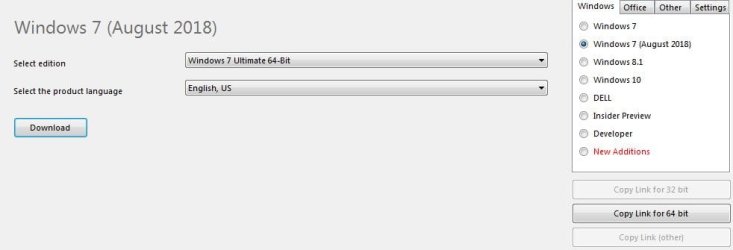
EDIT: I found that program to download, but what version is better?Windows 7, Windows 7 OEM or Windows 7 (August 2018)?
 
Last edited:

My Computer

Computer type
PC/Desktop
OS
Windows 7 Ultimate x64
CPU
AMD Athlon(tm) II X2 240 Processor
Motherboard
ASRock N68PV-GS
Memory
4.00 GB / 4.00 GB
Graphics Card(s)
ATI Radeon HD 4600 Series
Sound Card
(1) AMD High Definition Audio Device (2) Realtek High Defi
Hard Drives
SAMSUNG HD103SJ ATA Device
PSU
Segotep SG-600B, 80+ Bronze, 500W
Hi

new machine
You can use either Rufus or MS's old download tool

Drop W7 ult to desktop
import into either Rufus or MSDt to give you bootable media


old machine


RESET BIOS to load from USB or Iso first
shutdown >>insert CD/USB >> restart and choose the install media option

Roy
 

My Computer

Computer type
PC/Desktop
Computer Manufacturer/Model Number
medionl/Aspire 6930G/acer x55a
OS
W7 home premium 32bit/W7HP 64bit/w10 tp insider ring
CPU
E5300 dual core
Motherboard
medion MS7366
Memory
3gb
Graphics Card(s)
Nvidia Geforce 7100 Nforce 630i
Monitor(s) Displays
avixc
Internet Speed
n (isp resticted to 72)
Antivirus
mse/pands
Browser
palemoon
Other Info
Belkin Fd7050 n USB using Railink RT2870 drivers, more upto date
I want to download that version updated from August 2018.Is good?
But problem is I give to download x64 and downloading x86 version.
 

Attachments

  • x64.JPG
    x64.JPG
    26.7 KB · Views: 0
  • x86.JPG
    x86.JPG
    13.1 KB · Views: 0

My Computer

Computer type
PC/Desktop
OS
Windows 7 Ultimate x64
CPU
AMD Athlon(tm) II X2 240 Processor
Motherboard
ASRock N68PV-GS
Memory
4.00 GB / 4.00 GB
Graphics Card(s)
ATI Radeon HD 4600 Series
Sound Card
(1) AMD High Definition Audio Device (2) Realtek High Defi
Hard Drives
SAMSUNG HD103SJ ATA Device
PSU
Segotep SG-600B, 80+ Bronze, 500W

My Computer

Computer type
Laptop
Computer Manufacturer/Model Number
Fujitsu LIFEBOOK
OS
Win 7 HP SP1 64-bit Vista HB SP2 32-bit Linux Mint 18.3
CPU
Intel(R) Pentium(R) CPU P6200 @ 2.13GHz
Motherboard
FUJITSU FJNBB06
Memory
4.00 GB
Graphics Card(s)
Intel(R) Graphics Media Accelerator HD
Sound Card
[1] Realtek High Definition Audio [2] Intel(R) Display Audio
Screen Resolution
1366 x 768 x 32 bits (4294967296 colors) @ 59 Hz
Hard Drives
TOSHIBA MK5076GSX
Antivirus
AVG FREE
Hi Insomn1a,


I agree with torchwood. Direct download from here => Windows ISO Downloader.exe.

I will do that, but which version to download if I must to use x64 to can use all Ram's Memory, with x86 PC use just 2GB of Ram.
Which version is better to I use now?
 

My Computer

Computer type
PC/Desktop
OS
Windows 7 Ultimate x64
CPU
AMD Athlon(tm) II X2 240 Processor
Motherboard
ASRock N68PV-GS
Memory
4.00 GB / 4.00 GB
Graphics Card(s)
ATI Radeon HD 4600 Series
Sound Card
(1) AMD High Definition Audio Device (2) Realtek High Defi
Hard Drives
SAMSUNG HD103SJ ATA Device
PSU
Segotep SG-600B, 80+ Bronze, 500W
Update System Specifications

Please update your system specifications in your UserCP => Edit System Spec setup. It will help us to help you!

This SevenForums tutorial [Published by Brink and written by CyberZeus] uses an automated tool which makes this task very easy and quick to do. Click here => System Info - See Your System Specs.

Thanks.
 

My Computer

Computer type
Laptop
Computer Manufacturer/Model Number
Fujitsu LIFEBOOK
OS
Win 7 HP SP1 64-bit Vista HB SP2 32-bit Linux Mint 18.3
CPU
Intel(R) Pentium(R) CPU P6200 @ 2.13GHz
Motherboard
FUJITSU FJNBB06
Memory
4.00 GB
Graphics Card(s)
Intel(R) Graphics Media Accelerator HD
Sound Card
[1] Realtek High Definition Audio [2] Intel(R) Display Audio
Screen Resolution
1366 x 768 x 32 bits (4294967296 colors) @ 59 Hz
Hard Drives
TOSHIBA MK5076GSX
Antivirus
AVG FREE
Hi Insomn1a,

I will do that, but which version to download if I must to use x64 to can use all Ram's Memory, with x86 PC use just 2GB of Ram.
Which version is better to I use now?

If your product key is for the 64-bit version then you must install the 64-bit version.
 

My Computer

Computer type
Laptop
Computer Manufacturer/Model Number
Fujitsu LIFEBOOK
OS
Win 7 HP SP1 64-bit Vista HB SP2 32-bit Linux Mint 18.3
CPU
Intel(R) Pentium(R) CPU P6200 @ 2.13GHz
Motherboard
FUJITSU FJNBB06
Memory
4.00 GB
Graphics Card(s)
Intel(R) Graphics Media Accelerator HD
Sound Card
[1] Realtek High Definition Audio [2] Intel(R) Display Audio
Screen Resolution
1366 x 768 x 32 bits (4294967296 colors) @ 59 Hz
Hard Drives
TOSHIBA MK5076GSX
Antivirus
AVG FREE
I don't have a product key, I want to use trial version and to use -rearm.

PS. I write the PC specification.
 

My Computer

Computer type
PC/Desktop
OS
Windows 7 Ultimate x64
CPU
AMD Athlon(tm) II X2 240 Processor
Motherboard
ASRock N68PV-GS
Memory
4.00 GB / 4.00 GB
Graphics Card(s)
ATI Radeon HD 4600 Series
Sound Card
(1) AMD High Definition Audio Device (2) Realtek High Defi
Hard Drives
SAMSUNG HD103SJ ATA Device
PSU
Segotep SG-600B, 80+ Bronze, 500W
Hi Insomn1a,

I don't have a product key, I want to use trial version and to use -rearm.

On a laptop, it will either be on a sticker on the bottom, or in the battery compartment. If the sticker is too worn to read, or there isn't one, then you can retrieve it by either using Belarc Advisor or Magic Jelly Bean. Write this Product Key down and keep it in a safe place.

PS. I write the PC specification.
:thumbsup:
 

My Computer

Computer type
Laptop
Computer Manufacturer/Model Number
Fujitsu LIFEBOOK
OS
Win 7 HP SP1 64-bit Vista HB SP2 32-bit Linux Mint 18.3
CPU
Intel(R) Pentium(R) CPU P6200 @ 2.13GHz
Motherboard
FUJITSU FJNBB06
Memory
4.00 GB
Graphics Card(s)
Intel(R) Graphics Media Accelerator HD
Sound Card
[1] Realtek High Definition Audio [2] Intel(R) Display Audio
Screen Resolution
1366 x 768 x 32 bits (4294967296 colors) @ 59 Hz
Hard Drives
TOSHIBA MK5076GSX
Antivirus
AVG FREE
I don't have a laptop with sticker, just PC without sticker...I must to use trial version and x64 bits.
That version with updates August 2018 is just x86 for Windows 7 Ultimate.What to do?
 

My Computer

Computer type
PC/Desktop
OS
Windows 7 Ultimate x64
CPU
AMD Athlon(tm) II X2 240 Processor
Motherboard
ASRock N68PV-GS
Memory
4.00 GB / 4.00 GB
Graphics Card(s)
ATI Radeon HD 4600 Series
Sound Card
(1) AMD High Definition Audio Device (2) Realtek High Defi
Hard Drives
SAMSUNG HD103SJ ATA Device
PSU
Segotep SG-600B, 80+ Bronze, 500W
Hi Insomn1a,

I don't have a laptop with sticker, just PC without sticker...I must to use trial version and x64 bits.
That version with updates August 2018 is just x86 for Windows 7 Ultimate. What to do?

NOTE: The light blue text below are links to the relevant websites and programs, just click them!

You can retrieve your Product Key by either using Belarc Advisor or Magic Jelly Bean.
 

My Computer

Computer type
Laptop
Computer Manufacturer/Model Number
Fujitsu LIFEBOOK
OS
Win 7 HP SP1 64-bit Vista HB SP2 32-bit Linux Mint 18.3
CPU
Intel(R) Pentium(R) CPU P6200 @ 2.13GHz
Motherboard
FUJITSU FJNBB06
Memory
4.00 GB
Graphics Card(s)
Intel(R) Graphics Media Accelerator HD
Sound Card
[1] Realtek High Definition Audio [2] Intel(R) Display Audio
Screen Resolution
1366 x 768 x 32 bits (4294967296 colors) @ 59 Hz
Hard Drives
TOSHIBA MK5076GSX
Antivirus
AVG FREE
Hi Insomn1a,


NOTE: The light blue text below are links to the relevant websites and programs, just click them!

You can retrieve your Product Key by either using Belarc Advisor or Magic Jelly Bean.

I mentioned in the previous post about product key.
I didn't have one and I don't have what to recover.
When I buy computer I buy on components and I didn't receive any license.

Can I download Windows 7 Ultimate x64 August 2018?
I see on Heidoc is just x86 version and on x64 link download the same download x86.(I post images before)
I say, I hear...
 

My Computer

Computer type
PC/Desktop
OS
Windows 7 Ultimate x64
CPU
AMD Athlon(tm) II X2 240 Processor
Motherboard
ASRock N68PV-GS
Memory
4.00 GB / 4.00 GB
Graphics Card(s)
ATI Radeon HD 4600 Series
Sound Card
(1) AMD High Definition Audio Device (2) Realtek High Defi
Hard Drives
SAMSUNG HD103SJ ATA Device
PSU
Segotep SG-600B, 80+ Bronze, 500W
Hi Insomn1a,

That issues appear when I do a fresh Windows install, everything on clean install (I delete all data from HDD and format all partitions). If I stop updates the problems appear.
I specified why I don't want to do updates.I reinstall Windows frequently and I must to wait much time to do updates, load data on hard-disk, used too much resources, my PC will be slowed down etc.

[1] What did you use to re-install Windows, was it a DVD or USB?
[2] Did you download an ISO and burn it to DVD or USB?
[3] If so, where did you download the ISO from?

If it is a problem with the installation media itself then even a Repair Install will not correct your problem!
You must have a Product Key if the computer came with Windows!
 

My Computer

Computer type
Laptop
Computer Manufacturer/Model Number
Fujitsu LIFEBOOK
OS
Win 7 HP SP1 64-bit Vista HB SP2 32-bit Linux Mint 18.3
CPU
Intel(R) Pentium(R) CPU P6200 @ 2.13GHz
Motherboard
FUJITSU FJNBB06
Memory
4.00 GB
Graphics Card(s)
Intel(R) Graphics Media Accelerator HD
Sound Card
[1] Realtek High Definition Audio [2] Intel(R) Display Audio
Screen Resolution
1366 x 768 x 32 bits (4294967296 colors) @ 59 Hz
Hard Drives
TOSHIBA MK5076GSX
Antivirus
AVG FREE
Hi Insomn1a,

You can also download the latest and last Windows [Final] > Windows 7 SP1 [build 7601] > Windows 7 Ultimate SP1 ISO [build 6.1.7601 - July 2009] file from TechBench [make sure you select the correct language and bit type] and then burn it to a DVD or USB to create a new bootable installation media.
 

My Computer

Computer type
Laptop
Computer Manufacturer/Model Number
Fujitsu LIFEBOOK
OS
Win 7 HP SP1 64-bit Vista HB SP2 32-bit Linux Mint 18.3
CPU
Intel(R) Pentium(R) CPU P6200 @ 2.13GHz
Motherboard
FUJITSU FJNBB06
Memory
4.00 GB
Graphics Card(s)
Intel(R) Graphics Media Accelerator HD
Sound Card
[1] Realtek High Definition Audio [2] Intel(R) Display Audio
Screen Resolution
1366 x 768 x 32 bits (4294967296 colors) @ 59 Hz
Hard Drives
TOSHIBA MK5076GSX
Antivirus
AVG FREE
Hi Insomn1a,

You can also download the latest and last Windows [Final] > Windows 7 SP1 [build 7601] > Windows 7 Ultimate SP1 ISO [build 6.1.7601 - July 2009] file from TechBench [make sure you select the correct language and bit type] and then burn it to a DVD or USB to create a new bootable installation media.

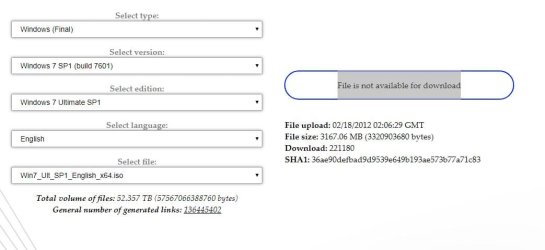
I know that site, from there I download the current Windows.
I use DVD to install Windows.

File is not available for download
 

Attachments

  • TechBench.JPG
    TechBench.JPG
    44.4 KB · Views: 0
Last edited:

My Computer

Computer type
PC/Desktop
OS
Windows 7 Ultimate x64
CPU
AMD Athlon(tm) II X2 240 Processor
Motherboard
ASRock N68PV-GS
Memory
4.00 GB / 4.00 GB
Graphics Card(s)
ATI Radeon HD 4600 Series
Sound Card
(1) AMD High Definition Audio Device (2) Realtek High Defi
Hard Drives
SAMSUNG HD103SJ ATA Device
PSU
Segotep SG-600B, 80+ Bronze, 500W
[FONT=&quot]TechBench by WZT The only working downloads are for Win7 Ultimate x64 and Win7 Ultimate x32[/FONT]

[FONT=&quot] To make all version available use[/FONT][FONT=&quot] eicfg_removal_utility.zip
[/FONT]
Your key will only work with the version you have currently.
 

My Computer

Computer type
PC/Desktop
Computer Manufacturer/Model Number
HP Desktop & Compaq Laptop
OS
Win 10 x64, Linux Lite, Win 7 x64, BlackArch, & Kali
Hard Drives
Samsung 850 Pro 256Gb,
Hitachi HDD 1Tb,
Crucial MX SSD 250Gb
Segate 3Tb USB 3.0 Ext. Backup HDD
Internet Speed
150Mbps dn, 20Mbps up
Antivirus
Avast Free, Malwarebytes Anti-Exploit & Anti-Ransomware
Browser
Firefox, Chrome, Opera, & VPN

My Computer

Computer type
PC/Desktop
Computer Manufacturer/Model Number
medionl/Aspire 6930G/acer x55a
OS
W7 home premium 32bit/W7HP 64bit/w10 tp insider ring
CPU
E5300 dual core
Motherboard
medion MS7366
Memory
3gb
Graphics Card(s)
Nvidia Geforce 7100 Nforce 630i
Monitor(s) Displays
avixc
Internet Speed
n (isp resticted to 72)
Antivirus
mse/pands
Browser
palemoon
Other Info
Belkin Fd7050 n USB using Railink RT2870 drivers, more upto date
After that I will reinstall Windows again, a lot of work but if cost a lof of a license what to I do?I use just home at PC, I don't have a company.

I download that version, but I wanted a version with updates.That version August 2018 I was interested but is just version x32 bit on both link.

How I can do a copy with updates of Windows, to fresh install that Windows 7 Ultimate x64 and to make updates after to not do again updates to wait for them, to have on a USB/DVD image bootable?A want a copy with updates, just to reinstall Windows with updates from March for example.
With what program I can do an image bootable(.iso) with updates?
 

My Computer

Computer type
PC/Desktop
OS
Windows 7 Ultimate x64
CPU
AMD Athlon(tm) II X2 240 Processor
Motherboard
ASRock N68PV-GS
Memory
4.00 GB / 4.00 GB
Graphics Card(s)
ATI Radeon HD 4600 Series
Sound Card
(1) AMD High Definition Audio Device (2) Realtek High Defi
Hard Drives
SAMSUNG HD103SJ ATA Device
PSU
Segotep SG-600B, 80+ Bronze, 500W
Hi Insomn1a,

[1] How I can do a copy with updates of Windows, to fresh install that Windows 7 Ultimate x64 and to make updates after to not do again updates to wait for them, to have on a USB/DVD image bootable?A want a copy with updates, just to reinstall Windows with updates from March for example.

[2] With what program I can do an image bootable(.iso) with updates?

[1] To get the ISO up to date, there are at present, over 240 updates. Now rather than letting M$ Windows update update your OS, which involves many hours of downloading, installing and re-booting, you can integrate all the updates into the ISO, then all you need to do is to create a new ISO for installation.

There are two options available do this, one is a utility called 7UPDATER [see below], written and created by SIW2, and the other is DISM++. Both these options are discussed and explained here => Update your Win 7 installation media.

[2] To burn the ISO to a USB, you can either use Rufus 3.4 or Rufus 3.4 Portable.

I hope this helps!
 

My Computer

Computer type
Laptop
Computer Manufacturer/Model Number
Fujitsu LIFEBOOK
OS
Win 7 HP SP1 64-bit Vista HB SP2 32-bit Linux Mint 18.3
CPU
Intel(R) Pentium(R) CPU P6200 @ 2.13GHz
Motherboard
FUJITSU FJNBB06
Memory
4.00 GB
Graphics Card(s)
Intel(R) Graphics Media Accelerator HD
Sound Card
[1] Realtek High Definition Audio [2] Intel(R) Display Audio
Screen Resolution
1366 x 768 x 32 bits (4294967296 colors) @ 59 Hz
Hard Drives
TOSHIBA MK5076GSX
Antivirus
AVG FREE
Hi Insomn1a,


[1] To get the ISO up to date, there are at present, over 240 updates. Now rather than letting M$ Windows update update your OS, which involves many hours of downloading, installing and re-booting, you can integrate all the updates into the ISO, then all you need to do is to create a new ISO for installation.

There are two options available do this, one is a utility called 7UPDATER [see below], written and created by SIW2, and the other is DISM++. Both these options are discussed and explained here => Update your Win 7 installation media.

[2] To burn the ISO to a USB, you can either use Rufus 3.4 or Rufus 3.4 Portable.

I hope this helps!

To the point 2. you don't understand.
I want some program to I make a copy with Windows updated from March for example, like is another versions to not I stay few hours to do all updates.You understand what I want?
 

My Computer

Computer type
PC/Desktop
OS
Windows 7 Ultimate x64
CPU
AMD Athlon(tm) II X2 240 Processor
Motherboard
ASRock N68PV-GS
Memory
4.00 GB / 4.00 GB
Graphics Card(s)
ATI Radeon HD 4600 Series
Sound Card
(1) AMD High Definition Audio Device (2) Realtek High Defi
Hard Drives
SAMSUNG HD103SJ ATA Device
PSU
Segotep SG-600B, 80+ Bronze, 500W
Back
Top