Solved MalwareByte's opens across dual monitors...

Loki

New member
Pro User
Local time
10:18 AM
Messages
186
Location
West Palm Beach
Hi,

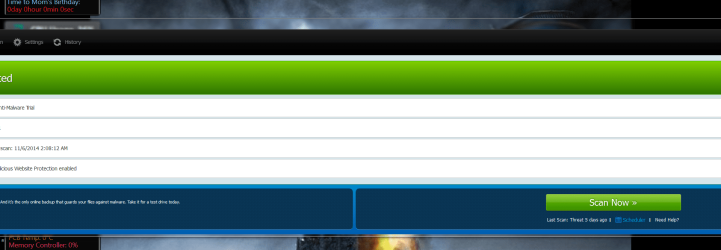
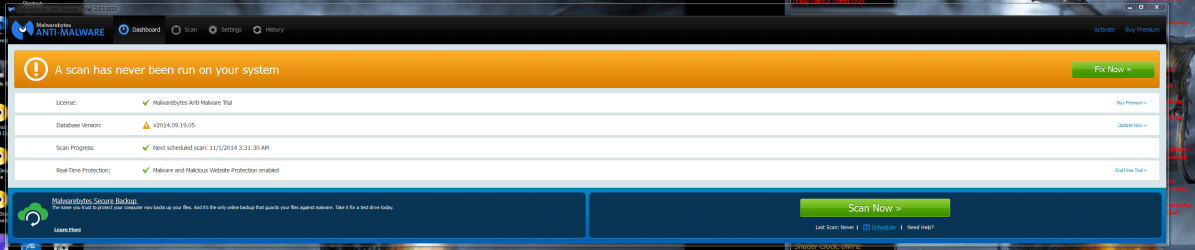
I downloaded the latest MBAM and installed it. It opens up across both monitors and can't be resized. Only Max and Min. I installed MBAM on a Windows 7 x64 bootable VM for testing. See screenshot. :cry:
 

Attachments

  • MBAM.PNG
    MBAM.PNG
    93.8 KB · Views: 6

My Computer

Computer type
PC/Desktop
Computer Manufacturer/Model Number
Custom
OS
Windows 7 Ultimate x64
CPU
AMD A10-7850 Quad Core 3.7 GHz
Motherboard
MSI MS-7900
Memory
16 GB
Graphics Card(s)
MSI Radeon R7 250 OC Crossfired with A10 AMD Radeon R7
Monitor(s) Displays
Samsung SyncMaster XL2370HD, ViewSonic VA1912wb
Screen Resolution
1920*1080, 1440*900
Hard Drives
128 GB SSD
512 GB SSD
500 GB HDD
PSU
Corsair CX500
Case
Rosewill THOR V2 BLACK
Keyboard
Logitech G15
Mouse
CMSTORM MS2K
Internet Speed
ATT U-Verse
Antivirus
Microsoft Security Essentials, MalwareBytes
Browser
Firefox (lastest stable) with NoScript
Other Info
Just a humdrum little system.
MBAM resize window

Using a single monitor the only options are max/ min. I tried the resize enable hack but wasn't able to resize the window.

ResizeEnable
 

My Computer

Computer type
Laptop
Computer Manufacturer/Model Number
ASUS
OS
Microsoft Windows 7 Home Premium 64-bit 7601 Multiprocessor Free Service Pack 1
CPU
AMD C-60 APU with Radeon(tm) HD Graphics
Motherboard
ASUSTeK COMPUTER INC. X501U
Memory
4.00 GB
Graphics Card(s)
AMD Radeon HD 6290 Graphics
Sound Card
(1) AMD High Definition Audio Device (2) Realtek High Defi
Screen Resolution
1366 x 768 x 32 bits (4294967296 colors) @ 60 Hz
Hard Drives
Hitachi HTS545050A7E380 SATA Disk Device
Antivirus
Comodo CIS & FW, SecureAplus App Whitelisting, Threatfire
Browser
Cyberfox 64bit, Opera 64bit, Airfox
Other Info
Spy-The-Spy, HitmanPro.Alert, Norton Connect Safe, MJRegWatcher, BitDefender TrafficLight, Voodoo Shield, Zemana AntiMalware
Using a single monitor the only options are max/ min. I tried the resize enable hack but wasn't able to resize the window.

ResizeEnable

What the heck is wrong with the software designers for MBAM? Restore Down works just fine in the old version plus one can drag the borders to resize the window. Why would they remove that feature in the new version?

Seriously, I have four lifetime Pro licenses and, if they don't get their heads before the older version reaches EOL, I'm going to demand (and legally pursue, if necessary) a refund for those soon to be useless licenses. I'm tired of waiting for them to fix things but, instead, I keep reading about new problems cropping up, then they want to release another new version when they can't even fix the current one.
 

My Computer

Computer type
PC/Desktop
Computer Manufacturer/Model Number
Custom Build
OS
Win 7 Ultimate 64 bit
CPU
Intel i7-3930K
Motherboard
ASUS P9X79 WS
Memory
Kingston HyperX Genesis 32GB Kit (8x4GB Modules) 1600MHz DDR
Graphics Card(s)
MSI R7850 Twin Frozr 2GD5/OC Radeon HD 7850 2GB 256-bit GDDR
Sound Card
Asus Xonar Essence STX
Monitor(s) Displays
3x Asus VG248QE 24", Vizio 32" TV
Screen Resolution
1920 x 1080, ?
Hard Drives
Samsung 128GB 840 Pro SSD (1),
Samsung 4TB 850 EVO SSDs (4)
Samsung 4TB 850 EVO SSDs (16) external backup drives used in 2.5" hot swap bays in the computer.
PSU
Corsair HX750w
Case
Antec Two Hundred v2 (modified)
Cooling
Cooler Master GeminII S524 120mm (fan replaced with a 140mm)
Keyboard
Logitech G510s
Mouse
Logitech M525 (two in use)
Internet Speed
=< 32Mbps down, 8Mbps up
Antivirus
AVAST!, MBAM, SAS, Spybot S&D (all but MBAM free) Glary Util
Browser
IE11
Other Info
LSI 9211-8i HBA card (8 SATA III ports), 2.5" & 3.5" Hot Swap Bays, HooToo HT-CR001 PCI-E to USB 3.0 Internal Hub + 6 Slot Card Reader, and LG Model CH12LS28 BD-ROM Optical Drive. Also, ScanSnap S1500 ADF duplexing scanner, Canon 9000F flat bed scanner, Corsair SP2500 2.1 speakers, Samsung CLP 415nw laser color printer, Cyberpower PP2200SW UPS
I had this issue when version 2 first came out, so I went back to version 1.75. I thought they would have fixed it by now... that is why I tried in a VM.
 

My Computer

Computer type
PC/Desktop
Computer Manufacturer/Model Number
Custom
OS
Windows 7 Ultimate x64
CPU
AMD A10-7850 Quad Core 3.7 GHz
Motherboard
MSI MS-7900
Memory
16 GB
Graphics Card(s)
MSI Radeon R7 250 OC Crossfired with A10 AMD Radeon R7
Monitor(s) Displays
Samsung SyncMaster XL2370HD, ViewSonic VA1912wb
Screen Resolution
1920*1080, 1440*900
Hard Drives
128 GB SSD
512 GB SSD
500 GB HDD
PSU
Corsair CX500
Case
Rosewill THOR V2 BLACK
Keyboard
Logitech G15
Mouse
CMSTORM MS2K
Internet Speed
ATT U-Verse
Antivirus
Microsoft Security Essentials, MalwareBytes
Browser
Firefox (lastest stable) with NoScript
Other Info
Just a humdrum little system.
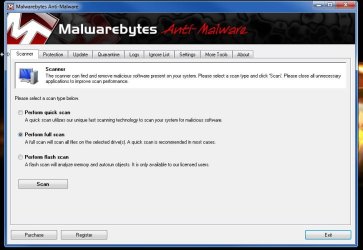
When you put the mouse to the edge, it does not change into a side-to-side cursor? As in the pic below?

What happens if you change the theme.. maybe turn Aero off?

mb.jpg
 

My Computer

Computer type
PC/Desktop
Computer Manufacturer/Model Number
Custom
OS
W7 64 Ult
CPU
Intel Core i9-7940x
Motherboard
ASUS x299 TUF
Memory
GSkill 128GB
Graphics Card(s)
AMD Radeon RX 560
Sound Card
RME
Screen Resolution
1920x1080
Hard Drives
5
PSU
BeQuiet!
Case
BeQuiet!
Keyboard
HyperX
Mouse
Logitech
Browser
IE - what else is there?
MBAM Old Version

Your screenshot shows an old version! Doesn't look like the new one to me. I use Classic Theme. Windows cannot be resized.
 

My Computer

Computer type
Laptop
Computer Manufacturer/Model Number
ASUS
OS
Microsoft Windows 7 Home Premium 64-bit 7601 Multiprocessor Free Service Pack 1
CPU
AMD C-60 APU with Radeon(tm) HD Graphics
Motherboard
ASUSTeK COMPUTER INC. X501U
Memory
4.00 GB
Graphics Card(s)
AMD Radeon HD 6290 Graphics
Sound Card
(1) AMD High Definition Audio Device (2) Realtek High Defi
Screen Resolution
1366 x 768 x 32 bits (4294967296 colors) @ 60 Hz
Hard Drives
Hitachi HTS545050A7E380 SATA Disk Device
Antivirus
Comodo CIS & FW, SecureAplus App Whitelisting, Threatfire
Browser
Cyberfox 64bit, Opera 64bit, Airfox
Other Info
Spy-The-Spy, HitmanPro.Alert, Norton Connect Safe, MJRegWatcher, BitDefender TrafficLight, Voodoo Shield, Zemana AntiMalware
Yes, I have v 1.6 - I was using that to illustrate.

You use the classic theme? Really? In your shot, MB seems to use the Aero Glass (Transparent) Theme... that's available with the classic theme?
 

My Computer

Computer type
PC/Desktop
Computer Manufacturer/Model Number
Custom
OS
W7 64 Ult
CPU
Intel Core i9-7940x
Motherboard
ASUS x299 TUF
Memory
GSkill 128GB
Graphics Card(s)
AMD Radeon RX 560
Sound Card
RME
Screen Resolution
1920x1080
Hard Drives
5
PSU
BeQuiet!
Case
BeQuiet!
Keyboard
HyperX
Mouse
Logitech
Browser
IE - what else is there?
MBAM screenshot

Yes, I have v 1.6 - I was using that to illustrate.

You use the classic theme? Really? In your shot, MB seems to use the Aero Glass (Transparent) Theme... that's available with the classic theme?

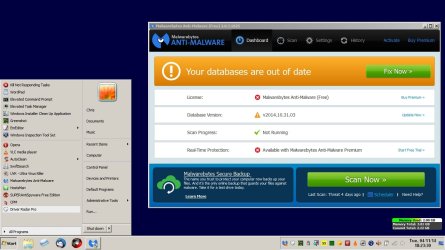
I didn't post a screenshot in this thread - or maybe I'm missing something. Here's what it looks like on my machine:

MBAM Screenshot.jpg
 

My Computer

Computer type
Laptop
Computer Manufacturer/Model Number
ASUS
OS
Microsoft Windows 7 Home Premium 64-bit 7601 Multiprocessor Free Service Pack 1
CPU
AMD C-60 APU with Radeon(tm) HD Graphics
Motherboard
ASUSTeK COMPUTER INC. X501U
Memory
4.00 GB
Graphics Card(s)
AMD Radeon HD 6290 Graphics
Sound Card
(1) AMD High Definition Audio Device (2) Realtek High Defi
Screen Resolution
1366 x 768 x 32 bits (4294967296 colors) @ 60 Hz
Hard Drives
Hitachi HTS545050A7E380 SATA Disk Device
Antivirus
Comodo CIS & FW, SecureAplus App Whitelisting, Threatfire
Browser
Cyberfox 64bit, Opera 64bit, Airfox
Other Info
Spy-The-Spy, HitmanPro.Alert, Norton Connect Safe, MJRegWatcher, BitDefender TrafficLight, Voodoo Shield, Zemana AntiMalware

My Computer

Computer type
PC/Desktop
Computer Manufacturer/Model Number
Custom
OS
W7 64 Ult
CPU
Intel Core i9-7940x
Motherboard
ASUS x299 TUF
Memory
GSkill 128GB
Graphics Card(s)
AMD Radeon RX 560
Sound Card
RME
Screen Resolution
1920x1080
Hard Drives
5
PSU
BeQuiet!
Case
BeQuiet!
Keyboard
HyperX
Mouse
Logitech
Browser
IE - what else is there?
No problem! That explains it...:)
 

My Computer

Computer type
Laptop
Computer Manufacturer/Model Number
ASUS
OS
Microsoft Windows 7 Home Premium 64-bit 7601 Multiprocessor Free Service Pack 1
CPU
AMD C-60 APU with Radeon(tm) HD Graphics
Motherboard
ASUSTeK COMPUTER INC. X501U
Memory
4.00 GB
Graphics Card(s)
AMD Radeon HD 6290 Graphics
Sound Card
(1) AMD High Definition Audio Device (2) Realtek High Defi
Screen Resolution
1366 x 768 x 32 bits (4294967296 colors) @ 60 Hz
Hard Drives
Hitachi HTS545050A7E380 SATA Disk Device
Antivirus
Comodo CIS & FW, SecureAplus App Whitelisting, Threatfire
Browser
Cyberfox 64bit, Opera 64bit, Airfox
Other Info
Spy-The-Spy, HitmanPro.Alert, Norton Connect Safe, MJRegWatcher, BitDefender TrafficLight, Voodoo Shield, Zemana AntiMalware
What a strange issue... I doubt the people from Malwarebytes did this on purpose.
Version 2.0.3.1025 here, I can resize the window normally but it won't go below a fixed size.

Could you maybe try shutting down MBAM (close the window, right-click on the icon and select "Exit") and unplug your secondary monitor, run it then and see if you can resize it?
 

Attachments

  • mbam2.PNG
    mbam2.PNG
    45.2 KB · Views: 1

My Computer

OS
Windows 7 x64
Sorry been away...

Nice idea turning off the second monitor. but no good, MBAM stretches off the screen. I unplugged the monitor and then did a detect to get windows to see only one monitor connected.

As to resizing yes I get the resize arrow and can make MBAM taller or longer but cannot make it any less wide than shown.

No I don't think MalwareBytes did this on purpose.

I changed the theme to windows basic and MBAM still opens across both monitors.
I then went into system properties: advanced: performance: selected Adjust for best performance
No change MBAM still opens across both monitors.

Loki
 

Attachments

  • mbam-long.PNG
    mbam-long.PNG
    63.8 KB · Views: 1

My Computer

Computer type
PC/Desktop
Computer Manufacturer/Model Number
Custom
OS
Windows 7 Ultimate x64
CPU
AMD A10-7850 Quad Core 3.7 GHz
Motherboard
MSI MS-7900
Memory
16 GB
Graphics Card(s)
MSI Radeon R7 250 OC Crossfired with A10 AMD Radeon R7
Monitor(s) Displays
Samsung SyncMaster XL2370HD, ViewSonic VA1912wb
Screen Resolution
1920*1080, 1440*900
Hard Drives
128 GB SSD
512 GB SSD
500 GB HDD
PSU
Corsair CX500
Case
Rosewill THOR V2 BLACK
Keyboard
Logitech G15
Mouse
CMSTORM MS2K
Internet Speed
ATT U-Verse
Antivirus
Microsoft Security Essentials, MalwareBytes
Browser
Firefox (lastest stable) with NoScript
Other Info
Just a humdrum little system.
Thanks for the ideas. I'll stick with 1.75 on my main PC.
 

My Computer

Computer type
PC/Desktop
Computer Manufacturer/Model Number
Custom
OS
Windows 7 Ultimate x64
CPU
AMD A10-7850 Quad Core 3.7 GHz
Motherboard
MSI MS-7900
Memory
16 GB
Graphics Card(s)
MSI Radeon R7 250 OC Crossfired with A10 AMD Radeon R7
Monitor(s) Displays
Samsung SyncMaster XL2370HD, ViewSonic VA1912wb
Screen Resolution
1920*1080, 1440*900
Hard Drives
128 GB SSD
512 GB SSD
500 GB HDD
PSU
Corsair CX500
Case
Rosewill THOR V2 BLACK
Keyboard
Logitech G15
Mouse
CMSTORM MS2K
Internet Speed
ATT U-Verse
Antivirus
Microsoft Security Essentials, MalwareBytes
Browser
Firefox (lastest stable) with NoScript
Other Info
Just a humdrum little system.
Back
Top