

- Local time
- 9:13 AM
- Messages
- 1,102
Hi, all:
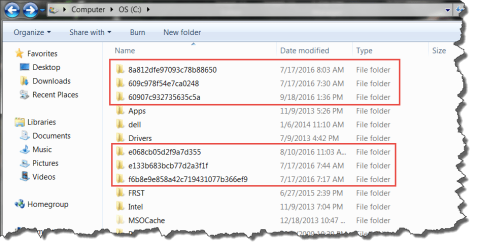
Are the folders in the C: drive shown in the screen shot from my Win7 laptop safe to delete?
The main reason I ask is that I am surprised to see them in the root of the C: drive.
I found them "by accident" a few days ago.
I did not create those folders in that location; Windows did.
They all appear to be leftovers from failed attempts several months ago to manually install Windows Updates BEFORE the underlying issue was eventually fixed by installing KB3020369 and KB3172605.
So, since all critical and important patches are now installed via the regular Win Update applet, and the system is fully patched and updating correctly, can these apparent old leftovers be removed safely?
(Yes, I know about creating a RP, backups and a system image before doing so.... )
)
Thanks,
MM
P.S. I have fewer, similar such folders on my Win7 desktop, too. I was having the same problem -- along with so many other users -- on that box, too. It is fixed there, too. So if they are safe to delete from one box, I assume they ought to be safe to remove on the other.
Are the folders in the C: drive shown in the screen shot from my Win7 laptop safe to delete?
The main reason I ask is that I am surprised to see them in the root of the C: drive.
I found them "by accident" a few days ago.
I did not create those folders in that location; Windows did.
They all appear to be leftovers from failed attempts several months ago to manually install Windows Updates BEFORE the underlying issue was eventually fixed by installing KB3020369 and KB3172605.
So, since all critical and important patches are now installed via the regular Win Update applet, and the system is fully patched and updating correctly, can these apparent old leftovers be removed safely?
(Yes, I know about creating a RP, backups and a system image before doing so....
)Thanks,
MM
P.S. I have fewer, similar such folders on my Win7 desktop, too. I was having the same problem -- along with so many other users -- on that box, too. It is fixed there, too. So if they are safe to delete from one box, I assume they ought to be safe to remove on the other.
Attachments
My Computer
- Computer type
- PC/Desktop
- Computer Manufacturer/Model Number
- Dell Studio XPS 8500
- OS
- OEM Windows 7 Ult (x64) SP1
- CPU
- Intel Core-i7 3770 @ 3.4 GHz
- Motherboard
- "Dell" branded
- Memory
- 16 GB DDR3 SDRAM @ 1333 MHz
- Graphics Card(s)
- NVidia GeForce GT620 1 GB
- Sound Card
- THX TruStudio PC
- Monitor(s) Displays
- Dell U2410 Full HD
- Hard Drives
- 2.0 TB SATA2 @ 7200 RPM
- PSU
- 350W
- Keyboard
- MS 4000 Ergon - Wired
- Mouse
- Logitech Anywhere MX
- Internet Speed
- Cable HSI w/Turbo (router)
- Antivirus
- KIS-MBAM Premium-MBAE Premium
- Browser
- Fx (current version); IE
- Other Info
- And a Win7/64 Pro laptop; And a Win10/64 Pro desktop.


