
Solved Many settings undone after renaming an external HDD

bawldiggle

GrayGhost2 ret.
Pro User
VIP
Local time
6:23 AM
Messages
895
Location
Australia
Today I renamed an external HDD.
Now many Win-Explorer settings have been undone PLUS Desktop has been re-arranged. :confused:

It might all be a coincidence (I am having problems with lagging screen-refresh) at app windows not refreshing ... stress overload :eek:
(Yesterday Firefox auto updated to v24.0, no visible problems) ?

Bitdefender Internet Security 2013 and Malwarebytes ... both report all is OK

Would appreciate any input. Thank you :)
-----

Toshiba Satellite C665
Model/part num:= PSC55A
Win7 32 bit (Toshiba preloaded)
UI:=Classic Shell Start + Classic Explorer
Purchased July 2012, out of the box Nov-2013 -- 10 months old.
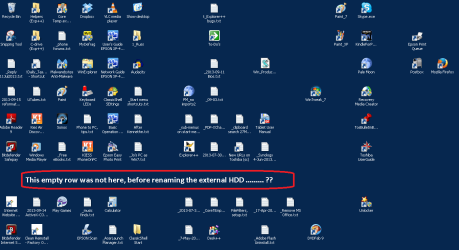
Desktop rearranged.PNG
.
 
Last edited:

My Computer My Computer

At a glance

XP Pro (x86) | 7 HP (x86) & (x64) | 7 Pro (x64)
Computer type
PC/Desktop
Computer Manufacturer/Model Number
Toshiba, Lenovo (laptops) + 4 rigs
OS
XP Pro (x86) | 7 HP (x86) & (x64) | 7 Pro (x64)
Strange and I don't know how it happened but do have some ideas.
What was on the external drive might of caused the change.
You could just do a restore point back a few days.

By Brink:
http://www.sevenforums.com/tutorials/700-system-restore.html

Their has been a few post that Bitdefender has caused a few strange things at times. Nothing much just a little gotya now and again. I don't remember any of the being the same little gotya.

You could also run sfc /scannow to check Windows System Files.

By Brink:
http://www.sevenforums.com/tutorials/1538-sfc-scannow-command-system-file-checker.html
 

My Computer My Computer

At a glance

Windows 10 Pro. 64/ version 1709 Windows 7 Pr...Intel i7-6800K @ 4.3Corsair Platinum 16 gig @2400EVGA GTX 1070 OC
Computer type
PC/Desktop
Computer Manufacturer/Model Number
Home made Desktop
OS
Windows 10 Pro. 64/ version 1709 Windows 7 Pro/64
CPU
Intel i7-6800K @ 4.3
Motherboard
ASUS X-99 Deluxe II
Memory
Corsair Platinum 16 gig @2400
Graphics Card(s)
EVGA GTX 1070 OC
Monitor(s) Displays
Asus 27" LED LCD/VE278Q
Screen Resolution
1920-1080 or 1280-720 HDMI
Hard Drives
INTEL SSD 730-240 Gb Sata 3.0/
PSU
EVGA Platium 1200W
Case
Phanteks Luxe Tempered Glass 8 fans/ one radiator
Cooling
XSPC/ Water Cooled CPU
Keyboard
Das 4 Professional
Mouse
Logitech M705/MX Anywhere 2-S
Internet Speed
100 mbits
Antivirus
Microsoft Security Essentials/ Malwarebytes Premium 3.0/ SAS
Browser
I.E. 11 default/Firefox/ ISP Time Warner Cable/Spectrum
Other Info
LG BluRay Burner/
Sound system-KLipsch-THX/
Icy Dock ssd Hot Swap bays.
You could also try unplugging the external drive and see what happens to your desktop. That might work out whether the problem is caused by the content of the Ext HD or your system!
BTW Did you edit the Ext Drive letter too?
 

My Computer My Computer

At a glance

Microsoft Windows 7 Home Premium 64-bit 7601 ...Intel(R) Core(TM) i7-3770 CPU @ 3.40GHz8.00 GBIntel(R) HD Graphics 4000
Computer type
PC/Desktop
OS
Microsoft Windows 7 Home Premium 64-bit 7601 Multiprocessor Free Service Pack 1
CPU
Intel(R) Core(TM) i7-3770 CPU @ 3.40GHz
Motherboard
ASUSTeK COMPUTER INC. P8H77-M
Memory
8.00 GB
Graphics Card(s)
Intel(R) HD Graphics 4000
Sound Card
On Board
Monitor(s) Displays
Dell 24"
Screen Resolution
1920 x 1080
Hard Drives
(1) INTEL SSDSC2CT180A3 ATA Device (2) ST500DM002-1BD142 ATA Device (3) WDC WD3200AAKS-75L9A0 ATA Device (4) Generic- Compact Flash USB Device (5) Generic- MS/MS-Pro USB Device (6) Generic- SD/MMC USB Device (7) Generic- SM/xD-Picture USB
PSU
500w Corsair
Case
Cooler Master
Cooling
3 Fans
Keyboard
Logitech MK300
Mouse
Logitech WOM
Internet Speed
75Mb
Antivirus
Norton 360
Browser
Firefox, Opera, IE
Layback Bear :)

I suspect this desktop rehash might have been caused by a Bitdefender Update.
Occasionally strange things happen after a BD update, but not enough to get my knickers-in-a-knot.
Small price to pay for a decent AV

Bitdefender have just extended my membership by 2 months. But they have not outlined for what issue.

   Note
(Very courteous email from Bitedefender)
Thank you for taking the time to complete our online survey. Your feedback is highly appreciated and will help us improve our products and services. We apologize for any inconvenience created by this situation. As a sign of appreciation, we would like to offer you a 2 month extension at your subscription and hope that you will accept it. All you have to do is to reply to this message.

I have had 5 email exchanges (5 issues) with BD in the last 2 weeks.
... what situation? They don't say, nor do BD ever quote a reference that I can relate to.
They are extremely slow to respond to email support requests (2 or 3 days) ... at least they do respond.
Their email support does not leave me with a copy of my original email lodgement.
Nor does their computer generated "thank you for you email" reveal which email or issue description.

This thread is not resolved (I don't expect it to be, I think the problem is Bitdefender) so I will leave it as unsolved.
Somebody at a later date might add some "discoveries" here.
 

My Computer My Computer

At a glance

XP Pro (x86) | 7 HP (x86) & (x64) | 7 Pro (x64)
Computer type
PC/Desktop
Computer Manufacturer/Model Number
Toshiba, Lenovo (laptops) + 4 rigs
OS
XP Pro (x86) | 7 HP (x86) & (x64) | 7 Pro (x64)
Hi mitchell65 (hope you don't feel overlooked) :o

I only renamed the drive and retained the drive letter.

Some gremlins have moved into this Toshiba laptop (I think)!
They don't take up much room but they do leave food crumbs on the keyboard and the desk.

Maybe time for a clean install. I have only just started investigating slicker ways of "restoring" the OS, but I am not there yet. (My older XP laptop had to be clean installed about every 12 months.)
Currently challenged by a Win8 to Win7 downgrade on a Dell laptop (on another thread).
As a mere male with declining testosterone ... I can't multi-task ...

Thanks for your contribution :)
 

My Computer My Computer

At a glance

XP Pro (x86) | 7 HP (x86) & (x64) | 7 Pro (x64)
Computer type
PC/Desktop
Computer Manufacturer/Model Number
Toshiba, Lenovo (laptops) + 4 rigs
OS
XP Pro (x86) | 7 HP (x86) & (x64) | 7 Pro (x64)
Looks like Bitdefender was the cause of "Settings" changed.
I have received the 2 months credit on my current Bitdefender Internet Security subscription.

It happened again after a BD update. "Unsettings" are minimal.
Desktop rearrangement? Icon size was changed to large by BD update again
When I change the desktop icon size back to "small" the empty row appeared.
   Note
Solution:
Taskbar > RClick > Properties > Taskbar (tab)
[ ] Lock the Taskbar
[x] Use small icons
Apply (button)
OK (button)

At least BD know about the problem and I assume they will address it.
As AVs go, Bitdefender has been the most vigilant. My PC has never been so stable after 12 months of a flogging on the web.

I also have to admit :o ... Win.7 is a lot more stable than my beloved Win.XP :cry:

Thank you to all for your contribution :)
 

My Computer My Computer

At a glance

XP Pro (x86) | 7 HP (x86) & (x64) | 7 Pro (x64)
Computer type
PC/Desktop
Computer Manufacturer/Model Number
Toshiba, Lenovo (laptops) + 4 rigs
OS
XP Pro (x86) | 7 HP (x86) & (x64) | 7 Pro (x64)
Back
Top