Solved Cannot use back up after renaming a new hdd

ididntdoit

New member
Member
Local time
3:28 PM
Messages
72
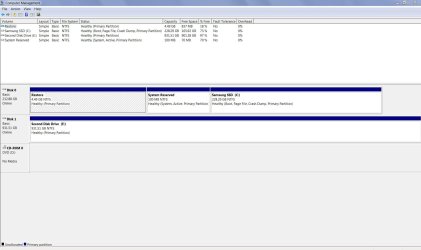
I installed a new 2nd HDD and afetr installing I renamed it from new volume to second disk.
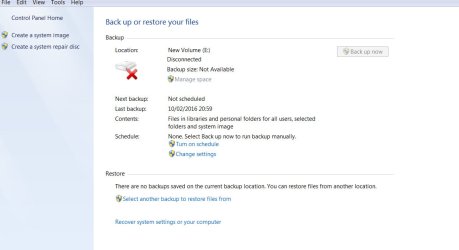
Then went to create a back up but the back up window was still saying new volume. I carried on and used the create system image which all worked ok onto my renamed disk.
But on testing I could not do any restore as it still said vew volume which is not there
What have I done wrong
 

Attachments
  • Untitled-3.jpg
    Untitled-3.jpg
    55.2 KB · Views: 1
  • Untitled-4.jpg
    Untitled-4.jpg
    44.8 KB · Views: 1

My Computer My Computer

At a glance

Windows 7 professionali516gb290
Computer type
PC/Desktop
Computer Manufacturer/Model Number
HP 8200 tower
OS
Windows 7 professional
CPU
i5
Memory
16gb
Graphics Card(s)
290
Hard Drives
samsung 850 evo ssd
WD blue 1tb

My Computer My Computer

At a glance

Multi-Boot W7_Pro_x64 W8.1_Pro_x64 W10_Pro_x6...AMD Athlon II x4 6206GB GSkill DDR2 800AMD 4670 GPU + AMD 4200 IGP
Computer type
PC/Desktop
Computer Manufacturer/Model Number
home built
OS
Multi-Boot W7_Pro_x64 W8.1_Pro_x64 W10_Pro_x64 +Linux_VMs +Chromium_VM
CPU
AMD Athlon II x4 620
Motherboard
Gigabyte GA-MA785G-UD3H
Memory
6GB GSkill DDR2 800
Graphics Card(s)
AMD 4670 GPU + AMD 4200 IGP
Sound Card
on board Realtek ALC889A
Monitor(s) Displays
RCA 40" LCD TV, Insignia 32" LCD TV, HP 15" LCD monitor
Screen Resolution
1680 x 1050
Hard Drives
OCZ Vertex 3 120GB,
Samsung F3 1TB (3),
Several others - WD, Seagate, Hitachi, ...
PSU
Corsair 500 W
Case
Rosewill mid tower
Cooling
CM 90mm rifle
Keyboard
Gyration wireless, Logitech wireless, Dell USB wired
Mouse
Gyration wireless, Logitech wireless, V7 USB wired
Internet Speed
Spectrum - 100Mbps D / 10Mbps U
Antivirus
Avast, MBAM3, EMET, WinPatrol
Browser
Pale Moon, Firefox, IE
Other Info
2 multi-boot PC's
Mainly HTPC/Office/Gen purpose (no gaming).
Trendnet USB KVM.
LG DVD burner/Blue Ray Player.
Tray system for removable SATA backup drives.

Not currently OCd, under-volted.
I use Hybrid sleep, rarely re-boot or shutdown.

Hauppauge HD-PVR, Avermedia PCIe TV Tuner, Hauppauge PCI TV Tuner.
What you did wrong is you tried to fool the system. If the system knows the disk as 'new volume', then that is the name you have to use.

Suggest you reboot the system and try again with your new name.
 

My Computer My Computer

At a glance

Vista, Windows7, Mint Mate, Zorin, Windows 8from 1.6GHz Duo to i7
Computer Manufacturer/Model Number
HP, Dell, Gateway, Toshiba - 4 laptops and 2 desktops
OS
Vista, Windows7, Mint Mate, Zorin, Windows 8
CPU
from 1.6GHz Duo to i7
Monitor(s) Displays
2x HP w2207
Hard Drives
5x HDD, 7x SSD, 12x Externals
Keyboard
with trackball - no mices
Mouse
Trackball mice
Internet Speed
DSL 6000
Here you are (picture) when I renamed the disk I did so in the computer window by right clicking on its icon and selecting rename the disk shows it has the new name in the manager
Whs-- the first thing I tryed was a reboot but still stuck on the name- new volume
The system image files are on the disk - new snip tool image below
(I do love that snipping tool, its the first time I have used it)
 

Attachments

  • Capture.JPG
    Capture.JPG
    119.4 KB · Views: 6
  • Capture2.JPG
    Capture2.JPG
    35 KB · Views: 0

My Computer My Computer

At a glance

Windows 7 professionali516gb290
Computer type
PC/Desktop
Computer Manufacturer/Model Number
HP 8200 tower
OS
Windows 7 professional
CPU
i5
Memory
16gb
Graphics Card(s)
290
Hard Drives
samsung 850 evo ssd
WD blue 1tb
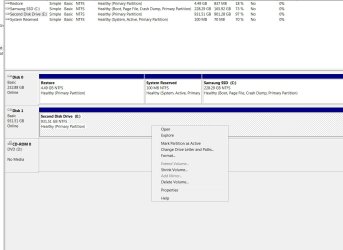
I have just looked again in disk manage and right clicked in the second disk and a pop up window said this (picture )
So should I have clicked "mark partition as active" as well
 

Attachments

  • Untitled-5.jpg
    Untitled-5.jpg
    116 KB · Views: 1

My Computer My Computer

At a glance

Windows 7 professionali516gb290
Computer type
PC/Desktop
Computer Manufacturer/Model Number
HP 8200 tower
OS
Windows 7 professional
CPU
i5
Memory
16gb
Graphics Card(s)
290
Hard Drives
samsung 850 evo ssd
WD blue 1tb
I have just looked again in disk manage and right clicked in the second disk and a pop up window said this (picture )
So should I have clicked "mark partition as active" as well

No.

You have System Reserved marked as active on the other drive.
 

My Computer My Computer

At a glance

Windows 7 Home Premium SP1, 64-bitIntel Skylake i5-6600K, not overclocked8 GB HyperX DDR4-2666 (2 x 4 GB)none; graphics are integrated on CPU
Computer type
PC/Desktop
Computer Manufacturer/Model Number
Ignatz Special; 4 speed manual gearbox; factory air conditioning; one of one
OS
Windows 7 Home Premium SP1, 64-bit
CPU
Intel Skylake i5-6600K, not overclocked
Motherboard
AsRock Z170M Extreme 4, micro ATX
Memory
8 GB HyperX DDR4-2666 (2 x 4 GB)
Graphics Card(s)
none; graphics are integrated on CPU
Sound Card
onboard: Realtek ALC1150; external: USB Behringer UF0-202
Monitor(s) Displays
Dell S2340M 23 inch IPS
Screen Resolution
1600 x 900
Hard Drives
System: Crucial MX100 series SSD, 128 GB;
Data: Samsung Spinpoint 103SJ, 1 TB;
Backup: WD Caviar Green WD30EZRX-00D8PB0, 3 TB
PSU
Rosewill SilentNight 500 watt fanless, semi-modular
Case
Antec Solo II
Cooling
Noctua NH-U12S; Noctua F12 intake, Noctua S12A exhaust
Keyboard
Microsoft 200 6JH-00001 USB
Mouse
Dell or Microsoft optical wired; USB
Antivirus
Microsoft Security Essentials and Malwarebytes Premium
Browser
Pale Moon
Other Info
All fans PWM; speeds at idle: CPU circa 500 rpm; intake circa 600 rpm; exhaust circa 600 rpm; CPU temps 27 idle and 47 C load in a warm room (27 C/81 F) when running Intel Extreme Tuning Utility stress test.
I have just looked again in disk manage and right clicked in the second disk and a pop up window said this (picture )
So should I have clicked "mark partition as active" as well

No.

You have System Reserved marked as active on the other drive.
Ah yes I see it now- not what I was thinking it was then
 

My Computer My Computer

At a glance

Windows 7 professionali516gb290
Computer type
PC/Desktop
Computer Manufacturer/Model Number
HP 8200 tower
OS
Windows 7 professional
CPU
i5
Memory
16gb
Graphics Card(s)
290
Hard Drives
samsung 850 evo ssd
WD blue 1tb
Could I just re format the drive and start again.And this time give it my own name at that stage.
When I was selecting a drive letter I saw it said "new volume" but I did not think that is what it was going to be called, I just thought it was an i.d for me to know which one I was working on.
 

My Computer My Computer

At a glance

Windows 7 professionali516gb290
Computer type
PC/Desktop
Computer Manufacturer/Model Number
HP 8200 tower
OS
Windows 7 professional
CPU
i5
Memory
16gb
Graphics Card(s)
290
Hard Drives
samsung 850 evo ssd
WD blue 1tb
Sure, if you have no valuable data on the drive you can reformat it.
 

My Computer My Computer

At a glance

Vista, Windows7, Mint Mate, Zorin, Windows 8from 1.6GHz Duo to i7
Computer Manufacturer/Model Number
HP, Dell, Gateway, Toshiba - 4 laptops and 2 desktops
OS
Vista, Windows7, Mint Mate, Zorin, Windows 8
CPU
from 1.6GHz Duo to i7
Monitor(s) Displays
2x HP w2207
Hard Drives
5x HDD, 7x SSD, 12x Externals
Keyboard
with trackball - no mices
Mouse
Trackball mice
Internet Speed
DSL 6000
Did you re-boot as whs suggested earlier ?

I don't use the built-in Windows program for backup images.
The built in program is "quirky" and harder to use.
I use Macrium Reflect free, it is much more reliable, controllable, and configurable for me.
There are many other imaging programs such as Acronis, AOEMI, EaseUS, etc., free and paid.

There would be a learning curve, but when you learn it, you'll see the advantages.

I try to keep my systems as "vanilla" as possible, but backups is one case where a 3rd party program is worth having for me.

I've never seen where changing a partition name caused problems (changing a Drive Letter, yes).
If the built-in Backup program is that quirky, i don't know.

If you're dead-set on using the built-in program see this tutorial by Brink:
http://www.sevenforums.com/tutorials/615-backup-user-system-files.html
Also see the related tutorials in this tutorial.

Personally i would now test other programs before you re-install.
If you're going to re-install, and lose everything, why not test alternatives now ?
 

My Computer My Computer

At a glance

Multi-Boot W7_Pro_x64 W8.1_Pro_x64 W10_Pro_x6...AMD Athlon II x4 6206GB GSkill DDR2 800AMD 4670 GPU + AMD 4200 IGP
Computer type
PC/Desktop
Computer Manufacturer/Model Number
home built
OS
Multi-Boot W7_Pro_x64 W8.1_Pro_x64 W10_Pro_x64 +Linux_VMs +Chromium_VM
CPU
AMD Athlon II x4 620
Motherboard
Gigabyte GA-MA785G-UD3H
Memory
6GB GSkill DDR2 800
Graphics Card(s)
AMD 4670 GPU + AMD 4200 IGP
Sound Card
on board Realtek ALC889A
Monitor(s) Displays
RCA 40" LCD TV, Insignia 32" LCD TV, HP 15" LCD monitor
Screen Resolution
1680 x 1050
Hard Drives
OCZ Vertex 3 120GB,
Samsung F3 1TB (3),
Several others - WD, Seagate, Hitachi, ...
PSU
Corsair 500 W
Case
Rosewill mid tower
Cooling
CM 90mm rifle
Keyboard
Gyration wireless, Logitech wireless, Dell USB wired
Mouse
Gyration wireless, Logitech wireless, V7 USB wired
Internet Speed
Spectrum - 100Mbps D / 10Mbps U
Antivirus
Avast, MBAM3, EMET, WinPatrol
Browser
Pale Moon, Firefox, IE
Other Info
2 multi-boot PC's
Mainly HTPC/Office/Gen purpose (no gaming).
Trendnet USB KVM.
LG DVD burner/Blue Ray Player.
Tray system for removable SATA backup drives.

Not currently OCd, under-volted.
I use Hybrid sleep, rarely re-boot or shutdown.

Hauppauge HD-PVR, Avermedia PCIe TV Tuner, Hauppauge PCI TV Tuner.
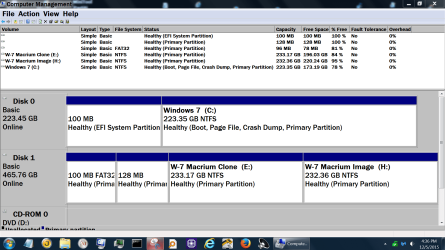
I change partition name all the time so I can keep track of them. Windows 7 doesn't care.
You go changing partition letters and Windows 7 can get lost look for things.

Example:

Capture.PNGDisk management today.PNG


Disk Management Dec 5 2015.PNG
 

My Computer My Computer

At a glance

Windows 10 Pro. 64/ version 1709 Windows 7 Pr...Intel i7-6800K @ 4.3Corsair Platinum 16 gig @2400EVGA GTX 1070 OC
Computer type
PC/Desktop
Computer Manufacturer/Model Number
Home made Desktop
OS
Windows 10 Pro. 64/ version 1709 Windows 7 Pro/64
CPU
Intel i7-6800K @ 4.3
Motherboard
ASUS X-99 Deluxe II
Memory
Corsair Platinum 16 gig @2400
Graphics Card(s)
EVGA GTX 1070 OC
Monitor(s) Displays
Asus 27" LED LCD/VE278Q
Screen Resolution
1920-1080 or 1280-720 HDMI
Hard Drives
INTEL SSD 730-240 Gb Sata 3.0/
PSU
EVGA Platium 1200W
Case
Phanteks Luxe Tempered Glass 8 fans/ one radiator
Cooling
XSPC/ Water Cooled CPU
Keyboard
Das 4 Professional
Mouse
Logitech M705/MX Anywhere 2-S
Internet Speed
100 mbits
Antivirus
Microsoft Security Essentials/ Malwarebytes Premium 3.0/ SAS
Browser
I.E. 11 default/Firefox/ ISP Time Warner Cable/Spectrum
Other Info
LG BluRay Burner/
Sound system-KLipsch-THX/
Icy Dock ssd Hot Swap bays.
Yes I did try a re boot and it was still the same.
But I think I have now sorted it.
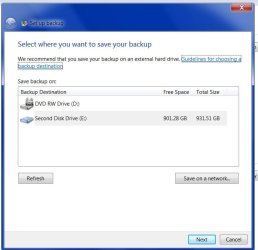
I went for Change settings and the first picture below shows the pop up window that in there it was showing the correct name but still not on the back up window.
I then did a back up of just one small file from that window , which all went through ok, and low and behold that had now "kicked" the wrong name to refresh to the correct one. Second picture.
I do use Acronis to do full backups to an external drive but I thought I would give the win7 a go as its a small faff to get out my external drive pulg it in -blah blah, by using the win 7 one I might back up more often as well as my longer back up periods to me external.
Im still a little confused is the win7 one just an image of the system and settings or does it include my files on that drive.
 

Attachments

  • Untitled-6.jpg
    Untitled-6.jpg
    46.4 KB · Views: 0
  • Untitled-7.jpg
    Untitled-7.jpg
    82.4 KB · Views: 0

My Computer My Computer

At a glance

Windows 7 professionali516gb290
Computer type
PC/Desktop
Computer Manufacturer/Model Number
HP 8200 tower
OS
Windows 7 professional
CPU
i5
Memory
16gb
Graphics Card(s)
290
Hard Drives
samsung 850 evo ssd
WD blue 1tb
Back
Top