Many Win7 problems.

redrooster01

New member
Member
VIP
Local time
5:44 AM
Messages
129
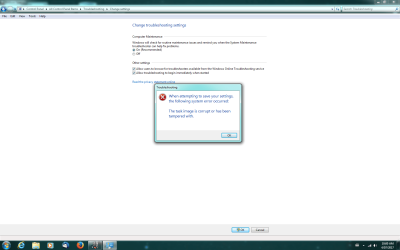
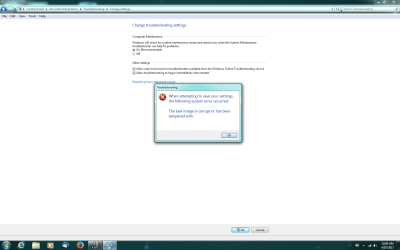
My Win7 O.S. has been playing up for months now, I have programs not opening, the computer going into hibernation and refusing to wake up again and all sorts of other stuff that I can't remember right now. I had previously looked at Speccy under services and saw that a lot of programs were not running so (like an idiot) I searched around until I found a place where I could turn them on! But of cause that was a bad idea because things only got worse. Its only certain programs that won’t work like Desktop gadget, G-Force music visualization program, Windows photo viewer, etc. A member here suggested I replace some registry entries but that didn't work properly, the programs would only work intermittently. Ive run sfc/scannow, when its finished running, it says there are no integrity violations? Ive included a screenshot of a random thing that happens on my computer. Any ideas how I can fix this? Or is it a re-install of the O.S. ? Im 63 y/o and only have a basic understanding of Windows 7, O.S.:rolleyes:
 

Attachments

  • Win7 problem.png
    Win7 problem.png
    157.6 KB · Views: 11

My Computer

Computer type
PC/Desktop
Computer Manufacturer/Model Number
HP P6-2203a
OS
Win 7 64 bit home premium
CPU
A8550
Motherboard
Gigabyte
Memory
8GB
Graphics Card(s)
HD7450
Sound Card
intergrated and Muse USB external DAC
Monitor(s) Displays
LG 22 inch Flatron W2242P
Screen Resolution
1960 x 1020
Hard Drives
C: Drive,1TB Hitachi. Backup Drive: 1TB Western Digital.
Mouse
Targus remote.
Internet Speed
Optical fibre.12mb download and 1mb upload
Antivirus
Microsoft Essentials.
Browser
Firefox 58.0.2
Other Info
Speccy,CCcleaner,Ultra-Defragmenter,Filehippo,ThunderBird.
Ok mate now first up you really shouldn't go messing around in the registry unless you have some idea of what you are doing - that is without backing it up first and getting advice on those sub entries.

Now to start with please run these

[FONT=Arial, sans-serif]http://www.sevenforums.com/tutorials/1538-sfc-scannow-command-system-file-checker.html[/FONT]

[FONT=Arial, sans-serif]http://www.sevenforums.com/tutorials/433-disk-check.html< if necessary include the /f switch and if this does not make any improvement then just run this switch instead /r in the command line as per Option2 [/FONT]

[FONT=Arial, sans-serif]Run these in safe mode and the sfc often best run for two to three runs – you can leave out the /r switch in ckdsk if you feel it not necessary [/FONT]


[FONT=Arial, sans-serif]if no fix then these [/FONT]


[FONT=Arial, sans-serif]http://www.superantispyware.com/ [/FONT]

[FONT=Arial, sans-serif]http://www.malwarebytes.org/products/malwarebytes_free/ [/FONT]

[FONT=Arial, sans-serif]http://www.bleepingcomputer.com/download/adwcleaner/[/FONT]

[FONT=Arial, sans-serif]ADW download from bleeping computer delete any rubbish found with the malware scans[/FONT]

[FONT=Arial, sans-serif](NB If you are running Kaspersky as the main AV then it might need disabling it when trying ADW because it does not like it at times)[/FONT]

Now it would be good to at least know what your motherboard is so you can get specs for everything by following this

Using HW Info

PART A:

You can test the volts on the PSU with HW Info https://www.hwinfo.com/download.php < download the right bit version and close the right hand window select Sensors and scroll down to the power section where you will see what the volts are doing see my pic. In my pic the section (Nuvoton) with VBATT as a dead give away you are in the section for the rail voltages. There are other section titles and one that pops up often is ITE (sometimes the usual one for Gigabyte boards)

Now the voltage on the different rails have to be within 5% =+/- of what is required or the machine will not work properly if at all.

Limits +/- (minimum - correct - maximum)

12v1 = 11.4 - 12 - 12.6v

12v2 = 11.4 - 12- 12.6v

5v = 4.75 – 5 - 5.25v

3.3v = 3.135 – 3 – 3.465v

-12v = -10.80 - -12 - -13.20v

+5VSB = 4.75 – 5 - 5.25v

The Power good signal voltage at pin 8 on the 24 pin plug (grey cable) should be the same as the 5v rail reading/s

See this for the rail voltage info

http://www.tomshardware.com/reviews/power-supply-specifications-atx-reference,3061.html (Section 2.)

The original right hand window shows the machine running and is handy for that but for looking at the components in some detail close it and use the main left hand side panel

FOR OTHER COMPONENTS

PART B:

Open each small square with + in it on the section the components are in and then click on the individual component/s (it will highlight in blue) - in the right hand side will appear all sorts of details including brands speeds and other essential info that particular device. See pic for example.
Run PART B: to get the specs don't worry about PART A: just yet


Now just what do you mean exactly by a basic understanding of Windows 7 I am not real sure what that means. I am 70 and have been doing stuff on this forum for some years now and I wouldn't say I have the best knowledge of it either.
Just as ay the by do your have or are running any programs that reckon they can tidy up the computer like registry cleaners driver finders etc??
 

My Computer

Computer type
PC/Desktop
Computer Manufacturer/Model Number
Own build (new) Desk1 / Asus ROG Win 7 / Desk2 1st build
OS
Desk1 7 Home Prem / Desk2 10 Pro / Main lap Asus ROG 10 Pro 2 laptop Toshiba 7 Pro Asus P2520 7 & 10
CPU
Desk1 i5 3750K / Laptop i7 GTX 860M / Desk2 i5 2500
Motherboard
Desk1 Asus P877-V / Desk2 Gigabyte H67 UD3H / Laptop ?
Memory
Desk1 8GB (1866) / Desk2 16GB (1333) / Laptop 8Gb DDR3
Graphics Card(s)
Desk 1& 2NVidia GTX 650 & Laptops on board Intel
Sound Card
Desk 1 & 2 -XONAR DG Realtek High Def audio Laptop
Monitor(s) Displays
Desk 1 Benq HD 2450 / Desk2 Philips 24" / Laptop 17.5"
Screen Resolution
1920x1080 D1 & D2 & Laptop 1
Hard Drives
Desk1 Samsung 120GB 830 SSD
Asus ROG 256GB 850 Pro SSD
Desk2 Samsung 840 256 SSD
Toshiba 120GB EVO
PSU
Desk 1 Corsair HX 1050/ Laptop ? / Desk 2 Corsair HX 650
Case
Desk 1 Cooler HAF XM ? Toshiba laptop / Desk2 Coolermaster
Cooling
Fans on all Desk1 -2 Desk2 - all Coolermasters 5 Laptop ?
Keyboard
Desk 1 MS Sidewinder X6 Desk 2 MS Sidewinder X 4
Mouse
Desk 1&2 - Gigabyte MS 900 gamer - laptop - Logitec wireless
Internet Speed
ADSL2+
Other Info
One other Desktop (tester) and spare Toshba laptop both with SSD's
Running Kaspersky 2016 ISS on all machines config'd identically
Logitec audio stereo systems on each machine (x3)
Canon MG5250MFC
Router/modem TP-Link running WPA2SK
In your specs i see your quoting a back up external drive.
IF your system is/was infected then so WILL IT.

Roy
 

My Computer

Computer type
PC/Desktop
Computer Manufacturer/Model Number
medionl/Aspire 6930G/acer x55a
OS
W7 home premium 32bit/W7HP 64bit/w10 tp insider ring
CPU
E5300 dual core
Motherboard
medion MS7366
Memory
3gb
Graphics Card(s)
Nvidia Geforce 7100 Nforce 630i
Monitor(s) Displays
avixc
Internet Speed
n (isp resticted to 72)
Antivirus
mse/pands
Browser
palemoon
Other Info
Belkin Fd7050 n USB using Railink RT2870 drivers, more upto date
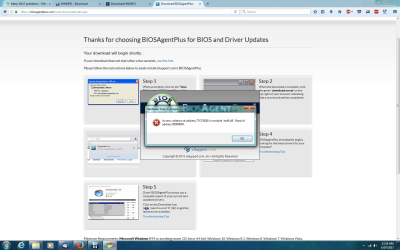
Motherboard is MSI 2AEO. Ive run all the antivirus/adware programs & sfc/scannow several times. I couldnt run diskchecker but Speccy says the hardrives are OK. Ive taken a few screenshot of the errors Ive been getting recently. I ran the HWINFO B program but it didnt show the power supply voltages anywhere it just said its OK. The voltages are alright on the CPU though. I have CCcleaner and Revo Uninstaller, I have been playing with the extra programs included with Revo but that was in an attempt to fix this OS! I dont use my external drive anymore.I use a 1TB F Drive for backups now. I think Ive answered all your questions?
 

Attachments

  • Bios Scan.png
    Bios Scan.png
    342.3 KB · Views: 8
  • Win7 problem.png
    Win7 problem.png
    157.6 KB · Views: 4

My Computer

Computer type
PC/Desktop
Computer Manufacturer/Model Number
HP P6-2203a
OS
Win 7 64 bit home premium
CPU
A8550
Motherboard
Gigabyte
Memory
8GB
Graphics Card(s)
HD7450
Sound Card
intergrated and Muse USB external DAC
Monitor(s) Displays
LG 22 inch Flatron W2242P
Screen Resolution
1960 x 1020
Hard Drives
C: Drive,1TB Hitachi. Backup Drive: 1TB Western Digital.
Mouse
Targus remote.
Internet Speed
Optical fibre.12mb download and 1mb upload
Antivirus
Microsoft Essentials.
Browser
Firefox 58.0.2
Other Info
Speccy,CCcleaner,Ultra-Defragmenter,Filehippo,ThunderBird.
It may seems a little drastic but I would do a clean install.
- Backup your data.
- Disconnect all other drives, living on only the one that will have windows installed.
- If your computer came with Windows, launch Factory recover HP Notebook PCs - Using System Recovery, Factory Reset and Minimized Image Recovery Options | HP® Customer Support

- If you installed Windows, do a clean install. Clean Install Windows 7 - Windows 7 Help Forums.
- For the updates MS releases SP2 for Windows 7 - Windows 7 Help Forums
- Restore your data from the backup.
 

My Computers

System One System Two

  • Computer type
    PC/Desktop
    Computer Manufacturer/Model Number
    custom build
    OS
    Windows 7 HP 64
    CPU
    i5 6600K - 800MHz to 4200MHz
    Motherboard
    GA-Z170-HD3P
    Memory
    4+4G GSkill DDR4 3000
    Graphics Card(s)
    IG - Intel 530
    Monitor(s) Displays
    Samsung 226BW
    Screen Resolution
    1680x1050
    Hard Drives
    (1) -1 SM951 – 128GB M.2 AHCI PCIe SSD drive for Windows 7 and Lubuntu
    (2) -1 WD SATA 3 - 1T for Data
    (3) -1 WD SATA 3 - 1T for backup
    PSU
    Thermaltake 450W TR2 gold
    Keyboard
    Old and good Chicony mechanical keyboard
    Mouse
    Logitech mX performance - 9 buttons (had to disable some)
    Internet Speed
    500Mb/s
    Browser
    Firefox 64
    Other Info
    TinyWall firewall
  • Computer type
    Laptop
    System Manufacturer/Model Number
    Asus Q550LF
    OS
    Windows 7 Pro
    CPU
    i7-4500U 800MHz to 3.0GHz
    Motherboard
    Asus Q550LF
    Memory
    (4+4)G DDR3 1600
    Graphics Card(s)
    IG intel 4400 + NVIDIA GeForce GT 745M
    Sound Card
    Realtek
    Monitor(s) Displays
    LG Display LP156WF4-SPH1
    Screen Resolution
    1920 x 1080
    Hard Drives
    BX500 120G SSD for Windows and programs +
    1T HDD for data
    Internet Speed
    500 Mb/s
    Browser
    Firefox
    Other Info
    TinyWall firewall
Hi Red,

have to agree with Mega, but i would go a step further
would you mind posting a list of your installed programs, for starters i certainly wouldn't use Bios agent+
especially as your motherboard is an HP hybrid.

Roy
 

My Computer

Computer type
PC/Desktop
Computer Manufacturer/Model Number
medionl/Aspire 6930G/acer x55a
OS
W7 home premium 32bit/W7HP 64bit/w10 tp insider ring
CPU
E5300 dual core
Motherboard
medion MS7366
Memory
3gb
Graphics Card(s)
Nvidia Geforce 7100 Nforce 630i
Monitor(s) Displays
avixc
Internet Speed
n (isp resticted to 72)
Antivirus
mse/pands
Browser
palemoon
Other Info
Belkin Fd7050 n USB using Railink RT2870 drivers, more upto date
Are your hardware specs from the MSI MB computer?
 
Last edited:

My Computers

System One System Two

  • Computer type
    PC/Desktop
    Computer Manufacturer/Model Number
    custom build
    OS
    Windows 7 HP 64
    CPU
    i5 6600K - 800MHz to 4200MHz
    Motherboard
    GA-Z170-HD3P
    Memory
    4+4G GSkill DDR4 3000
    Graphics Card(s)
    IG - Intel 530
    Monitor(s) Displays
    Samsung 226BW
    Screen Resolution
    1680x1050
    Hard Drives
    (1) -1 SM951 – 128GB M.2 AHCI PCIe SSD drive for Windows 7 and Lubuntu
    (2) -1 WD SATA 3 - 1T for Data
    (3) -1 WD SATA 3 - 1T for backup
    PSU
    Thermaltake 450W TR2 gold
    Keyboard
    Old and good Chicony mechanical keyboard
    Mouse
    Logitech mX performance - 9 buttons (had to disable some)
    Internet Speed
    500Mb/s
    Browser
    Firefox 64
    Other Info
    TinyWall firewall
  • Computer type
    Laptop
    System Manufacturer/Model Number
    Asus Q550LF
    OS
    Windows 7 Pro
    CPU
    i7-4500U 800MHz to 3.0GHz
    Motherboard
    Asus Q550LF
    Memory
    (4+4)G DDR3 1600
    Graphics Card(s)
    IG intel 4400 + NVIDIA GeForce GT 745M
    Sound Card
    Realtek
    Monitor(s) Displays
    LG Display LP156WF4-SPH1
    Screen Resolution
    1920 x 1080
    Hard Drives
    BX500 120G SSD for Windows and programs +
    1T HDD for data
    Internet Speed
    500 Mb/s
    Browser
    Firefox
    Other Info
    TinyWall firewall
Hi Mega
specs are spot on:)

Roy
 

My Computer

Computer type
PC/Desktop
Computer Manufacturer/Model Number
medionl/Aspire 6930G/acer x55a
OS
W7 home premium 32bit/W7HP 64bit/w10 tp insider ring
CPU
E5300 dual core
Motherboard
medion MS7366
Memory
3gb
Graphics Card(s)
Nvidia Geforce 7100 Nforce 630i
Monitor(s) Displays
avixc
Internet Speed
n (isp resticted to 72)
Antivirus
mse/pands
Browser
palemoon
Other Info
Belkin Fd7050 n USB using Railink RT2870 drivers, more upto date
Are your hardware specs from the MSI MB computer?

I'm asking as on his hardware profile it mention motherboard as unknown and Post #4 mention a MSI MB.
 

My Computers

System One System Two

  • Computer type
    PC/Desktop
    Computer Manufacturer/Model Number
    custom build
    OS
    Windows 7 HP 64
    CPU
    i5 6600K - 800MHz to 4200MHz
    Motherboard
    GA-Z170-HD3P
    Memory
    4+4G GSkill DDR4 3000
    Graphics Card(s)
    IG - Intel 530
    Monitor(s) Displays
    Samsung 226BW
    Screen Resolution
    1680x1050
    Hard Drives
    (1) -1 SM951 – 128GB M.2 AHCI PCIe SSD drive for Windows 7 and Lubuntu
    (2) -1 WD SATA 3 - 1T for Data
    (3) -1 WD SATA 3 - 1T for backup
    PSU
    Thermaltake 450W TR2 gold
    Keyboard
    Old and good Chicony mechanical keyboard
    Mouse
    Logitech mX performance - 9 buttons (had to disable some)
    Internet Speed
    500Mb/s
    Browser
    Firefox 64
    Other Info
    TinyWall firewall
  • Computer type
    Laptop
    System Manufacturer/Model Number
    Asus Q550LF
    OS
    Windows 7 Pro
    CPU
    i7-4500U 800MHz to 3.0GHz
    Motherboard
    Asus Q550LF
    Memory
    (4+4)G DDR3 1600
    Graphics Card(s)
    IG intel 4400 + NVIDIA GeForce GT 745M
    Sound Card
    Realtek
    Monitor(s) Displays
    LG Display LP156WF4-SPH1
    Screen Resolution
    1920 x 1080
    Hard Drives
    BX500 120G SSD for Windows and programs +
    1T HDD for data
    Internet Speed
    500 Mb/s
    Browser
    Firefox
    Other Info
    TinyWall firewall
That comp comes with that MSI motherboard, specific to that model, hence my comment re Bios+.

As i said its hybrid only produced for HP models.


Roy
 

My Computer

Computer type
PC/Desktop
Computer Manufacturer/Model Number
medionl/Aspire 6930G/acer x55a
OS
W7 home premium 32bit/W7HP 64bit/w10 tp insider ring
CPU
E5300 dual core
Motherboard
medion MS7366
Memory
3gb
Graphics Card(s)
Nvidia Geforce 7100 Nforce 630i
Monitor(s) Displays
avixc
Internet Speed
n (isp resticted to 72)
Antivirus
mse/pands
Browser
palemoon
Other Info
Belkin Fd7050 n USB using Railink RT2870 drivers, more upto date
Hi Red,

have to agree with Mega, but i would go a step further
would you mind posting a list of your installed programs, for starters i certainly wouldn't use Bios agent+
especially as your motherboard is an HP hybrid.

Roy
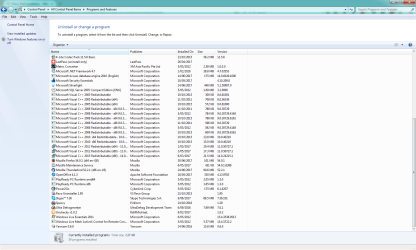
Here are the programs on my computer. I only used Bios Agent because it was on one of the Antivirus downloads recommended so I thought it would be safe!
 

Attachments

  • Win7 programs.png
    Win7 programs.png
    209.6 KB · Views: 7
  • Win7 programs 2.png
    Win7 programs 2.png
    188.2 KB · Views: 7

My Computer

Computer type
PC/Desktop
Computer Manufacturer/Model Number
HP P6-2203a
OS
Win 7 64 bit home premium
CPU
A8550
Motherboard
Gigabyte
Memory
8GB
Graphics Card(s)
HD7450
Sound Card
intergrated and Muse USB external DAC
Monitor(s) Displays
LG 22 inch Flatron W2242P
Screen Resolution
1960 x 1020
Hard Drives
C: Drive,1TB Hitachi. Backup Drive: 1TB Western Digital.
Mouse
Targus remote.
Internet Speed
Optical fibre.12mb download and 1mb upload
Antivirus
Microsoft Essentials.
Browser
Firefox 58.0.2
Other Info
Speccy,CCcleaner,Ultra-Defragmenter,Filehippo,ThunderBird.
I'm asking as on his hardware profile it mention motherboard as unknown and Post #4 mention a MSI MB.
My computer is a HP P6-2203A with the MSI MB that I mentioned before. My computer has the OS on the C / Hard drive partition but I get confused on how to go about doing a clean install. Ive done it before and made a complete mess of my music,documents and download files, they were all screwed up with 2 or 3 copies and others I couldnt access because I renamed the computer. LOL I can laugh about it now but I wasnt then thats for sure. Is there a tutorial in existence that I could follow to do a flawless clean install? That would be the way to go and everything will be like new again.
 

My Computer

Computer type
PC/Desktop
Computer Manufacturer/Model Number
HP P6-2203a
OS
Win 7 64 bit home premium
CPU
A8550
Motherboard
Gigabyte
Memory
8GB
Graphics Card(s)
HD7450
Sound Card
intergrated and Muse USB external DAC
Monitor(s) Displays
LG 22 inch Flatron W2242P
Screen Resolution
1960 x 1020
Hard Drives
C: Drive,1TB Hitachi. Backup Drive: 1TB Western Digital.
Mouse
Targus remote.
Internet Speed
Optical fibre.12mb download and 1mb upload
Antivirus
Microsoft Essentials.
Browser
Firefox 58.0.2
Other Info
Speccy,CCcleaner,Ultra-Defragmenter,Filehippo,ThunderBird.
Hi Red,

attached is a link for an OEM SP1 x64 english
https://software-download.microsoft...1499424011&h=99628f4aa5284f8224de3e9ac8970c77

NOTE its only valid for 24hrs till 11.30AM Friday
Its Bloatware free.

If you have a spare USB stick 4GB+ its easier to use, it will need to be able to be bootable, you need this tool
Windows USB/DVD Download Tool - Microsoft Store


Once installed go to your lappys homepage and ONLY run the live updater it will then list any drivers needed to up date your system.

DONT forget to copy your docs and pics to another device


Your program list looks OK apart from the 2 with x's on them, not sure why???


BEFORE you start the install process change the boot order to either USB/CD first REBOOT
UNPLUG ALL other devices

Clean install tutorial
Clean Install Windows 7 - Windows 7 Help Forums
(note picture in 7 make sure yours looks the same before proceeding - 1 unallocated partition.)

DO NOT USE the insert key here SKIP it, should auto activate.
Once installed follow Thrash's instructions here post#2 READ IT BEFOREHAND

Windows Update will not update and I've tried multiple fixes Solved - Windows 7 Help Forums


Roy
 

My Computer

Computer type
PC/Desktop
Computer Manufacturer/Model Number
medionl/Aspire 6930G/acer x55a
OS
W7 home premium 32bit/W7HP 64bit/w10 tp insider ring
CPU
E5300 dual core
Motherboard
medion MS7366
Memory
3gb
Graphics Card(s)
Nvidia Geforce 7100 Nforce 630i
Monitor(s) Displays
avixc
Internet Speed
n (isp resticted to 72)
Antivirus
mse/pands
Browser
palemoon
Other Info
Belkin Fd7050 n USB using Railink RT2870 drivers, more upto date
Yep Red go with Roy and I would if I were you unless you have an HP disk download the WAN and WLAN drivers at very least first onto a stick so that you can load them to get onto the net after the clean install . Come to that I would load most of the drivers you can find onto that stick including the sound card ones GPU ones etc etc unless you have the disks for them but the net ones will be the latest and in my mind better .

Plus I see you do have some of those addon programs that I asked about a while back mate leave the things off the machine they are useless you can do all those things in Windows!!
 

My Computer

Computer type
PC/Desktop
Computer Manufacturer/Model Number
Own build (new) Desk1 / Asus ROG Win 7 / Desk2 1st build
OS
Desk1 7 Home Prem / Desk2 10 Pro / Main lap Asus ROG 10 Pro 2 laptop Toshiba 7 Pro Asus P2520 7 & 10
CPU
Desk1 i5 3750K / Laptop i7 GTX 860M / Desk2 i5 2500
Motherboard
Desk1 Asus P877-V / Desk2 Gigabyte H67 UD3H / Laptop ?
Memory
Desk1 8GB (1866) / Desk2 16GB (1333) / Laptop 8Gb DDR3
Graphics Card(s)
Desk 1& 2NVidia GTX 650 & Laptops on board Intel
Sound Card
Desk 1 & 2 -XONAR DG Realtek High Def audio Laptop
Monitor(s) Displays
Desk 1 Benq HD 2450 / Desk2 Philips 24" / Laptop 17.5"
Screen Resolution
1920x1080 D1 & D2 & Laptop 1
Hard Drives
Desk1 Samsung 120GB 830 SSD
Asus ROG 256GB 850 Pro SSD
Desk2 Samsung 840 256 SSD
Toshiba 120GB EVO
PSU
Desk 1 Corsair HX 1050/ Laptop ? / Desk 2 Corsair HX 650
Case
Desk 1 Cooler HAF XM ? Toshiba laptop / Desk2 Coolermaster
Cooling
Fans on all Desk1 -2 Desk2 - all Coolermasters 5 Laptop ?
Keyboard
Desk 1 MS Sidewinder X6 Desk 2 MS Sidewinder X 4
Mouse
Desk 1&2 - Gigabyte MS 900 gamer - laptop - Logitec wireless
Internet Speed
ADSL2+
Other Info
One other Desktop (tester) and spare Toshba laptop both with SSD's
Running Kaspersky 2016 ISS on all machines config'd identically
Logitec audio stereo systems on each machine (x3)
Canon MG5250MFC
Router/modem TP-Link running WPA2SK
I haven't replied for a while because I don't know what to say without sounding like I'm whingeing or ungrateful for the help but I am more confused than ever by the directions I was given. Not the tutorials, I can follow them, it's the ambiguous wording that has thrown me? Would it be better for me to use the OS on my hard drive, bloatware and all and I can deal with the bloatware later when Ive got my computer working properly again? Where would I save my drivers and bookmarks from, to the USB stick?
 

My Computer

Computer type
PC/Desktop
Computer Manufacturer/Model Number
HP P6-2203a
OS
Win 7 64 bit home premium
CPU
A8550
Motherboard
Gigabyte
Memory
8GB
Graphics Card(s)
HD7450
Sound Card
intergrated and Muse USB external DAC
Monitor(s) Displays
LG 22 inch Flatron W2242P
Screen Resolution
1960 x 1020
Hard Drives
C: Drive,1TB Hitachi. Backup Drive: 1TB Western Digital.
Mouse
Targus remote.
Internet Speed
Optical fibre.12mb download and 1mb upload
Antivirus
Microsoft Essentials.
Browser
Firefox 58.0.2
Other Info
Speccy,CCcleaner,Ultra-Defragmenter,Filehippo,ThunderBird.

My Computers

System One System Two

  • Computer type
    PC/Desktop
    Computer Manufacturer/Model Number
    custom build
    OS
    Windows 7 HP 64
    CPU
    i5 6600K - 800MHz to 4200MHz
    Motherboard
    GA-Z170-HD3P
    Memory
    4+4G GSkill DDR4 3000
    Graphics Card(s)
    IG - Intel 530
    Monitor(s) Displays
    Samsung 226BW
    Screen Resolution
    1680x1050
    Hard Drives
    (1) -1 SM951 – 128GB M.2 AHCI PCIe SSD drive for Windows 7 and Lubuntu
    (2) -1 WD SATA 3 - 1T for Data
    (3) -1 WD SATA 3 - 1T for backup
    PSU
    Thermaltake 450W TR2 gold
    Keyboard
    Old and good Chicony mechanical keyboard
    Mouse
    Logitech mX performance - 9 buttons (had to disable some)
    Internet Speed
    500Mb/s
    Browser
    Firefox 64
    Other Info
    TinyWall firewall
  • Computer type
    Laptop
    System Manufacturer/Model Number
    Asus Q550LF
    OS
    Windows 7 Pro
    CPU
    i7-4500U 800MHz to 3.0GHz
    Motherboard
    Asus Q550LF
    Memory
    (4+4)G DDR3 1600
    Graphics Card(s)
    IG intel 4400 + NVIDIA GeForce GT 745M
    Sound Card
    Realtek
    Monitor(s) Displays
    LG Display LP156WF4-SPH1
    Screen Resolution
    1920 x 1080
    Hard Drives
    BX500 120G SSD for Windows and programs +
    1T HDD for data
    Internet Speed
    500 Mb/s
    Browser
    Firefox
    Other Info
    TinyWall firewall
Reinstall is the best but hardest solution.
Read my post #5.
Your hardware profile says you have a 1TB Western Digital backup drive.
- Run Migration wizard to save MS configuration (configuration only, not data) and save on the backup drive. %windir%\system32\migwiz\migwiz.exe
- Save your data on the backup drive.
- For Firefox use this How do I migrate to a new computer saving all my settings and add ons etc in Firefoz | Firefox Support Forum | Mozilla Support
Thanks mate, Ill get back to you on how I went with it.
 

My Computer

Computer type
PC/Desktop
Computer Manufacturer/Model Number
HP P6-2203a
OS
Win 7 64 bit home premium
CPU
A8550
Motherboard
Gigabyte
Memory
8GB
Graphics Card(s)
HD7450
Sound Card
intergrated and Muse USB external DAC
Monitor(s) Displays
LG 22 inch Flatron W2242P
Screen Resolution
1960 x 1020
Hard Drives
C: Drive,1TB Hitachi. Backup Drive: 1TB Western Digital.
Mouse
Targus remote.
Internet Speed
Optical fibre.12mb download and 1mb upload
Antivirus
Microsoft Essentials.
Browser
Firefox 58.0.2
Other Info
Speccy,CCcleaner,Ultra-Defragmenter,Filehippo,ThunderBird.
Red - Megahertz is right mate and really a clean install is your best choice and truly if you have got a valid key (code) for that machine installing from an ISO will give you a bloat free OS because I sometimes think that some of the bloat is necessary for the makers machine to function properly, at least that is what I found with Toshiba laptops I have owned.
So you just need to do a few things if this is what you want to do.

Make sure you get the ISO from the Microsoft Recovery link in the clean install tutorial.

Make sure that when you burn the ISO to a disk or stick you do the burning at the slowest rate it will allow -that avoids any burn to be more precise burning it fast can corrupt the end product.

If you are going to use the existing drive make sure it is cleaned and not just formatted and maybe a good time to replace the drive for a new one.

That is what I would do personally because it is taking the appropriate precautions to get a good system up and running.
 

My Computer

Computer type
PC/Desktop
Computer Manufacturer/Model Number
Own build (new) Desk1 / Asus ROG Win 7 / Desk2 1st build
OS
Desk1 7 Home Prem / Desk2 10 Pro / Main lap Asus ROG 10 Pro 2 laptop Toshiba 7 Pro Asus P2520 7 & 10
CPU
Desk1 i5 3750K / Laptop i7 GTX 860M / Desk2 i5 2500
Motherboard
Desk1 Asus P877-V / Desk2 Gigabyte H67 UD3H / Laptop ?
Memory
Desk1 8GB (1866) / Desk2 16GB (1333) / Laptop 8Gb DDR3
Graphics Card(s)
Desk 1& 2NVidia GTX 650 & Laptops on board Intel
Sound Card
Desk 1 & 2 -XONAR DG Realtek High Def audio Laptop
Monitor(s) Displays
Desk 1 Benq HD 2450 / Desk2 Philips 24" / Laptop 17.5"
Screen Resolution
1920x1080 D1 & D2 & Laptop 1
Hard Drives
Desk1 Samsung 120GB 830 SSD
Asus ROG 256GB 850 Pro SSD
Desk2 Samsung 840 256 SSD
Toshiba 120GB EVO
PSU
Desk 1 Corsair HX 1050/ Laptop ? / Desk 2 Corsair HX 650
Case
Desk 1 Cooler HAF XM ? Toshiba laptop / Desk2 Coolermaster
Cooling
Fans on all Desk1 -2 Desk2 - all Coolermasters 5 Laptop ?
Keyboard
Desk 1 MS Sidewinder X6 Desk 2 MS Sidewinder X 4
Mouse
Desk 1&2 - Gigabyte MS 900 gamer - laptop - Logitec wireless
Internet Speed
ADSL2+
Other Info
One other Desktop (tester) and spare Toshba laptop both with SSD's
Running Kaspersky 2016 ISS on all machines config'd identically
Logitec audio stereo systems on each machine (x3)
Canon MG5250MFC
Router/modem TP-Link running WPA2SK

My Computers

System One System Two

  • Computer type
    PC/Desktop
    Computer Manufacturer/Model Number
    custom build
    OS
    Windows 7 HP 64
    CPU
    i5 6600K - 800MHz to 4200MHz
    Motherboard
    GA-Z170-HD3P
    Memory
    4+4G GSkill DDR4 3000
    Graphics Card(s)
    IG - Intel 530
    Monitor(s) Displays
    Samsung 226BW
    Screen Resolution
    1680x1050
    Hard Drives
    (1) -1 SM951 – 128GB M.2 AHCI PCIe SSD drive for Windows 7 and Lubuntu
    (2) -1 WD SATA 3 - 1T for Data
    (3) -1 WD SATA 3 - 1T for backup
    PSU
    Thermaltake 450W TR2 gold
    Keyboard
    Old and good Chicony mechanical keyboard
    Mouse
    Logitech mX performance - 9 buttons (had to disable some)
    Internet Speed
    500Mb/s
    Browser
    Firefox 64
    Other Info
    TinyWall firewall
  • Computer type
    Laptop
    System Manufacturer/Model Number
    Asus Q550LF
    OS
    Windows 7 Pro
    CPU
    i7-4500U 800MHz to 3.0GHz
    Motherboard
    Asus Q550LF
    Memory
    (4+4)G DDR3 1600
    Graphics Card(s)
    IG intel 4400 + NVIDIA GeForce GT 745M
    Sound Card
    Realtek
    Monitor(s) Displays
    LG Display LP156WF4-SPH1
    Screen Resolution
    1920 x 1080
    Hard Drives
    BX500 120G SSD for Windows and programs +
    1T HDD for data
    Internet Speed
    500 Mb/s
    Browser
    Firefox
    Other Info
    TinyWall firewall
As you have a HP computer it came with a Factory recover partition.
The easiest way is to do a factory recover. HP Notebook PCs - Using System Recovery, Factory Reset and Minimized Image Recovery Options | HP® Customer Support

It will format your disk so backup your data on an external disk.

For the updates MS releases SP2 for Windows 7 - Windows 7 Help Forums
Ive read all the articles on how to do this but they dont go into detail, like how to save my bookmarks and system settings and how to put them back after the re-install of the OS. What about savng my files,Documents, Downloads, Photos, Pictures and Music and putting them back properly? My backups are scheduled weekly but they include the system image, I assume that is the OS? So I cant just restore my backup files without including the old OS! Or can I?
These articles seem to be for people who already understand computer lingo. Im having to Google articles on all these things and it just gets so confusing for me , thats why I wanted to know if there was an article or tutorial that explained the re-install process in plain english. Does the Factory recover process save my bookmarks and system settings? If not, how do I do that? Thats the important part for me because I can pretty well figure out the rest of it! :sarc:
 

My Computer

Computer type
PC/Desktop
Computer Manufacturer/Model Number
HP P6-2203a
OS
Win 7 64 bit home premium
CPU
A8550
Motherboard
Gigabyte
Memory
8GB
Graphics Card(s)
HD7450
Sound Card
intergrated and Muse USB external DAC
Monitor(s) Displays
LG 22 inch Flatron W2242P
Screen Resolution
1960 x 1020
Hard Drives
C: Drive,1TB Hitachi. Backup Drive: 1TB Western Digital.
Mouse
Targus remote.
Internet Speed
Optical fibre.12mb download and 1mb upload
Antivirus
Microsoft Essentials.
Browser
Firefox 58.0.2
Other Info
Speccy,CCcleaner,Ultra-Defragmenter,Filehippo,ThunderBird.
Back
Top