
Market Share March 2018

lehnerus2000

New member
Guru
Gold Member
VIP
Local time
8:33 AM
Messages
4,058
Location
Adelaide
Here are the charts from NetMarketShare and StatCounter.

NetMarketShare suggests that W7 & W10 both decreased slightly and XP went up.
009.png

StatCounter shows W10 increasing and W7 decreasing.
(You'll need to click several times to see it full size)
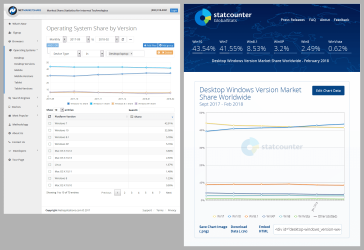
Market Share OS (2018-03-03) NetMarketShare & StatCounter.png
Data from NetMarketShare
Data from StatCounter

Note:

If you visit the NetMarketShare site, you'll notice that the info listed in the table does not match the data points on the graph.
009.png
 

My Computer

Computer type
PC/Desktop
Computer Manufacturer/Model Number
n/a
OS
W7 Ultimate SP1, LM19.2 MATE, W10 Home 1703, W10 Pro 1703 VM, #All 64 bit
CPU
AMD Phenom II x6 1100T, 3.3 GHz
Motherboard
ASUS M4A88T-M/USB3 (AM3)
Memory
12GB DDR3 1333 G-Skill (4GB x 2), G-Skill (2GB x 2)
Graphics Card(s)
NVIDIA GeForce GTX 660
Sound Card
Realtek?
Monitor(s) Displays
Samsung S23B350
Screen Resolution
1920x1080
Hard Drives
WD Green 2TB (SATA), WD Green 3TB (SATA), WD Blue 4TB (SATA), WD Blue 6TB (SATA)
PSU
Cooler Master
Case
Antec GX300 Tower
Cooling
3x Antec TRICOOL 120mm Fans
Mouse
Wired Optical
Internet Speed
DSL
Antivirus
Avast
Browser
Pale Moon (64 bit)
Other Info
2018-12-27 Upgraded HDDs
2015-12-10 Upgraded case, graphics card, storage
2015-08-15 Upgraded motherboard & RAM
2015-07-15 Upgraded LM17.1 to LM17.2
Hope many people stay on 7

Here are the charts from NetMarketShare and StatCounter.

NetMarketShare suggests that W7 & W10 both decreased slightly and XP went up.
009.png

StatCounter shows W10 increasing and W7 decreasing.
(You'll need to click several times to see it full size)
View attachment 402994
Data from NetMarketShare
Data from StatCounter

Note:

If you visit the NetMarketShare site, you'll notice that the info listed in the table does not match the data points on the graph.
009.png

To be honest, I think windows 10 still isn't mature yet, many bugs,, even they messing arround with cortana, that aren't available for other country except US,UK,India, etc.. while google now is much better at handling this kind of problem to deal with..

Second, Windows 10 become much worst on some case, especially on handling search file, event the item is indexed, it never appear on the search via cortana.. I just want to stop knowing MS because of this.. In W7, everything works well, and well customized and mature, not like windows 10...
urgh...
 

My Computer

Computer type
Laptop
Computer Manufacturer/Model Number
ASUS A43SV-VX072D | Custom Build CPU
OS
Windows 7 Ultimate x64
CPU
i7-2670QM
Motherboard
ASUS MotherBoard (ASUS A43SV Mobo American Megatrends)
Memory
16GB Crossair Value
Graphics Card(s)
GT540M NVidia 1GB
Sound Card
Realtek
Monitor(s) Displays
LG and BOC
Screen Resolution
1366x768
Hard Drives
SAMSUNG EVO 860 MZ-76P1T0BW 1TB
-------------- DEPRECATED -------------
HGST 7200rpm TRAVELSTAR 1TB
WD Blue 5400rpm 750GB
Cooling
taffware external Cooler
Keyboard
Logitec MK220
Mouse
Prolink without any specific number
Internet Speed
1mbps(small one :v)
Antivirus
AVAST PREMIER
Browser
Chrome
I just want an OS that works which is why I've stuck with Windows 7. I've never had any issues that I haven't been able to solve easily.
I don't want an OS that is constantly receiving forced updates, features added or removed from one update to the next, I just want one that runs my software well.

I'm not interested in any AI or voice assistant features, it's the first thing I disable on any device I get. I have no devices like Alexa or Google Home in my house - not interested. I use my fingers to communicate with devices and my voice to communicate with other humans.
Even my new Smart TV isn't connected to the internet, I bought a TV just to watch TV. If they offered one without the Smart features at a reduced price, I'd happily buy one.

I'm probably old fashioned, but I really don't care. I have as much interest in Windows 10 now as I did when it first came out - ZERO!
 

My Computer

Computer type
PC/Desktop
Computer Manufacturer/Model Number
Custom Build
OS
Win 7 Ultimate, Win 8.1 Pro, Linux Mint 19 Cinnamon (All 64-Bit)
CPU
Intel i5 4690K
Motherboard
Gigabyte Z97X-UD3H
Memory
Corsair Vengeance LP 32GB DDR3
Graphics Card(s)
MSI GTX 1060 GAMING X 6GB
Sound Card
Onboard
Hard Drives
Samsung 850 EVO 250GB SSD (x2)
Samsung 860 EVO 1TB SSD (x2)
Crucial MX300 525GB SSD
WD Blue 2TB 5400rpm Intellipark Disabled (x2)
PSU
Corsair HX750i
Case
Phanteks Enthoo Pro
Cooling
CM Hyper 212 EVO on CPU, Noctua Redux NF-P14S 1500rpm (x6)
Keyboard
Corsair K70 RGB LUX
Mouse
Corsair Sabre RGB
Antivirus
Avast Free, MalwareBytes, SAS & CryptoPrevent
Browser
Chrome
Other Info
StarTech PEXESAT322I 2 Port PCI-E SATA Card
ASUS PCE-AC56 Dual-band AC1300 Wireless Card
Akasa FC.Six Manual Fan Controller
And a Partridge in a Pear Tree!
lolzz.. when I bought my first PC it was XP, I was trying to get Windows 98 rather than XP but the vendors asked me to get XP for better results - haven't regretted that - though I had 98 as partition for a while.
After nearly 12 years when I again went into the market, I got my laptop with Windows 7, 8 didn't release when I'd it.

Basically I've got the best releases from MS unknowingly both the times :p

as far as the figures go.. may be the results are based on the no.of internet connections via respective OS's ? There could be many more XP even 98 & older versions which aren't connected via internet.
 

My Computer

Computer type
Laptop
Computer Manufacturer/Model Number
DELL
OS
windows 7 ultimate x32
CPU
T6670,
Motherboard
INTEL CORE 2 DUO, 0TFXK9
Memory
8GB DDR3
Screen Resolution
1366*768
Hard Drives
512GB SSD
Mouse
Logitech M165 w/sidebuttons
Internet Speed
30-150 mb/s
Antivirus
Bitdefender
Browser
FF, Opera GX
I just want an OS that works which is why I've stuck with Windows 7. I've never had any issues that I haven't been able to solve easily.
I don't want an OS that is constantly receiving forced updates, features added or removed from one update to the next, I just want one that runs my software well.

I'm not interested in any AI or voice assistant features, it's the first thing I disable on any device I get. I have no devices like Alexa or Google Home in my house - not interested. I use my fingers to communicate with devices and my voice to communicate with other humans.
Even my new Smart TV isn't connected to the internet, I bought a TV just to watch TV. If they offered one without the Smart features at a reduced price, I'd happily buy one.
Agreed.

I'm probably old fashioned, but I really don't care. I have as much interest in Windows 10 now as I did when it first came out - ZERO!
You're not old-fashioned, you're smart. :)
 

My Computer

Computer type
PC/Desktop
Computer Manufacturer/Model Number
n/a
OS
W7 Ultimate SP1, LM19.2 MATE, W10 Home 1703, W10 Pro 1703 VM, #All 64 bit
CPU
AMD Phenom II x6 1100T, 3.3 GHz
Motherboard
ASUS M4A88T-M/USB3 (AM3)
Memory
12GB DDR3 1333 G-Skill (4GB x 2), G-Skill (2GB x 2)
Graphics Card(s)
NVIDIA GeForce GTX 660
Sound Card
Realtek?
Monitor(s) Displays
Samsung S23B350
Screen Resolution
1920x1080
Hard Drives
WD Green 2TB (SATA), WD Green 3TB (SATA), WD Blue 4TB (SATA), WD Blue 6TB (SATA)
PSU
Cooler Master
Case
Antec GX300 Tower
Cooling
3x Antec TRICOOL 120mm Fans
Mouse
Wired Optical
Internet Speed
DSL
Antivirus
Avast
Browser
Pale Moon (64 bit)
Other Info
2018-12-27 Upgraded HDDs
2015-12-10 Upgraded case, graphics card, storage
2015-08-15 Upgraded motherboard & RAM
2015-07-15 Upgraded LM17.1 to LM17.2
I run Linux Mint 18.2 64-bit as my host OS, and I run Windows 7 and Windows 8.1 (each 32-bit) as virtual machines inside of my Linux Mint host. (I use VMWare Workstation Player as my virtual machine software; I use Classic Shell to make Windows 8.1 look and feel just like Windows 7.)

I am able to do just about everything I need in Linux Mint. But there are some things that I just haven't been able to do in Linux, such as Microsoft Movie Maker; for these things, I use one of my Windows VMs. This arrangement works very well for me.

When Windows 7 goes out of support in January 2020, I will set the VM to not allow Windows 7 to access the internet. However, I will still have until January 2023 for Windows 8.1, so I won't have to prevent 8.1 from getting on the internet until then.

The above works very well for me.
 

My Computer

Computer type
PC/Desktop
Computer Manufacturer/Model Number
Dell
OS
Linux Mint 18.2 xfce 64-bit (VMWare host) / Windows 8.1 Pro 32-bit (VMWare guest)
CPU
Haswell
Memory
4 GB
Monitor(s) Displays
Acer 23"
Screen Resolution
1920 x 1080
Hard Drives
Two hard drives, 1TB each: One for Linux, one for my data.
Keyboard
IBM Model M
Antivirus
Sophos (Linux), Trend Micro (Windows)
Browser
Firefox, Opera
Other Info
I use Samba to share my data drive with the other computers at my house and with my guest session in VMWare Workstation Player.
Similar Setup

I run Linux Mint 18.2 64-bit as my host OS, and I run Windows 7 and Windows 8.1 (each 32-bit) as virtual machines inside of my Linux Mint host. (I use VMWare Workstation Player as my virtual machine software; I use Classic Shell to make Windows 8.1 look and feel just like Windows 7.)

I am able to do just about everything I need in Linux Mint. But there are some things that I just haven't been able to do in Linux, such as Microsoft Movie Maker; for these things, I use one of my Windows VMs. This arrangement works very well for me.

When Windows 7 goes out of support in January 2020, I will set the VM to not allow Windows 7 to access the internet. However, I will still have until January 2023 for Windows 8.1, so I won't have to prevent 8.1 from getting on the internet until then.

The above works very well for me.
To keep my W10 Pro VM under my control, I use Linux Mint 18.3 and VMware Player (virtual network disabled). :)

Most of the time I'm using W7 and VMware Workstation for my VMs (XP, W7 & Linux) but my Workstation is too old to run W10.
 
Last edited:

My Computer

Computer type
PC/Desktop
Computer Manufacturer/Model Number
n/a
OS
W7 Ultimate SP1, LM19.2 MATE, W10 Home 1703, W10 Pro 1703 VM, #All 64 bit
CPU
AMD Phenom II x6 1100T, 3.3 GHz
Motherboard
ASUS M4A88T-M/USB3 (AM3)
Memory
12GB DDR3 1333 G-Skill (4GB x 2), G-Skill (2GB x 2)
Graphics Card(s)
NVIDIA GeForce GTX 660
Sound Card
Realtek?
Monitor(s) Displays
Samsung S23B350
Screen Resolution
1920x1080
Hard Drives
WD Green 2TB (SATA), WD Green 3TB (SATA), WD Blue 4TB (SATA), WD Blue 6TB (SATA)
PSU
Cooler Master
Case
Antec GX300 Tower
Cooling
3x Antec TRICOOL 120mm Fans
Mouse
Wired Optical
Internet Speed
DSL
Antivirus
Avast
Browser
Pale Moon (64 bit)
Other Info
2018-12-27 Upgraded HDDs
2015-12-10 Upgraded case, graphics card, storage
2015-08-15 Upgraded motherboard & RAM
2015-07-15 Upgraded LM17.1 to LM17.2

My Computer

Computer type
PC/Desktop
Computer Manufacturer/Model Number
Custom Build
OS
Win 7 Ultimate, Win 8.1 Pro, Linux Mint 19 Cinnamon (All 64-Bit)
CPU
Intel i5 4690K
Motherboard
Gigabyte Z97X-UD3H
Memory
Corsair Vengeance LP 32GB DDR3
Graphics Card(s)
MSI GTX 1060 GAMING X 6GB
Sound Card
Onboard
Hard Drives
Samsung 850 EVO 250GB SSD (x2)
Samsung 860 EVO 1TB SSD (x2)
Crucial MX300 525GB SSD
WD Blue 2TB 5400rpm Intellipark Disabled (x2)
PSU
Corsair HX750i
Case
Phanteks Enthoo Pro
Cooling
CM Hyper 212 EVO on CPU, Noctua Redux NF-P14S 1500rpm (x6)
Keyboard
Corsair K70 RGB LUX
Mouse
Corsair Sabre RGB
Antivirus
Avast Free, MalwareBytes, SAS & CryptoPrevent
Browser
Chrome
Other Info
StarTech PEXESAT322I 2 Port PCI-E SATA Card
ASUS PCE-AC56 Dual-band AC1300 Wireless Card
Akasa FC.Six Manual Fan Controller
And a Partridge in a Pear Tree!
First off, If you are using Windows 7 like I'm doing at the present time; does not mean you can't also use Windows 10 if you choose.

One can use many operating system if one chooses to and the hardware will allow it to be done.
I like both systems. Windows 7 and Windows 10 have their pluses and minuses.
Windows 10 has many things I turn off because I don't need or want them.
When I first installed Windows 10 it took a couple of weeks of learning and tinkering to get things the way I want them.
Any time I have installed a new operating system, it has always had a learning curve. That's to be expected.
Windows 10 main fault in my opinion is it's updating/upgrading methods. I like to be able to choose what and when I upgrade/update Windows 10.
When one gets a Windows 10 upgrade, one never knows what it will do. It may or may not put all the settings back to default.
Then one will have to spend hours once again making things the way one wants them.

Spending many hours on the Ten Forums one can learn how to do things. Just like we use this forum to learn how to use Windows 7.

Their will always be new things to learn with anything computing.
If for some strange reason I could only use one operating system I would prefer Windows 7 but Windows 10 will be a great operating system in time. One can not stop progress, whether it is to their liking of not.

Jack
 

My Computer

Computer type
PC/Desktop
Computer Manufacturer/Model Number
Home made Desktop
OS
Windows 10 Pro. 64/ version 1709 Windows 7 Pro/64
CPU
Intel i7-6800K @ 4.3
Motherboard
ASUS X-99 Deluxe II
Memory
Corsair Platinum 16 gig @2400
Graphics Card(s)
EVGA GTX 1070 OC
Monitor(s) Displays
Asus 27" LED LCD/VE278Q
Screen Resolution
1920-1080 or 1280-720 HDMI
Hard Drives
INTEL SSD 730-240 Gb Sata 3.0/
PSU
EVGA Platium 1200W
Case
Phanteks Luxe Tempered Glass 8 fans/ one radiator
Cooling
XSPC/ Water Cooled CPU
Keyboard
Das 4 Professional
Mouse
Logitech M705/MX Anywhere 2-S
Internet Speed
100 mbits
Antivirus
Microsoft Security Essentials/ Malwarebytes Premium 3.0/ SAS
Browser
I.E. 11 default/Firefox/ ISP Time Warner Cable/Spectrum
Other Info
LG BluRay Burner/
Sound system-KLipsch-THX/
Icy Dock ssd Hot Swap bays.
I have no intention of ever trying to stop progress. The tech industry changes at a rapid pace these days. But, that doesn't mean I have to embrace changes that are sometimes done just for the sake of change.

I've seen a lot of technological advances lately, but I've also seen a lot of steps backwards too. Not just in computing but electronics in general. Taking away user choices, forcing things on to people that are unwelcome to some - switching motion smoothing on in modern TVs by default is a big annoyance of mine. Oh, and removing the headphone jacks from phones. I've yet to find an affordable pair of Bluetooth headphones that can match the sound quality of an affordable pair of wired ones - those are subjects for other forums though. Not everybody has to like the same things just because they're considered "trendy".

I think we can all agree that a stubborn person like me isn't the tech industries target market though. But, I've always thought if something works well, there's no need to change or remove it. There are plenty of advances in the tech industry that have been a big benefit though.

I have attempted to try Windows 10 on many different occasions, but there are just too many things about it which annoy me. Right now, I just can't imagine using it on any of my systems. I'm happy to give it another shot though if things change in future. But, it's been out for over two years now and it still hasn't changed my opinion or convinced me to install it for daily use.

It's trying to do too much for me. I'd rather Microsoft concentrated on the quality, rather than the quantity of features they can cram in - most of which I'll never even touch. I guess that's what modern consumers want though. More features, more, more, more. Many people aren't happy unless they get more these days. They could cram in every option and feature and people would still complain why it doesn't vacuum the house for them!
 

My Computer

Computer type
PC/Desktop
Computer Manufacturer/Model Number
Custom Build
OS
Win 7 Ultimate, Win 8.1 Pro, Linux Mint 19 Cinnamon (All 64-Bit)
CPU
Intel i5 4690K
Motherboard
Gigabyte Z97X-UD3H
Memory
Corsair Vengeance LP 32GB DDR3
Graphics Card(s)
MSI GTX 1060 GAMING X 6GB
Sound Card
Onboard
Hard Drives
Samsung 850 EVO 250GB SSD (x2)
Samsung 860 EVO 1TB SSD (x2)
Crucial MX300 525GB SSD
WD Blue 2TB 5400rpm Intellipark Disabled (x2)
PSU
Corsair HX750i
Case
Phanteks Enthoo Pro
Cooling
CM Hyper 212 EVO on CPU, Noctua Redux NF-P14S 1500rpm (x6)
Keyboard
Corsair K70 RGB LUX
Mouse
Corsair Sabre RGB
Antivirus
Avast Free, MalwareBytes, SAS & CryptoPrevent
Browser
Chrome
Other Info
StarTech PEXESAT322I 2 Port PCI-E SATA Card
ASUS PCE-AC56 Dual-band AC1300 Wireless Card
Akasa FC.Six Manual Fan Controller
And a Partridge in a Pear Tree!
To keep my W10 Pro VM under my control, I use Linux Mint 18.3 and VMware Player (virtual network disabled). :)

Most of the time I'm using W7 and VMware Workstation for my VMs (XP, W7 & Linux) but my Workstation is too old to run W10.

Does VMWare Player allow the VM to share the host's hard drive if you have the virtual network disabled?

Also, do you EVER do updates on Windows 10?
 

My Computer

Computer type
PC/Desktop
Computer Manufacturer/Model Number
Dell
OS
Linux Mint 18.2 xfce 64-bit (VMWare host) / Windows 8.1 Pro 32-bit (VMWare guest)
CPU
Haswell
Memory
4 GB
Monitor(s) Displays
Acer 23"
Screen Resolution
1920 x 1080
Hard Drives
Two hard drives, 1TB each: One for Linux, one for my data.
Keyboard
IBM Model M
Antivirus
Sophos (Linux), Trend Micro (Windows)
Browser
Firefox, Opera
Other Info
I use Samba to share my data drive with the other computers at my house and with my guest session in VMWare Workstation Player.
Market share is beginning to show an increase in the demand for Windows 10 over Windows 7, because the bulk of Windows users are in the enterprise and government (approx. 90%). They are migrating in larger numbers to W10 in 2018-19 due to their business agreements with Microsoft. The market share will shift dramatically toward W10 based on business demand, not based on choice or preference for one OS version over another. The fact that all new Windows hardware comes with W10 on board is also reflected in these numbers.

The enterprise and government face crippling support costs and security exposure if they do not migrate to W10. That is a compelling reason to migrate.

We should not be regarding these statistics as having anything to do with product satisfaction or user driven demand. This is a tightly controlled market, with 10% being individuals and 90% being non-individuals (e.g. employees).

The consumer gets to determine their own fate. Even if 1 million consumers jumped ship, it would only be a blip to Microsoft's W10 adoption. W10 is just one choice for these users. New hardware is the only limiting factor.
 

My Computer

Computer type
PC/Desktop
Computer Manufacturer/Model Number
Custom build
OS
W7Pro/64
Snip ...

This is a tightly controlled market, with 10% being individuals and 90% being non-individuals (e.g. employees).

... Snip

One other thing, of the 10% of those who have a choice, because they are not employees, only less than 1% are pros or enthusiasts who actually make a choice rather than just use what comes with the system they purchase.

Of course most pros and enthusiasts would be likely to run multiple operating systems and thus appear more than once either for one OS or more likely for different OS variations and Types
 

My Computers

System One System Two

  • Computer type
    PC/Desktop
    Computer Manufacturer/Model Number
    ChillBlast - Custom to my design
    OS
    Windows 11 Pro x64 [Latest Release and Release Preview]
    CPU
    Ryzen 9 5950X, 3.8 - 5.2 MHz
    Motherboard
    Asus Prime X570-Pro
    Memory
    64GB [2 x 32GB] DDR4 3200MHz
    Graphics Card(s)
    4GB NVIDIA GEFORCE GTX 1650 Ti
    Sound Card
    On-board SPDIF to 5.1 System + HDMI [5.1 system]
    Monitor(s) Displays
    32" UHD 32 Bit HDR Monitor + 43" UHD 4K 32Bit HDR TV
    Screen Resolution
    2 x 3840 x 2160 @60Hz
    Hard Drives
    1TB M2 SSD OS, 500GB Fast Access SSD, 2 x 8TB Data + Various Externals from 1TB to 4TB, 10TB NAS
    PSU
    NZXT C750 80 PLUS Gold 750W Modular PSU
    Case
    Workstation Case [Matt Black]
    Cooling
    NZXT Kraken X63 280mm CPU Cooler +2x Quiet Case fans
    Keyboard
    Logitech Wireless MX Keys & K400 + others
    Mouse
    Logitech Wireless MX Master 3S
    Internet Speed
    920 MB Down 50 MB Up
    Antivirus
    BitDefender Total Security Pro
    Browser
    Chrome (always run latest Non-Beta)
    Other Info
    Also run ...
    Laptop - Quad 8GB - Windows 10 Pro x64
    Nexus 7 Android tablet x2
    Samsung 10.2" tablet
    Blackview TAB 8 4G Android Tablet c/w Keyboard
    Wacom Intuos Pro Medium Pen Pad
    Wacom Intuos Pro Small Pen Pad
    Wacom Expresskeys Remote
    Loopdeck+ Graphics Controller
    Shuttle Pro v2 Control
  • Computer type
    Laptop
    System Manufacturer/Model Number
    Dell XPS 17 10750H
    OS
    Windows 11 Pro x64 Latest RP
    CPU
    Intel I7 10750H 5.0GHz
    Motherboard
    Dell XPS
    Memory
    32GB [2x16GB] DDR4 2933 MHz
    Graphics Card(s)
    nVidia GTX1650Ti 4 GB GDDR6
    Sound Card
    Stock [Realtek] 4 Speaker
    Monitor(s) Displays
    17" IPS UHD+ Infinity Edge Touchscreen
    Screen Resolution
    3840 x 2400
    Hard Drives
    2TB M2 NVMe, 4TB External + various 500GB & 1TB External NVMe (also have access to spinner HDD from
    PSU
    Stock
    Case
    Stock XPS Aluminium & Carbon Fibre
    Cooling
    Stock - Active Fan Control
    Keyboard
    Backlit + Various Logitech
    Mouse
    Stock Track Pad + Logitech MX Trackball
    Internet Speed
    72 MB Down 18MB Up
    Browser
    Chrome
    Other Info
    Also run ...
    Laptop - Quad 8GB - Windows 10 Pro x64
    Nexus 7 Android tablet x2
    10.2" tablet
    Sony Z3 Android Smartphone
    Wacom Intuos Pro Medium Pen Pad
    Wacom Intuos Pro Small Pen Pad
    Wacom Expresskeys Remote
    Loopdeck+ Graphics Controller
    Shuttle Pro v2 Control Pad
    10TB NAS
One other thing, of the 10% of those who have a choice, because they are not employees, only less than 1% are pros or enthusiasts who actually make a choice rather than just use what comes with the system they purchase.

Of course most pros and enthusiasts would be likely to run multiple operating systems and thus appear more than once either for one OS or more likely for different OS variations and Types

That is for sure. More knowledgeable users not only run multiple Windows operating systems, they probably also use competitor's products and the freebies. VMs are popular with more savvy users, but this usage is not reflected in the usage numbers. There are also several non-internet connected systems in industry and now a significantly greater number in government ... these systems need not migrate either. Of course, we will never know how many there are as the two companies that collect the market share stats rely on an internet presence. Devices produced/sold is what Microsoft uses when they tally their market share, but they do not share that info with the public on a monthly basis. These numbers are probably useful in competitive sales situations, partner deliberations or at shareholder meetings.
 

My Computer

Computer type
PC/Desktop
Computer Manufacturer/Model Number
Custom build
OS
W7Pro/64
Does VMWare Player allow the VM to share the host's hard drive if you have the virtual network disabled?
I haven't tried attaching a real HDD to my W10 Pro VM. :)

Also, do you EVER do updates on Windows 10?
I was installing updates/upgrades until the 1709 Upgrade broke it (continuous upgrade failure loop).

Yesterday I copied my backup W10 Pro VM (1703) onto my SSD.

Additional
Here we go again! :(
https://www.ghacks.net/2018/03/08/r...ion-1709-upgrades-that-bypass-windows-update/


I need to install Visual Studio in W10 to complete my UWP subject for TAFE.
I can't afford to spend hours every day fixing update/upgrade issues, so I'm going to disable Windows Update.
 
Last edited:

My Computer

Computer type
PC/Desktop
Computer Manufacturer/Model Number
n/a
OS
W7 Ultimate SP1, LM19.2 MATE, W10 Home 1703, W10 Pro 1703 VM, #All 64 bit
CPU
AMD Phenom II x6 1100T, 3.3 GHz
Motherboard
ASUS M4A88T-M/USB3 (AM3)
Memory
12GB DDR3 1333 G-Skill (4GB x 2), G-Skill (2GB x 2)
Graphics Card(s)
NVIDIA GeForce GTX 660
Sound Card
Realtek?
Monitor(s) Displays
Samsung S23B350
Screen Resolution
1920x1080
Hard Drives
WD Green 2TB (SATA), WD Green 3TB (SATA), WD Blue 4TB (SATA), WD Blue 6TB (SATA)
PSU
Cooler Master
Case
Antec GX300 Tower
Cooling
3x Antec TRICOOL 120mm Fans
Mouse
Wired Optical
Internet Speed
DSL
Antivirus
Avast
Browser
Pale Moon (64 bit)
Other Info
2018-12-27 Upgraded HDDs
2015-12-10 Upgraded case, graphics card, storage
2015-08-15 Upgraded motherboard & RAM
2015-07-15 Upgraded LM17.1 to LM17.2

My Computer

Computer type
PC/Desktop
Computer Manufacturer/Model Number
Custom Build
OS
Win 7 Ultimate, Win 8.1 Pro, Linux Mint 19 Cinnamon (All 64-Bit)
CPU
Intel i5 4690K
Motherboard
Gigabyte Z97X-UD3H
Memory
Corsair Vengeance LP 32GB DDR3
Graphics Card(s)
MSI GTX 1060 GAMING X 6GB
Sound Card
Onboard
Hard Drives
Samsung 850 EVO 250GB SSD (x2)
Samsung 860 EVO 1TB SSD (x2)
Crucial MX300 525GB SSD
WD Blue 2TB 5400rpm Intellipark Disabled (x2)
PSU
Corsair HX750i
Case
Phanteks Enthoo Pro
Cooling
CM Hyper 212 EVO on CPU, Noctua Redux NF-P14S 1500rpm (x6)
Keyboard
Corsair K70 RGB LUX
Mouse
Corsair Sabre RGB
Antivirus
Avast Free, MalwareBytes, SAS & CryptoPrevent
Browser
Chrome
Other Info
StarTech PEXESAT322I 2 Port PCI-E SATA Card
ASUS PCE-AC56 Dual-band AC1300 Wireless Card
Akasa FC.Six Manual Fan Controller
And a Partridge in a Pear Tree!
Users should have known what they were getting into when they chose to install an OS with forced updates. To be honest, I'm surprised MS didn't start doing this earlier! :rolleyes:

How in the world would most users have known this? Microsoft has never, ever done forced updates until now.

I don't think most geeks were expecting this, let alone the regular folks who don't make it their point to keep up with all of these issues.
 

My Computer

Computer type
PC/Desktop
Computer Manufacturer/Model Number
Dell
OS
Linux Mint 18.2 xfce 64-bit (VMWare host) / Windows 8.1 Pro 32-bit (VMWare guest)
CPU
Haswell
Memory
4 GB
Monitor(s) Displays
Acer 23"
Screen Resolution
1920 x 1080
Hard Drives
Two hard drives, 1TB each: One for Linux, one for my data.
Keyboard
IBM Model M
Antivirus
Sophos (Linux), Trend Micro (Windows)
Browser
Firefox, Opera
Other Info
I use Samba to share my data drive with the other computers at my house and with my guest session in VMWare Workstation Player.
Yesterday I copied my backup W10 Pro VM (1703) onto my SSD.

How well does Windows 10 work when you install and run it in a VM? I'm sure it can't get beyond the bounds of the VM to do any mischief in the host OS. Has that been your experience?

And will it continue to run without any problem if you totally disconnect it from the internet?
 

My Computer

Computer type
PC/Desktop
Computer Manufacturer/Model Number
Dell
OS
Linux Mint 18.2 xfce 64-bit (VMWare host) / Windows 8.1 Pro 32-bit (VMWare guest)
CPU
Haswell
Memory
4 GB
Monitor(s) Displays
Acer 23"
Screen Resolution
1920 x 1080
Hard Drives
Two hard drives, 1TB each: One for Linux, one for my data.
Keyboard
IBM Model M
Antivirus
Sophos (Linux), Trend Micro (Windows)
Browser
Firefox, Opera
Other Info
I use Samba to share my data drive with the other computers at my house and with my guest session in VMWare Workstation Player.
How in the world would most users have known this? Microsoft has never, ever done forced updates until now.

I don't think most geeks were expecting this, let alone the regular folks who don't make it their point to keep up with all of these issues.

You're telling me Windows 10 home doesn't have forced updates? It's had them from day one! :confused:

Pro version also has them, those users just have a little more control as to when they're installed. You can delay an update, you can't just refuse it unlike Windows 7 & 8.1.
 

My Computer

Computer type
PC/Desktop
Computer Manufacturer/Model Number
Custom Build
OS
Win 7 Ultimate, Win 8.1 Pro, Linux Mint 19 Cinnamon (All 64-Bit)
CPU
Intel i5 4690K
Motherboard
Gigabyte Z97X-UD3H
Memory
Corsair Vengeance LP 32GB DDR3
Graphics Card(s)
MSI GTX 1060 GAMING X 6GB
Sound Card
Onboard
Hard Drives
Samsung 850 EVO 250GB SSD (x2)
Samsung 860 EVO 1TB SSD (x2)
Crucial MX300 525GB SSD
WD Blue 2TB 5400rpm Intellipark Disabled (x2)
PSU
Corsair HX750i
Case
Phanteks Enthoo Pro
Cooling
CM Hyper 212 EVO on CPU, Noctua Redux NF-P14S 1500rpm (x6)
Keyboard
Corsair K70 RGB LUX
Mouse
Corsair Sabre RGB
Antivirus
Avast Free, MalwareBytes, SAS & CryptoPrevent
Browser
Chrome
Other Info
StarTech PEXESAT322I 2 Port PCI-E SATA Card
ASUS PCE-AC56 Dual-band AC1300 Wireless Card
Akasa FC.Six Manual Fan Controller
And a Partridge in a Pear Tree!
You're telling me Windows 10 home doesn't have forced updates? It's had them from day one! :confused:

That's not what I meant. What I meant was that during the pre-Windows 10 era, there were no forced updates. The Windows 10 era is a whole new world - it's different than what people have always known with regard to Microsoft's way of doing things.
 

My Computer

Computer type
PC/Desktop
Computer Manufacturer/Model Number
Dell
OS
Linux Mint 18.2 xfce 64-bit (VMWare host) / Windows 8.1 Pro 32-bit (VMWare guest)
CPU
Haswell
Memory
4 GB
Monitor(s) Displays
Acer 23"
Screen Resolution
1920 x 1080
Hard Drives
Two hard drives, 1TB each: One for Linux, one for my data.
Keyboard
IBM Model M
Antivirus
Sophos (Linux), Trend Micro (Windows)
Browser
Firefox, Opera
Other Info
I use Samba to share my data drive with the other computers at my house and with my guest session in VMWare Workstation Player.
Back
Top