Maxed out CPU as soon as i boot up

dmill

New member
Local time
3:26 AM
Messages
2
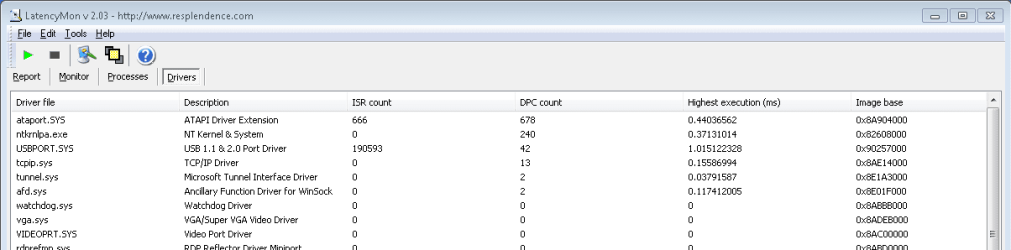
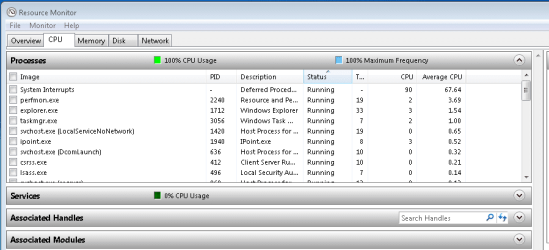
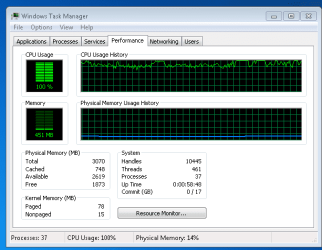
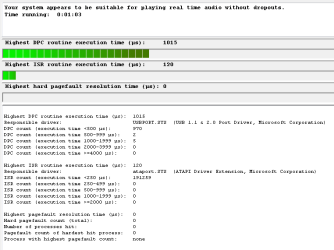
I recently installed windows 7 onto my computer and since then my cpu has run at or very near 100%. I haven't had any BSODs, yet but I wouldn't be surprised if they started to occur if my system continues to run maxed out like it is. Below are some screen shots of my task manager and a program I found through this site called LatencyMon, if anyone could possibly help me or point me in the correct direction for getting this problem resolved I would greatly appreciate it.


The only thing that I wasn't able to capture with the Latency Monitoring tool was when ndis.sys was at the top of the list
 

Attachments
  • Latency Monitor.PNG
    Latency Monitor.PNG
    7.1 KB · Views: 17
  • Latency Monitor2.PNG
    Latency Monitor2.PNG
    9.1 KB · Views: 6
  • Resource Monitor.PNG
    Resource Monitor.PNG
    12.2 KB · Views: 11
  • Task Manager.PNG
    Task Manager.PNG
    13 KB · Views: 10

My Computer My Computer

At a glance

Windows 7 Home Premium 32bit
OS
Windows 7 Home Premium 32bit
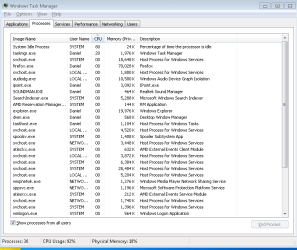
Can you post a screen shot of the task manager's Processes tab? Lets see what's showing as using the CPU. A Guy
 

My Computer My Computer

At a glance

Windows 10 Home x64INTEL Core i5-750 Quad-Core 3.37GHzHyperX Fury Black Series 8GB (2 x 4GB) 1866MhzEVGA GeForce GTX 750 Superclocked 1GB 128-Bit...
Computer type
PC/Desktop
OS
Windows 10 Home x64
CPU
INTEL Core i5-750 Quad-Core 3.37GHz
Motherboard
ASUS P7P55D
Memory
HyperX Fury Black Series 8GB (2 x 4GB) 1866Mhz
Graphics Card(s)
EVGA GeForce GTX 750 Superclocked 1GB 128-Bit GDDR5
Monitor(s) Displays
LG 32MA68HY 32" IPS
Screen Resolution
1920 x 1080
Hard Drives
Samsung 840 Evo 120GB, SEAGATE 500GB Barracuda® 7200.12, SATA 3 Gb/s, 7200 RPM, 16MB cache
PSU
ANTEC TruePower New TP-550, 80 PLUS, 550W
Case
ANTEC Three Hundred Illusion
Cooling
COOLER MASTER Hyper 212 Plus, 4 x 120mm 1 x 140mm Noctua's
Internet Speed
85 + Mbps
Antivirus
Avast
Browser
Vivaldi
You need to update all drivers including chipset and network drivers. Plus scan and clean with free MBAM. Then reboot and check.
 

My Computer My Computer

At a glance

Windows 7 x64 pro/ Windows 7 x86 Pro/ XP SP3 x86
Computer Manufacturer/Model Number
Too many to describe...
OS
Windows 7 x64 pro/ Windows 7 x86 Pro/ XP SP3 x86
Sorry, here is the shot of the processes tab of my task manager
 

Attachments

  • Processes.PNG
    Processes.PNG
    15.3 KB · Views: 33

My Computer My Computer

At a glance

Windows 7 Home Premium 32bit
OS
Windows 7 Home Premium 32bit
I would follow what Bill said, you do indeed have an idle machine, with high CPU usage. This can be explained by drivers, non default BIOS settings, or even an unknown process, which could indicate a malicious program.

Since you recently installed, it would make sense that you have a driver issue. See if you can update your drivers, and do scan with MalwareBytes. If necessary, we can offer ideas to run a clean boot, and even if necessary, see if you have a BIOS update, or how to set the BIOS defaults. A Guy
 

My Computer My Computer

At a glance

Windows 10 Home x64INTEL Core i5-750 Quad-Core 3.37GHzHyperX Fury Black Series 8GB (2 x 4GB) 1866MhzEVGA GeForce GTX 750 Superclocked 1GB 128-Bit...
Computer type
PC/Desktop
OS
Windows 10 Home x64
CPU
INTEL Core i5-750 Quad-Core 3.37GHz
Motherboard
ASUS P7P55D
Memory
HyperX Fury Black Series 8GB (2 x 4GB) 1866Mhz
Graphics Card(s)
EVGA GeForce GTX 750 Superclocked 1GB 128-Bit GDDR5
Monitor(s) Displays
LG 32MA68HY 32" IPS
Screen Resolution
1920 x 1080
Hard Drives
Samsung 840 Evo 120GB, SEAGATE 500GB Barracuda® 7200.12, SATA 3 Gb/s, 7200 RPM, 16MB cache
PSU
ANTEC TruePower New TP-550, 80 PLUS, 550W
Case
ANTEC Three Hundred Illusion
Cooling
COOLER MASTER Hyper 212 Plus, 4 x 120mm 1 x 140mm Noctua's
Internet Speed
85 + Mbps
Antivirus
Avast
Browser
Vivaldi
Back
Top