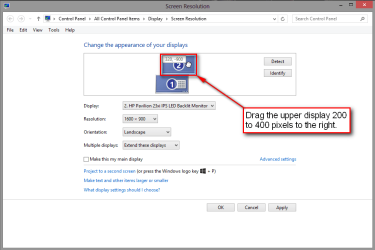
I have a dual screen setup where the two monitors are physically placed above one another. This is reflected in Windows' 'Screen Resolution' settings, where the bottom screen is set as the main screen.
Now the issue I would like to find a workaround for is, when I attempt to do the standard Windows 7 tiling move (ie. drag a window to either corner of either screen), that window gets automatically tiled to the respective side of the screen (so far so good). However, when I try to move it towards the top of the screen [so as to maximize it], it will naturally cross over from the bottom screen to the top LCD.
I would like to be able to maximize windows by moving them towards the top of either of the [two] screens.
I found a utility which prevents the mouse from crossing over from one screen to the other (unless a hotkey is being held), however this hasn't remedied my maximize window on the bottom screen issue.
Any help would be greatly appreciated!
(I understand I can achieve what I need using the Win+Up Arrow keycommand, but being able to do so with the mouse is something I'd love to retain [or be able to toggle the behaviour]...)
Now the issue I would like to find a workaround for is, when I attempt to do the standard Windows 7 tiling move (ie. drag a window to either corner of either screen), that window gets automatically tiled to the respective side of the screen (so far so good). However, when I try to move it towards the top of the screen [so as to maximize it], it will naturally cross over from the bottom screen to the top LCD.
I would like to be able to maximize windows by moving them towards the top of either of the [two] screens.
I found a utility which prevents the mouse from crossing over from one screen to the other (unless a hotkey is being held), however this hasn't remedied my maximize window on the bottom screen issue.
Any help would be greatly appreciated!
(I understand I can achieve what I need using the Win+Up Arrow keycommand, but being able to do so with the mouse is something I'd love to retain [or be able to toggle the behaviour]...)
My Computer
At a glance
Microsoft Windows 7 Enterprise 64-bitIntel(R) Core(TM)2 Quad CPU Q9550 @ 2.83GHz12.00 GBAMD Radeon HD 5450
- Computer type
- PC/Desktop
- Computer Manufacturer/Model Number
- custom build
- OS
- Microsoft Windows 7 Enterprise 64-bit
- CPU
- Intel(R) Core(TM)2 Quad CPU Q9550 @ 2.83GHz
- Motherboard
- ASUSTeK Computer INC. P5P43TD PRO
- Memory
- 12.00 GB
- Graphics Card(s)
- AMD Radeon HD 5450
- Sound Card
- PCI audio interface
- Screen Resolution
- 1:2560x1440x 2 bits(4294967296 colors)@60Hz 2: 1920x1200
- Hard Drives
- INTEL SSDSC2CW180A3
SAMSUNG HD103SJ
SAMSUNG HD103UJ
SAMSUNG HD103UJ
- Browser
- Chrome