How do I rebuild the MBR on just one of my HHD's
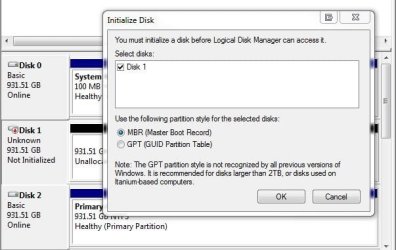
This is what it has to say in Disk Management ( You must initialize a disk before Logical Disk Manager can access it.) This disk was working just fine the day before.
Than it states to use the following partition style for the selected disks: MBR or GPT. When I do this is what pops up. (The device is not ready).
When I click on Properties, is states (This device is working properly) , This is a 1.5 TB WD, green drive. My first green drive. Not a happy camper. The drive is about 6 Mo. old.
Any help would be welcome. I'm running out of hair.
Steve
This is what it has to say in Disk Management ( You must initialize a disk before Logical Disk Manager can access it.) This disk was working just fine the day before.
Than it states to use the following partition style for the selected disks: MBR or GPT. When I do this is what pops up. (The device is not ready).
When I click on Properties, is states (This device is working properly) , This is a 1.5 TB WD, green drive. My first green drive. Not a happy camper. The drive is about 6 Mo. old.
Any help would be welcome. I'm running out of hair.
Steve
My Computer
- Computer Manufacturer/Model Number
- Home built
- OS
- Win 7 Pro, 64bit, Win 7 Home Premiun 32bit
- CPU
- Q6600
- Motherboard
- Asus
- Memory
- 6 Gig
- Graphics Card(s)
- Radeon 5770
- Sound Card
- On board
- Monitor(s) Displays
- Duel 24 inch
- Hard Drives
- C = 150 Gig 10,000 rpm, E = 1 TB, F = 2 TB, G = 1 TB, H = 2 TB.
E, F, G and H are 7,200 rpm.
- PSU
- PC Power and Colling 800 watt
- Case
- Cool Master - Cosmos
- Cooling
- Air