Media card readers

mediaman09

New member
Member
VIP
Local time
1:34 AM
Messages
260
Location
Toronto
Once again Windows 7 has raised my stress levels beyond imagaantation. Three hours into this problem now, and all I hit is brick walls.

I am DESPERATELY trying re retreive some photos off my camera's SD card. The card is perfect.

I have
- an internal card reader on my Dell 9200
- an internal card reader in my Dell monitor
- a Lexar USB2.0 external card reader

There is no way on earth they are all defectiive.

I have multiple SD cards - There is no way on earth they are all defective.

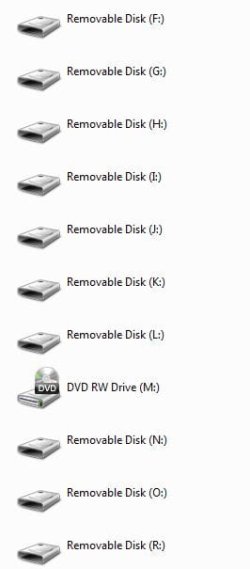
My computer shows my a whack of Removable drive. Nothing works.

To compound everthing, as if its not frustrating enough, I have no way to tell which drive is for what.

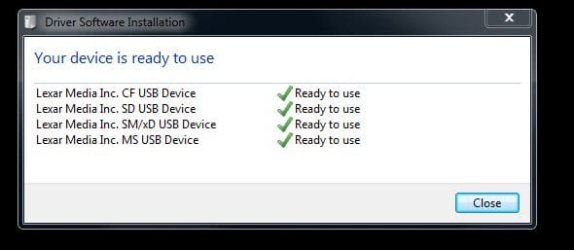
The external drive reports the device is Ready for Use

When I randomely select some of the drives I get the progress bar going on the Computer windows. It goes right across, and then does nothing.

When I randomly select other drive, it asks for the media, but ask as if its not there.

I cannot seem to be able to remove all the portable/removable drives from device manager, I had hoped to be able to do this so that Windwos 7 could redetect them... but alas I cannot.

In Device Manager even I go thru each tab, I get some cluse as to what some of the drives are for. I tried to rename the drives accordingly, but Win 7 will not let me.

I am all out of ideas.

Total Windows frusrtration, yet again.
 

Attachments
  • removable.JPG
    removable.JPG
    19.4 KB · Views: 16
  • progress.JPG
    progress.JPG
    23.5 KB · Views: 10
  • lexar.JPG
    lexar.JPG
    24.6 KB · Views: 16

My Computer

Computer type
PC/Desktop
Computer Manufacturer/Model Number
DELL XPS 8500 // DELL XPS Studio 9100 // DELL Dim 9200
OS
DELL Win 7 Home Premium 64 Bit
CPU
Intel Core i7-930 (8MB L2, 2.8GHz) // ntel Core 2 Quad Q6600
Motherboard
?? // Dell A02 BIOS // ??
Memory
16GB // 18GB DDR3 SDRAM 1333Mhhz 6 DIMMS (3x2, 3x4) //4 GB
Graphics Card(s)
AMD HD7570 // AMD Radeon HD6750 // ATI Radeon HD5670 1 GB GD
Sound Card
?? // THX TruStudio PC //?
Monitor(s) Displays
Dual Dell 2405 WFP-HC24 //SAmsung 27" // Triple 19" LCD
Screen Resolution
1900 x 1200
Hard Drives
Main :WD Caviar Black 1 TB SATA WD1002FAEX
Backup :WD Caviar Black 1 TB SATA WD1002FAEX
PSU
?? // Ultra 900W // ??
This won't fix the problem of figuring which drive letter belongs to what but this might help.
Do you have the cable to connect your camera to the PC?
If so insert the sd card into the camera and then connect the camera to the pc. If the autoplay doesn't open, then browse with windows explorer and you should get an icon image of a camera or a new drive letter. Then there should be a folder of DCIM which should contain your photos ... hope this helps ;)
 

My Computer

Computer type
PC/Desktop
Computer Manufacturer/Model Number
Self Built
OS
Windows 7 Ultimate 64bit
CPU
AMD Phenom Quad core 9950 black edition
Motherboard
Gigabyte
Memory
16Gb
Graphics Card(s)
2x XFX Radeon 5850
Sound Card
PCI Express X-Fi Titanium / Logitech G35
Monitor(s) Displays
2x HP 2410i
Screen Resolution
1920x1080
Hard Drives
2x 500Gb Seagate
1x 300Gb Seagate
1x 1Tb Seagate
2x 1Tb Hitatchi
PSU
Jean Tech Storm 700W
Case
Cooler Master COSMOS S
Cooling
Akasa Evo Blue Pro
Keyboard
Logitech G15
Mouse
Mad Catz M.M.O. 7
Internet Speed
12mb
mediaman09,
I had a similar problem with a all-in-one card reader fan controller unit I installed. I un-installed W7 multiple times and after hours on the phone with Microsoft we determined I had a bad usb device. Sure enough after un-plugging the usb plug off the mobo header life was good again and all my drives responded properly but plugging that usb back in and I would get the same green bar as in your snip. I would unplug all unnecessary drives and usb devices and see how the system responds with just the Lexar external reader plugged in. If better and all cards read then go about plugging a device back into the mobo till the problem occurs and that's your bad device.
 

My Computer

Computer type
PC/Desktop
Computer Manufacturer/Model Number
A blend of brains, brawn and dumb luck.
OS
Windows 7 Ultimate 64
CPU
i7 3770k OC'd 4.6 @ 1.17v, also FX 8120 & i5 miniITX
Motherboard
MSI P67A-GD80 b3
Memory
32 gb G.Skill Sniper DDR3 10-12-12-31 @ 2133
Graphics Card(s)
XFX Radeon 7870 2GB DDR5
Sound Card
Sound Blaster Z Series Card
Monitor(s) Displays
(2) LG LED 23" 1920 x 1080 2ms Monitors via mini d-port
Screen Resolution
1680 X 1050 p
Hard Drives
Samsung 256 gb 830 SSD sata III
(1) 1 tb WD Black
(2) 1 tb Hitachi deskmates/sata II
(2) 1 tb WD green/sata II
(2) 3 tb Seagate Barracuda
(1) 120 gb OCZ Vertex SS
(1) Drobo 5N w/5 Seagate 3tb
PSU
EVGA modular 1000G2 80% gold rating & APC 1200 RS
Case
CoolerMaster Storm Styker
Cooling
7 case fans 140mm & 120mm, NZXT Kraken X60
Keyboard
(2) Logitech Illuminated Keyboards (1) usb (1) wireless
Mouse
Logitech G700 & T-BC21 - nano nx for the laptop
Internet Speed
Basic 120mbps down
Antivirus
Trend Micro Titanium Max Security & Malwarebytes Premium
Browser
Chrome and IE 10
Other Info
5 Noctua case fans + 3 Noctua in p/p on NZXT cooler
Integrated hot swap drive bays for 2.5" Drives
(2) Lite-on dvd/cd/Blu Ray optical 22X
Integrated fan controller and led on/off
HP Officejet Pro 8630 all-n-one
Hot-swappable 3.5" hard drive bay
Netgear Nighthawk router
Asus USB 3 & sata 6 PCIe card
Vantec IDE to sata adptr./Ultra sata adptr
Lenovo L420 i5 lappy with m sata
Drobo 5N advanced NAS
Ignnoring external USB for the moment (ie when nothing connected), my issue is that I cannot get the INTERNAL card reader to work.

I can see all the drives in Windowa explorer, Device Manager and Manage Computer. But all that happens when it tries to read any memory card, is the green bar.
 

My Computer

Computer type
PC/Desktop
Computer Manufacturer/Model Number
DELL XPS 8500 // DELL XPS Studio 9100 // DELL Dim 9200
OS
DELL Win 7 Home Premium 64 Bit
CPU
Intel Core i7-930 (8MB L2, 2.8GHz) // ntel Core 2 Quad Q6600
Motherboard
?? // Dell A02 BIOS // ??
Memory
16GB // 18GB DDR3 SDRAM 1333Mhhz 6 DIMMS (3x2, 3x4) //4 GB
Graphics Card(s)
AMD HD7570 // AMD Radeon HD6750 // ATI Radeon HD5670 1 GB GD
Sound Card
?? // THX TruStudio PC //?
Monitor(s) Displays
Dual Dell 2405 WFP-HC24 //SAmsung 27" // Triple 19" LCD
Screen Resolution
1900 x 1200
Hard Drives
Main :WD Caviar Black 1 TB SATA WD1002FAEX
Backup :WD Caviar Black 1 TB SATA WD1002FAEX
PSU
?? // Ultra 900W // ??
Same with my system and the green bar begins then slows and seems to never complete what would normally happen in a blink. I believe you have a usb device that has gone bad. This very fan controller unit functioned perfect in it's original case and worked well in the new build with the first mobo but with the new mobo it failed, but I couldn't believe it was bad hence the calls to W7 and re-installs. It was never W7 but a usb connection in my case. Frustrating but if you take the time to remove items one at a time and test or remove all non essentials and reconnect one at a time you'll find the culprit.
 

My Computer

Computer type
PC/Desktop
Computer Manufacturer/Model Number
A blend of brains, brawn and dumb luck.
OS
Windows 7 Ultimate 64
CPU
i7 3770k OC'd 4.6 @ 1.17v, also FX 8120 & i5 miniITX
Motherboard
MSI P67A-GD80 b3
Memory
32 gb G.Skill Sniper DDR3 10-12-12-31 @ 2133
Graphics Card(s)
XFX Radeon 7870 2GB DDR5
Sound Card
Sound Blaster Z Series Card
Monitor(s) Displays
(2) LG LED 23" 1920 x 1080 2ms Monitors via mini d-port
Screen Resolution
1680 X 1050 p
Hard Drives
Samsung 256 gb 830 SSD sata III
(1) 1 tb WD Black
(2) 1 tb Hitachi deskmates/sata II
(2) 1 tb WD green/sata II
(2) 3 tb Seagate Barracuda
(1) 120 gb OCZ Vertex SS
(1) Drobo 5N w/5 Seagate 3tb
PSU
EVGA modular 1000G2 80% gold rating & APC 1200 RS
Case
CoolerMaster Storm Styker
Cooling
7 case fans 140mm & 120mm, NZXT Kraken X60
Keyboard
(2) Logitech Illuminated Keyboards (1) usb (1) wireless
Mouse
Logitech G700 & T-BC21 - nano nx for the laptop
Internet Speed
Basic 120mbps down
Antivirus
Trend Micro Titanium Max Security & Malwarebytes Premium
Browser
Chrome and IE 10
Other Info
5 Noctua case fans + 3 Noctua in p/p on NZXT cooler
Integrated hot swap drive bays for 2.5" Drives
(2) Lite-on dvd/cd/Blu Ray optical 22X
Integrated fan controller and led on/off
HP Officejet Pro 8630 all-n-one
Hot-swappable 3.5" hard drive bay
Netgear Nighthawk router
Asus USB 3 & sata 6 PCIe card
Vantec IDE to sata adptr./Ultra sata adptr
Lenovo L420 i5 lappy with m sata
Drobo 5N advanced NAS
I unplugged all the USB devices. Even the keyboard and the mouse! There is nothing more to remove.

I even updated firmware for teh reader

Under windows 7, I

- cannot get the internal card reader to work (only get the never ending green bar in explorer)
- same with external usb reader on my monitor
- same with external udb card reader

All chips and external readers work fine on all my XP computers and other monitors

Windows 7 sticks it to me once again.

I would not be surprised at all if the fix is something as outrageous as a new fan contoroller, power supply, motherboard, 25 reinstalls of Windows 7, or whatever. Clearly I am not going to go that route. I think Microsoft might want to consder hiring some 14 years olds next, as thr twelve year olds aren't cutting it.
 

My Computer

Computer type
PC/Desktop
Computer Manufacturer/Model Number
DELL XPS 8500 // DELL XPS Studio 9100 // DELL Dim 9200
OS
DELL Win 7 Home Premium 64 Bit
CPU
Intel Core i7-930 (8MB L2, 2.8GHz) // ntel Core 2 Quad Q6600
Motherboard
?? // Dell A02 BIOS // ??
Memory
16GB // 18GB DDR3 SDRAM 1333Mhhz 6 DIMMS (3x2, 3x4) //4 GB
Graphics Card(s)
AMD HD7570 // AMD Radeon HD6750 // ATI Radeon HD5670 1 GB GD
Sound Card
?? // THX TruStudio PC //?
Monitor(s) Displays
Dual Dell 2405 WFP-HC24 //SAmsung 27" // Triple 19" LCD
Screen Resolution
1900 x 1200
Hard Drives
Main :WD Caviar Black 1 TB SATA WD1002FAEX
Backup :WD Caviar Black 1 TB SATA WD1002FAEX
PSU
?? // Ultra 900W // ??
This won't fix the problem of figuring which drive letter belongs to what but this might help.
Do you have the cable to connect your camera to the PC?
If so insert the sd card into the camera and then connect the camera to the pc. If the autoplay doesn't open, then browse with windows explorer and you should get an icon image of a camera or a new drive letter. Then there should be a folder of DCIM which should contain your photos ... hope this helps ;)

Thanks for the post. yes, I can get the photos that way, but my camera has other battery draining issues using the cable (!!!) ... so I'm am trying to get the Win7 computer to read the card directly.
 

My Computer

Computer type
PC/Desktop
Computer Manufacturer/Model Number
DELL XPS 8500 // DELL XPS Studio 9100 // DELL Dim 9200
OS
DELL Win 7 Home Premium 64 Bit
CPU
Intel Core i7-930 (8MB L2, 2.8GHz) // ntel Core 2 Quad Q6600
Motherboard
?? // Dell A02 BIOS // ??
Memory
16GB // 18GB DDR3 SDRAM 1333Mhhz 6 DIMMS (3x2, 3x4) //4 GB
Graphics Card(s)
AMD HD7570 // AMD Radeon HD6750 // ATI Radeon HD5670 1 GB GD
Sound Card
?? // THX TruStudio PC //?
Monitor(s) Displays
Dual Dell 2405 WFP-HC24 //SAmsung 27" // Triple 19" LCD
Screen Resolution
1900 x 1200
Hard Drives
Main :WD Caviar Black 1 TB SATA WD1002FAEX
Backup :WD Caviar Black 1 TB SATA WD1002FAEX
PSU
?? // Ultra 900W // ??
mediaman,
The usb devices I'm referring to are on the mobo headers ! I would trace the wires from the internal card reader to the mobo and unplug then try the external lexar and report back.
 

My Computer

Computer type
PC/Desktop
Computer Manufacturer/Model Number
A blend of brains, brawn and dumb luck.
OS
Windows 7 Ultimate 64
CPU
i7 3770k OC'd 4.6 @ 1.17v, also FX 8120 & i5 miniITX
Motherboard
MSI P67A-GD80 b3
Memory
32 gb G.Skill Sniper DDR3 10-12-12-31 @ 2133
Graphics Card(s)
XFX Radeon 7870 2GB DDR5
Sound Card
Sound Blaster Z Series Card
Monitor(s) Displays
(2) LG LED 23" 1920 x 1080 2ms Monitors via mini d-port
Screen Resolution
1680 X 1050 p
Hard Drives
Samsung 256 gb 830 SSD sata III
(1) 1 tb WD Black
(2) 1 tb Hitachi deskmates/sata II
(2) 1 tb WD green/sata II
(2) 3 tb Seagate Barracuda
(1) 120 gb OCZ Vertex SS
(1) Drobo 5N w/5 Seagate 3tb
PSU
EVGA modular 1000G2 80% gold rating & APC 1200 RS
Case
CoolerMaster Storm Styker
Cooling
7 case fans 140mm & 120mm, NZXT Kraken X60
Keyboard
(2) Logitech Illuminated Keyboards (1) usb (1) wireless
Mouse
Logitech G700 & T-BC21 - nano nx for the laptop
Internet Speed
Basic 120mbps down
Antivirus
Trend Micro Titanium Max Security & Malwarebytes Premium
Browser
Chrome and IE 10
Other Info
5 Noctua case fans + 3 Noctua in p/p on NZXT cooler
Integrated hot swap drive bays for 2.5" Drives
(2) Lite-on dvd/cd/Blu Ray optical 22X
Integrated fan controller and led on/off
HP Officejet Pro 8630 all-n-one
Hot-swappable 3.5" hard drive bay
Netgear Nighthawk router
Asus USB 3 & sata 6 PCIe card
Vantec IDE to sata adptr./Ultra sata adptr
Lenovo L420 i5 lappy with m sata
Drobo 5N advanced NAS
Way too much troubleshoot effort here to read a media card.

I think the issue is newer media vs older hardware.

The main media card I have is a 16GB SDHC card. I suspect its as simple as some readers have issues with the capacity

After rebooting with a fimrware upgrade, the internal reader now recognizes the SDHC card... but the external readers (Dell 2407monitor, and Lexar USB 2.0) do not, and I suspect never will.
 

My Computer

Computer type
PC/Desktop
Computer Manufacturer/Model Number
DELL XPS 8500 // DELL XPS Studio 9100 // DELL Dim 9200
OS
DELL Win 7 Home Premium 64 Bit
CPU
Intel Core i7-930 (8MB L2, 2.8GHz) // ntel Core 2 Quad Q6600
Motherboard
?? // Dell A02 BIOS // ??
Memory
16GB // 18GB DDR3 SDRAM 1333Mhhz 6 DIMMS (3x2, 3x4) //4 GB
Graphics Card(s)
AMD HD7570 // AMD Radeon HD6750 // ATI Radeon HD5670 1 GB GD
Sound Card
?? // THX TruStudio PC //?
Monitor(s) Displays
Dual Dell 2405 WFP-HC24 //SAmsung 27" // Triple 19" LCD
Screen Resolution
1900 x 1200
Hard Drives
Main :WD Caviar Black 1 TB SATA WD1002FAEX
Backup :WD Caviar Black 1 TB SATA WD1002FAEX
PSU
?? // Ultra 900W // ??
Yes these high capacity cards are tough with older readers. I always plug them into my external lexar pro reader but it cost me 80.00 so it's not your garden variety card reader !
 

My Computer

Computer type
PC/Desktop
Computer Manufacturer/Model Number
A blend of brains, brawn and dumb luck.
OS
Windows 7 Ultimate 64
CPU
i7 3770k OC'd 4.6 @ 1.17v, also FX 8120 & i5 miniITX
Motherboard
MSI P67A-GD80 b3
Memory
32 gb G.Skill Sniper DDR3 10-12-12-31 @ 2133
Graphics Card(s)
XFX Radeon 7870 2GB DDR5
Sound Card
Sound Blaster Z Series Card
Monitor(s) Displays
(2) LG LED 23" 1920 x 1080 2ms Monitors via mini d-port
Screen Resolution
1680 X 1050 p
Hard Drives
Samsung 256 gb 830 SSD sata III
(1) 1 tb WD Black
(2) 1 tb Hitachi deskmates/sata II
(2) 1 tb WD green/sata II
(2) 3 tb Seagate Barracuda
(1) 120 gb OCZ Vertex SS
(1) Drobo 5N w/5 Seagate 3tb
PSU
EVGA modular 1000G2 80% gold rating & APC 1200 RS
Case
CoolerMaster Storm Styker
Cooling
7 case fans 140mm & 120mm, NZXT Kraken X60
Keyboard
(2) Logitech Illuminated Keyboards (1) usb (1) wireless
Mouse
Logitech G700 & T-BC21 - nano nx for the laptop
Internet Speed
Basic 120mbps down
Antivirus
Trend Micro Titanium Max Security & Malwarebytes Premium
Browser
Chrome and IE 10
Other Info
5 Noctua case fans + 3 Noctua in p/p on NZXT cooler
Integrated hot swap drive bays for 2.5" Drives
(2) Lite-on dvd/cd/Blu Ray optical 22X
Integrated fan controller and led on/off
HP Officejet Pro 8630 all-n-one
Hot-swappable 3.5" hard drive bay
Netgear Nighthawk router
Asus USB 3 & sata 6 PCIe card
Vantec IDE to sata adptr./Ultra sata adptr
Lenovo L420 i5 lappy with m sata
Drobo 5N advanced NAS
Soz pal I must have misinterpreted your post ...

I am DESPERATELY trying re retreive some photos off my camera's SD card. The card is perfect.

I thought it didn't matter how you retrieved your images I just thought it was important that you got them back ;)
 

My Computer

Computer type
PC/Desktop
Computer Manufacturer/Model Number
Self Built
OS
Windows 7 Ultimate 64bit
CPU
AMD Phenom Quad core 9950 black edition
Motherboard
Gigabyte
Memory
16Gb
Graphics Card(s)
2x XFX Radeon 5850
Sound Card
PCI Express X-Fi Titanium / Logitech G35
Monitor(s) Displays
2x HP 2410i
Screen Resolution
1920x1080
Hard Drives
2x 500Gb Seagate
1x 300Gb Seagate
1x 1Tb Seagate
2x 1Tb Hitatchi
PSU
Jean Tech Storm 700W
Case
Cooler Master COSMOS S
Cooling
Akasa Evo Blue Pro
Keyboard
Logitech G15
Mouse
Mad Catz M.M.O. 7
Internet Speed
12mb
Soz pal I must have misinterpreted your post ...
I thought it didn't matter how you retrieved your images I just thought it was important that you got them back ;)

I thought i clarified that in post 7, ie "Thanks for the post. yes, I can get the photos that way, but my camera has other battery draining issues using the cable (!!!) ... so I'm am trying to get the Windows 7 computer to read the card directly.

Appreciate the help though!
 

My Computer

Computer type
PC/Desktop
Computer Manufacturer/Model Number
DELL XPS 8500 // DELL XPS Studio 9100 // DELL Dim 9200
OS
DELL Win 7 Home Premium 64 Bit
CPU
Intel Core i7-930 (8MB L2, 2.8GHz) // ntel Core 2 Quad Q6600
Motherboard
?? // Dell A02 BIOS // ??
Memory
16GB // 18GB DDR3 SDRAM 1333Mhhz 6 DIMMS (3x2, 3x4) //4 GB
Graphics Card(s)
AMD HD7570 // AMD Radeon HD6750 // ATI Radeon HD5670 1 GB GD
Sound Card
?? // THX TruStudio PC //?
Monitor(s) Displays
Dual Dell 2405 WFP-HC24 //SAmsung 27" // Triple 19" LCD
Screen Resolution
1900 x 1200
Hard Drives
Main :WD Caviar Black 1 TB SATA WD1002FAEX
Backup :WD Caviar Black 1 TB SATA WD1002FAEX
PSU
?? // Ultra 900W // ??
Tagging onto this thread, my SB build is also experiencing issues with the internal media card reader. When I first built it, I had no issues at all. But after numerous driver updates and software updates since the original build, the media card reader seems to have a mind of its own.

Yes, I can plug the SD card in an external reader or connect the camera via USB cable and get my pics, but that totally bypasses the media reader. Shouldn't have wasted the money on it in the first place, but there are time when it is much faster to d/l a lot of digital pics/movies via the internal media reader rather than using an external USB 2.0 device.

I don't believe there are any drivers for it other than the Win 7/64 drivers.
 

My Computer

OS
Windows 7 x64 home premium
CPU
Intel core i5-2500k
Motherboard
Asus P8Z68-V Pro
Memory
2x4GB G.Skill DDR3-1333, 2x2GB AData DDR3-1333
Graphics Card(s)
HD3000 graphics
Sound Card
on board
Monitor(s) Displays
Samsung 19" syncmaster
Screen Resolution
1280x1024
Hard Drives
Intel 80 GB X25-M SSD
Samsung HD321KJ 320 GB SATA
Samsung HD204UI 2.0 TB SATA
WD 1.5 TB Green eSATA in an external NexStar enclosure
PSU
Corsair HX520W
Case
Antec Solo
Cooling
CoolerMaster Hyper 212+ with dual fans
Keyboard
MS Natural Ergonomic 4000
Mouse
Logitech
Internet Speed
RoadRunner
Update: my issue is resolved. I had to internally disconnect the USB cable from the back of the device (XM28U) and reconnect it. There are two USB connections to the rear, both Type B. I disconnected the center one as it was easiest to get to, heard the USB connect tones when I reconnected, and then the media reader functioned normally again.

I have no idea what caused the issue in the first place. It would survive reboots and still fail. But with the system powered up, disconnecting and reconnecting the USB cable to the back of the device restored my media reader functions.

I have another computer with a similar issue using a different media reader. I'll try that next to see if it fixes that one too.

Edit: While my media reader is now functioning properly, I have an unresolved problem (pre-existing) where my external USB 2.0 media reader lights up on connection but SD cards aren't recognized. Sigh. It's always something. This problem pre-dates the media reader fix above. I'm not sure when I lost the ability to use my external media reader.

Edit 2: I had to correct the USB connector info, they were both type B connectors. Also, I tried this fix on the other computer with a Pro-55u media reader and it now functions properly too.
 
Last edited:

My Computer

OS
Windows 7 x64 home premium
CPU
Intel core i5-2500k
Motherboard
Asus P8Z68-V Pro
Memory
2x4GB G.Skill DDR3-1333, 2x2GB AData DDR3-1333
Graphics Card(s)
HD3000 graphics
Sound Card
on board
Monitor(s) Displays
Samsung 19" syncmaster
Screen Resolution
1280x1024
Hard Drives
Intel 80 GB X25-M SSD
Samsung HD321KJ 320 GB SATA
Samsung HD204UI 2.0 TB SATA
WD 1.5 TB Green eSATA in an external NexStar enclosure
PSU
Corsair HX520W
Case
Antec Solo
Cooling
CoolerMaster Hyper 212+ with dual fans
Keyboard
MS Natural Ergonomic 4000
Mouse
Logitech
Internet Speed
RoadRunner
Back
Top