Media Center- Setup Movie Library

How to Setup a Media Center Movie Library in Windows 7

   Information
This tutorial will show how to manage your movie library in Media Center, including poster images & full synopsis information.
   Note
Windows Media Center is not available in Windows 7 Starter and Windows 7 Home Basic editions.


The N and KN editions of Windows 7 have all the features that normally come with each individual Windows 7 edition, except for Windows Media Player 12 and related programs, such as Windows Media Center or Windows DVD Maker.

The N editions of Windows 7 allow you to choose your own media player and software required to manage and play CDs, DVDs, and other digital media files. If you choose to use Windows Media Player 12, downloading it, along with related software, is free. Download Media Feature Pack for Windows 7 N with Service Pack 1 and Windows 7 KN with Service Pack 1 (KB968211) from Official Microsoft Download Center

Examples: With & without poster information.
7 Example Media Center (Movies without posters).PNG8 Example Media Center (Movies with posters).png

Before you start:
NOTE: Special thanks to DemonSeed for the file2folder batch file. 1. Click on the Download button below to download the file2folder.zip file and extract the file2folder.bat file to the drive containing your movie files (e.g. G:\MOVIES). Run the file which will create directories based on the movie file name (e.g. Babylon A.D.avi will have the directory Babylon A.D created) and the movie file moved to the directory.

2. Search for & download a file for the movie you would like as a poster and save it in the movie folder and name it folder.jpg. Do this for each movie.
   Warning
I would advise at least 2GB of memory as due to the size of the folder.jpg files there is a lot of memory used. You could (like me) resize all folder.jpg files to a width of 300 pixels & maintain aspect ratio.


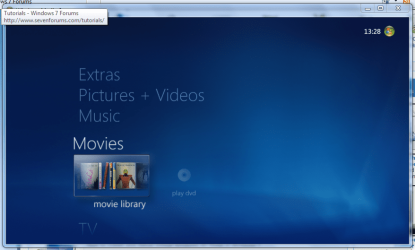
Here's How: 1. Run Media Center and navigate to Movies 1 Media Center (Start Page).PNG
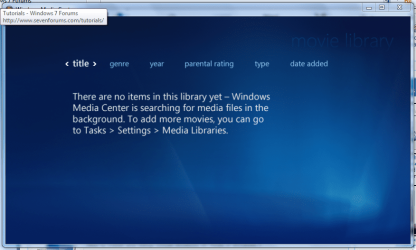
2. Open movie library, you should notice no movies shown 2 Media Center (Movie Library - Empty).PNG
3. Right-Click within the inner (empty area) and select Manage Library, you will be shown the 'Add folders' wizard. Select 'Add folders to the library' and click next 3 Media Center (Add folder to library).PNG
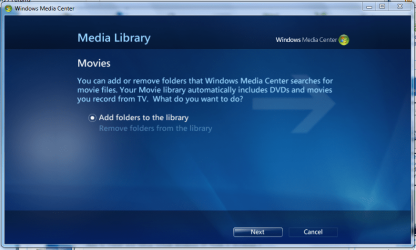
4. Select the location where your drive with the videos is stored, and click on next. 4 Media Center (Folder Selection 1).PNG
5. Navigate to the folder where your videos are stored (e.g. G:\MOVIES), and click next. 5 Media Center (Select Folder).PNG
6. On the final screen select 'Yes, use these locations' and click finish 6 Media Center (Finish Selection).PNG


Now your folder is added, Media Center will show the Video folders (with posters if you downloaded an image file for each movie).

   Note
If you wish to include metadata you will need to download Yammm. The meta data will download the DVDID.XML file which will allow for Media Center to download full synopsis information for each movie
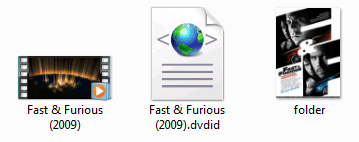

Example folder view.PNG

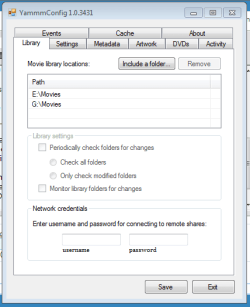
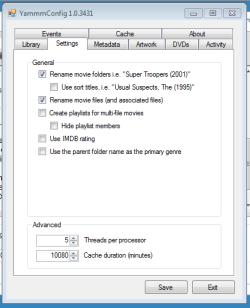
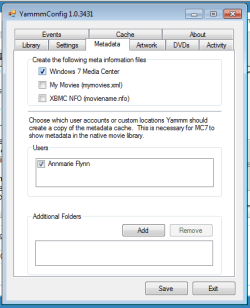
Recommended Yammm settings
1 yammm paths.PNG2 yammm settings.PNG
3 yammm metadata.PNG
   Note
These setting will automatically rename folders/files, download folder.jpg & DVDID.XML files for Media Center to read from.


Update

The Yammm application has been updated to include Image Resizing
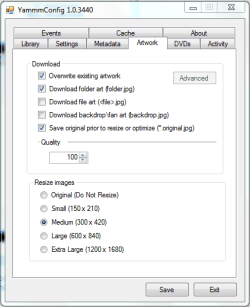
Yammm (Artwork).PNG

This will allow Media Center to use less memory when rendering folder images.

   Tip
It's recommended that you use a setting of 92 Quality & 300x420 medium size as this will greatly reduce the amount of memory used by 7MC when viewing a large movie library


Update 2: More Synopsis

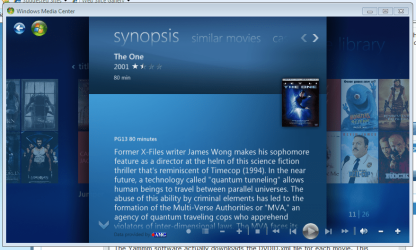
I thought i'd include an example of how the DVDID.XML file works.

1, Full synopsis information Movie Library (Full Synopsis).PNG
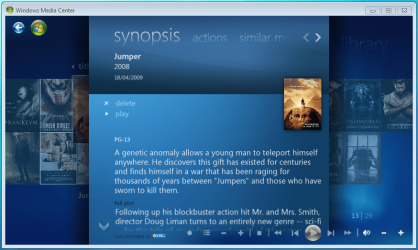
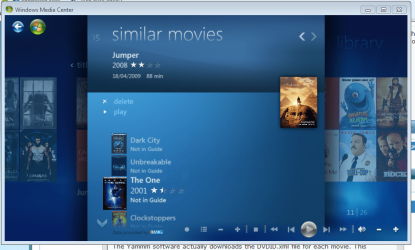
2, Similar Movies shown, with posters Movie Library (Similar Movies).PNG
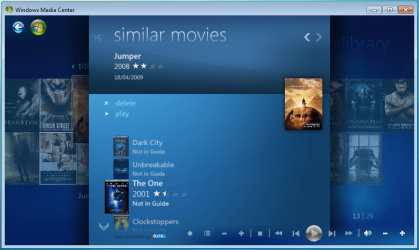
3, Click the similar movie to get full details of that movie Movie Library (Similar Movies - Synopsis).PNG
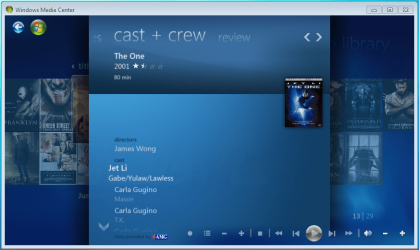
4, Cast & Crew information Movie Library (Cast & Crew).PNG
5, Click on a name to see a fimography (film list) relating to that actor/director Movie Library (Cast & Crew - Filmography).PNG

Enjoy
 

Attachments

  • file2folder.zip
    file2folder.zip
    230 bytes · Views: 22,835
  • synopsis.PNG
    synopsis.PNG
    127.1 KB · Views: 85
  • similar movies.PNG
    similar movies.PNG
    131.5 KB · Views: 66
  • similar movies detail.PNG
    similar movies detail.PNG
    140 KB · Views: 60
Last edited by a moderator:
is it the movie files i rename and will i need to rename the metadata yammm added or do i rename the folder there in?

YAMMM works via the folder name you place each movie in... for example if you have a folder called "Movies" and inside that you create folders for each movie, the folder names are the names that may need to manipulate. For example: "Fast & Furious 5" or "Fast Five"...

Currently YAMMM doesnt support TV series, but I believe the developer Mikenho was working on it. Mikenho, any news on the updates or upcoming beta???

I have over 3TB of media and yes sometimes MC/YAMMM get slow/sluggish!

Again, Mikenho is working on it!
 

My Computer My Computer

At a glance

Windows 7 Ultimate 64 bit Steve Ballmer Signa...Intel Core 2 Quad - Q9550 - 2.83GHz stock - O...4GB DDR2 800MHz (PC6400) OCZ ReaperNvidia GE Force 8800 GTS
Computer Manufacturer/Model Number
Homebrew PC - "Alpha_Dawg"
OS
Windows 7 Ultimate 64 bit Steve Ballmer Signature Edition
CPU
Intel Core 2 Quad - Q9550 - 2.83GHz stock - OC'd to 3.6GHz
Motherboard
Gigabyte EP45-UD3P
Memory
4GB DDR2 800MHz (PC6400) OCZ Reaper
Graphics Card(s)
Nvidia GE Force 8800 GTS
Sound Card
Asus Xonar DX
Monitor(s) Displays
Samsung SyncMaster 2333HD
Screen Resolution
1920 x 1080
Hard Drives
WD Caviar Black 750GB - 7200RPM - 32MB cache
WD Caviar Green 1.5TB - 5400RPM - 64MB cache
WD Caviar Green 2.0TB - 5400RPM - 64MB cache
PSU
PC Power & Cooling Silencer 750
Case
Gigabyte 3D Aurora
Cooling
Case is Air - 5ea. 120mm fans (mix of Arctic and Xigmatec)
Keyboard
MS Natural Wireless KB
Mouse
MS Wireless Mouse
Internet Speed
50 mbps down/5 mbps up
Other Info
AVerMedia - AVerTVHD G2 Dual Tuner Card
is it the movie files i rename and will i need to rename the metadata yammm added or do i rename the folder there in?

YAMMM works via the folder name you place each movie in... for example if you have a folder called "Movies" and inside that you create folders for each movie, the folder names are the names that may need to manipulate. For example: "Fast & Furious 5" or "Fast Five"...

Currently YAMMM doesnt support TV series, but I believe the developer Mikenho was working on it. Mikenho, any news on the updates or upcoming beta???

I have over 3TB of media and yes sometimes MC/YAMMM get slow/sluggish!

Again, Mikenho is working on it!

I have manipulated the folder names that still doesnt not put the movies together or in the correct order any other suggestions???
 

My Computer My Computer

At a glance

windows 7 ultimate 64bitAMD PhenomII x4 975 processor 3.60GHzKingston HyperX Genesis DDR3 1600MHz CL9 8GB ...Nvidia 9800 GT
OS
windows 7 ultimate 64bit
CPU
AMD PhenomII x4 975 processor 3.60GHz
Motherboard
Asus M5A78L LE
Memory
Kingston HyperX Genesis DDR3 1600MHz CL9 8GB DIMM Memory Mod
Graphics Card(s)
Nvidia 9800 GT
Can you send a screenshot of your movie folder/drive showing the folders and structure you are using?

YAMMM works best when you place each movies files into seperate folders. Example: lets say we are talking about the movie The Longest Yard. There are 2 of these movies, the original 1974 version with Burt Reynolds, and the more recent version with Adam Sandler in 2005.

In order for YAMMM to properly ID the movie and get the correct movie metadata into the correct folder, you need to name these folders... Moviename (YEAR), so in our example... The Longest Yard (1974) or The Longest Yard (2005). Once YAMMM is setup, it will actually rename either of these folders to Longest Yard, The (YEAR). If you need help configureing YAMMM, let me know.

Honestly, I find that YAMMM works 95% of the time perfectly! It automatically remanes the folders from the database @ imdb.com, adds movie art, metadata, etc. Occasionally, YAMMM will auto name a folder incorrectly, but the majority of the time its a gem! ...and there are workarounds for the occasional YAMMM hiccups! But lets get you working properly first! ;)
 

My Computer My Computer

At a glance

Windows 7 Ultimate 64 bit Steve Ballmer Signa...Intel Core 2 Quad - Q9550 - 2.83GHz stock - O...4GB DDR2 800MHz (PC6400) OCZ ReaperNvidia GE Force 8800 GTS
Computer Manufacturer/Model Number
Homebrew PC - "Alpha_Dawg"
OS
Windows 7 Ultimate 64 bit Steve Ballmer Signature Edition
CPU
Intel Core 2 Quad - Q9550 - 2.83GHz stock - OC'd to 3.6GHz
Motherboard
Gigabyte EP45-UD3P
Memory
4GB DDR2 800MHz (PC6400) OCZ Reaper
Graphics Card(s)
Nvidia GE Force 8800 GTS
Sound Card
Asus Xonar DX
Monitor(s) Displays
Samsung SyncMaster 2333HD
Screen Resolution
1920 x 1080
Hard Drives
WD Caviar Black 750GB - 7200RPM - 32MB cache
WD Caviar Green 1.5TB - 5400RPM - 64MB cache
WD Caviar Green 2.0TB - 5400RPM - 64MB cache
PSU
PC Power & Cooling Silencer 750
Case
Gigabyte 3D Aurora
Cooling
Case is Air - 5ea. 120mm fans (mix of Arctic and Xigmatec)
Keyboard
MS Natural Wireless KB
Mouse
MS Wireless Mouse
Internet Speed
50 mbps down/5 mbps up
Other Info
AVerMedia - AVerTVHD G2 Dual Tuner Card
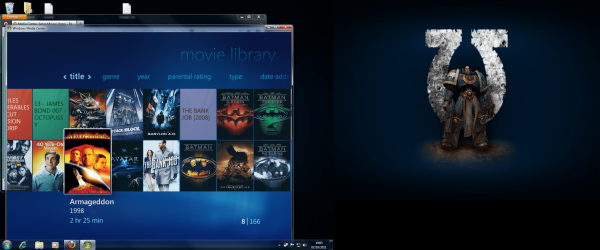
i have no problem with yammm nameing films properly i just want to know how to get my films in media centre to appear together and in order iv added an attachment which shows 2 fast 2 furious as the second movie in my collection the other fast and furious films are dotted arround the other f titled movies and in the pic as well the batmans are pretty much together but not in the right order of old to new and i have all the jamesbond films too and there not in the right order either this is what i need help with if u can help it be appreciated
 

Attachments

  • library.png
    library.png
    476.8 KB · Views: 404

My Computer My Computer

At a glance

windows 7 ultimate 64bitAMD PhenomII x4 975 processor 3.60GHzKingston HyperX Genesis DDR3 1600MHz CL9 8GB ...Nvidia 9800 GT
OS
windows 7 ultimate 64bit
CPU
AMD PhenomII x4 975 processor 3.60GHz
Motherboard
Asus M5A78L LE
Memory
Kingston HyperX Genesis DDR3 1600MHz CL9 8GB DIMM Memory Mod
Graphics Card(s)
Nvidia 9800 GT
i know you are happy to use the media center movie display but.....
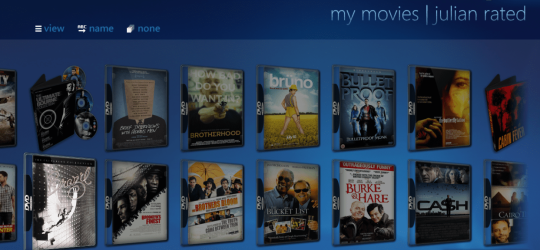
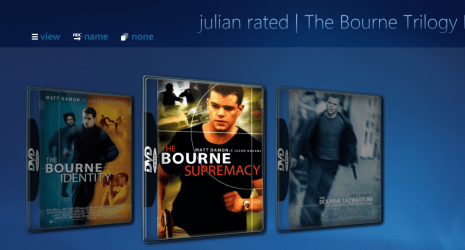
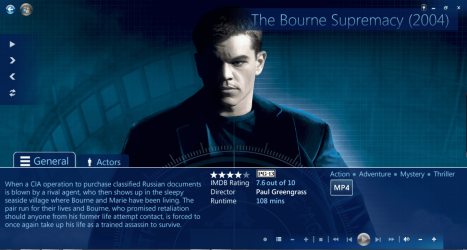
in mediabrowser you put all the movies from one boxset in one folder and when you click it you see all the five fast and furious in the right order, there are nice boxset icons and in the mediabrowser forum you can request that a certain movie box set can be made. ,you can have thae movie posters as you do in media center but also thay can be in a dvd box ,the best money i ever spent on a plug-in.
also you can have icons displaying for movie genres ,

here is a few screens of my set up, look for the bourne trillogy boxset ,

2011-10-07_2030.png

then the next is it open

2011-10-07_2032.png

and then the individual folder open.

2011-10-07_2033.png

anyhow ,you may want to have a try of it before ruling it out as its free,
 

My Computer My Computer

At a glance

Microsoft Windows 7 Home Premium 64-bit 7600IIx4 amd athelon 635 processor2x2gbati radeon HD 5450
Computer Manufacturer/Model Number
Hewlett packard/p6512uk
OS
Microsoft Windows 7 Home Premium 64-bit 7600
CPU
IIx4 amd athelon 635 processor
Motherboard
FOXCONN 2AA9
Memory
2x2gb
Graphics Card(s)
ati radeon HD 5450
Sound Card
(1) Realtek High Definition Audio (2) AMD High Definition
Monitor(s) Displays
samsung lcd tv 32"
Screen Resolution
1360x 768
Hard Drives
(1) WDC WD10 01FAES-60Z2A0 SATA Disk Device (2) Maxtor OneTouch USB Device (3) ST310003 33AS USB Device (4) WD My Book 1111 USB Device
PSU
?
Cooling
air!
Keyboard
wireless hp
Mouse
wireless Hp,optical
Internet Speed
1.10mb/s
Antivirus
MSE
Browser
Firefox
hey man thanks for your imput on the media browser personaly im not keen on it because everythime ive used it i have had nothin but problems so i would prefer help on the media centre front only any suggestions
 

My Computer My Computer

At a glance

windows 7 ultimate 64bitAMD PhenomII x4 975 processor 3.60GHzKingston HyperX Genesis DDR3 1600MHz CL9 8GB ...Nvidia 9800 GT
OS
windows 7 ultimate 64bit
CPU
AMD PhenomII x4 975 processor 3.60GHz
Motherboard
Asus M5A78L LE
Memory
Kingston HyperX Genesis DDR3 1600MHz CL9 8GB DIMM Memory Mod
Graphics Card(s)
Nvidia 9800 GT
ok no prob.
 

My Computer My Computer

At a glance

Microsoft Windows 7 Home Premium 64-bit 7600IIx4 amd athelon 635 processor2x2gbati radeon HD 5450
Computer Manufacturer/Model Number
Hewlett packard/p6512uk
OS
Microsoft Windows 7 Home Premium 64-bit 7600
CPU
IIx4 amd athelon 635 processor
Motherboard
FOXCONN 2AA9
Memory
2x2gb
Graphics Card(s)
ati radeon HD 5450
Sound Card
(1) Realtek High Definition Audio (2) AMD High Definition
Monitor(s) Displays
samsung lcd tv 32"
Screen Resolution
1360x 768
Hard Drives
(1) WDC WD10 01FAES-60Z2A0 SATA Disk Device (2) Maxtor OneTouch USB Device (3) ST310003 33AS USB Device (4) WD My Book 1111 USB Device
PSU
?
Cooling
air!
Keyboard
wireless hp
Mouse
wireless Hp,optical
Internet Speed
1.10mb/s
Antivirus
MSE
Browser
Firefox
i have no problem with yammm nameing films properly i just want to know how to get my films in media centre to appear together and in order iv added an attachment which shows 2 fast 2 furious as the second movie in my collection the other fast and furious films are dotted arround the other f titled movies and in the pic as well the batmans are pretty much together but not in the right order of old to new and i have all the jamesbond films too and there not in the right order either this is what i need help with if u can help it be appreciated

YAMMM puts the movies in alphabetical order... that's it!
 

My Computer My Computer

At a glance

Windows 7 Ultimate 64 bit Steve Ballmer Signa...Intel Core 2 Quad - Q9550 - 2.83GHz stock - O...4GB DDR2 800MHz (PC6400) OCZ ReaperNvidia GE Force 8800 GTS
Computer Manufacturer/Model Number
Homebrew PC - "Alpha_Dawg"
OS
Windows 7 Ultimate 64 bit Steve Ballmer Signature Edition
CPU
Intel Core 2 Quad - Q9550 - 2.83GHz stock - OC'd to 3.6GHz
Motherboard
Gigabyte EP45-UD3P
Memory
4GB DDR2 800MHz (PC6400) OCZ Reaper
Graphics Card(s)
Nvidia GE Force 8800 GTS
Sound Card
Asus Xonar DX
Monitor(s) Displays
Samsung SyncMaster 2333HD
Screen Resolution
1920 x 1080
Hard Drives
WD Caviar Black 750GB - 7200RPM - 32MB cache
WD Caviar Green 1.5TB - 5400RPM - 64MB cache
WD Caviar Green 2.0TB - 5400RPM - 64MB cache
PSU
PC Power & Cooling Silencer 750
Case
Gigabyte 3D Aurora
Cooling
Case is Air - 5ea. 120mm fans (mix of Arctic and Xigmatec)
Keyboard
MS Natural Wireless KB
Mouse
MS Wireless Mouse
Internet Speed
50 mbps down/5 mbps up
Other Info
AVerMedia - AVerTVHD G2 Dual Tuner Card
hey guys (specaily boobah) i have to come back with my tail between my legs lol media centre 7 with the xbox360 is just too slow looke great and plays everything thrown at it but takes 10 minutes to fully load everything and browser movement is realy slow.

So i decided to give media browser another chance as i said before i always have bother with it so if u cud help that would be great iv got a xmas get together movie night comin up soon and need help

media browser looks great and browser movement is a dream a lot faster than wm7 on the xbox360 but for some reason it keeps sayin cannot play movie or something like that when tryin through the xbox but on the pc smashin all these movies work fine on the wmc7 on the xbox so nothings changed except from using media browser is there a step to step tutorial so that i can get it to work properly and look amazing and how do you get the boxset art to work aswell that was previously mentioned in a post please help sorry for being so stubborn guys
 

My Computer My Computer

At a glance

windows 7 ultimate 64bitAMD PhenomII x4 975 processor 3.60GHzKingston HyperX Genesis DDR3 1600MHz CL9 8GB ...Nvidia 9800 GT
OS
windows 7 ultimate 64bit
CPU
AMD PhenomII x4 975 processor 3.60GHz
Motherboard
Asus M5A78L LE
Memory
Kingston HyperX Genesis DDR3 1600MHz CL9 8GB DIMM Memory Mod
Graphics Card(s)
Nvidia 9800 GT
Hi. Thanks a lot for the guide. I have followed its steps and got most of my movies tagged in WMC (W7), but I still have a few issues:

  1. The information downloaded for the movies are: poster image, title, year, genre (only one for each movie), and a short synopsis. There's no detailed synopsis, cast+crew, or ratings.
  2. Some movies even lack year or genre.
  3. A few movies lack any info. DVDID is not downloaded for these even.
Here is a sample of the contents of the DVDID of one tagged movie by yammm:


Code:
<?xml version="1.0" encoding="utf-8"?>
<Disc>
  <Name>Batman- Under the Red Hood</Name>
  <ID>YAMMM000|00009ED6</ID>
</Disc>
It looks quite short, isn't it? Is there any way to fix that? and also get untagged movies to download its info?


Thanks!
 

My Computer My Computer

At a glance

Win 7 Home Premium
OS
Win 7 Home Premium
Thank you for the tutorial and comments. Was working through 1TB manually and have several more to go. Made it so much easier.
 

My Computer My Computer

At a glance

Windows 7 Ultimate x643.20 gigahertz AMD Phenom II X6 1090T4GB Corsair VengeanceNvidia GeForce 9800GT
OS
Windows 7 Ultimate x64
CPU
3.20 gigahertz AMD Phenom II X6 1090T
Motherboard
Gigabyte GA-890GPA-UD3H
Memory
4GB Corsair Vengeance
Graphics Card(s)
Nvidia GeForce 9800GT
Hard Drives
2 X OCZ Agility 120GB SSD
14.2TB Storage
PSU
Coolermaster 850W Silent Pro
Case
Coolermaster 690II Advanced
Destructive batch file? (file2folder.zip)

I ran the batch file on the drive where all my movies are located. After I did, I started getting missing .dll files for most of my programs (Windows 7). I had to restore my drive using my last backup. Why did this happen?
 

My Computer My Computer

At a glance

Windows 7 Ultimate x64
OS
Windows 7 Ultimate x64
Windows 7 Tutorial: Media Center-Setup movie Library

Thank you. I have profound troubles with my Media. all the information has helped patch it up.
 

My Computer My Computer

At a glance

Windows 7 Professional 32 bit Service Pack 1Pentium Dual Core E5200 @ 2.5 GHz 2.5 GHz4 GBIntel Graphics Media Accelerated driver
Computer type
PC/Desktop
Computer Manufacturer/Model Number
Dell Studio 54 Desktop
OS
Windows 7 Professional 32 bit Service Pack 1
CPU
Pentium Dual Core E5200 @ 2.5 GHz 2.5 GHz
Memory
4 GB
Graphics Card(s)
Intel Graphics Media Accelerated driver
Monitor(s) Displays
Dell SX2210T
Screen Resolution
1920 X 1040
Internet Speed
Hi speed Cable
Antivirus
Norton
Browser
Internet Explorer 11 (Bing)
Didnt work

Okay, I was so excited about getting my movies in order and information set but at last it didn't work for me:(. So maybe i am slow and didn't follow the directions right(some i didn't quite understand). so the part about finding files and putting them in a folder.jpeg is confusing. Where do I put the folder? I have download 344 jpeg files for each movie. I have tried putting each one in the movie folder its for and also in just one group file. Neither has work when I loaded them in my windows media player. Any help would be appreciated. Thanks
 

My Computer My Computer

At a glance

Windows 7 Home Premium 64bitIntel core i5
Computer type
Laptop
Computer Manufacturer/Model Number
Toshiba
OS
Windows 7 Home Premium 64bit
CPU
Intel core i5
Back
Top