Media Center update log

whipple

New member
Local time
11:24 AM
Messages
14
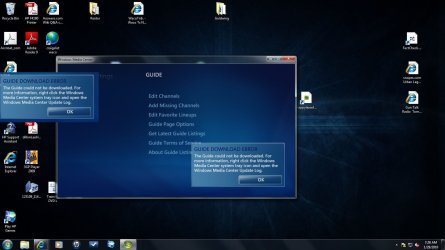
I don't have media center in the system tray and when I try to download the update guide it say "right click on the media center and get the update guide". I can't find the update guide and can't get the media center to update.

Bob
 

My Computer

Computer Manufacturer/Model Number
HP p6232p
OS
win7
Win7 came on this computer and I wonder if I will have to reinstall Win7 to get Media Center working? I was able to use if for a couple of months but don't know if some of the updates corrupted it or what?
Bob
 

My Computer

Computer Manufacturer/Model Number
HP p6232p
OS
win7
In Windows 7, not all icons appear all the time in the tray by default. To modify this, type "tray" in the start menu search box and select the item accordingly. Once the tray icon appears you can then right click it as desired.

Control Panel\All Control Panel Items\Notification Area Icons

To force guide update in Windows Media Center:

A) Type "Media Center" in the start menu search box. Open Media Center.
B) Navigate to Tasks>Settings>TV>Guide>Get latest Guide listings>OK
 
Thanks for the reply. After talking to 4 tech suport people I just deleted everything on my HD and started over again. It must have been courpted and I did not have that much stuff on my HD to reinstall. Thanks for the help.
Bob
 

My Computer

Computer Manufacturer/Model Number
HP p6232p
OS
win7
I'm still not able to download the program guide. I was able to after I reinstalled Win7 but that only lasted for a couple of weeks.
Bob
 

My Computer

Computer Manufacturer/Model Number
HP p6232p
OS
win7
A) Type "Media Center" in the start menu search box. Open Media Center.
B) Navigate to Tasks>Settings>TV>Guide>Get latest Guide listings>OK

Unless a firewall is blocking WMC updates this should do it.

Have you disabled any default options in WMC?
 
I'm having a hell of a time trying to copy a screen shot. I did a couple of them and now all I'm getting WMC is a black screen. I can get a screen shot of other things on my computer.
 

Attachments

  • Download error.jpg
    Download error.jpg
    252.4 KB · Views: 364

My Computer

Computer Manufacturer/Model Number
HP p6232p
OS
win7
I have windows 7 x64 Ultimate. I get the same message. I right click on tray icon and there is no link to open log. What is the filename and location for the media center update log? I have had no problems for 3 years, and suddenly this is first time. I have also used sfc /scannow. All listings now after today is nothing but no data avalable. Frustrating.

In event viewer I did find this.
Failed to retrieve EpgListing-2.enc (Error: BITS 0x80070424)
Failed to retrieve Broadband-2.enc (Error: BITS 0x80070424)
Failed to retrieve SportsSchedule.enc (Error: BITS 0x80070424)

Any ideas?
 

My Computer

OS
Windows 7 Ultimate x64
Motherboard
Asus M4n78 Pro -looking to upgrade Motherboard
Graphics Card(s)
NVIDIA GeForce GTX 660
Sound Card
Sound Blaster Recon3D PCIe Fatality Champion
Monitor(s) Displays
Dual 24" Monitors ( Asus widescreen 24" Monitors)
Screen Resolution
1920 X 1080 (native)
Keyboard
Logitech Wave 2.4 wireless keyboard
Mouse
Logitech MX Revolution wireless laser mouse - Charging Dock
Fix to download Guide

Steps I took to fix my Media Center Guide Download Failure​
1) Set my systems DNS to 8.8.8.8. and 8.8.4.4
a. Right click on My Network and select properties
b. Select Change Adapter Settings
c. Right click on the icon for your connection, select properties (mine is named Local Area Connection)
d. Select Internet Protocol Version 4, then select properties
e. At bottom select the radio button that says Use the following DNS........
f. Enter the 2 values listed above, save and exit
2) When Media Center ask for a zip code I used mine first and got min channels so I went to zap2it.com and saw the default zip code for my area (example, my zip is 85395 and on the web page it has Phoenix, 85001, I used 85001)
3) We need to clean out the eHome folder under ProgramData (be careful there are 2 folders on the system with that name, make sure you get the right one)
a. The ProgramData folder is hidden so you need to change settings to make it visible
b. Open Windows Explorer (not the browser)
c. Select Organize ->> Folder and search options ->> View Tab and then change Don't show hidden files, folders, or drives to Show hidden files, folders, and drives
d. Click ok and go back to the file list and go to c:\\ProgramData\Microsoft\eHome
e. Make a copy of everything in this folder and make a back up, once done delete everything in the eHome folder (eHome should be empty now)
4) Start Media Center and go through the setup steps, mine downloaded all settings as expected.
a. I did notice some of the programming was not correct but will give it some time to settl

 

My Computer

Computer type
PC/Desktop
OS
Win 7 64 professional
To see Media Center Log

Open Control Panel ->> Administrative Tools ->> Event Viewer ->> Applications and Service Logs ->>Media Center
 

My Computer

Computer type
PC/Desktop
OS
Win 7 64 professional
Wmc guide does not update

I was having the same problem. Cancel any recording in progress then back out of media center. Start media center again and go straight to the update now. Worked for me ☝
 

My Computer

Computer type
PC/Desktop
Computer Manufacturer/Model Number
Hp
OS
Windows 7 home x64
CPU
1.8
Motherboard
Asus
Memory
4gb
Graphics Card(s)
Radeon
Hard Drives
3Tb
Antivirus
None
Browser
Chrome
I'm having a hell of a time trying to copy a screen shot. I did a couple of them and now all I'm getting WMC is a black screen. I can get a screen shot of other things on my computer.


Here, in June of 2019, I received the same message and instructions, as this screen shot. It was not helpful. What did solve this problem with downloading the Guide update, was to choose a restore point before this issue first appeared, and restoring my system. The guide download then completed successfully, without and error messages. I recommend you try this approach. It worked for me, when I finally concluded that this issue and the instructions were a glitch in how the WMC was loaded. It was a real relief to discover that this solved this annoying problem, just a day before the Guide Schedule information was to disappear.
 

My Computer

Computer type
Laptop
Computer Manufacturer/Model Number
HP DV7 -6195us
OS
Window 7 Home Premium 64 bit
CPU
2nd generation Intel Core i7-2630QM Processor 2.00GHz with T
Memory
8GB DDR3 System Memory (2 DIMM)
Graphics Card(s)
Radeon HD 6770M s
Hard Drives
1TB Dual Hard Drive (2x500GB 5400RPM)
Antivirus
McAfee
Browser
Firefox Quantum
Back
Top