
Media Centre Harmony One sleep issues.

Gingerbread Man

New member
Local time
2:58 AM
Messages
5
Hi folks.

I've got a home built media centre (Windows 7) running in my lounge. I've got a few niggles with it and I'm hoping you guys and girls can help iron them out. I'll try to work out this sleep issue first.

I have two ways of controlling the media centre. The first is with a Logitech Harmony One remote. This controls my TV, Amp, Media Centre, Freesat Box etc...
The second method is via a Logitech DiNovo Mini keyboard. I use this for more technical things/ controlling the rest of windows etc...

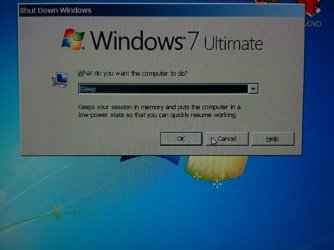
Anyhow, the Harmony One has a 'macro' feature. I tell it what I want to do e.g. Media Centre. This'll then turn on everything I need for my Media Centre and off everything I don't need. It'll turn the Amp to the right setting and the TV to the right channel. Perfect. I can then play DVD's/ Music and the works, but when I come to shut down the media centre. The off button on the remote turns the TV off, the amp off and the Media Centre. But instead of turning the Media Centre straight off, it brings up a dialogue box asking if I'd like to shutdown, put it to sleep, restart etc...
But the TV and Amp have turned off like they were told, so I have a Media Centre still on displaying this options box which I can no longer see! Is there a way that I can program the off button on the remote to put the computer to sleep automaticly instead of a prompt box?

If you need, I can get a print screen.

Any ideas?

David
 

My Computer

OS
Windows 7 Ultimate x64
Hi folks.

I've got a home built media centre (Windows 7) running in my lounge. I've got a few niggles with it and I'm hoping you guys and girls can help iron them out. I'll try to work out this sleep issue first.

I have two ways of controlling the media centre. The first is with a Logitech Harmony One remote. This controls my TV, Amp, Media Centre, Freesat Box etc...
The second method is via a Logitech DiNovo Mini keyboard. I use this for more technical things/ controlling the rest of windows etc...

Anyhow, the Harmony One has a 'macro' feature. I tell it what I want to do e.g. Media Centre. This'll then turn on everything I need for my Media Centre and off everything I don't need. It'll turn the Amp to the right setting and the TV to the right channel. Perfect. I can then play DVD's/ Music and the works, but when I come to shut down the media centre. The off button on the remote turns the TV off, the amp off and the Media Centre. But instead of turning the Media Centre straight off, it brings up a dialogue box asking if I'd like to shutdown, put it to sleep, restart etc...
But the TV and Amp have turned off like they were told, so I have a Media Centre still on displaying this options box which I can no longer see! Is there a way that I can program the off button on the remote to put the computer to sleep automaticly instead of a prompt box?

If you need, I can get a print screen.

Any ideas?

David

Within the power options, there is an advanced option that let's you set what certain buttons do, for example, power button will be set to shutdown, you can change that to sleep, but I'm not sure if the harmony one remote is capable of being picked up as a power switch, I think we need to test it first.

Any who, to get to the power options, right click your desktop and click on personalize, then in the bottom right click on screen saver and then click on change power settings, on the left bar, there should be an option saying choose what the power buttons do, click that and select the power button to sleep, click save changes and give it a whirl, if it works then we are good, if not then you may need to find a program that re-maps your key presses on the harmony one.

Dave
 

My Computer

Computer type
PC/Desktop
Computer Manufacturer/Model Number
Custom Build
OS
Windows 7 Ultimate x64 SP1
CPU
Intel Q6600 @ 2.6Ghz
Motherboard
Evga NF78-CK-132-A 3-Way SLI
Memory
4Gb DDR2 Corsair Dominator @ 800Mhz 5-5-5-15
Graphics Card(s)
EVGA 560 GTX SC FTW 1GB
Sound Card
Realtek HD 7.1 Audio, Plantronics GameCom780 7.1 Headset
Monitor(s) Displays
Dell S2409W
Screen Resolution
1920 x 1080
Hard Drives
SanDisk SDSSDHII-120G-G25 120GB SSD
Samsung 7200RPM 750Gb SATA
Samsung 850 EVO 120GB SSD
Western Digital Green 1TB 7200RPM
PSU
Xigmatek 750W Quad sli quad core 80% eff
Case
Antec 900 Gaming Case
Cooling
Zalman CNPS9700-NT NVIDIA Tritium
Keyboard
Logitech generic keyboard, MS wireless keyboard
Mouse
Razor Lachesis Banshee V2 Blue, 4000DPI, MS wireless mouse
Internet Speed
152Mb Virgin Media Fibre Optic
Antivirus
Microsoft Security Essentials
Browser
Google Chrome
Other Info
Wireless Gaming Receiver for Windows, Wireless Xbox 360 Pad
Hi again.

Sorry for the very late reply.

I've got those settings correctly set. Everything I can find, I've set to sleep!

Tell me more about these key mappers.
 

My Computer

OS
Windows 7 Ultimate x64
^ I had spent long hours in trying to understand the advanced power settings that best suits a media center PC (without much success :)) and/but in fact had successfully configured my Logitech Harmony 525 to control my AV Receiver and TV with the Zotac Mini HTPC - again after a lot of trials and deliberations with the Harmony.
That was almost a year back and it is hard for me to recall what exactly the settings are, sitting thousands of miles away with no access to those. What all I can say now is that I did not face any such problem encountered by you. So it should be a simple adjustment of settings in both the PC as well as the Harmony.

Have a look at this article Power Settings for a Media Centre PC « Musings of a PC and other related articles - google "advanced power settings for media center PC" - and check whether changing any of them as indicated therein resolves your problem. ( If I remember correctly the hybrid sleep and hybernation should be set to off and the preferred Power Management setting in BIOS is S3)

I may perhaps chip in after about a month from now after examining my system. ( Again I may have to go through the relearning process.:))
 
Last edited:

My Computer

Computer Manufacturer/Model Number
self-assembled
OS
Windows 7 Ultimate 32bit
CPU
AMD Phenom II X3 720 Processor
Motherboard
Gigabyte GA-MA78GM-S2H Revision 1.0
Memory
Transcend DDR2 (PC2 6400) 4 X 1GB
Graphics Card(s)
Integrated + ATI Radeon 4550
Sound Card
Integrated Realtek ALC 889A
Monitor(s) Displays
DELL 1704 FPT
Screen Resolution
1280 x 1024
Hard Drives
Western Digital Caviar SE16 250 GB x2 in RAID 0
PSU
Coolermaster 400 W
Case
Zebronics Cube
Cooling
stock
Keyboard
Microsoft - wired
Mouse
Microsoft - wired
Internet Speed
ADSL 256-512Kbps
Here is the long awaited photo of what pops up when I pressed the off button on my harmony one controller. I want it to auto sleep as opposed to ask me what to do.
I have no trouble turning my media centre on with my harmony one. Just off.
 

Attachments

  • CI1P1Q6a.jpg
    CI1P1Q6a.jpg
    46.8 KB · Views: 17

My Computer

OS
Windows 7 Ultimate x64
Do you get this dialog box when you click on Shut Down or Sleep in the Start menu of Windows 7? Does your computer go to sleep when you press the physical Power button on the PC?

Normally, Windows 7 does not bring such a Shutdown dialog box.( Not definitely on the many clean installs of retail versions I had done.)

The only way I know of to bring in such a dialog box in Windows 7 is pressing the Alt+F4 keeping only the desktop in focus.

And while setting up the Harmony did you select Microsoft Windows Media Center as the equipment to be set up?
 
Last edited:

My Computer

Computer Manufacturer/Model Number
self-assembled
OS
Windows 7 Ultimate 32bit
CPU
AMD Phenom II X3 720 Processor
Motherboard
Gigabyte GA-MA78GM-S2H Revision 1.0
Memory
Transcend DDR2 (PC2 6400) 4 X 1GB
Graphics Card(s)
Integrated + ATI Radeon 4550
Sound Card
Integrated Realtek ALC 889A
Monitor(s) Displays
DELL 1704 FPT
Screen Resolution
1280 x 1024
Hard Drives
Western Digital Caviar SE16 250 GB x2 in RAID 0
PSU
Coolermaster 400 W
Case
Zebronics Cube
Cooling
stock
Keyboard
Microsoft - wired
Mouse
Microsoft - wired
Internet Speed
ADSL 256-512Kbps
I'll check later to see if it comes up when I click the shut down options on the start menu, but I'm pretty sure it doesn't, which is why I thought it particularly odd.

While setting up the Harmony, I selected the Microsoft Windows Media Centre remote as the one to mimic as it were? I don't know If I told it that was the program I was setting it up for. Are these two different setup methods?

David
 

My Computer

OS
Windows 7 Ultimate x64
Yep, if you had set up the power options on your Media center PC correctly, when you press the physical Power button, it should go to sleep without throwing any dialog box.

If not, that problem has to be resolved first before getting on to the remote and examining the setup process.

So first thing first.:)
.
 

My Computer

Computer Manufacturer/Model Number
self-assembled
OS
Windows 7 Ultimate 32bit
CPU
AMD Phenom II X3 720 Processor
Motherboard
Gigabyte GA-MA78GM-S2H Revision 1.0
Memory
Transcend DDR2 (PC2 6400) 4 X 1GB
Graphics Card(s)
Integrated + ATI Radeon 4550
Sound Card
Integrated Realtek ALC 889A
Monitor(s) Displays
DELL 1704 FPT
Screen Resolution
1280 x 1024
Hard Drives
Western Digital Caviar SE16 250 GB x2 in RAID 0
PSU
Coolermaster 400 W
Case
Zebronics Cube
Cooling
stock
Keyboard
Microsoft - wired
Mouse
Microsoft - wired
Internet Speed
ADSL 256-512Kbps
Yep, if you had set up the power options on your Media center PC correctly, when you press the physical Power button, it should go to sleep without throwing any dialog box.

If not, that problem has to be resolved first before getting on to the remote and examining the setup process.

So first thing first.:)
.

When you say physical power button...If i press the button on the front of the machine, it goes to sleep yes. I've set this up to do this. All settings on the computer say sleep unless I pick otherwise.

I can't get the dialogue box to pop up any other way other than shutting down with the Harmony remote.

I also have a Logitech diNovo mini keyboard controlled by bluetooth. If I press the off button on this, it turns off the media centre pc without any hiccup. Could this be a sleep button as opposed to a random off button though?
Also, If I load up the media centre with the harmony one, the dinovo doesn't work. I have to remove the battery and reinsert. Only then will it happily work alongside the harmony one. This only happens when I load up via the Harmony, otherwise the dinovo keyboard/ mouse works fine.
But that is my second problem, one step at a time!
 

My Computer

OS
Windows 7 Ultimate x64
Now that you have confirmed that pressing the Power button on your PC puts it to sleep without throwing the Shutdown dialog box, I now believe that there may be some interaction between the diNova software and the Harmony One. ( I suspected this after reading your first post itself but then it would have been premature )

Somehow the power off command from the Harmony is read as Alt+F4 that brings the Shut down dialog box and the problem of simultaneous operation of the KB and Harmony may not be a second problem but the first problem or the cause of it itself.:)

Just stop any diNova software from starting with Windows (either by disabling it in the Program setup or startup in the Start Menu or msconfig>startup, reboot your machine and check whether it resolves the problem. You may also do the same with any other Logitech Mouse software. Pull out the RF receiver too and completely delink the diNova.

If that does not resolve the problem, we may have to look into what IR receiver you are using and then whether the Harmony set up has been OK.

Incidentally just now I searched the web and got this. Have a look. Harmony One and Dinovo Mini just don't want to get... - Logitech Forums

EDIT: On a closer scrutiny, it appears that you posted a problem there but did not pursue when someone asked what IR receiver you are using.
 
Last edited:

My Computer

Computer Manufacturer/Model Number
self-assembled
OS
Windows 7 Ultimate 32bit
CPU
AMD Phenom II X3 720 Processor
Motherboard
Gigabyte GA-MA78GM-S2H Revision 1.0
Memory
Transcend DDR2 (PC2 6400) 4 X 1GB
Graphics Card(s)
Integrated + ATI Radeon 4550
Sound Card
Integrated Realtek ALC 889A
Monitor(s) Displays
DELL 1704 FPT
Screen Resolution
1280 x 1024
Hard Drives
Western Digital Caviar SE16 250 GB x2 in RAID 0
PSU
Coolermaster 400 W
Case
Zebronics Cube
Cooling
stock
Keyboard
Microsoft - wired
Mouse
Microsoft - wired
Internet Speed
ADSL 256-512Kbps
Back
Top