
MediaBrowser

So Lets get some feed Back on Media Browser


  • Total voters
    137
Yes I Do!! Just love tinkering with everything I run across! Cant help my self!
I would love to find a way to make it work for me but still haven't found the door.
 

My Computer My Computer

Computer Manufacturer/Model Number
Custom Built Rig BY ME "My Baby"
OS
7 Ultimate x64
CPU
AMD Athlon 64X2 4600+ 2.51Ghz
Motherboard
ASUS M2N-E SLI
Memory
6GB DDR2 900 Kingston
Graphics Card(s)
2x BFG Nvidia 9600 GT-OC
Sound Card
SoundBlaster XF-I
Monitor(s) Displays
19"acer, 22"acer, 19"acer, 48" HITACHI HDTV
Screen Resolution
1400x900, 1680x1050, 1400x900, 1920x1080
Hard Drives
Seagate 500GB Sata
Seagate 500GB Sata
Seagate 500GB Sata
Seagate 500GB Sata
Seagate 320 Sata (Primary)
Western Digital 500GB IDE
Western Digital 300GB IDE
Maxter 720 Sata (USB)
PSU
BFG 800 Watt SLI Power Supply
Case
Game Master
Cooling
Thermotake
Keyboard
Logitech (Bluetooth)
Mouse
Logitech (Bluetooth)
Internet Speed
Turbo Cable
Other Info
ATI 650HD TV Tuner X2,
Samsung (Light scribe) DVD-R,
Sony (Dual Layer) DVD-R
Australian TV Logos For "My Channel Logos" program

I wanted to use the MyChannelLogos Addon for media center to put on the logos for Australia but first i need to make them!

so the program is here http://mychannellogos.com to save other aussies from having to make their own i did it for you and they are here. If you live in the US then your channel are preloaded and mychannellogos will scan your guide in Media Center and assign them automatically. anyway you look at it, it's nicer than than the name showing up in the guide.
 

My Computer My Computer

Computer Manufacturer/Model Number
Toshiba sattelite l300
OS
Windows 7 Build 7137
CPU
Celeron 575
Memory
2gb
Graphics Card(s)
onboard intel
Sound Card
onboard
Monitor(s) Displays
17inch LCD WS
Screen Resolution
1280x800
Hard Drives
120gb onboard
A peek at some more modded thumbs. I have Tyborg working on a new addition to StarkCovers! The ability to add overlays to the TV Show thumbs. I cant what for this to get added! What do y'all think?

New%20thumbs.png
6-23-2009%205-05-52%20PM.png


New%20Thumbs%202.png
6-23-2009%205-04-45%20PM.png
 
Last edited:

My Computer My Computer

Computer Manufacturer/Model Number
Custom Built Rig BY ME "My Baby"
OS
7 Ultimate x64
CPU
AMD Athlon 64X2 4600+ 2.51Ghz
Motherboard
ASUS M2N-E SLI
Memory
6GB DDR2 900 Kingston
Graphics Card(s)
2x BFG Nvidia 9600 GT-OC
Sound Card
SoundBlaster XF-I
Monitor(s) Displays
19"acer, 22"acer, 19"acer, 48" HITACHI HDTV
Screen Resolution
1400x900, 1680x1050, 1400x900, 1920x1080
Hard Drives
Seagate 500GB Sata
Seagate 500GB Sata
Seagate 500GB Sata
Seagate 500GB Sata
Seagate 320 Sata (Primary)
Western Digital 500GB IDE
Western Digital 300GB IDE
Maxter 720 Sata (USB)
PSU
BFG 800 Watt SLI Power Supply
Case
Game Master
Cooling
Thermotake
Keyboard
Logitech (Bluetooth)
Mouse
Logitech (Bluetooth)
Internet Speed
Turbo Cable
Other Info
ATI 650HD TV Tuner X2,
Samsung (Light scribe) DVD-R,
Sony (Dual Layer) DVD-R
DS - i should know this, but how are you getting the black? Mine is staying blue even with loading my own ehres.dll files or loading the black theme. Unless my settings are wrong.
Please help
 

My Computer My Computer

Computer Manufacturer/Model Number
dell optiplex - 2003
OS
windows7 7600 x86
CPU
itel pentium 4
Memory
3.00 GB
Graphics Card(s)
diamond radion x1050
Sound Card
SoundMax
Monitor(s) Displays
dell 2408wfp dell e172fp
Screen Resolution
1920 x 1200 1280 x 1024
Hard Drives
2 - 80 GB internals WD
1 - 01 TB ext
2 - 750 GB ext
1- 500 GB ext
all running on system no problems
Keyboard
old logitech cordless
Mouse
logitech wireless
Internet Speed
16 / 4
Other Info
networked into my sbs2003 server running sp1 still
it's a wonder I could even get windows 7 to connect to it
In the config setting inside MB you'll find something about color, change that to black.
 

My Computer My Computer

Computer Manufacturer/Model Number
Custom Built Rig BY ME "My Baby"
OS
7 Ultimate x64
CPU
AMD Athlon 64X2 4600+ 2.51Ghz
Motherboard
ASUS M2N-E SLI
Memory
6GB DDR2 900 Kingston
Graphics Card(s)
2x BFG Nvidia 9600 GT-OC
Sound Card
SoundBlaster XF-I
Monitor(s) Displays
19"acer, 22"acer, 19"acer, 48" HITACHI HDTV
Screen Resolution
1400x900, 1680x1050, 1400x900, 1920x1080
Hard Drives
Seagate 500GB Sata
Seagate 500GB Sata
Seagate 500GB Sata
Seagate 500GB Sata
Seagate 320 Sata (Primary)
Western Digital 500GB IDE
Western Digital 300GB IDE
Maxter 720 Sata (USB)
PSU
BFG 800 Watt SLI Power Supply
Case
Game Master
Cooling
Thermotake
Keyboard
Logitech (Bluetooth)
Mouse
Logitech (Bluetooth)
Internet Speed
Turbo Cable
Other Info
ATI 650HD TV Tuner X2,
Samsung (Light scribe) DVD-R,
Sony (Dual Layer) DVD-R
yeah it says LightSkyBlue changing to black

<ListViewWatchedColor>LightSkyBlue</ListViewWatchedColor>

to

<ListViewWatchedColor>black</ListViewWatchedColor>

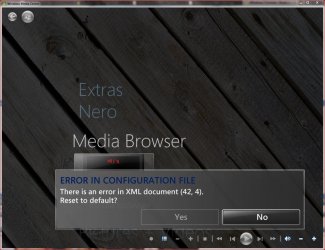
do that and this is error I get - here is file

Code:
<?xml version="1.0"?>
<ConfigData xmlns:xsi="http://www.w3.org/2001/XMLSchema-instance" xmlns:xsd="http://www.w3.org/2001/XMLSchema">
  <EnableRootPage>true</EnableRootPage>
  <IsFirstRun>false</IsFirstRun>
  <ImageByNameLocation />
  <OverScanScaling>
    <X>1</X>
    <Y>1</Y>
    <Z>1</Z>
  </OverScanScaling>
  <OverScanPadding>
    <Bottom>0</Bottom>
    <Left>0</Left>
    <Right>0</Right>
    <Top>0</Top>
  </OverScanPadding>
  <EnableTraceLogging>false</EnableTraceLogging>
  <DefaultPosterSize>
    <Height>220</Height>
    <Width>220</Width>
  </DefaultPosterSize>
  <GridSpacing>
    <Height>4</Height>
    <Width>4</Width>
  </GridSpacing>
  <MaximumAspectRatioDistortion>0.2</MaximumAspectRatioDistortion>
  <EnableTranscode360>true</EnableTranscode360>
  <ExtenderNativeTypes>.dvr-ms,.wmv</ExtenderNativeTypes>
  <TransparentBackground>true</TransparentBackground>
  <DimUnselectedPosters>true</DimUnselectedPosters>
  <EnableNestedMovieFolders>true</EnableNestedMovieFolders>
  <EnableMoviePlaylists>true</EnableMoviePlaylists>
  <PlaylistLimit>2</PlaylistLimit>
  <InitialFolder>C:\ProgramData\MediaBrowser\StartupFolder</InitialFolder>
  <EnableUpdates>true</EnableUpdates>
  <EnableBetas>false</EnableBetas>
  <DaemonToolsLocation>C:\Program Files\DAEMON Tools Lite\daemon.exe</DaemonToolsLocation>
  <DaemonToolsDrive>E</DaemonToolsDrive>
  <EnableAlphanumericSorting>true</EnableAlphanumericSorting>
  <EnableListViewTicks>false</EnableListViewTicks>
  <ListViewWatchedColor>black</ListViewWatchedColor>
  <ShowUnwatchedCount>true</ShowUnwatchedCount>
  <ShowWatchedTickOnFolders>true</ShowWatchedTickOnFolders>
  <ShowWatchTickInPosterView>true</ShowWatchTickInPosterView>
  <DefaultToFirstUnwatched>false</DefaultToFirstUnwatched>
  <AutoEnterSingleDirs>false</AutoEnterSingleDirs>
  <AssumeWatchedBefore>2008-06-23T00:00:00-04:00</AssumeWatchedBefore>
  <InheritDefaultView>true</InheritDefaultView>
  <DefaultViewType>Poster</DefaultViewType>
  <DefaultShowLabels>false</DefaultShowLabels>
  <DefaultVerticalScroll>false</DefaultVerticalScroll>
  <BreadcrumbCountLimit>2</BreadcrumbCountLimit>
  <SortRemoveCharacters>,|&|-|{|}</SortRemoveCharacters>
  <SortReplaceCharacters>.|+|%</SortReplaceCharacters>
  <SortReplaceWords>the|a|an</SortReplaceWords>
  <AllowInternetMetadataProviders>true</AllowInternetMetadataProviders>
  <EnableFileWatching>false</EnableFileWatching>
  <ThumbStripPosterWidth>550</ThumbStripPosterWidth>
  <RememberIndexing>false</RememberIndexing>
  <ShowIndexWarning>true</ShowIndexWarning>
  <IndexWarningThreshold>0.1</IndexWarningThreshold>
  <PreferredMetaDataLanguage>en</PreferredMetaDataLanguage>
  <ExternalPlayers />
  <Theme>Black</Theme>
  <FontTheme>Default</FontTheme>
  <ShowClock>true</ShowClock>
  <EnableAdvancedCmds>false</EnableAdvancedCmds>
  <Advanced_EnableDelete>false</Advanced_EnableDelete>
  <UseAutoPlayForIso>false</UseAutoPlayForIso>
  <ShowBackdrop>true</ShowBackdrop>
  <InitialBreadcrumbName>Media</InitialBreadcrumbName>
  <ViewTheme>Diamond</ViewTheme>
  <AlphaBlending>50</AlphaBlending>
  <ShowConfigButton>true</ShowConfigButton>
  <EnableSyncViews>true</EnableSyncViews>
  <YahooWeatherFeed>USFL0468</YahooWeatherFeed>
  <YahooWeatherUnit>f</YahooWeatherUnit>
  <PodcastHome>C:\ProgramData\MediaBrowser\Podcasts</PodcastHome>
  <HideFocusFrame>false</HideFocusFrame>
</ConfigData>

thanks for help
 

Attachments

  • Capture1.JPG
    Capture1.JPG
    141.4 KB · Views: 30

My Computer My Computer

Computer Manufacturer/Model Number
dell optiplex - 2003
OS
windows7 7600 x86
CPU
itel pentium 4
Memory
3.00 GB
Graphics Card(s)
diamond radion x1050
Sound Card
SoundMax
Monitor(s) Displays
dell 2408wfp dell e172fp
Screen Resolution
1920 x 1200 1280 x 1024
Hard Drives
2 - 80 GB internals WD
1 - 01 TB ext
2 - 750 GB ext
1- 500 GB ext
all running on system no problems
Keyboard
old logitech cordless
Mouse
logitech wireless
Internet Speed
16 / 4
Other Info
networked into my sbs2003 server running sp1 still
it's a wonder I could even get windows 7 to connect to it
No not like that!
Here.
12.png
 

My Computer My Computer

Computer Manufacturer/Model Number
Custom Built Rig BY ME "My Baby"
OS
7 Ultimate x64
CPU
AMD Athlon 64X2 4600+ 2.51Ghz
Motherboard
ASUS M2N-E SLI
Memory
6GB DDR2 900 Kingston
Graphics Card(s)
2x BFG Nvidia 9600 GT-OC
Sound Card
SoundBlaster XF-I
Monitor(s) Displays
19"acer, 22"acer, 19"acer, 48" HITACHI HDTV
Screen Resolution
1400x900, 1680x1050, 1400x900, 1920x1080
Hard Drives
Seagate 500GB Sata
Seagate 500GB Sata
Seagate 500GB Sata
Seagate 500GB Sata
Seagate 320 Sata (Primary)
Western Digital 500GB IDE
Western Digital 300GB IDE
Maxter 720 Sata (USB)
PSU
BFG 800 Watt SLI Power Supply
Case
Game Master
Cooling
Thermotake
Keyboard
Logitech (Bluetooth)
Mouse
Logitech (Bluetooth)
Internet Speed
Turbo Cable
Other Info
ATI 650HD TV Tuner X2,
Samsung (Light scribe) DVD-R,
Sony (Dual Layer) DVD-R
thats how i was first changing it, but did not change at all - that's why i went into the config file itself - i can get the weather to change fine, but not the blue to black. still same thing
Even reset all defaults and started over - still get the blue - not sure why.

gonna restart pc see if it helps, at a loss.
thanks
 

My Computer My Computer

Computer Manufacturer/Model Number
dell optiplex - 2003
OS
windows7 7600 x86
CPU
itel pentium 4
Memory
3.00 GB
Graphics Card(s)
diamond radion x1050
Sound Card
SoundMax
Monitor(s) Displays
dell 2408wfp dell e172fp
Screen Resolution
1920 x 1200 1280 x 1024
Hard Drives
2 - 80 GB internals WD
1 - 01 TB ext
2 - 750 GB ext
1- 500 GB ext
all running on system no problems
Keyboard
old logitech cordless
Mouse
logitech wireless
Internet Speed
16 / 4
Other Info
networked into my sbs2003 server running sp1 still
it's a wonder I could even get windows 7 to connect to it
Show me whats blue
 

My Computer My Computer

Computer Manufacturer/Model Number
Custom Built Rig BY ME "My Baby"
OS
7 Ultimate x64
CPU
AMD Athlon 64X2 4600+ 2.51Ghz
Motherboard
ASUS M2N-E SLI
Memory
6GB DDR2 900 Kingston
Graphics Card(s)
2x BFG Nvidia 9600 GT-OC
Sound Card
SoundBlaster XF-I
Monitor(s) Displays
19"acer, 22"acer, 19"acer, 48" HITACHI HDTV
Screen Resolution
1400x900, 1680x1050, 1400x900, 1920x1080
Hard Drives
Seagate 500GB Sata
Seagate 500GB Sata
Seagate 500GB Sata
Seagate 500GB Sata
Seagate 320 Sata (Primary)
Western Digital 500GB IDE
Western Digital 300GB IDE
Maxter 720 Sata (USB)
PSU
BFG 800 Watt SLI Power Supply
Case
Game Master
Cooling
Thermotake
Keyboard
Logitech (Bluetooth)
Mouse
Logitech (Bluetooth)
Internet Speed
Turbo Cable
Other Info
ATI 650HD TV Tuner X2,
Samsung (Light scribe) DVD-R,
Sony (Dual Layer) DVD-R
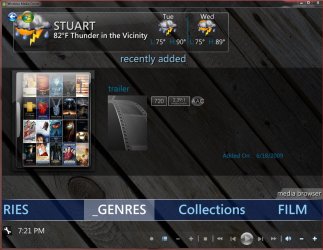
ok I guess it is just the loding page - if that's all the blue in it than I'm ok now.

Thanks again - i guess it wasnt catching for some reason before
 

Attachments

  • 44.JPG
    44.JPG
    171.4 KB · Views: 13
  • 55.JPG
    55.JPG
    192.6 KB · Views: 9
  • 66.JPG
    66.JPG
    171.8 KB · Views: 9

My Computer My Computer

Computer Manufacturer/Model Number
dell optiplex - 2003
OS
windows7 7600 x86
CPU
itel pentium 4
Memory
3.00 GB
Graphics Card(s)
diamond radion x1050
Sound Card
SoundMax
Monitor(s) Displays
dell 2408wfp dell e172fp
Screen Resolution
1920 x 1200 1280 x 1024
Hard Drives
2 - 80 GB internals WD
1 - 01 TB ext
2 - 750 GB ext
1- 500 GB ext
all running on system no problems
Keyboard
old logitech cordless
Mouse
logitech wireless
Internet Speed
16 / 4
Other Info
networked into my sbs2003 server running sp1 still
it's a wonder I could even get windows 7 to connect to it
Yea that may only work with the Vanilla theme. I don know for sure.
 

My Computer My Computer

Computer Manufacturer/Model Number
Custom Built Rig BY ME "My Baby"
OS
7 Ultimate x64
CPU
AMD Athlon 64X2 4600+ 2.51Ghz
Motherboard
ASUS M2N-E SLI
Memory
6GB DDR2 900 Kingston
Graphics Card(s)
2x BFG Nvidia 9600 GT-OC
Sound Card
SoundBlaster XF-I
Monitor(s) Displays
19"acer, 22"acer, 19"acer, 48" HITACHI HDTV
Screen Resolution
1400x900, 1680x1050, 1400x900, 1920x1080
Hard Drives
Seagate 500GB Sata
Seagate 500GB Sata
Seagate 500GB Sata
Seagate 500GB Sata
Seagate 320 Sata (Primary)
Western Digital 500GB IDE
Western Digital 300GB IDE
Maxter 720 Sata (USB)
PSU
BFG 800 Watt SLI Power Supply
Case
Game Master
Cooling
Thermotake
Keyboard
Logitech (Bluetooth)
Mouse
Logitech (Bluetooth)
Internet Speed
Turbo Cable
Other Info
ATI 650HD TV Tuner X2,
Samsung (Light scribe) DVD-R,
Sony (Dual Layer) DVD-R
I am about to make the move to upgrade to the newest version of MB, any tips I need to consider before starting? Will the new one over write the old one? Or, should I uninstall the old one first before installing the new one? Also, does anyone know if the reg key in the entry point for this one, is the same as the old one?
 

My Computer My Computer

Computer Manufacturer/Model Number
Gigabyte
OS
Windows 7 Ultimate
CPU
Intel Core(TM)2 Quad- Q9550, 2.83GHz
Motherboard
G31M-ES2L
Memory
4GB
Graphics Card(s)
ATI Radeon HD4600
Sound Card
On Board:
Monitor(s) Displays
Acer AL2223W, Acer AL1916
Screen Resolution
1680 x 1050, 1280 x 1024
Hard Drives
160GB
350GB
250GB
250GB
PSU
600W
Case
Cooler Master
Keyboard
Microsoft Laser 6000
Mouse
Logitech Optical Trackman
Internet Speed
1.5MB
Other Info
I am also running a quasar gamatron flux capacitor with twin pulse tronic phasers......jk, I have no such stuff.
Yes it will over wright, in fact it seems to be better if you do!

As for the regkey yes its the same as it was.
 

My Computer My Computer

Computer Manufacturer/Model Number
Custom Built Rig BY ME "My Baby"
OS
7 Ultimate x64
CPU
AMD Athlon 64X2 4600+ 2.51Ghz
Motherboard
ASUS M2N-E SLI
Memory
6GB DDR2 900 Kingston
Graphics Card(s)
2x BFG Nvidia 9600 GT-OC
Sound Card
SoundBlaster XF-I
Monitor(s) Displays
19"acer, 22"acer, 19"acer, 48" HITACHI HDTV
Screen Resolution
1400x900, 1680x1050, 1400x900, 1920x1080
Hard Drives
Seagate 500GB Sata
Seagate 500GB Sata
Seagate 500GB Sata
Seagate 500GB Sata
Seagate 320 Sata (Primary)
Western Digital 500GB IDE
Western Digital 300GB IDE
Maxter 720 Sata (USB)
PSU
BFG 800 Watt SLI Power Supply
Case
Game Master
Cooling
Thermotake
Keyboard
Logitech (Bluetooth)
Mouse
Logitech (Bluetooth)
Internet Speed
Turbo Cable
Other Info
ATI 650HD TV Tuner X2,
Samsung (Light scribe) DVD-R,
Sony (Dual Layer) DVD-R
Zay I would like your help with something:) please.:)


I want to have a easy way to view photos with MB and came up with a pretty good solution.
But I need your help to Finish the code. I placed and changed some I found to put a lot of photos in a folder of there own and add an empty.avi in the folder with each picture.
But I need you to add to it so it will all so rename the pictures to folder.jpg, and would also like it to copy the picture and the copy be named backdrop.jpg.

This is what I have so far
Code:
@echo off

for %%a in (*.*) do (
md "%%~na" 2>nul
move "%%a" "%%~na"
) 
Echo empty.avi placed in
Echo    %~dp0
Echo. > empty.avi
FOR /f "tokens=* delims= " %%a in ('dir/b/x/ad/s "%~sdp0"') do (
Echo    %%a\
Echo. > "%%a\empty.avi"
)
Will you complete it for me please?

I have tested it and it works well at showing the pics with Media Browser specially in thumbs view


EDIT:
You know now that I think about it can you wright one to do this.
Rename all the *jpg files "in the folder with the batch file" to be called backdrop, backdrop1, backdrop2 and so on.
And copy the first image only and name it folder.jpg And add an empty.avi to the folder.

That way I can just hover over the folder in MB and it will cycle through the pictures on the main screen.

Thanks a lot!
DemonSeed
 
Last edited:

My Computer My Computer

Computer Manufacturer/Model Number
Custom Built Rig BY ME "My Baby"
OS
7 Ultimate x64
CPU
AMD Athlon 64X2 4600+ 2.51Ghz
Motherboard
ASUS M2N-E SLI
Memory
6GB DDR2 900 Kingston
Graphics Card(s)
2x BFG Nvidia 9600 GT-OC
Sound Card
SoundBlaster XF-I
Monitor(s) Displays
19"acer, 22"acer, 19"acer, 48" HITACHI HDTV
Screen Resolution
1400x900, 1680x1050, 1400x900, 1920x1080
Hard Drives
Seagate 500GB Sata
Seagate 500GB Sata
Seagate 500GB Sata
Seagate 500GB Sata
Seagate 320 Sata (Primary)
Western Digital 500GB IDE
Western Digital 300GB IDE
Maxter 720 Sata (USB)
PSU
BFG 800 Watt SLI Power Supply
Case
Game Master
Cooling
Thermotake
Keyboard
Logitech (Bluetooth)
Mouse
Logitech (Bluetooth)
Internet Speed
Turbo Cable
Other Info
ATI 650HD TV Tuner X2,
Samsung (Light scribe) DVD-R,
Sony (Dual Layer) DVD-R
As normal with these you need to be viewing it through firefox to see the animation.

My Boxset Collection:
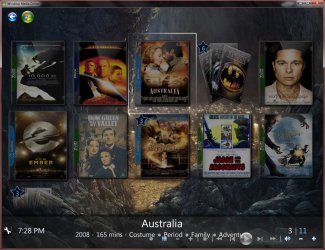
Here is mine using shortcuts from a folder and pointing MB to it.
i.e. C:user/documents/Movie Box Sets/The Matrix, The Matrix - Shortcut, The Matrix Reloaded - Shortcut, The Matrix Revolutions - Shortcut, backdrop.jpg, backdrop1.jpg ect. + a folder.png
I dont put more than one movie in a folder in my storage of my movies so I can keep a true count of everything. And if I want to jump right to any of my titles from my main browsing for my movies with out going any deeper. I personally like it this way so this might give you some options to work with.

Boxsets.png
 

My Computer My Computer

Computer Manufacturer/Model Number
Custom Built Rig BY ME "My Baby"
OS
7 Ultimate x64
CPU
AMD Athlon 64X2 4600+ 2.51Ghz
Motherboard
ASUS M2N-E SLI
Memory
6GB DDR2 900 Kingston
Graphics Card(s)
2x BFG Nvidia 9600 GT-OC
Sound Card
SoundBlaster XF-I
Monitor(s) Displays
19"acer, 22"acer, 19"acer, 48" HITACHI HDTV
Screen Resolution
1400x900, 1680x1050, 1400x900, 1920x1080
Hard Drives
Seagate 500GB Sata
Seagate 500GB Sata
Seagate 500GB Sata
Seagate 500GB Sata
Seagate 320 Sata (Primary)
Western Digital 500GB IDE
Western Digital 300GB IDE
Maxter 720 Sata (USB)
PSU
BFG 800 Watt SLI Power Supply
Case
Game Master
Cooling
Thermotake
Keyboard
Logitech (Bluetooth)
Mouse
Logitech (Bluetooth)
Internet Speed
Turbo Cable
Other Info
ATI 650HD TV Tuner X2,
Samsung (Light scribe) DVD-R,
Sony (Dual Layer) DVD-R
Ok couple of things to clarify:
You want all the .jpg (except the first one) to be called backdrop1 and so on? The first one is skipped, and renamed to folder.jpg?
Where is empty.avi coming from?
Or, do you want it to create a file called empty.avi?
 

My Computer My Computer

Computer Manufacturer/Model Number
Gigabyte
OS
Windows 7 Ultimate
CPU
Intel Core(TM)2 Quad- Q9550, 2.83GHz
Motherboard
G31M-ES2L
Memory
4GB
Graphics Card(s)
ATI Radeon HD4600
Sound Card
On Board:
Monitor(s) Displays
Acer AL2223W, Acer AL1916
Screen Resolution
1680 x 1050, 1280 x 1024
Hard Drives
160GB
350GB
250GB
250GB
PSU
600W
Case
Cooler Master
Keyboard
Microsoft Laser 6000
Mouse
Logitech Optical Trackman
Internet Speed
1.5MB
Other Info
I am also running a quasar gamatron flux capacitor with twin pulse tronic phasers......jk, I have no such stuff.
Ok couple of things to clarify:
You want all the .jpg (except the first one) to be called backdrop1 and so on? The first one is skipped, and renamed to folder.jpg?
Where is empty.avi coming from?
Or, do you want it to create a file called empty.avi?
Yes but the name list starts at backdrop. then backdrop1 ect.

Yes skipping the first and renaming it to folder will work fine.

Yes create the file empty.avi. This way MB will see and look in the folder.

Thank GOD you showed up!!!
I have been tring for 3hrs to work on the first one I showed but could not for the life of me figure out to get it to stop moving the damn bat to a folder and cutting off the last part of the command list.

Man I have been pulling hares!!! I mean IT HELP ME PLEASE!!!!!!!!!!!!
 

My Computer My Computer

Computer Manufacturer/Model Number
Custom Built Rig BY ME "My Baby"
OS
7 Ultimate x64
CPU
AMD Athlon 64X2 4600+ 2.51Ghz
Motherboard
ASUS M2N-E SLI
Memory
6GB DDR2 900 Kingston
Graphics Card(s)
2x BFG Nvidia 9600 GT-OC
Sound Card
SoundBlaster XF-I
Monitor(s) Displays
19"acer, 22"acer, 19"acer, 48" HITACHI HDTV
Screen Resolution
1400x900, 1680x1050, 1400x900, 1920x1080
Hard Drives
Seagate 500GB Sata
Seagate 500GB Sata
Seagate 500GB Sata
Seagate 500GB Sata
Seagate 320 Sata (Primary)
Western Digital 500GB IDE
Western Digital 300GB IDE
Maxter 720 Sata (USB)
PSU
BFG 800 Watt SLI Power Supply
Case
Game Master
Cooling
Thermotake
Keyboard
Logitech (Bluetooth)
Mouse
Logitech (Bluetooth)
Internet Speed
Turbo Cable
Other Info
ATI 650HD TV Tuner X2,
Samsung (Light scribe) DVD-R,
Sony (Dual Layer) DVD-R
yeah I tested your script, and it created the folders fine (the first part came from that file2folder huh? lol), but the other part you added, is moving the batch file as well, and generating a missing batch file error. Give me some time to work on this for you. I am working on a major backup issue with a mail server, but I will make sometime to do that for you. I am also working on getting the moving png files to work in IE7. I know why it does not work, I am working on a work around. With the invent of IE7 and onward, there is mode called quirks mode that allows browsers to be backward compatible, that functionality went away. FF, safari, Opera, and a few other browsers still have that function. I will keep you in the loop. But I will put a high priority on that script for you.
 

My Computer My Computer

Computer Manufacturer/Model Number
Gigabyte
OS
Windows 7 Ultimate
CPU
Intel Core(TM)2 Quad- Q9550, 2.83GHz
Motherboard
G31M-ES2L
Memory
4GB
Graphics Card(s)
ATI Radeon HD4600
Sound Card
On Board:
Monitor(s) Displays
Acer AL2223W, Acer AL1916
Screen Resolution
1680 x 1050, 1280 x 1024
Hard Drives
160GB
350GB
250GB
250GB
PSU
600W
Case
Cooler Master
Keyboard
Microsoft Laser 6000
Mouse
Logitech Optical Trackman
Internet Speed
1.5MB
Other Info
I am also running a quasar gamatron flux capacitor with twin pulse tronic phasers......jk, I have no such stuff.
SWEET!!! Thank You!!! Your The Man!!!

lol yea what I have there works great as two bat files BUT NOT AS ONE as I found out!

I have been tiring to do it on my own but was just LOST!
 

My Computer My Computer

Computer Manufacturer/Model Number
Custom Built Rig BY ME "My Baby"
OS
7 Ultimate x64
CPU
AMD Athlon 64X2 4600+ 2.51Ghz
Motherboard
ASUS M2N-E SLI
Memory
6GB DDR2 900 Kingston
Graphics Card(s)
2x BFG Nvidia 9600 GT-OC
Sound Card
SoundBlaster XF-I
Monitor(s) Displays
19"acer, 22"acer, 19"acer, 48" HITACHI HDTV
Screen Resolution
1400x900, 1680x1050, 1400x900, 1920x1080
Hard Drives
Seagate 500GB Sata
Seagate 500GB Sata
Seagate 500GB Sata
Seagate 500GB Sata
Seagate 320 Sata (Primary)
Western Digital 500GB IDE
Western Digital 300GB IDE
Maxter 720 Sata (USB)
PSU
BFG 800 Watt SLI Power Supply
Case
Game Master
Cooling
Thermotake
Keyboard
Logitech (Bluetooth)
Mouse
Logitech (Bluetooth)
Internet Speed
Turbo Cable
Other Info
ATI 650HD TV Tuner X2,
Samsung (Light scribe) DVD-R,
Sony (Dual Layer) DVD-R
If running them as one causes a problem, sometimes what I do is have one batch file call another batch file to do the other part for you. Let's say your second batch file is called move.bat, on the last line of the first batch file type this Call move.bat
 

My Computer My Computer

Computer Manufacturer/Model Number
Gigabyte
OS
Windows 7 Ultimate
CPU
Intel Core(TM)2 Quad- Q9550, 2.83GHz
Motherboard
G31M-ES2L
Memory
4GB
Graphics Card(s)
ATI Radeon HD4600
Sound Card
On Board:
Monitor(s) Displays
Acer AL2223W, Acer AL1916
Screen Resolution
1680 x 1050, 1280 x 1024
Hard Drives
160GB
350GB
250GB
250GB
PSU
600W
Case
Cooler Master
Keyboard
Microsoft Laser 6000
Mouse
Logitech Optical Trackman
Internet Speed
1.5MB
Other Info
I am also running a quasar gamatron flux capacitor with twin pulse tronic phasers......jk, I have no such stuff.
Back
Top