
MediaBrowser

So Lets get some feed Back on Media Browser


  • Total voters
    137
lol, I know right! I am a dumb a** some times! Think I can do anything and go and fu** some sh** up!!!:sarc:

But to be fare I did try you first but you didnt get back to me fast enough. lol
My apologies on that. Since being laid off, I have been actually more busy than when I was employed. Back then at least while at my desk programming or troubleshooting, I could monitor my alerts. Now, I am constantly on the road with clients, or travelling to remote sites to fix stuff. Either way, hope it all works out for you.
 

My Computer

Computer Manufacturer/Model Number
Gigabyte
OS
Windows 7 Ultimate
CPU
Intel Core(TM)2 Quad- Q9550, 2.83GHz
Motherboard
G31M-ES2L
Memory
4GB
Graphics Card(s)
ATI Radeon HD4600
Sound Card
On Board:
Monitor(s) Displays
Acer AL2223W, Acer AL1916
Screen Resolution
1680 x 1050, 1280 x 1024
Hard Drives
160GB
350GB
250GB
250GB
PSU
600W
Case
Cooler Master
Keyboard
Microsoft Laser 6000
Mouse
Logitech Optical Trackman
Internet Speed
1.5MB
Other Info
I am also running a quasar gamatron flux capacitor with twin pulse tronic phasers......jk, I have no such stuff.
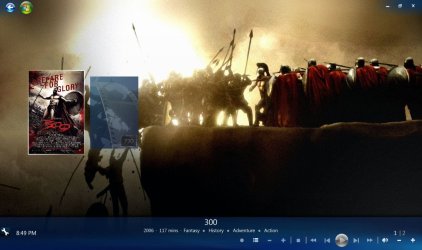
trying to get trailers to work...not having much luck. here is my problem.

I have installed and run the HD movie trailer downloader.
I have run trailerxml and checked the XML file and the info has been changed the same way as the manual code example looks.

Now I have no details, actors etc. All I see are both the actual movie and the trailer.mov. If I select either it plays in full screen.

??? So in trying to add MORE features, I end up with much less.
 

Attachments

  • Capture.JPG
    Capture.JPG
    125.3 KB · Views: 25

My Computer

Computer Manufacturer/Model Number
HP Pavilion dv7
OS
w7 dual boot vista32
CPU
Core2Duo T5800 2GHz
Motherboard
HP
Memory
4gig
Graphics Card(s)
NVIDIA GeForce 9600M GT
Another item of concern is that I get this error most of the time. From the start.
 

Attachments

  • Capture2.jpg
    Capture2.jpg
    10 KB · Views: 6

My Computer

Computer Manufacturer/Model Number
HP Pavilion dv7
OS
w7 dual boot vista32
CPU
Core2Duo T5800 2GHz
Motherboard
HP
Memory
4gig
Graphics Card(s)
NVIDIA GeForce 9600M GT
Can you post your movie.xml file so we can look at it. I must admit though, I am not clear on exactly what your issue is. Can you be more detailed please.
 

My Computer

Computer Manufacturer/Model Number
Gigabyte
OS
Windows 7 Ultimate
CPU
Intel Core(TM)2 Quad- Q9550, 2.83GHz
Motherboard
G31M-ES2L
Memory
4GB
Graphics Card(s)
ATI Radeon HD4600
Sound Card
On Board:
Monitor(s) Displays
Acer AL2223W, Acer AL1916
Screen Resolution
1680 x 1050, 1280 x 1024
Hard Drives
160GB
350GB
250GB
250GB
PSU
600W
Case
Cooler Master
Keyboard
Microsoft Laser 6000
Mouse
Logitech Optical Trackman
Internet Speed
1.5MB
Other Info
I am also running a quasar gamatron flux capacitor with twin pulse tronic phasers......jk, I have no such stuff.
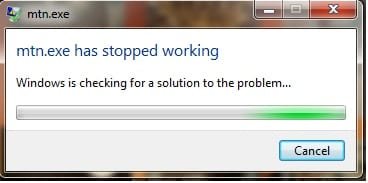
When I open media browser everything is okay. As soon as I select a move (eg. 300) I get the error That I displayed (multiple times).

The screen shot from my post is all that I see. I see both the movie and trailer but No movie info, actors etc. I can play either the movie or the trailer full screen.
 

Attachments

My Computer

Computer Manufacturer/Model Number
HP Pavilion dv7
OS
w7 dual boot vista32
CPU
Core2Duo T5800 2GHz
Motherboard
HP
Memory
4gig
Graphics Card(s)
NVIDIA GeForce 9600M GT
I uninstalled hd Icon plugin and no longer get the MTN.exe error

still do not get the trailer icon as seen in the screen shot from the first page.
 

My Computer

Computer Manufacturer/Model Number
HP Pavilion dv7
OS
w7 dual boot vista32
CPU
Core2Duo T5800 2GHz
Motherboard
HP
Memory
4gig
Graphics Card(s)
NVIDIA GeForce 9600M GT
I looked at your xml file, and see nothing wrong. Are you using the diamond or the vanilla theme? Try switching themes and see if that helps. I will keep trying to figure it out for you.
 

My Computer

Computer Manufacturer/Model Number
Gigabyte
OS
Windows 7 Ultimate
CPU
Intel Core(TM)2 Quad- Q9550, 2.83GHz
Motherboard
G31M-ES2L
Memory
4GB
Graphics Card(s)
ATI Radeon HD4600
Sound Card
On Board:
Monitor(s) Displays
Acer AL2223W, Acer AL1916
Screen Resolution
1680 x 1050, 1280 x 1024
Hard Drives
160GB
350GB
250GB
250GB
PSU
600W
Case
Cooler Master
Keyboard
Microsoft Laser 6000
Mouse
Logitech Optical Trackman
Internet Speed
1.5MB
Other Info
I am also running a quasar gamatron flux capacitor with twin pulse tronic phasers......jk, I have no such stuff.
I have switched from default vanilla and diamond and its all the same. I removed the trailer.mov from a folder and restarted WMC. Now I have the icon for the trailer but it obviously wont play. It seems like as soon as I have trailer.mov and the actual movie in the same folder MediaBrowser shows both as movies.


Fixed somewhat???
I removed the trailer.mov file from one of my movie folders. I re-started Media Browser and navigated to the movie that I removed the trailer.mov

With Media Browser still open I put the trailer.mov back into the movies folder and Media Browser played the trailer. (not always in the small preview window but better than before).

I tried other movies after this and some work "properly" other in full screen and some not at all (a border for the preview opens up but no video plays). So its working partially but not totally.
 
Last edited:

My Computer

Computer Manufacturer/Model Number
HP Pavilion dv7
OS
w7 dual boot vista32
CPU
Core2Duo T5800 2GHz
Motherboard
HP
Memory
4gig
Graphics Card(s)
NVIDIA GeForce 9600M GT
man I think you jinxed me, now my trailers are not playing any more, lol. I get the windows media center cannot play this file. I will redo my codecs, and see if that helps.
 

My Computer

Computer Manufacturer/Model Number
Gigabyte
OS
Windows 7 Ultimate
CPU
Intel Core(TM)2 Quad- Q9550, 2.83GHz
Motherboard
G31M-ES2L
Memory
4GB
Graphics Card(s)
ATI Radeon HD4600
Sound Card
On Board:
Monitor(s) Displays
Acer AL2223W, Acer AL1916
Screen Resolution
1680 x 1050, 1280 x 1024
Hard Drives
160GB
350GB
250GB
250GB
PSU
600W
Case
Cooler Master
Keyboard
Microsoft Laser 6000
Mouse
Logitech Optical Trackman
Internet Speed
1.5MB
Other Info
I am also running a quasar gamatron flux capacitor with twin pulse tronic phasers......jk, I have no such stuff.
You need to bump up your auto play count to at least 3 so that movies that have two parts and a trailer in the folder MB will still do as it was meant to.

   Note
Trailers only work in the Vanilla Theme
 

My Computer

Computer Manufacturer/Model Number
Custom Built Rig BY ME "My Baby"
OS
7 Ultimate x64
CPU
AMD Athlon 64X2 4600+ 2.51Ghz
Motherboard
ASUS M2N-E SLI
Memory
6GB DDR2 900 Kingston
Graphics Card(s)
2x BFG Nvidia 9600 GT-OC
Sound Card
SoundBlaster XF-I
Monitor(s) Displays
19"acer, 22"acer, 19"acer, 48" HITACHI HDTV
Screen Resolution
1400x900, 1680x1050, 1400x900, 1920x1080
Hard Drives
Seagate 500GB Sata
Seagate 500GB Sata
Seagate 500GB Sata
Seagate 500GB Sata
Seagate 320 Sata (Primary)
Western Digital 500GB IDE
Western Digital 300GB IDE
Maxter 720 Sata (USB)
PSU
BFG 800 Watt SLI Power Supply
Case
Game Master
Cooling
Thermotake
Keyboard
Logitech (Bluetooth)
Mouse
Logitech (Bluetooth)
Internet Speed
Turbo Cable
Other Info
ATI 650HD TV Tuner X2,
Samsung (Light scribe) DVD-R,
Sony (Dual Layer) DVD-R
That must be a new "bug" with this new version of MB; it never did that in the prior versions.
 

My Computer

Computer Manufacturer/Model Number
Gigabyte
OS
Windows 7 Ultimate
CPU
Intel Core(TM)2 Quad- Q9550, 2.83GHz
Motherboard
G31M-ES2L
Memory
4GB
Graphics Card(s)
ATI Radeon HD4600
Sound Card
On Board:
Monitor(s) Displays
Acer AL2223W, Acer AL1916
Screen Resolution
1680 x 1050, 1280 x 1024
Hard Drives
160GB
350GB
250GB
250GB
PSU
600W
Case
Cooler Master
Keyboard
Microsoft Laser 6000
Mouse
Logitech Optical Trackman
Internet Speed
1.5MB
Other Info
I am also running a quasar gamatron flux capacitor with twin pulse tronic phasers......jk, I have no such stuff.
No I think it has been that way with the play count, and it only working in Vanilla, has and will continue to be the only theme that it works in.

The theme creator is the one that added it in, not the MB devs.
 

My Computer

Computer Manufacturer/Model Number
Custom Built Rig BY ME "My Baby"
OS
7 Ultimate x64
CPU
AMD Athlon 64X2 4600+ 2.51Ghz
Motherboard
ASUS M2N-E SLI
Memory
6GB DDR2 900 Kingston
Graphics Card(s)
2x BFG Nvidia 9600 GT-OC
Sound Card
SoundBlaster XF-I
Monitor(s) Displays
19"acer, 22"acer, 19"acer, 48" HITACHI HDTV
Screen Resolution
1400x900, 1680x1050, 1400x900, 1920x1080
Hard Drives
Seagate 500GB Sata
Seagate 500GB Sata
Seagate 500GB Sata
Seagate 500GB Sata
Seagate 320 Sata (Primary)
Western Digital 500GB IDE
Western Digital 300GB IDE
Maxter 720 Sata (USB)
PSU
BFG 800 Watt SLI Power Supply
Case
Game Master
Cooling
Thermotake
Keyboard
Logitech (Bluetooth)
Mouse
Logitech (Bluetooth)
Internet Speed
Turbo Cable
Other Info
ATI 650HD TV Tuner X2,
Samsung (Light scribe) DVD-R,
Sony (Dual Layer) DVD-R
Temporary Trailer Fix...

To get the trailer button to show-up and work correctly...
1) Add the trailer.mov to your movie folder, if not already there.
2) Add the xml snippet to the mymovie.xml file, if not already there.
3) Edit the trailer.mov file ext and the file path callout in the mymovie.xml file to something like trailer.mov1.

xml snippet:

<LocalTrailer>
<URL>\\HOMESERVER\Videos\Movies\Eagle Eye\trailer.mov1</URL>
<Type>1</Type>
</LocalTrailer>

That should fix the problem. It looks like MB is trying to treat the trailer.mov like a main feature.

Jay
 

My Computer

OS
Windows 7 64bit
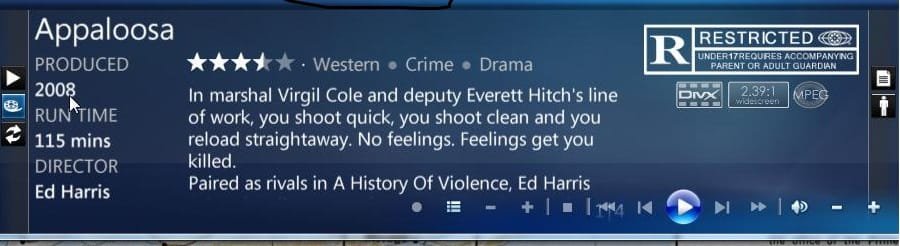
He already had the xml configured the way you posted, and was still experiencing the issue. On another note, I am still having trouble playing my trailers, see screen shot. It tries to play, but all I get is a blank rectangle. The screen shot on the right is to show that I have the trailer icon. In case anyone is wondering, I am using the vanilla theme. If this is not resolved, I will go back to the older version of MB, and see if they work.
 

Attachments

  • ScreenShot016.jpg
    ScreenShot016.jpg
    104.6 KB · Views: 17
  • ScreenShot015.jpg
    ScreenShot015.jpg
    35.2 KB · Views: 17

My Computer

Computer Manufacturer/Model Number
Gigabyte
OS
Windows 7 Ultimate
CPU
Intel Core(TM)2 Quad- Q9550, 2.83GHz
Motherboard
G31M-ES2L
Memory
4GB
Graphics Card(s)
ATI Radeon HD4600
Sound Card
On Board:
Monitor(s) Displays
Acer AL2223W, Acer AL1916
Screen Resolution
1680 x 1050, 1280 x 1024
Hard Drives
160GB
350GB
250GB
250GB
PSU
600W
Case
Cooler Master
Keyboard
Microsoft Laser 6000
Mouse
Logitech Optical Trackman
Internet Speed
1.5MB
Other Info
I am also running a quasar gamatron flux capacitor with twin pulse tronic phasers......jk, I have no such stuff.
What codices are you using? Mine works fine on my setup.
 

My Computer

Computer Manufacturer/Model Number
Custom Built Rig BY ME "My Baby"
OS
7 Ultimate x64
CPU
AMD Athlon 64X2 4600+ 2.51Ghz
Motherboard
ASUS M2N-E SLI
Memory
6GB DDR2 900 Kingston
Graphics Card(s)
2x BFG Nvidia 9600 GT-OC
Sound Card
SoundBlaster XF-I
Monitor(s) Displays
19"acer, 22"acer, 19"acer, 48" HITACHI HDTV
Screen Resolution
1400x900, 1680x1050, 1400x900, 1920x1080
Hard Drives
Seagate 500GB Sata
Seagate 500GB Sata
Seagate 500GB Sata
Seagate 500GB Sata
Seagate 320 Sata (Primary)
Western Digital 500GB IDE
Western Digital 300GB IDE
Maxter 720 Sata (USB)
PSU
BFG 800 Watt SLI Power Supply
Case
Game Master
Cooling
Thermotake
Keyboard
Logitech (Bluetooth)
Mouse
Logitech (Bluetooth)
Internet Speed
Turbo Cable
Other Info
ATI 650HD TV Tuner X2,
Samsung (Light scribe) DVD-R,
Sony (Dual Layer) DVD-R
Strange, i've had trailers working fine on my rig (7260 x86). I have to install v2.0.1 followed by an upgrade to 2.1, even though you've got MB working you could try that.

Also, to compliment DemonSeed's statement, have you got Apple Quicktime installed? as I believe that the trailers (especially HD) are taken direct from the Apple website.
 

My Computer

Computer Manufacturer/Model Number
Compaq Desktop
OS
Windows 7 Ultimate x64
CPU
AMD Sempron Dual Core
Memory
3GB
Graphics Card(s)
NVIDIA GeForce 6150SE nForce 430
Screen Resolution
1024x768
Hard Drives
150GB Sata
I have quicktime installed and have the same problem as Zay Posted. The codecs that I am using are from shark007.
 

My Computer

Computer Manufacturer/Model Number
HP Pavilion dv7
OS
w7 dual boot vista32
CPU
Core2Duo T5800 2GHz
Motherboard
HP
Memory
4gig
Graphics Card(s)
NVIDIA GeForce 9600M GT
Man thats the same ones I'm using and mine are working fine. I do not have any quick time anything installed. do you have your auto playlist count set up to a least 3?
 

My Computer

Computer Manufacturer/Model Number
Custom Built Rig BY ME "My Baby"
OS
7 Ultimate x64
CPU
AMD Athlon 64X2 4600+ 2.51Ghz
Motherboard
ASUS M2N-E SLI
Memory
6GB DDR2 900 Kingston
Graphics Card(s)
2x BFG Nvidia 9600 GT-OC
Sound Card
SoundBlaster XF-I
Monitor(s) Displays
19"acer, 22"acer, 19"acer, 48" HITACHI HDTV
Screen Resolution
1400x900, 1680x1050, 1400x900, 1920x1080
Hard Drives
Seagate 500GB Sata
Seagate 500GB Sata
Seagate 500GB Sata
Seagate 500GB Sata
Seagate 320 Sata (Primary)
Western Digital 500GB IDE
Western Digital 300GB IDE
Maxter 720 Sata (USB)
PSU
BFG 800 Watt SLI Power Supply
Case
Game Master
Cooling
Thermotake
Keyboard
Logitech (Bluetooth)
Mouse
Logitech (Bluetooth)
Internet Speed
Turbo Cable
Other Info
ATI 650HD TV Tuner X2,
Samsung (Light scribe) DVD-R,
Sony (Dual Layer) DVD-R
I am using the latest shark007 w7 codecs. Bear in mind, this used to work fine (of course I have not used my MC in a while), now they do not. I will try that play list count advice that DS recommended. I know for a fact, I did not have to do that with the prior version of MB, but, que cera cera. BTW, just to be sure, are you referring to the Playlist SIze Limit found under Behavior in the configuration menu of MB? That is the only reference to a playlist that I see in the config, unless I am missing something.
 

My Computer

Computer Manufacturer/Model Number
Gigabyte
OS
Windows 7 Ultimate
CPU
Intel Core(TM)2 Quad- Q9550, 2.83GHz
Motherboard
G31M-ES2L
Memory
4GB
Graphics Card(s)
ATI Radeon HD4600
Sound Card
On Board:
Monitor(s) Displays
Acer AL2223W, Acer AL1916
Screen Resolution
1680 x 1050, 1280 x 1024
Hard Drives
160GB
350GB
250GB
250GB
PSU
600W
Case
Cooler Master
Keyboard
Microsoft Laser 6000
Mouse
Logitech Optical Trackman
Internet Speed
1.5MB
Other Info
I am also running a quasar gamatron flux capacitor with twin pulse tronic phasers......jk, I have no such stuff.
If you are referring to the play list under behavior Mine is set for 9 (always has been)
 

My Computer

Computer Manufacturer/Model Number
HP Pavilion dv7
OS
w7 dual boot vista32
CPU
Core2Duo T5800 2GHz
Motherboard
HP
Memory
4gig
Graphics Card(s)
NVIDIA GeForce 9600M GT
Back
Top