MediaBrowser

So Lets get some feed Back on Media Browser


  • Total voters
    137
I assume you are using a third party firewall, because this is the first time I am hearing MB being blocked. Either way, whether you have a third party firewall or just the windows one, just create a rule that allows it to access the internet.
 

My Computer My Computer

Computer Manufacturer/Model Number
Gigabyte
OS
Windows 7 Ultimate
CPU
Intel Core(TM)2 Quad- Q9550, 2.83GHz
Motherboard
G31M-ES2L
Memory
4GB
Graphics Card(s)
ATI Radeon HD4600
Sound Card
On Board:
Monitor(s) Displays
Acer AL2223W, Acer AL1916
Screen Resolution
1680 x 1050, 1280 x 1024
Hard Drives
160GB
350GB
250GB
250GB
PSU
600W
Case
Cooler Master
Keyboard
Microsoft Laser 6000
Mouse
Logitech Optical Trackman
Internet Speed
1.5MB
Other Info
I am also running a quasar gamatron flux capacitor with twin pulse tronic phasers......jk, I have no such stuff.
Quote: Originally Posted by daroy99
i meant that all of the links to pictures on the first post don't show up, they all have the ****** instead of address


Quote: Originally Posted by sergiogarcia9
oh :doh: I cant see them either :(


I talked to the admin about that and they said they would fix it!
They blocked dropbox for one reason or another, but said they would unblock my thread today.
 

My Computer My Computer

Computer Manufacturer/Model Number
Custom Built Rig BY ME "My Baby"
OS
7 Ultimate x64
CPU
AMD Athlon 64X2 4600+ 2.51Ghz
Motherboard
ASUS M2N-E SLI
Memory
6GB DDR2 900 Kingston
Graphics Card(s)
2x BFG Nvidia 9600 GT-OC
Sound Card
SoundBlaster XF-I
Monitor(s) Displays
19"acer, 22"acer, 19"acer, 48" HITACHI HDTV
Screen Resolution
1400x900, 1680x1050, 1400x900, 1920x1080
Hard Drives
Seagate 500GB Sata
Seagate 500GB Sata
Seagate 500GB Sata
Seagate 500GB Sata
Seagate 320 Sata (Primary)
Western Digital 500GB IDE
Western Digital 300GB IDE
Maxter 720 Sata (USB)
PSU
BFG 800 Watt SLI Power Supply
Case
Game Master
Cooling
Thermotake
Keyboard
Logitech (Bluetooth)
Mouse
Logitech (Bluetooth)
Internet Speed
Turbo Cable
Other Info
ATI 650HD TV Tuner X2,
Samsung (Light scribe) DVD-R,
Sony (Dual Layer) DVD-R
I assume you are using a third party firewall, because this is the first time I am hearing MB being blocked. Either way, whether you have a third party firewall or just the windows one, just create a rule that allows it to access the internet.

Just the Windows firewall - Media Browser doesn't seem to be able to gather metadata for movies that I don't already have covers for.
 

My Computer My Computer

OS
XP Pro & Win7 Ult
Just the Windows firewall - Media Browser doesn't seem to be able to gather metadata for movies that I don't already have covers for.
It could have something to do with the names of the movies. I have 2 movies and 1 TV series in my libary that MB can't find cover for (XIII: The Conspiracy, Flammen og Citronen (danish movie) and 24 (Tv series from Fox))
 
You need to be sure to have Metadata checked off in the config menu. To get the info from media browser.
 

My Computer My Computer

Computer Manufacturer/Model Number
Custom Built Rig BY ME "My Baby"
OS
7 Ultimate x64
CPU
AMD Athlon 64X2 4600+ 2.51Ghz
Motherboard
ASUS M2N-E SLI
Memory
6GB DDR2 900 Kingston
Graphics Card(s)
2x BFG Nvidia 9600 GT-OC
Sound Card
SoundBlaster XF-I
Monitor(s) Displays
19"acer, 22"acer, 19"acer, 48" HITACHI HDTV
Screen Resolution
1400x900, 1680x1050, 1400x900, 1920x1080
Hard Drives
Seagate 500GB Sata
Seagate 500GB Sata
Seagate 500GB Sata
Seagate 500GB Sata
Seagate 320 Sata (Primary)
Western Digital 500GB IDE
Western Digital 300GB IDE
Maxter 720 Sata (USB)
PSU
BFG 800 Watt SLI Power Supply
Case
Game Master
Cooling
Thermotake
Keyboard
Logitech (Bluetooth)
Mouse
Logitech (Bluetooth)
Internet Speed
Turbo Cable
Other Info
ATI 650HD TV Tuner X2,
Samsung (Light scribe) DVD-R,
Sony (Dual Layer) DVD-R
Hey DS,

Wanted to try a go at organizing some of my collection into box sets. I have a basic setup (HDD's) on my HTPC. But I couldn't figure out how to set it up in MB.

My HDD configuration looks like this...

D:\ (contains 80+ DVDs, all of which in their own folder)
E:\ (same as above)
F:\ (contains Blurays, DVD, and Recorded TV shows)

example of drive F:\HD Movies\Bourne Identity\Bourne Identity.mkv

I'd like to setup an icon on the main MB screen, "Box Sets", and have just box set movies. ex: Star Wars, Inidana Jones, Scream, Bourne Trilogy, etc...

Can you help me out dude??

Thanks,
 

My Computer My Computer

OS
Windows 7 RC 7100
Hey DS,

Wanted to try a go at organizing some of my collection into box sets. I have a basic setup (HDD's) on my HTPC. But I couldn't figure out how to set it up in MB.

My HDD configuration looks like this...

D:\ (contains 80+ DVDs, all of which in their own folder)
E:\ (same as above)
F:\ (contains Blurays, DVD, and Recorded TV shows)

example of drive F:\HD Movies\Bourne Identity\Bourne Identity.mkv

I'd like to setup an icon on the main MB screen, "Box Sets", and have just box set movies. ex: Star Wars, Inidana Jones, Scream, Bourne Trilogy, etc...

Can you help me out dude??

Thanks,

Hope you dont mind a noob jumping in and helping but this is what I did to set up boxsets.

Created a new folder called "Boxsets" added the folder in Media Browser Configuration tool. Created a folder for each boxset "Spiderman, X-Men" and so on inside the boxset folder and then created a shortcut for each movie in the folder. Does that make sense? In other words just use shortcuts and Media Browser picks them up with no problem. As for boxset folder pictures I use Settingsun's boxset icons.
 

My Computer My Computer

OS
Windows 7
Hey Xzener, whats up man! Here is how I have mine set up.


*** I am using animated pix in this post that you can not see move with Internet Explorer. If you are using Firefox, Safari, or Opera your good, just skip over this next part.
If your using any other web browser please just for this, download this Portable Web Browser and run the opera.exe and it will open, Then browse back to this page, and you wont miss a thing.

This is going to be based on how I have my system set up, please don't think this is the only way of doing thing because that's just incorrect. This is solely going to be based on my system.

I am going to give pointers on how to set up a box set collection using shortcuts from your main movie collection.

First thing, I do not separate my movies in my library. They are all grouped together so I can better keep a true count of things,
and when browsing all of my tidals, its really all of my tidals .
Here is what I mean.

Click on Photos to ENLARGE

7-11-2009%2012-14-50%20AM.png

7-11-2009%201-15-44%20AM.png

Note the folder.dna file I have inside my folder. The reason I have that there is, Stark did not make the icon you see. It is a custom made icon and I don't want stark to change it or alter it in any way, so by putting the folder.dna inside the folder Stark will skip it from be processed.

Now on to the part Media Browser looks at to show me my Box Sets.
This is a folder with nothing inside but what you see here.
Boxset%20how2.png


And this is my end game.
stark%20boxset.png


It will be easy to do it this way, but there is a down side tho.
If you use the sort by Genre or other filters, MB is going to show two of all of the movie that have been linked with shortcuts.

I don't use and filters, so I don't have any problems with it doing that.

Hope this helps ya out.
Later -DS
 

My Computer My Computer

Computer Manufacturer/Model Number
Custom Built Rig BY ME "My Baby"
OS
7 Ultimate x64
CPU
AMD Athlon 64X2 4600+ 2.51Ghz
Motherboard
ASUS M2N-E SLI
Memory
6GB DDR2 900 Kingston
Graphics Card(s)
2x BFG Nvidia 9600 GT-OC
Sound Card
SoundBlaster XF-I
Monitor(s) Displays
19"acer, 22"acer, 19"acer, 48" HITACHI HDTV
Screen Resolution
1400x900, 1680x1050, 1400x900, 1920x1080
Hard Drives
Seagate 500GB Sata
Seagate 500GB Sata
Seagate 500GB Sata
Seagate 500GB Sata
Seagate 320 Sata (Primary)
Western Digital 500GB IDE
Western Digital 300GB IDE
Maxter 720 Sata (USB)
PSU
BFG 800 Watt SLI Power Supply
Case
Game Master
Cooling
Thermotake
Keyboard
Logitech (Bluetooth)
Mouse
Logitech (Bluetooth)
Internet Speed
Turbo Cable
Other Info
ATI 650HD TV Tuner X2,
Samsung (Light scribe) DVD-R,
Sony (Dual Layer) DVD-R
I did the trailers mod, but it seems after I watch a few, they start screwing up, I get no pic and some loud screaching noises.

I can view them fine with quicktime so I dont think they are corrupted. Not sure what the deal is???

Also do I have to do something special to get the itunes trailers to work. These look really cool but I just get the blue screen that the file type is not playable.

I can play the .mov's on WMP just fine.
 

My Computer My Computer

Computer Manufacturer/Model Number
HP
OS
win 7 64
CPU
i7 950
Motherboard
gigabyte ga-x58-ud3r
Memory
3 x 2 gb gskill 1600
Graphics Card(s)
gtx 470
I did the trailers mod, but it seems after I watch a few, they start screwing up, I get no pic and some loud screaching noises.

I can view them fine with quicktime so I dont think they are corrupted. Not sure what the deal is???

Also do I have to do something special to get the itunes trailers to work. These look really cool but I just get the blue screen that the file type is not playable.

I can play the .mov's on WMP just fine.
The only thing I know to suggest is codec pack.All I use is Sharks x64 & x32 and can play everything. I have not had to trouble shoot any file I have tried to play, so this is all I know. Sorry I cant be of more help to ya.

By the way Welcome to the Forum!:D
 

My Computer My Computer

Computer Manufacturer/Model Number
Custom Built Rig BY ME "My Baby"
OS
7 Ultimate x64
CPU
AMD Athlon 64X2 4600+ 2.51Ghz
Motherboard
ASUS M2N-E SLI
Memory
6GB DDR2 900 Kingston
Graphics Card(s)
2x BFG Nvidia 9600 GT-OC
Sound Card
SoundBlaster XF-I
Monitor(s) Displays
19"acer, 22"acer, 19"acer, 48" HITACHI HDTV
Screen Resolution
1400x900, 1680x1050, 1400x900, 1920x1080
Hard Drives
Seagate 500GB Sata
Seagate 500GB Sata
Seagate 500GB Sata
Seagate 500GB Sata
Seagate 320 Sata (Primary)
Western Digital 500GB IDE
Western Digital 300GB IDE
Maxter 720 Sata (USB)
PSU
BFG 800 Watt SLI Power Supply
Case
Game Master
Cooling
Thermotake
Keyboard
Logitech (Bluetooth)
Mouse
Logitech (Bluetooth)
Internet Speed
Turbo Cable
Other Info
ATI 650HD TV Tuner X2,
Samsung (Light scribe) DVD-R,
Sony (Dual Layer) DVD-R
Ok I'll try that and thanks for the welcome, awesome first post you got here.Loads of great info!!
 

My Computer My Computer

Computer Manufacturer/Model Number
HP
OS
win 7 64
CPU
i7 950
Motherboard
gigabyte ga-x58-ud3r
Memory
3 x 2 gb gskill 1600
Graphics Card(s)
gtx 470
Hey Xzener, Ive been playing with your icons a little to see what you could do for your box set icons for your collection. What do ya think of this?
LOTR%20boxset.png
 

My Computer My Computer

Computer Manufacturer/Model Number
Custom Built Rig BY ME "My Baby"
OS
7 Ultimate x64
CPU
AMD Athlon 64X2 4600+ 2.51Ghz
Motherboard
ASUS M2N-E SLI
Memory
6GB DDR2 900 Kingston
Graphics Card(s)
2x BFG Nvidia 9600 GT-OC
Sound Card
SoundBlaster XF-I
Monitor(s) Displays
19"acer, 22"acer, 19"acer, 48" HITACHI HDTV
Screen Resolution
1400x900, 1680x1050, 1400x900, 1920x1080
Hard Drives
Seagate 500GB Sata
Seagate 500GB Sata
Seagate 500GB Sata
Seagate 500GB Sata
Seagate 320 Sata (Primary)
Western Digital 500GB IDE
Western Digital 300GB IDE
Maxter 720 Sata (USB)
PSU
BFG 800 Watt SLI Power Supply
Case
Game Master
Cooling
Thermotake
Keyboard
Logitech (Bluetooth)
Mouse
Logitech (Bluetooth)
Internet Speed
Turbo Cable
Other Info
ATI 650HD TV Tuner X2,
Samsung (Light scribe) DVD-R,
Sony (Dual Layer) DVD-R
Hey Xzener, whats up man! Here is how I have mine set up.


*** I am using animated pix in this post that you can not see move with Internet Explorer. If you are using Firefox, Safari, or Opera your good, just skip over this next part.
If your using any other web browser please just for this, download this Portable Web Browser and run the opera.exe and it will open, Then browse back to this page, and you wont miss a thing.

This is going to be based on how I have my system set up, please don't think this is the only way of doing thing because that's just incorrect. This is solely going to be based on my system.

I am going to give pointers on how to set up a box set collection using shortcuts from your main movie collection.

First thing, I do not separate my movies in my library. They are all grouped together so I can better keep a true count of things,
and when browsing all of my tidals, its really all of my tidals .
Here is what I mean.

Click on Photos to ENLARGE

7-11-2009%2012-14-50%20AM.png

7-11-2009%201-15-44%20AM.png

Note the folder.dna file I have inside my folder. The reason I have that there is, Stark did not make the icon you see. It is a custom made icon and I don't want stark to change it or alter it in any way, so by putting the folder.dna inside the folder Stark will skip it from be processed.

Now on to the part Media Browser looks at to show me my Box Sets.
This is a folder with nothing inside but what you see here.
Boxset%20how2.png


And this is my end game.
stark%20boxset.png


It will be easy to do it this way, but there is a down side tho.
If you use the sort by Genre or other filters, MB is going to show two of all of the movie that have been linked with shortcuts.

I don't use and filters, so I don't have any problems with it doing that.

Hope this helps ya out.
Later -DS

Ok, I have my dunce hat on tonight. I can't figure out your tutorial to save my life. No offence. What does your configuration wizard look like??

Does the folder.dna hold any part in this??

And are those just shortcuts of the actual movie folders??

I must be tired. :confused:
 

My Computer My Computer

OS
Windows 7 RC 7100
QUOTE xzener What does your configuration wizard look like??
8-13-2009%205-58-47%20AM.png


Does the folder.dna hold any part in this??
Its only to stop Stark Covers from changing the Icon you set. If its a custom icon and you dont want it getting changed on accident add the folder.dna and Stark Covers will not proses it..

And are those just shortcuts of the actual movie folders??
YEA They Are. That's all it takes, is creating short cuts to the movies in your collection and placing them all in a containing folder. Then show MB the shortcuts folder and that's it.
 

My Computer My Computer

Computer Manufacturer/Model Number
Custom Built Rig BY ME "My Baby"
OS
7 Ultimate x64
CPU
AMD Athlon 64X2 4600+ 2.51Ghz
Motherboard
ASUS M2N-E SLI
Memory
6GB DDR2 900 Kingston
Graphics Card(s)
2x BFG Nvidia 9600 GT-OC
Sound Card
SoundBlaster XF-I
Monitor(s) Displays
19"acer, 22"acer, 19"acer, 48" HITACHI HDTV
Screen Resolution
1400x900, 1680x1050, 1400x900, 1920x1080
Hard Drives
Seagate 500GB Sata
Seagate 500GB Sata
Seagate 500GB Sata
Seagate 500GB Sata
Seagate 320 Sata (Primary)
Western Digital 500GB IDE
Western Digital 300GB IDE
Maxter 720 Sata (USB)
PSU
BFG 800 Watt SLI Power Supply
Case
Game Master
Cooling
Thermotake
Keyboard
Logitech (Bluetooth)
Mouse
Logitech (Bluetooth)
Internet Speed
Turbo Cable
Other Info
ATI 650HD TV Tuner X2,
Samsung (Light scribe) DVD-R,
Sony (Dual Layer) DVD-R
QUOTE xzener What does your configuration wizard look like??
8-13-2009%205-58-47%20AM.png


Does the folder.dna hold any part in this??
Its only to stop Stark Covers from changing the Icon you set. If its a custom icon and you dont want it getting changed on accident add the folder.dna and Stark Covers will not proses it..

And are those just shortcuts of the actual movie folders??
YEA They Are. That's all it takes, is creating short cuts to the movies in your collection and placing them all in a containing folder. Then show MB the shortcuts folder and that's it.
hmm dirty girls :sarc: I wonder whats in that folder :p
 
Opps:o I meant to white that out! lol:huh::rolleyes::p But what do I care I'm single and FREE!!!
 

My Computer My Computer

Computer Manufacturer/Model Number
Custom Built Rig BY ME "My Baby"
OS
7 Ultimate x64
CPU
AMD Athlon 64X2 4600+ 2.51Ghz
Motherboard
ASUS M2N-E SLI
Memory
6GB DDR2 900 Kingston
Graphics Card(s)
2x BFG Nvidia 9600 GT-OC
Sound Card
SoundBlaster XF-I
Monitor(s) Displays
19"acer, 22"acer, 19"acer, 48" HITACHI HDTV
Screen Resolution
1400x900, 1680x1050, 1400x900, 1920x1080
Hard Drives
Seagate 500GB Sata
Seagate 500GB Sata
Seagate 500GB Sata
Seagate 500GB Sata
Seagate 320 Sata (Primary)
Western Digital 500GB IDE
Western Digital 300GB IDE
Maxter 720 Sata (USB)
PSU
BFG 800 Watt SLI Power Supply
Case
Game Master
Cooling
Thermotake
Keyboard
Logitech (Bluetooth)
Mouse
Logitech (Bluetooth)
Internet Speed
Turbo Cable
Other Info
ATI 650HD TV Tuner X2,
Samsung (Light scribe) DVD-R,
Sony (Dual Layer) DVD-R
I set mine up just like yours.... MB see's the folder, and will set up an icon, if the folder is empty. As soon as I add a folder, and add shortcut folders, MB shows no icon, no movies, no backdrops. And when I click on "Box Sets" in MB it starts one of the movies. Here is my setup...

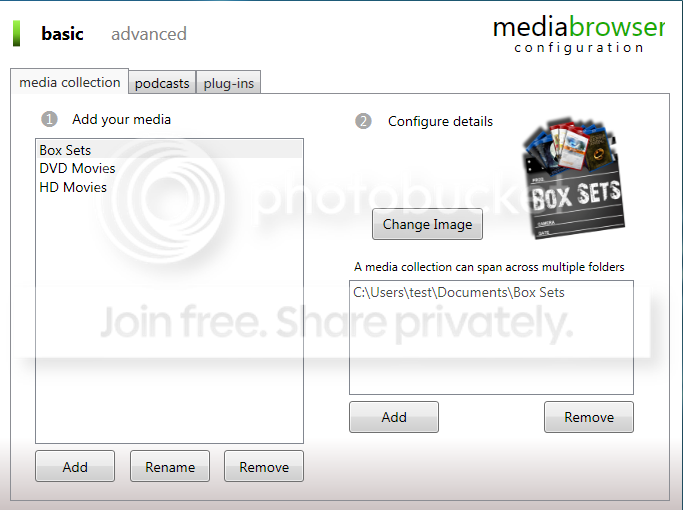
MB Configuration Tool
Capture-22.png


My Box Sets/The Bourne Trilogy/shortcuts setup
Capture3-1.png


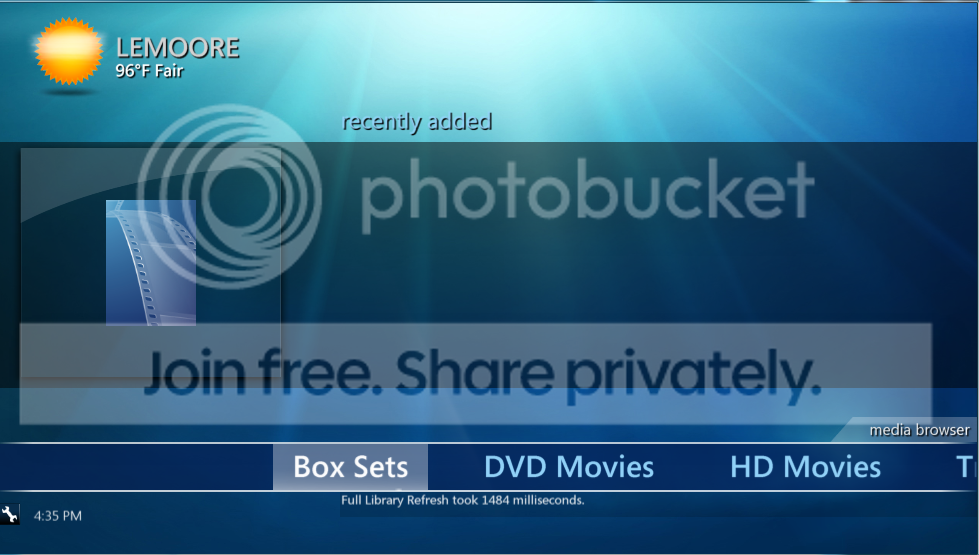
This is the outcome, absolutely nothing...
Capture2-3.png


What am I doing wrong here?? All that I can see that is different is all those backdrops you have.
 

My Computer My Computer

OS
Windows 7 RC 7100
Do you have auto enter single item folder enabled? I dont know what else it could be???

It works fine on mine. You have used the shortcuts to check the path right.
 

My Computer My Computer

Computer Manufacturer/Model Number
Custom Built Rig BY ME "My Baby"
OS
7 Ultimate x64
CPU
AMD Athlon 64X2 4600+ 2.51Ghz
Motherboard
ASUS M2N-E SLI
Memory
6GB DDR2 900 Kingston
Graphics Card(s)
2x BFG Nvidia 9600 GT-OC
Sound Card
SoundBlaster XF-I
Monitor(s) Displays
19"acer, 22"acer, 19"acer, 48" HITACHI HDTV
Screen Resolution
1400x900, 1680x1050, 1400x900, 1920x1080
Hard Drives
Seagate 500GB Sata
Seagate 500GB Sata
Seagate 500GB Sata
Seagate 500GB Sata
Seagate 320 Sata (Primary)
Western Digital 500GB IDE
Western Digital 300GB IDE
Maxter 720 Sata (USB)
PSU
BFG 800 Watt SLI Power Supply
Case
Game Master
Cooling
Thermotake
Keyboard
Logitech (Bluetooth)
Mouse
Logitech (Bluetooth)
Internet Speed
Turbo Cable
Other Info
ATI 650HD TV Tuner X2,
Samsung (Light scribe) DVD-R,
Sony (Dual Layer) DVD-R
Yes, I have that checked. And to think they're going to make us pay for this. Is there a tutorial in the wiki?? I've done everything I know how. The folder (with icon) only works when the folder is empty!?!?:mad:
 

My Computer My Computer

OS
Windows 7 RC 7100
Back
Top