MediaBrowser

So Lets get some feed Back on Media Browser


  • Total voters
    137
Can't get the back ground to change with covers
 

My Computer My Computer

Computer type
PC/Desktop
Computer Manufacturer/Model Number
Custom build
OS
Windows 7 64 bit
CPU
AMD Athlon(tm) 64 X2 Dual Core Processor 6000+ 3.00 GHz
Motherboard
Gigabyte GA-MA78G-DS3H (Socket M2)
Memory
4.00 GB Dual-Channel DDR2 @ 376MHz
Graphics Card(s)
mobile intel r 965 express chipset family
Hard Drives
465GB Seagate (SATA)
931GB Western Digital (SATA)
Keyboard
Logitech G15
Mouse
Logitech MX 518
Antivirus
MSE
Browser
Chrome
Do you have Show Backdrop on Supported Views enabled?

9-26-2009%204-35-17%20PM.png
 

My Computer My Computer

Computer Manufacturer/Model Number
Custom Built Rig BY ME "My Baby"
OS
7 Ultimate x64
CPU
AMD Athlon 64X2 4600+ 2.51Ghz
Motherboard
ASUS M2N-E SLI
Memory
6GB DDR2 900 Kingston
Graphics Card(s)
2x BFG Nvidia 9600 GT-OC
Sound Card
SoundBlaster XF-I
Monitor(s) Displays
19"acer, 22"acer, 19"acer, 48" HITACHI HDTV
Screen Resolution
1400x900, 1680x1050, 1400x900, 1920x1080
Hard Drives
Seagate 500GB Sata
Seagate 500GB Sata
Seagate 500GB Sata
Seagate 500GB Sata
Seagate 320 Sata (Primary)
Western Digital 500GB IDE
Western Digital 300GB IDE
Maxter 720 Sata (USB)
PSU
BFG 800 Watt SLI Power Supply
Case
Game Master
Cooling
Thermotake
Keyboard
Logitech (Bluetooth)
Mouse
Logitech (Bluetooth)
Internet Speed
Turbo Cable
Other Info
ATI 650HD TV Tuner X2,
Samsung (Light scribe) DVD-R,
Sony (Dual Layer) DVD-R
got it to work thanks.
 

My Computer My Computer

Computer type
PC/Desktop
Computer Manufacturer/Model Number
Custom build
OS
Windows 7 64 bit
CPU
AMD Athlon(tm) 64 X2 Dual Core Processor 6000+ 3.00 GHz
Motherboard
Gigabyte GA-MA78G-DS3H (Socket M2)
Memory
4.00 GB Dual-Channel DDR2 @ 376MHz
Graphics Card(s)
mobile intel r 965 express chipset family
Hard Drives
465GB Seagate (SATA)
931GB Western Digital (SATA)
Keyboard
Logitech G15
Mouse
Logitech MX 518
Antivirus
MSE
Browser
Chrome
Any time!
 

My Computer My Computer

Computer Manufacturer/Model Number
Custom Built Rig BY ME "My Baby"
OS
7 Ultimate x64
CPU
AMD Athlon 64X2 4600+ 2.51Ghz
Motherboard
ASUS M2N-E SLI
Memory
6GB DDR2 900 Kingston
Graphics Card(s)
2x BFG Nvidia 9600 GT-OC
Sound Card
SoundBlaster XF-I
Monitor(s) Displays
19"acer, 22"acer, 19"acer, 48" HITACHI HDTV
Screen Resolution
1400x900, 1680x1050, 1400x900, 1920x1080
Hard Drives
Seagate 500GB Sata
Seagate 500GB Sata
Seagate 500GB Sata
Seagate 500GB Sata
Seagate 320 Sata (Primary)
Western Digital 500GB IDE
Western Digital 300GB IDE
Maxter 720 Sata (USB)
PSU
BFG 800 Watt SLI Power Supply
Case
Game Master
Cooling
Thermotake
Keyboard
Logitech (Bluetooth)
Mouse
Logitech (Bluetooth)
Internet Speed
Turbo Cable
Other Info
ATI 650HD TV Tuner X2,
Samsung (Light scribe) DVD-R,
Sony (Dual Layer) DVD-R
I've just finished installing the x86 rtm version and setting up codecs. Only i can't get media browser to show up in mce (using the latest version). I does show when i select manage extra's, but it says "no extra's are available". I also tried the registry keys to get an extra strip for media browser, but it doesn't work either. Maybe i'm missing something very obvious, but i have no ideas left.

Go back and get version 2.0.11, then uninstall the one you have, then install 2.0.11 and right after, install 2.1.1 over it. I'm not sure why it does that but whta I said should work.

I have Win 7 RTM x64 Polish version and I can't seem to get MediaBrowser to work for me. If I install the newest version then it is not visible in my Extras section of MC. I tried installing 2.0.11 - it downloads .NET 3.5 installation and then quits. Is there any other way or hack to install it ? I tried various compatibility settings on the setup file but with no luck. The language version could be to blame here ? The x64 version?

Best regards,
AnarioN
 

My Computer My Computer

OS
Windows 7 RTM PL

My Computer My Computer

Computer Manufacturer/Model Number
Custom Built Rig BY ME "My Baby"
OS
7 Ultimate x64
CPU
AMD Athlon 64X2 4600+ 2.51Ghz
Motherboard
ASUS M2N-E SLI
Memory
6GB DDR2 900 Kingston
Graphics Card(s)
2x BFG Nvidia 9600 GT-OC
Sound Card
SoundBlaster XF-I
Monitor(s) Displays
19"acer, 22"acer, 19"acer, 48" HITACHI HDTV
Screen Resolution
1400x900, 1680x1050, 1400x900, 1920x1080
Hard Drives
Seagate 500GB Sata
Seagate 500GB Sata
Seagate 500GB Sata
Seagate 500GB Sata
Seagate 320 Sata (Primary)
Western Digital 500GB IDE
Western Digital 300GB IDE
Maxter 720 Sata (USB)
PSU
BFG 800 Watt SLI Power Supply
Case
Game Master
Cooling
Thermotake
Keyboard
Logitech (Bluetooth)
Mouse
Logitech (Bluetooth)
Internet Speed
Turbo Cable
Other Info
ATI 650HD TV Tuner X2,
Samsung (Light scribe) DVD-R,
Sony (Dual Layer) DVD-R
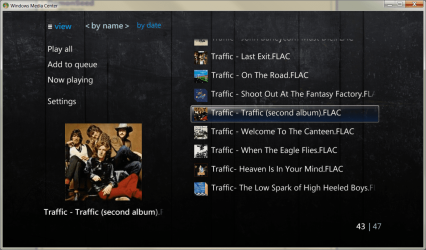
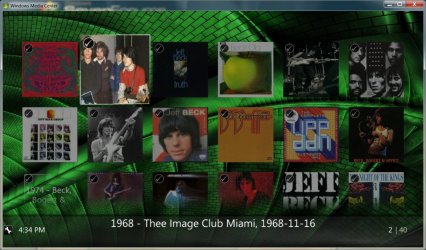
OK I have been testing this music plugin out, in my opinion it needs a little work. I have over 2TB of Zeppelin bootlegs alone. They have artwork in the metadata, not in the folders, so this could take me years to get my collection on here. Also I find it strange that MB can't pick up .jpg as cover art - only .png files. The old music browser picked up the jpg files, not png so it's a bit of a drag, I wish i could use the old music browser with the png files i created.

Not trying to sound like I'm complaining or sarcastic, but I will probably use orangecd or Jrivermedia player on my http if i ever get one.
Also found it very inconvenient to play complete albums, unless I'm doing something wrong- which is probably the case. The menu is not as clean as musicbrowser - least not for me - i dont like to have to keep adding songs to my play list just to here an album. And as far as loading artwork since winamp, media monkey, etc. can read it from the metadata, using mp3tag is just going to take too long since all have to be extracted and then saved as folder.png - need a script for this.
I use jaikoz -link- to tag my files since i have so many - and it speeds the process up, but does not - as far as last update - save artwork as jpg only as metadata. I like the fact t that MB can read the metadata and show it but we need a script or program that can automatically extract the artwork from the metadata and save it to the respective folders. If someone knows how mp3tag extracts it that would be a start.
Should list songs in list view more like the pic on the left from musicbrowser.
Other than those things it's coming along nicely.:)
 

Attachments

  • 1.PNG
    1.PNG
    322.4 KB · Views: 43
  • 4.jpg
    4.jpg
    159 KB · Views: 32

My Computer My Computer

Computer Manufacturer/Model Number
dell optiplex - 2003
OS
windows7 7600 x86
CPU
itel pentium 4
Memory
3.00 GB
Graphics Card(s)
diamond radion x1050
Sound Card
SoundMax
Monitor(s) Displays
dell 2408wfp dell e172fp
Screen Resolution
1920 x 1200 1280 x 1024
Hard Drives
2 - 80 GB internals WD
1 - 01 TB ext
2 - 750 GB ext
1- 500 GB ext
all running on system no problems
Keyboard
old logitech cordless
Mouse
logitech wireless
Internet Speed
16 / 4
Other Info
networked into my sbs2003 server running sp1 still
it's a wonder I could even get windows 7 to connect to it
@t41 it will show Folder.jpg or folder.png but if you have one of each in the folder its going to show the jpg over the png.
To queue up a full album press play on your remote or press Ctrl-P, While hovering over the Album Folder and a Play All - Queue etc. will pop up. Note that in the Vanilla theme, with music the Play All Button shows twice but the #2 one is the Queue. The theme has not been updated yet to say Queue but its there.

I think once the Music plug in has a little time to grow it will gain all of the feathers and thing the Music browser has. And more I hope.
 

My Computer My Computer

Computer Manufacturer/Model Number
Custom Built Rig BY ME "My Baby"
OS
7 Ultimate x64
CPU
AMD Athlon 64X2 4600+ 2.51Ghz
Motherboard
ASUS M2N-E SLI
Memory
6GB DDR2 900 Kingston
Graphics Card(s)
2x BFG Nvidia 9600 GT-OC
Sound Card
SoundBlaster XF-I
Monitor(s) Displays
19"acer, 22"acer, 19"acer, 48" HITACHI HDTV
Screen Resolution
1400x900, 1680x1050, 1400x900, 1920x1080
Hard Drives
Seagate 500GB Sata
Seagate 500GB Sata
Seagate 500GB Sata
Seagate 500GB Sata
Seagate 320 Sata (Primary)
Western Digital 500GB IDE
Western Digital 300GB IDE
Maxter 720 Sata (USB)
PSU
BFG 800 Watt SLI Power Supply
Case
Game Master
Cooling
Thermotake
Keyboard
Logitech (Bluetooth)
Mouse
Logitech (Bluetooth)
Internet Speed
Turbo Cable
Other Info
ATI 650HD TV Tuner X2,
Samsung (Light scribe) DVD-R,
Sony (Dual Layer) DVD-R
Some remote buttons (play, pause, stop, skip, replay, ff, rew, back, vol & mute) no longer function, the rest work fine (ch, green button, numbers, etc.)

Check to see if your "Human Interface Device Access" service is running.

I can confirm, having that service set to Manual or Disabled is INDEED what's causing the problem! I was having the same problem on my computer, so I set that service to automatic and started it and voila! the problem was gone.

All Fixed if anyone else has the problem.

yeah i had the same problem and found that to be the solution for my problem as well. mine was set to manual. the media center SHOULD automatically start the service on startup if it's a manual service, but it doesn't for some reason so it has to be set to automatic.
 

My Computer My Computer

Computer Manufacturer/Model Number
Dell XPS One 24 (A2420)
OS
Windows 7 RTM Ultimate x64
CPU
Intel Core 2 Quad Q8200 @ 2.33 GHz
Motherboard
Intel P45 Express Chipset
Memory
4 GB Dual Channel DDR2 SDRAM @ 800MHz
Graphics Card(s)
512MB NVIDIA GeForce 9600M GT
Sound Card
Realtek ALC262 Integrated HD Audio
Thanks for info Demon Seed - I dont have remote - but will try the ctrl-p. I agree it is gonna take some time to grow.
Now the only real problem which is a big one is getting all my artwork extracted form the metadata. lol
 

My Computer My Computer

Computer Manufacturer/Model Number
dell optiplex - 2003
OS
windows7 7600 x86
CPU
itel pentium 4
Memory
3.00 GB
Graphics Card(s)
diamond radion x1050
Sound Card
SoundMax
Monitor(s) Displays
dell 2408wfp dell e172fp
Screen Resolution
1920 x 1200 1280 x 1024
Hard Drives
2 - 80 GB internals WD
1 - 01 TB ext
2 - 750 GB ext
1- 500 GB ext
all running on system no problems
Keyboard
old logitech cordless
Mouse
logitech wireless
Internet Speed
16 / 4
Other Info
networked into my sbs2003 server running sp1 still
it's a wonder I could even get windows 7 to connect to it
@t41 Thats easy with Mp3Tag. Just show it your library, Press Ctrl-A to select all, and then press the first (Aa) in the menu bar, in the new box that pops up choose extract cover to file.
 

My Computer My Computer

Computer Manufacturer/Model Number
Custom Built Rig BY ME "My Baby"
OS
7 Ultimate x64
CPU
AMD Athlon 64X2 4600+ 2.51Ghz
Motherboard
ASUS M2N-E SLI
Memory
6GB DDR2 900 Kingston
Graphics Card(s)
2x BFG Nvidia 9600 GT-OC
Sound Card
SoundBlaster XF-I
Monitor(s) Displays
19"acer, 22"acer, 19"acer, 48" HITACHI HDTV
Screen Resolution
1400x900, 1680x1050, 1400x900, 1920x1080
Hard Drives
Seagate 500GB Sata
Seagate 500GB Sata
Seagate 500GB Sata
Seagate 500GB Sata
Seagate 320 Sata (Primary)
Western Digital 500GB IDE
Western Digital 300GB IDE
Maxter 720 Sata (USB)
PSU
BFG 800 Watt SLI Power Supply
Case
Game Master
Cooling
Thermotake
Keyboard
Logitech (Bluetooth)
Mouse
Logitech (Bluetooth)
Internet Speed
Turbo Cable
Other Info
ATI 650HD TV Tuner X2,
Samsung (Light scribe) DVD-R,
Sony (Dual Layer) DVD-R
  • Like
Reactions: t41
thanks again I thought I had to extract them one at a time. Very nice

update: :doh: I was importing from folder instead of extracting to folder - that is why I got the errors before. All is good now :thumbsup::thumbsup::thumbsup:
 
Last edited:

My Computer My Computer

Computer Manufacturer/Model Number
dell optiplex - 2003
OS
windows7 7600 x86
CPU
itel pentium 4
Memory
3.00 GB
Graphics Card(s)
diamond radion x1050
Sound Card
SoundMax
Monitor(s) Displays
dell 2408wfp dell e172fp
Screen Resolution
1920 x 1200 1280 x 1024
Hard Drives
2 - 80 GB internals WD
1 - 01 TB ext
2 - 750 GB ext
1- 500 GB ext
all running on system no problems
Keyboard
old logitech cordless
Mouse
logitech wireless
Internet Speed
16 / 4
Other Info
networked into my sbs2003 server running sp1 still
it's a wonder I could even get windows 7 to connect to it

My Computer My Computer

OS
vista home
CONTEST: Create a Video of Media Browser in Action

CONTEST: Create a Video of Media Browser in Action
Create a video of Media Browser in action, maybe show off your customizations. Or teach the new generation a thing of two about Media Browser and get your video posted on Media Browser's homepage.

Prize

  • If selected your video will go up on the homepage of media browser
  • Media Browser VIP access
  • First ever Media Browser VIP badge


Bonus Points

  • Display use of the configurator application as well


How we Judge the Entries

  • Presentation
  • Originality
  • Value Learned (How well did you communicate your experience)


The Rules

  • Create a video of your Media Browser setup in action.
  • Create a video of your Media Browser setup in action.
  • Video runtime must be approximately 2 to 3 minutes in length (some leeway here).
  • Videos that breach copyright rules will be disqualified - NO EXCEPTIONS (i.e. displaying 'The Simpson Season 20' when the box set hasn't even been released yet will get your video thrown out)
  • Contest is open to all, multiple entries are accepted. Top 5 videos will be chosen by Media Browser team with a final vote by the community to determine the winner of the competition.
  • Winner(s) will be contacted and asked for their name and a blog link or other.


How to Enter

  • Post your videos on youtube with a link back in this thread to your video.

Just to clarify, Post any videos on the MB forum HERE. Not in this one.
 

My Computer My Computer

Computer Manufacturer/Model Number
Custom Built Rig BY ME "My Baby"
OS
7 Ultimate x64
CPU
AMD Athlon 64X2 4600+ 2.51Ghz
Motherboard
ASUS M2N-E SLI
Memory
6GB DDR2 900 Kingston
Graphics Card(s)
2x BFG Nvidia 9600 GT-OC
Sound Card
SoundBlaster XF-I
Monitor(s) Displays
19"acer, 22"acer, 19"acer, 48" HITACHI HDTV
Screen Resolution
1400x900, 1680x1050, 1400x900, 1920x1080
Hard Drives
Seagate 500GB Sata
Seagate 500GB Sata
Seagate 500GB Sata
Seagate 500GB Sata
Seagate 320 Sata (Primary)
Western Digital 500GB IDE
Western Digital 300GB IDE
Maxter 720 Sata (USB)
PSU
BFG 800 Watt SLI Power Supply
Case
Game Master
Cooling
Thermotake
Keyboard
Logitech (Bluetooth)
Mouse
Logitech (Bluetooth)
Internet Speed
Turbo Cable
Other Info
ATI 650HD TV Tuner X2,
Samsung (Light scribe) DVD-R,
Sony (Dual Layer) DVD-R
With some help from jcalton88 I have found out that its possible to have your Stark Music Covers, showing in Media Centers now playing, floating box.

Things to keep in mind:
1. I have gone through my entire music collection and added a folder.jpg to ALL of my music folders. Using Music Art, To hep find all of the images.
2. I have run Stark Covers and created the images I want to see.


To do this you will need:
Mp3Tag
The Newest StarkCovers
Music Art

Now on to the Install, install Mp3Tag
then run and after it opens, show it where your music is.


After the list is full, Select one song, then press Control-A and it will select all.


After its all selected, go to the bar at the top and press the Aa.


Then Choose Import Cover From File.


After you press OK, you will need to tell it what file name to look for to set the images into the tags.
Now we need to remove any images that might be tagged to your songs.
So go to the bottom left and Check the box, "Delete existing Cover Art"
Then press OK

Now you will see this box.

After its done...Your dune!!
Thats it! After its done setting the covers into the id3 tags, MC will show the Stark Covers image when a song is playing.
See that was easy! Have Fun & Enjoy!!

Special Thanks: jcalton88,tyborg, Craigt

I'm still trying to find a way to have Starks images in the waterfall as well, so if anyone knows where MC gets its images to show on the waterfall please tell me! Thanks Never Mind,
I had to remove my music folder from MC music library, then re add it to see Stark Covers in the Waterfall.


I just compiled the new MB that supports Music and started working on my collection and thought that this made a very good looking music case.

Here is the files: http://dl.getdropbox.com/u/841137/Sidelogo-CD.rar
if you want to use them just drop them inside the sidelogo folder and stark will see them.

Reply to an old post I know, but . . . . . . . . .

you mention MP3TAG, Stark Covers and MUSCIART, and having worked my way through MP3TAG, there's nothing about using Stark Covers, and Stark Covers doesn't find my media on my NAS storage - do I have to map a drive first ??

Also, is there a quick Stark Covers tutorial ??

How do you use Music Art ??
 

My Computer My Computer

Computer Manufacturer/Model Number
AsRock ION330
OS
Windows 7
CPU
Atom 330
Motherboard
ASRock ION
Memory
4Gb
Graphics Card(s)
Nvidia ION
Sound Card
Nvidia ION
Monitor(s) Displays
42" Pioneer Plasma
Screen Resolution
1920 x 1080
Hard Drives
300Gb SATA internal, and 2Tb in NAS on LAN.
PSU
Standard
Case
ASRock
Cooling
ASRock
Keyboard
Basic
Mouse
Basic
Internet Speed
50 Mb/s
Other Info
6" 4"", top lip, and walks about a lot !!
Do I have to map a drive first ?? Yes, map the drive or folder, which ever you want, and show stark the Mapped what ever.

Also, is there a quick Stark Covers tutorial ?? Its really easy. Just find the case you like by playing with the Base Profile and Preview. Then show it your media location. If you want to to use your media type to determine what case is used then just check off one of the three settings (By Codec, File Type, MyMovies.xml) and it will use the profiles that matches your settings.
10-8-2009%202-51-58%20PM.png

If you want to change to a new profile just check off the (Revert Folder jpg) and choose the new look you want and run, it will revert back to the oraginals and then apply the new look.

The Base Profile is the one to use for Movies.
The Series Profile can be set and Stark will use that setting on a TV Series Top Folder.
The Season Profile can be set and Stark will use that setting on and Season Folder inside of a Shows Top Folder.
The Thumbs Setting is is one to set for TV Shows thumbs. It will only use a few profiles for this setting, TV, TV3D, Movie, Movie3D and a few others.

You can set them all to something different for your shows and thats how they will be applied.

I think that's about it.

How do you use Music Art ?? Its a one at a time tool that will help find the folder.jpg and backdrop.jpg for your music folders. Lode up your collection and then go down the list and it will auto search Google for the folder.jpg and has another tab that searches another site for the backdrops. Just choose the image you want and save it by pushing the buttons in the upper right corner.

Music%20Art.png


My Computer My Computer

Computer Manufacturer/Model Number
Custom Built Rig BY ME "My Baby"
OS
7 Ultimate x64
CPU
AMD Athlon 64X2 4600+ 2.51Ghz
Motherboard
ASUS M2N-E SLI
Memory
6GB DDR2 900 Kingston
Graphics Card(s)
2x BFG Nvidia 9600 GT-OC
Sound Card
SoundBlaster XF-I
Monitor(s) Displays
19"acer, 22"acer, 19"acer, 48" HITACHI HDTV
Screen Resolution
1400x900, 1680x1050, 1400x900, 1920x1080
Hard Drives
Seagate 500GB Sata
Seagate 500GB Sata
Seagate 500GB Sata
Seagate 500GB Sata
Seagate 320 Sata (Primary)
Western Digital 500GB IDE
Western Digital 300GB IDE
Maxter 720 Sata (USB)
PSU
BFG 800 Watt SLI Power Supply
Case
Game Master
Cooling
Thermotake
Keyboard
Logitech (Bluetooth)
Mouse
Logitech (Bluetooth)
Internet Speed
Turbo Cable
Other Info
ATI 650HD TV Tuner X2,
Samsung (Light scribe) DVD-R,
Sony (Dual Layer) DVD-R
Thanks DS, I'll give it a go this week whilst I'm off.
 

My Computer My Computer

Computer Manufacturer/Model Number
AsRock ION330
OS
Windows 7
CPU
Atom 330
Motherboard
ASRock ION
Memory
4Gb
Graphics Card(s)
Nvidia ION
Sound Card
Nvidia ION
Monitor(s) Displays
42" Pioneer Plasma
Screen Resolution
1920 x 1080
Hard Drives
300Gb SATA internal, and 2Tb in NAS on LAN.
PSU
Standard
Case
ASRock
Cooling
ASRock
Keyboard
Basic
Mouse
Basic
Internet Speed
50 Mb/s
Other Info
6" 4"", top lip, and walks about a lot !!
Media Browser - Phoenix - 2.1.3.0

============================================================================================================
RELEASE NOTES
============================================================================================================

CHANGES

  • Added: Parental Controls Facility
    • Can control media based on metadata rating, or conversely block everything
    • PINEntry, added support to match diamond theme when user has diamond theme enabled.
    • Option to unlock entire library on first PIN entry this is consistent with most other PC systems but can be turned off.
  • Added: Support for music plugin.
  • Added: Retrieval of runtime data from mediainfo.dll if no Metadata present.
  • Added: Ability to disable weather on EHS, by entering a blank weather location.
  • Added: Mouse friendly tweaks to tame mouse enter/exit from scrolling data all over the place.
  • Added: Descriptions for options in Config page.
  • Added: Tiered Backdrop support (not extender friendly).
  • Added: option AlwaysShowDetails (Default true) will always show the details page for all content (Episodes or Movies)
  • Added: New option AlwaysCreatePlayList - will always create an auto playlist, the reason we want this on by default is 2 fold (first to protect against accidental deletes in Vista, but more importantly so the title of the now playing window matches the metadata
  • Changed: Priority of aspect ratio to take metadata if there over mediainfo.
  • Changed: NPV to text when in detail mode (Default theme).
  • Updated: Runtime data now stored in minutes to mitigate re-calculations.
  • Updated: The default poster size to rectangle instead of square (220x330).
  • Updated: EHS, Recently Added now scrolls back to page 1 when transitioning between folders.
  • Updated: Information control to support recurring messages for 'X' cycles.
  • Updated: Cleanup for media delete mechanism (only movies and episodes support deletion at this time).
  • Updated: Seasons and Episodes inherit parental rating from their Series.
  • Updated: Diamond Theme v0.2 Revamp
    • Diamond supports Episode View combined with 'advanced commands' + 'enable delete' allows for episode deletion.
    • Diamond - new mini-mode for movies and episodes details page.
    • Changed Title to automatically scroll across screen if text is longer than display area.
    • Diamond added information bar to all views.
    • Due to popular demand changed diamond bottom fade from white to black.
    • Diamond compatible with custom fonts.
    • Coverflow: Radically improved spacing which now allows for large covers without spacing issues (within reason).
    • Movie/Episode Details, Command Buttons no longer overlap poster preview.
    • Modified media info icons.
    • Diamond details view added scrollable overview.
    • Fixed date display for titles with no dates.
  • Removed: Classic Theme taken out of Media Browser it is no longer supported.


BUG FIXES


  • Fixed: Standard filters so they now display images correctly (visible in genres).
  • Fixed: Play All,queue and random.
  • Fixed: Remember index-by state.
  • Fixed: Auto enter single directory option.
  • Fixed: MediaInfoProvider Video Codec
  • Fixed: Issue where A|An|The were not being ignored during sorting.
  • Fixed: Vanilla season count mistakenly defaults to 0
  • Fixed: Crash that would occur in folder validation when a folder has been moved
  • Fixed: Patched autoscroller code from sending negative sizes.
  • Fixed: Episode sorting now correctly sorts items.
  • Fixed: Adjusted positioning of elements on config page
  • Fixed: Incorrect Breadcrumbs for actor(s)/genre(s)/director(s).
  • Fixed: Data duplication of actors for individual episodes.

============================================================================================================

You may download Phoenix here: http://code.google.com/p/videobrowser/downloads/list
Check out our new community site here: http://community.mediabrowser.tv/topics ... =published
List of the items resolved in phoenix: http://community.mediabrowser.tv/topics ... stone_id=1


As always it's your feedback that drives this product, so don't be shy let us know what you think.
 
Last edited:

My Computer My Computer

Computer Manufacturer/Model Number
Custom Built Rig BY ME "My Baby"
OS
7 Ultimate x64
CPU
AMD Athlon 64X2 4600+ 2.51Ghz
Motherboard
ASUS M2N-E SLI
Memory
6GB DDR2 900 Kingston
Graphics Card(s)
2x BFG Nvidia 9600 GT-OC
Sound Card
SoundBlaster XF-I
Monitor(s) Displays
19"acer, 22"acer, 19"acer, 48" HITACHI HDTV
Screen Resolution
1400x900, 1680x1050, 1400x900, 1920x1080
Hard Drives
Seagate 500GB Sata
Seagate 500GB Sata
Seagate 500GB Sata
Seagate 500GB Sata
Seagate 320 Sata (Primary)
Western Digital 500GB IDE
Western Digital 300GB IDE
Maxter 720 Sata (USB)
PSU
BFG 800 Watt SLI Power Supply
Case
Game Master
Cooling
Thermotake
Keyboard
Logitech (Bluetooth)
Mouse
Logitech (Bluetooth)
Internet Speed
Turbo Cable
Other Info
ATI 650HD TV Tuner X2,
Samsung (Light scribe) DVD-R,
Sony (Dual Layer) DVD-R
thanks 4 update :D
 

My Computer My Computer

Computer Manufacturer/Model Number
dell optiplex - 2003
OS
windows7 7600 x86
CPU
itel pentium 4
Memory
3.00 GB
Graphics Card(s)
diamond radion x1050
Sound Card
SoundMax
Monitor(s) Displays
dell 2408wfp dell e172fp
Screen Resolution
1920 x 1200 1280 x 1024
Hard Drives
2 - 80 GB internals WD
1 - 01 TB ext
2 - 750 GB ext
1- 500 GB ext
all running on system no problems
Keyboard
old logitech cordless
Mouse
logitech wireless
Internet Speed
16 / 4
Other Info
networked into my sbs2003 server running sp1 still
it's a wonder I could even get windows 7 to connect to it
A confused noob

Demonseed,

I know, I know -- here comes the noob :rolleyes:...

I have Windows 7x64 (as of 3 days ago) and am trying to get the hang of Media Browser to get all of the goodies I see here.

I have used your Stark Covers app (great), but can't get the preview to work -- I get
System.UnauthorizedAccessException: Access to the path 'C:\Program Files (x86)\StarkCovers\Preview\folder.png' is denied.
So I end up trial and erroring my way through to find what I like best (very time consuming).

FWIW, I get a similar access denied error when trying to run MusicArt...

I know this must be a windows 7 thing, but I never had this problem with Vista x64. I am running with administrator rights.

Thanks,

dave
 

My Computer My Computer

OS
Windows 7 x64
Back
Top