MediaBrowser

So Lets get some feed Back on Media Browser


  • Total voters
    137

DemonSeed

New member
Guru
VIP
Local time
7:47 PM
Messages
603
Location
Charlotte
I just wanted to show the world the best Media Center Plugin I have found!


This is MediaBrowser
AND IT'S FREE .................

It can do it all and much, much more!
Sort out Giant Library's over multiple HDD's or even PC's
Find cover and backdrop's with no help.
It has the best UI I've ever seen.
I'm going to shut up and let the videos talk for me! Check it out!

Related links: Media Center- Setup Movie Library by Orbital Shark.

If your looking for some custom icons to dress up your Media Browser be sure to check out my icons thread!


It's Game Time in Media Browser!! A plugin for MB


Last edited:

My Computer

Computer Manufacturer/Model Number
Custom Built Rig BY ME "My Baby"
OS
7 Ultimate x64
CPU
AMD Athlon 64X2 4600+ 2.51Ghz
Motherboard
ASUS M2N-E SLI
Memory
6GB DDR2 900 Kingston
Graphics Card(s)
2x BFG Nvidia 9600 GT-OC
Sound Card
SoundBlaster XF-I
Monitor(s) Displays
19"acer, 22"acer, 19"acer, 48" HITACHI HDTV
Screen Resolution
1400x900, 1680x1050, 1400x900, 1920x1080
Hard Drives
Seagate 500GB Sata
Seagate 500GB Sata
Seagate 500GB Sata
Seagate 500GB Sata
Seagate 320 Sata (Primary)
Western Digital 500GB IDE
Western Digital 300GB IDE
Maxter 720 Sata (USB)
PSU
BFG 800 Watt SLI Power Supply
Case
Game Master
Cooling
Thermotake
Keyboard
Logitech (Bluetooth)
Mouse
Logitech (Bluetooth)
Internet Speed
Turbo Cable
Other Info
ATI 650HD TV Tuner X2,
Samsung (Light scribe) DVD-R,
Sony (Dual Layer) DVD-R
rep for you mate, thats awsome doesnt take long to sort out either, was looking for something for windows that had the same effect as plex for mac. Looks good, thanks
 

My Computer

Computer Manufacturer/Model Number
Made by Mastercard
OS
Windows 7 RTM x64
CPU
Core 2 Quad, @3.8 on aircooling
Motherboard
XFX 750i Nforce
Memory
8 Gig Geil Black Dragon
Graphics Card(s)
Nvidia 8800GTX 512 x 2 in SLI
Sound Card
Razor Barracuda
Monitor(s) Displays
2 X 24 Inch Hannsg
Screen Resolution
1600x1050
Hard Drives
1X64 Gig Kingston SSD Drive
2X 320 sata
2X250 ide
1X 320 External. and lets not forget the 8 gig thumbdrive :)
and a partridge in a pear tree
PSU
600 Watt Coolermaster Elite Silent Pro
Case
Coolermaster Storm
Cooling
Coolermaster V8
Keyboard
Razor Lycosa
Mouse
Razor Mamba, sweet as candy
Internet Speed
Virgin 50MB.
Other Info
Zalman Guardian System Fan Controls
Aerocool Modern V system monitor.
And a nice bunch of stickers on the front!! All that money for something that glows blue. But thats why we do it kids. all for the bling!!

100mbit Seedbox, loving that!
Razor Destructor Gaming Mat, Razor Moray Headphones.

To much spare money perhaps? Nah, my mrs has shoes. I have a very expensive way of her shopping for
No problem
I know you'll love it just as I do.
If you or any one else needs any help with setting up the plugin
I am more than glad to help!
 

My Computer

Computer Manufacturer/Model Number
Custom Built Rig BY ME "My Baby"
OS
7 Ultimate x64
CPU
AMD Athlon 64X2 4600+ 2.51Ghz
Motherboard
ASUS M2N-E SLI
Memory
6GB DDR2 900 Kingston
Graphics Card(s)
2x BFG Nvidia 9600 GT-OC
Sound Card
SoundBlaster XF-I
Monitor(s) Displays
19"acer, 22"acer, 19"acer, 48" HITACHI HDTV
Screen Resolution
1400x900, 1680x1050, 1400x900, 1920x1080
Hard Drives
Seagate 500GB Sata
Seagate 500GB Sata
Seagate 500GB Sata
Seagate 500GB Sata
Seagate 320 Sata (Primary)
Western Digital 500GB IDE
Western Digital 300GB IDE
Maxter 720 Sata (USB)
PSU
BFG 800 Watt SLI Power Supply
Case
Game Master
Cooling
Thermotake
Keyboard
Logitech (Bluetooth)
Mouse
Logitech (Bluetooth)
Internet Speed
Turbo Cable
Other Info
ATI 650HD TV Tuner X2,
Samsung (Light scribe) DVD-R,
Sony (Dual Layer) DVD-R
I can't seem to get it installed. I only get to set configuration but no way to start application. I have build 7077 of windows 7. Any help would be appreciated. Thanks
 

My Computer

Computer Manufacturer/Model Number
HP Pavilion e9107c
OS
Windows 7 Home Premium 64 bit
CPU
Intel Core 2 Quad Q8200 @ 2.33 GHz
Memory
8 GB DDR3
Graphics Card(s)
ATI Radeon HD 4350
Monitor(s) Displays
HP 23 in. High Definition (w2338h)
Screen Resolution
1920 x 1080
Hard Drives
750 GB
Keyboard
Logitech Illuminated keyboard
Mouse
Logitech Laser mouse
I can't seem to get it installed. I only get to set configuration but no way to start application. I have build 7077 of windows 7. Any help would be appreciated. Thanks


Start Media configurator, set your folders etc... start media centre, go to extras select media browser, there you go :D
 

My Computer

Computer Manufacturer/Model Number
Made by Mastercard
OS
Windows 7 RTM x64
CPU
Core 2 Quad, @3.8 on aircooling
Motherboard
XFX 750i Nforce
Memory
8 Gig Geil Black Dragon
Graphics Card(s)
Nvidia 8800GTX 512 x 2 in SLI
Sound Card
Razor Barracuda
Monitor(s) Displays
2 X 24 Inch Hannsg
Screen Resolution
1600x1050
Hard Drives
1X64 Gig Kingston SSD Drive
2X 320 sata
2X250 ide
1X 320 External. and lets not forget the 8 gig thumbdrive :)
and a partridge in a pear tree
PSU
600 Watt Coolermaster Elite Silent Pro
Case
Coolermaster Storm
Cooling
Coolermaster V8
Keyboard
Razor Lycosa
Mouse
Razor Mamba, sweet as candy
Internet Speed
Virgin 50MB.
Other Info
Zalman Guardian System Fan Controls
Aerocool Modern V system monitor.
And a nice bunch of stickers on the front!! All that money for something that glows blue. But thats why we do it kids. all for the bling!!

100mbit Seedbox, loving that!
Razor Destructor Gaming Mat, Razor Moray Headphones.

To much spare money perhaps? Nah, my mrs has shoes. I have a very expensive way of her shopping for
Start Media configurator, set your folders etc... start media centre, go to extras select media browser, there you go :D
Thanks for clarifying. I did that and the program will not find my pictures or music. Tried adding several folders and also tried clearing cache and letting program rescan for media. Still shows nothing when I click on music or pictures.
 

My Computer

Computer Manufacturer/Model Number
HP Pavilion e9107c
OS
Windows 7 Home Premium 64 bit
CPU
Intel Core 2 Quad Q8200 @ 2.33 GHz
Memory
8 GB DDR3
Graphics Card(s)
ATI Radeon HD 4350
Monitor(s) Displays
HP 23 in. High Definition (w2338h)
Screen Resolution
1920 x 1080
Hard Drives
750 GB
Keyboard
Logitech Illuminated keyboard
Mouse
Logitech Laser mouse
OMG!! This plugin is awesome!! It even has images for movies that have just come out in the cinema ;)

Also, +rep duly given :)
 
Last edited:

My Computer

Computer Manufacturer/Model Number
Compaq Desktop
OS
Windows 7 Ultimate x64
CPU
AMD Sempron Dual Core
Memory
3GB
Graphics Card(s)
NVIDIA GeForce 6150SE nForce 430
Screen Resolution
1024x768
Hard Drives
150GB Sata
Thanks for clarifying. I did that and the program will not find my pictures or music. Tried adding several folders and also tried clearing cache and letting program rescan for media. Still shows nothing when I click on music or pictures.
Yea as of now it does not support Pictures or music.
I know
It sucks But I have herd rumors that they are adding support for both.

To get a launcher on MC Home Page go to the Program Library and right click on the Media Browser and set to main strip.
 
Last edited:

My Computer

Computer Manufacturer/Model Number
Custom Built Rig BY ME "My Baby"
OS
7 Ultimate x64
CPU
AMD Athlon 64X2 4600+ 2.51Ghz
Motherboard
ASUS M2N-E SLI
Memory
6GB DDR2 900 Kingston
Graphics Card(s)
2x BFG Nvidia 9600 GT-OC
Sound Card
SoundBlaster XF-I
Monitor(s) Displays
19"acer, 22"acer, 19"acer, 48" HITACHI HDTV
Screen Resolution
1400x900, 1680x1050, 1400x900, 1920x1080
Hard Drives
Seagate 500GB Sata
Seagate 500GB Sata
Seagate 500GB Sata
Seagate 500GB Sata
Seagate 320 Sata (Primary)
Western Digital 500GB IDE
Western Digital 300GB IDE
Maxter 720 Sata (USB)
PSU
BFG 800 Watt SLI Power Supply
Case
Game Master
Cooling
Thermotake
Keyboard
Logitech (Bluetooth)
Mouse
Logitech (Bluetooth)
Internet Speed
Turbo Cable
Other Info
ATI 650HD TV Tuner X2,
Samsung (Light scribe) DVD-R,
Sony (Dual Layer) DVD-R
While using the configuration for MB is good, if you have movies in more than one folder, then it shows multiple folders in MB. If you want to show one folder in MB, do this:
Before installing MB, create notepad file and save it with a .vf extension (not .vf.txt). Create it in your users\videos folder
Put this in it:
folder: C:\AVI movies 1\
folder: G:\AVI movies 2\
folder: G:\DVD's\
You can edit this to suit your needs.
When you install MB, it will look for that and set it up for you.
If you already installed MB, then go to your program data\media Browser\start up folder, and put the .vf file there.
If you want to launch MC to go straight to MB create a shortcut on your desktop with the following entry:
%systemroot%\ehome\ehshell.exe /entrypoint:{ce32c570-4bec-4aeb-ad1d-cf47b91de0b2}\{fc9abccc-36cb-47ac-8bab-03e8ef5f6f22}
Don't worry, it automatically assigns the MC icon to it. Once you double click it, it will automatically go to MB.
If you have trailers in a folder somewhere on your computer
create a XML file in the same movie folder so it points to the trailer folder. Put this in the .xml file
<Title>
<LocalTrailer>
<URL>C:\Users\Public\Videos\HD Movies\Bangkok Dangerous\trailer.mov</URL>
<Type>1</Type>
</LocalTrailer>
</Title>
MAKE SURE TO NAME IT MYMOVIES.XML
edit it to your likeness by changing the url information to point to where your trailer movies are located.
 

My Computer

Computer Manufacturer/Model Number
Gigabyte
OS
Windows 7 Ultimate
CPU
Intel Core(TM)2 Quad- Q9550, 2.83GHz
Motherboard
G31M-ES2L
Memory
4GB
Graphics Card(s)
ATI Radeon HD4600
Sound Card
On Board:
Monitor(s) Displays
Acer AL2223W, Acer AL1916
Screen Resolution
1680 x 1050, 1280 x 1024
Hard Drives
160GB
350GB
250GB
250GB
PSU
600W
Case
Cooler Master
Keyboard
Microsoft Laser 6000
Mouse
Logitech Optical Trackman
Internet Speed
1.5MB
Other Info
I am also running a quasar gamatron flux capacitor with twin pulse tronic phasers......jk, I have no such stuff.
While using the configuration for MB is good, if you have movies in more than one folder, then it shows multiple folders in MB. If you want to show one folder in MB, do this:
Before installing MB, create notepad file and save it with a .vf extension (not .vf.txt). Create it in your users\videos folder
Put this in it:
folder: C:\AVI movies 1\
folder: G:\AVI movies 2\
folder: G:\DVD's\
You can edit this to suit your needs.
When you install MB, it will look for that and set it up for you.
If you already installed MB, then go to your program data\media Browser\start up folder, and put the .vf file there.
If you want to launch MC to go straight to MB create a shortcut on your desktop with the following entry:
%systemroot%\ehome\ehshell.exe /entrypoint:{ce32c570-4bec-4aeb-ad1d-cf47b91de0b2}\{fc9abccc-36cb-47ac-8bab-03e8ef5f6f22}
Don't worry, it automatically assigns the MC icon to it. Once you double click it, it will automatically go to MB.
If you have trailers in a folder somewhere on your computer
create a XML file in the same movie folder so it points to the trailer folder. Put this in the .xml file
<Title>
<LocalTrailer>
<URL>C:\Users\Public\Videos\HD Movies\Bangkok Dangerous\trailer.mov</URL>
<Type>1</Type>
</LocalTrailer>
</Title>
MAKE SURE TO NAME IT MYMOVIES.XML
edit it to your likeness by changing the url information to point to where your trailer movies are located.


Nice one thanks mate. Also to topic starter, how do you get your background images on? I am assuming they are custom in the first shot?
 

My Computer

Computer Manufacturer/Model Number
Made by Mastercard
OS
Windows 7 RTM x64
CPU
Core 2 Quad, @3.8 on aircooling
Motherboard
XFX 750i Nforce
Memory
8 Gig Geil Black Dragon
Graphics Card(s)
Nvidia 8800GTX 512 x 2 in SLI
Sound Card
Razor Barracuda
Monitor(s) Displays
2 X 24 Inch Hannsg
Screen Resolution
1600x1050
Hard Drives
1X64 Gig Kingston SSD Drive
2X 320 sata
2X250 ide
1X 320 External. and lets not forget the 8 gig thumbdrive :)
and a partridge in a pear tree
PSU
600 Watt Coolermaster Elite Silent Pro
Case
Coolermaster Storm
Cooling
Coolermaster V8
Keyboard
Razor Lycosa
Mouse
Razor Mamba, sweet as candy
Internet Speed
Virgin 50MB.
Other Info
Zalman Guardian System Fan Controls
Aerocool Modern V system monitor.
And a nice bunch of stickers on the front!! All that money for something that glows blue. But thats why we do it kids. all for the bling!!

100mbit Seedbox, loving that!
Razor Destructor Gaming Mat, Razor Moray Headphones.

To much spare money perhaps? Nah, my mrs has shoes. I have a very expensive way of her shopping for
Are you referring to the image of the folder when you first open MB? If that is what you are referring to, you can do it two ways.
1. Launch the media browser config tool, then on the left pane, highlight your folder, then when it shows up on the right pane, click the button to change the image. Browse to where you have a picture, and select it.
2. Copy and paste or type this: image: d:\movies\folder.jpg
in the .vf folder you created. (make sure the picture is there.)
Edit to suit your needs.
 

My Computer

Computer Manufacturer/Model Number
Gigabyte
OS
Windows 7 Ultimate
CPU
Intel Core(TM)2 Quad- Q9550, 2.83GHz
Motherboard
G31M-ES2L
Memory
4GB
Graphics Card(s)
ATI Radeon HD4600
Sound Card
On Board:
Monitor(s) Displays
Acer AL2223W, Acer AL1916
Screen Resolution
1680 x 1050, 1280 x 1024
Hard Drives
160GB
350GB
250GB
250GB
PSU
600W
Case
Cooler Master
Keyboard
Microsoft Laser 6000
Mouse
Logitech Optical Trackman
Internet Speed
1.5MB
Other Info
I am also running a quasar gamatron flux capacitor with twin pulse tronic phasers......jk, I have no such stuff.
Merge the attached reg file to allow taking ownership of any file of folder by just right clicking it.
 

Attachments

My Computer

Computer Manufacturer/Model Number
Gigabyte
OS
Windows 7 Ultimate
CPU
Intel Core(TM)2 Quad- Q9550, 2.83GHz
Motherboard
G31M-ES2L
Memory
4GB
Graphics Card(s)
ATI Radeon HD4600
Sound Card
On Board:
Monitor(s) Displays
Acer AL2223W, Acer AL1916
Screen Resolution
1680 x 1050, 1280 x 1024
Hard Drives
160GB
350GB
250GB
250GB
PSU
600W
Case
Cooler Master
Keyboard
Microsoft Laser 6000
Mouse
Logitech Optical Trackman
Internet Speed
1.5MB
Other Info
I am also running a quasar gamatron flux capacitor with twin pulse tronic phasers......jk, I have no such stuff.
I know some of you probably have a ton of movies in one folder, but remember MB needs each movie to be in its own folder. Yeah you have the headache of sitting there creating 500 folders with names to match your 500 movies......so you thought. Extract the zip file to the folder that has all your movies. Double click the batch file, sit back and watch your 500 movies get put into 500 folders with matching names.
 

Attachments

My Computer

Computer Manufacturer/Model Number
Gigabyte
OS
Windows 7 Ultimate
CPU
Intel Core(TM)2 Quad- Q9550, 2.83GHz
Motherboard
G31M-ES2L
Memory
4GB
Graphics Card(s)
ATI Radeon HD4600
Sound Card
On Board:
Monitor(s) Displays
Acer AL2223W, Acer AL1916
Screen Resolution
1680 x 1050, 1280 x 1024
Hard Drives
160GB
350GB
250GB
250GB
PSU
600W
Case
Cooler Master
Keyboard
Microsoft Laser 6000
Mouse
Logitech Optical Trackman
Internet Speed
1.5MB
Other Info
I am also running a quasar gamatron flux capacitor with twin pulse tronic phasers......jk, I have no such stuff.
thanks mate
 

My Computer

Computer Manufacturer/Model Number
Made by Mastercard
OS
Windows 7 RTM x64
CPU
Core 2 Quad, @3.8 on aircooling
Motherboard
XFX 750i Nforce
Memory
8 Gig Geil Black Dragon
Graphics Card(s)
Nvidia 8800GTX 512 x 2 in SLI
Sound Card
Razor Barracuda
Monitor(s) Displays
2 X 24 Inch Hannsg
Screen Resolution
1600x1050
Hard Drives
1X64 Gig Kingston SSD Drive
2X 320 sata
2X250 ide
1X 320 External. and lets not forget the 8 gig thumbdrive :)
and a partridge in a pear tree
PSU
600 Watt Coolermaster Elite Silent Pro
Case
Coolermaster Storm
Cooling
Coolermaster V8
Keyboard
Razor Lycosa
Mouse
Razor Mamba, sweet as candy
Internet Speed
Virgin 50MB.
Other Info
Zalman Guardian System Fan Controls
Aerocool Modern V system monitor.
And a nice bunch of stickers on the front!! All that money for something that glows blue. But thats why we do it kids. all for the bling!!

100mbit Seedbox, loving that!
Razor Destructor Gaming Mat, Razor Moray Headphones.

To much spare money perhaps? Nah, my mrs has shoes. I have a very expensive way of her shopping for
I (used to LOL) have a rather large collection of movies, but i've only got a few now. I've got them all stored in the same folder & it's working fine. The only thing is TV series, is there a specific format with which the filenames/folders have to be called?
 

My Computer

Computer Manufacturer/Model Number
Compaq Desktop
OS
Windows 7 Ultimate x64
CPU
AMD Sempron Dual Core
Memory
3GB
Graphics Card(s)
NVIDIA GeForce 6150SE nForce 430
Screen Resolution
1024x768
Hard Drives
150GB Sata
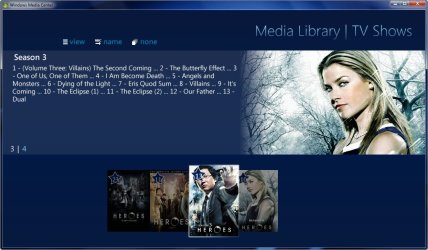
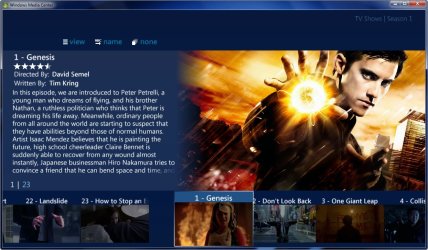
Great add on thank you DemonSeed, it's nice the way it adds the movie covers and descriptions.

2009-04-18_045658.jpg

It even does it for all my Heroes episodes and renamed them as well.

2009-04-18_050327.jpg2009-04-18_050208.jpg
 

My Computer

Computer Manufacturer/Model Number
Home Brew
OS
Windows 7 Ultimate Vista Ultimate x64
CPU
Core 2 Duo E8500 3.16Ghz @ 3.8Ghz
Motherboard
eVGA 750i FTW
Memory
2x2Gigs Patriot PC2-6400 LL
Graphics Card(s)
Inno3D GeForce GTX260 216 SP
Monitor(s) Displays
ASUS VW222U 22" 2ms Response time
Screen Resolution
1680x1050
Hard Drives
SATA 150GB
SATA II 250GB
USB IDE 750GB Ext.
PSU
HYTEC 600W & Thermaltake 650W Toughpower Power Exp
Case
Thermaltake Armor LCS (Liquid Cooling System)
Cooling
Liquid Cooling System
Keyboard
Logitech G15 Gaming Keyboard
Mouse
Logitech G9 Gaming Mouse
There is an easer way!

1.jpg


And to see a backdrop in the starting window go to
Program Data/Media Browser/Startup Folder and add your jpg then name it backdrop.jpg
 

My Computer

Computer Manufacturer/Model Number
Custom Built Rig BY ME "My Baby"
OS
7 Ultimate x64
CPU
AMD Athlon 64X2 4600+ 2.51Ghz
Motherboard
ASUS M2N-E SLI
Memory
6GB DDR2 900 Kingston
Graphics Card(s)
2x BFG Nvidia 9600 GT-OC
Sound Card
SoundBlaster XF-I
Monitor(s) Displays
19"acer, 22"acer, 19"acer, 48" HITACHI HDTV
Screen Resolution
1400x900, 1680x1050, 1400x900, 1920x1080
Hard Drives
Seagate 500GB Sata
Seagate 500GB Sata
Seagate 500GB Sata
Seagate 500GB Sata
Seagate 320 Sata (Primary)
Western Digital 500GB IDE
Western Digital 300GB IDE
Maxter 720 Sata (USB)
PSU
BFG 800 Watt SLI Power Supply
Case
Game Master
Cooling
Thermotake
Keyboard
Logitech (Bluetooth)
Mouse
Logitech (Bluetooth)
Internet Speed
Turbo Cable
Other Info
ATI 650HD TV Tuner X2,
Samsung (Light scribe) DVD-R,
Sony (Dual Layer) DVD-R
I (used to LOL) have a rather large collection of movies, but i've only got a few now. I've got them all stored in the same folder & it's working fine. The only thing is TV series, is there a specific format with which the filenames/folders have to be called?
In the case of tv shows, the files need to be grouped in a season folder inside the shows main folder:
Suggested Directory Structure for TV Shows
D:\TV Shows\My TV Show\Season 1\
101-Episode 1.avi
102-Episode 2.avi
D:\TV Shows\My Tv Show\Season2\
201-Epispode 1.avi
202- Episode 2.avi
 

My Computer

Computer Manufacturer/Model Number
Gigabyte
OS
Windows 7 Ultimate
CPU
Intel Core(TM)2 Quad- Q9550, 2.83GHz
Motherboard
G31M-ES2L
Memory
4GB
Graphics Card(s)
ATI Radeon HD4600
Sound Card
On Board:
Monitor(s) Displays
Acer AL2223W, Acer AL1916
Screen Resolution
1680 x 1050, 1280 x 1024
Hard Drives
160GB
350GB
250GB
250GB
PSU
600W
Case
Cooler Master
Keyboard
Microsoft Laser 6000
Mouse
Logitech Optical Trackman
Internet Speed
1.5MB
Other Info
I am also running a quasar gamatron flux capacitor with twin pulse tronic phasers......jk, I have no such stuff.
Oh I forgot to mention that the file in the archive uploaded earlier is hidden. Change your folder options to show hidden, so you can see it. Then change the attribute of the file to unhidden for further use.
I attached 2 text files. After saving the show_hidden_files.txt. change it to show_hidden_files.vbs<<< use it to toggle between showing or not showing hidden files. Saves you the headache from launching folder options.
The second file, file2folder.txt, convert that to a batch file to move files to folders, and automatically give it the name of the file that it is moved to the folder.
 

Attachments

My Computer

Computer Manufacturer/Model Number
Gigabyte
OS
Windows 7 Ultimate
CPU
Intel Core(TM)2 Quad- Q9550, 2.83GHz
Motherboard
G31M-ES2L
Memory
4GB
Graphics Card(s)
ATI Radeon HD4600
Sound Card
On Board:
Monitor(s) Displays
Acer AL2223W, Acer AL1916
Screen Resolution
1680 x 1050, 1280 x 1024
Hard Drives
160GB
350GB
250GB
250GB
PSU
600W
Case
Cooler Master
Keyboard
Microsoft Laser 6000
Mouse
Logitech Optical Trackman
Internet Speed
1.5MB
Other Info
I am also running a quasar gamatron flux capacitor with twin pulse tronic phasers......jk, I have no such stuff.
I (used to LOL) have a rather large collection of movies, but i've only got a few now. I've got them all stored in the same folder & it's working fine. The only thing is TV series, is there a specific format with which the filenames/folders have to be called?
Wait!!!! Are you saying that MB is working fine with more than one movie in the same folder? Is it displaying the art for each movie in the folder?
 

My Computer

Computer Manufacturer/Model Number
Gigabyte
OS
Windows 7 Ultimate
CPU
Intel Core(TM)2 Quad- Q9550, 2.83GHz
Motherboard
G31M-ES2L
Memory
4GB
Graphics Card(s)
ATI Radeon HD4600
Sound Card
On Board:
Monitor(s) Displays
Acer AL2223W, Acer AL1916
Screen Resolution
1680 x 1050, 1280 x 1024
Hard Drives
160GB
350GB
250GB
250GB
PSU
600W
Case
Cooler Master
Keyboard
Microsoft Laser 6000
Mouse
Logitech Optical Trackman
Internet Speed
1.5MB
Other Info
I am also running a quasar gamatron flux capacitor with twin pulse tronic phasers......jk, I have no such stuff.
Back
Top