
You are using an out of date browser. It may not display this or other websites correctly.
You should upgrade or use an alternative browser.
You should upgrade or use an alternative browser.
Memory Allocation problem
- Thread starter diama13
- Start date

I'm like edwar and don't understand what you are trying to do. I don't understand the worry about 128 mb of ram.
If you want to see what windows is doing with your ram got to Resource Monitor and tick ram at the top of the page. Windows 7 will take care of how your ram is use with no problems.
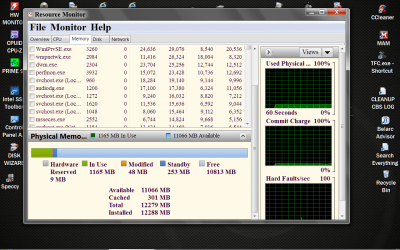
If you want to see what windows is doing with your ram got to Resource Monitor and tick ram at the top of the page. Windows 7 will take care of how your ram is use with no problems.
My Computer
- Computer type
- PC/Desktop
- Computer Manufacturer/Model Number
- Home made Desktop
- OS
- Windows 10 Pro. 64/ version 1709 Windows 7 Pro/64
- CPU
- Intel i7-6800K @ 4.3
- Motherboard
- ASUS X-99 Deluxe II
- Memory
- Corsair Platinum 16 gig @2400
- Graphics Card(s)
- EVGA GTX 1070 OC
- Monitor(s) Displays
- Asus 27" LED LCD/VE278Q
- Screen Resolution
- 1920-1080 or 1280-720 HDMI
- Hard Drives
- INTEL SSD 730-240 Gb Sata 3.0/
- PSU
- EVGA Platium 1200W
- Case
- Phanteks Luxe Tempered Glass 8 fans/ one radiator
- Cooling
- XSPC/ Water Cooled CPU
- Keyboard
- Das 4 Professional
- Mouse
- Logitech M705/MX Anywhere 2-S
- Internet Speed
- 100 mbits
- Antivirus
- Microsoft Security Essentials/ Malwarebytes Premium 3.0/ SAS
- Browser
- I.E. 11 default/Firefox/ ISP Time Warner Cable/Spectrum
- Other Info
- LG BluRay Burner/
Sound system-KLipsch-THX/
Icy Dock ssd Hot Swap bays.
Ok . I will explain better. I have a driver for a pcie card which tries to allocate 128 MB of memory when widnows 7 start. I use the MmallocateContiguousMemorySpecifyCache() routine for this reason. I see that when i use the optional parameter BoundaryAddressMultiple of the routine which is something that i really need it does the allocation after 4 or 5 restarts of the pc. When i do not use this parameter it does the allocation from the first time. Why?I have 8 GB memory and i can not understand the reason for the multiple restarts.
My Computer
- OS
- Windows 7 Professional 64 bit
If you have a PCIe card shouldn't there be drivers for that Add-On card that takes care of allocating whatever system resources it needs to work properly? Why are you trying to override what the drivers and or card software is trying to do?
My Computer
- OS
- 7 x64
I'm just curious so bear with me. What is the problem with letting Windows 7 allocate ram to what ever it wants to? I don't know why it takes so many boots. I'm trying to understand what problem you are trying to solve with this 128 mgs of ram. You say you really need to do this so I'm guessing you are having a problem. If we know the problem surely their/there will be somebody here that can help. Like I say I'm just curious. Edwar you type fast.
My Computer
- Computer type
- PC/Desktop
- Computer Manufacturer/Model Number
- Home made Desktop
- OS
- Windows 10 Pro. 64/ version 1709 Windows 7 Pro/64
- CPU
- Intel i7-6800K @ 4.3
- Motherboard
- ASUS X-99 Deluxe II
- Memory
- Corsair Platinum 16 gig @2400
- Graphics Card(s)
- EVGA GTX 1070 OC
- Monitor(s) Displays
- Asus 27" LED LCD/VE278Q
- Screen Resolution
- 1920-1080 or 1280-720 HDMI
- Hard Drives
- INTEL SSD 730-240 Gb Sata 3.0/
- PSU
- EVGA Platium 1200W
- Case
- Phanteks Luxe Tempered Glass 8 fans/ one radiator
- Cooling
- XSPC/ Water Cooled CPU
- Keyboard
- Das 4 Professional
- Mouse
- Logitech M705/MX Anywhere 2-S
- Internet Speed
- 100 mbits
- Antivirus
- Microsoft Security Essentials/ Malwarebytes Premium 3.0/ SAS
- Browser
- I.E. 11 default/Firefox/ ISP Time Warner Cable/Spectrum
- Other Info
- LG BluRay Burner/
Sound system-KLipsch-THX/
Icy Dock ssd Hot Swap bays.
I have built the driver so i need to use this routine. I must use that parameter(BoundaryAddress) because some transfers of data must be done and in other case the address translation will be wrong and the data will lost.
Sorry that makes no sense to me. If this card you have installed is a Name Brand card it should come with the proper drivers and software to make it work correctly. Why are you Building a Driver for it.
What is the Make and model of this card?
If the included drivers and software isn't functioning correctly contact the maker of the card for updated software.
My Computer
- OS
- 7 x64
diama13 thanks for answering my question. I must say it wasn't the answer I expected. I surly can't help you build a driver. Your the first person that I know that can build their/there own drivers. Could we go a little farther? What problems are you having that you have to build your own driver? We mostly do two things on this site, help people and learn ourself. To do these things we really need to know the problem you are trying to solve. What isn't working properly? Your movie watching, Windows functions, Internet displays, Youtube ect.?
My Computer
- Computer type
- PC/Desktop
- Computer Manufacturer/Model Number
- Home made Desktop
- OS
- Windows 10 Pro. 64/ version 1709 Windows 7 Pro/64
- CPU
- Intel i7-6800K @ 4.3
- Motherboard
- ASUS X-99 Deluxe II
- Memory
- Corsair Platinum 16 gig @2400
- Graphics Card(s)
- EVGA GTX 1070 OC
- Monitor(s) Displays
- Asus 27" LED LCD/VE278Q
- Screen Resolution
- 1920-1080 or 1280-720 HDMI
- Hard Drives
- INTEL SSD 730-240 Gb Sata 3.0/
- PSU
- EVGA Platium 1200W
- Case
- Phanteks Luxe Tempered Glass 8 fans/ one radiator
- Cooling
- XSPC/ Water Cooled CPU
- Keyboard
- Das 4 Professional
- Mouse
- Logitech M705/MX Anywhere 2-S
- Internet Speed
- 100 mbits
- Antivirus
- Microsoft Security Essentials/ Malwarebytes Premium 3.0/ SAS
- Browser
- I.E. 11 default/Firefox/ ISP Time Warner Cable/Spectrum
- Other Info
- LG BluRay Burner/
Sound system-KLipsch-THX/
Icy Dock ssd Hot Swap bays.
Maybe it's due to you asking too much memory and the requirements. Even though you have 8GB, demanding 128MB to be contigous, available in physical memory and not placed without crossing any 128MB boundary seems too much for your system. If it succeeds "sometimes" it may be due the loading order (if something else memory hungry claims the memory before) or some other program loading and fragmenting the memory so that it can't be continuous.
BTW, I also think that the question is too technical for SF . Driver programming is one of the most complex things in computing so I would ask at a specialized forum instead. Try at StackOverflow, that forum is dedicated to programming and one of the best sources of info in the topic.
BTW, I also think that the question is too technical for SF
. Driver programming is one of the most complex things in computing so I would ask at a specialized forum instead. Try at StackOverflow, that forum is dedicated to programming and one of the best sources of info in the topic.My Computer
- Computer type
- Laptop
- Computer Manufacturer/Model Number
- Toshiba Sattelite A665-S6092
- OS
- Windows 7 Ultimate x64
- CPU
- Intel Core i7-740QM
- Memory
- 8 GB DDR3
- Graphics Card(s)
- NVIDIA GeForce 330GT
- Screen Resolution
- 1366x768
- Hard Drives
- Samsung 840 SSD 500GB
1TB USB3 external HD
- Cooling
- Coolermaster Notepal U3 notebook cooling pad
- Internet Speed
- 3mbps ASDL
- Antivirus
- ClamWin 0.98.7
- Browser
- Opera 12.17 x86 (main), Firefox 38 (sec), IE11 (last resort)
Thank you all. Alejandro15 that's what i was thinking too. I think that if i knew the way windows allocate memory during boot time i would understand the things better. Never mind. Thank you all again.
My Computer
- OS
- Windows 7 Professional 64 bit
Similar threads


- Replies
- 11
- Views
- 3K
- Replies
- 6
- Views
- 17K