Memory blocking while downloading large data files

Do you have a problem like this?

  • Yes

    Votes: 4 33.3%
  • No

    Votes: 8 66.7%

  • Total voters
    12

martinpelant

New member
Local time
2:40 PM
Messages
9
Hello I have a "little" problem.
When i start downloading large data files with multiple connections (it does not matter which download manager i use - flash get, jdownloader, IDM) it starts to consume a lot of MB until it consumes all of it, but when i close the download manager only about 200 MB becomes free (before downloading started i had used only 900/2048 MB and after closing download manager, it is used ~1800 MB / 2048 MB and there is no program in task manager which would consume such a lot of memory and i can free the ram only by restarting computer. This happens to me on celan RC version and even on clean RTM version.
I have quite a fast conenction 50/50 Mbps so the RAM runs out quite fast (in 15 minutes i have no free ram).
This happens only in Win7 (in Vista, XP it downloads without any memory leak using the same download managers)

Does anyone have the same problem or know how to solve it?
THX

//EDIT: I have 32bit systems; see My System Specs under this post to view HW ane please vote only if you are downloading in Win7
//EDIT2: Problem solved - since i uninstalled nod32, i have had no memory issues
 
Last edited:

My Computer

Computer Manufacturer/Model Number
Compal FL90
OS
Windows 7
CPU
Core2Duo T7500
Memory
2GB
Graphics Card(s)
GeForce 8600M GT
Screen Resolution
1280x800, 1920x1200
Hard Drives
Seagate momentus, 160GB, 7200RPM, G-Force, NCQ
Mouse
Logitech G9
Internet Speed
50/50Mbps
Hello I have a "little" problem.
When i start downloading large data files with multiple connections (it does not matter which download manager i use - flash get, jdownloader, IDM) it starts to consume a lot of MB until it consumes all of it, but when i close the download manager only about 200 MB becomes free (before downloading started i had used only 900/2048 MB and after closing download manager, it is used ~1800 MB / 2048 MB and there is no program in task manager which would consume such a lot of memory and i can free the ram only by restarting computer. This happens to me on celan RC version and even on clean RTM version.
I have quite a fast conenction 50/50 Mbps so the RAM runs out quite fast (in 15 minutes i have no free ram).
This happens only in Win7 (in Vista, XP it downloads without any memory leak using the same download managers)

Does anyone have the same problem or know how to solve it?
THX


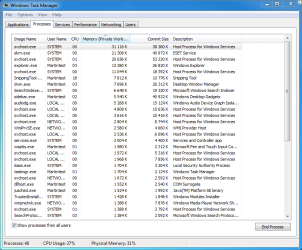
Well lets start with is ot 32bit? when this happens what does the process tab in task manager say is using the memory? to open task mgr rightclick taskbar.

Ken
 

My Computer

Computer Manufacturer/Model Number
HP Pavillion dv-7 1005 Tx
OS
Win 8 Release candidate 8400
CPU
[email protected]
Memory
4 gigs
Graphics Card(s)
Nvidia 9600M
Sound Card
HD built-in
Monitor(s) Displays
17" Wxga
Screen Resolution
1440x900
Cooling
none
Internet Speed
45Mb down 5Mb up
Thats what is most weird. Task manager shows that the program uses only about 200MB - the aoumnt of ram that releases after closing the program. There is NO process in task manager that would consume such a lot of RAM.
I have 32bit version btw
 

My Computer

Computer Manufacturer/Model Number
Compal FL90
OS
Windows 7
CPU
Core2Duo T7500
Memory
2GB
Graphics Card(s)
GeForce 8600M GT
Screen Resolution
1280x800, 1920x1200
Hard Drives
Seagate momentus, 160GB, 7200RPM, G-Force, NCQ
Mouse
Logitech G9
Internet Speed
50/50Mbps
Tomorrow, when my rs account lets me download again, i will post screenshot of taskmanager before and after downloading
 

My Computer

Computer Manufacturer/Model Number
Compal FL90
OS
Windows 7
CPU
Core2Duo T7500
Memory
2GB
Graphics Card(s)
GeForce 8600M GT
Screen Resolution
1280x800, 1920x1200
Hard Drives
Seagate momentus, 160GB, 7200RPM, G-Force, NCQ
Mouse
Logitech G9
Internet Speed
50/50Mbps
You can use the snipping tool in win 7 (type snipping in search) and attach them to your reply with the icon shaped like a paperclip. do the process and performance tabs

KEN
 

My Computer

Computer Manufacturer/Model Number
HP Pavillion dv-7 1005 Tx
OS
Win 8 Release candidate 8400
CPU
[email protected]
Memory
4 gigs
Graphics Card(s)
Nvidia 9600M
Sound Card
HD built-in
Monitor(s) Displays
17" Wxga
Screen Resolution
1440x900
Cooling
none
Internet Speed
45Mb down 5Mb up
You have not decribed a problem. You seem to indicate that no single process is consuming an undue amount of RAM. You seem to be describing normal Windows memory management.

We shall see.
 
You have not decribed a problem. You seem to indicate that no single process is consuming an undue amount of RAM. You seem to be describing normal Windows memory management.

We shall see.
I am descibing that no process in task manager is consuming such a large amount of ram ( at least task manager doesn't show any RAM consuming process and yes i selected show process of all users)but the ram is stil used by something i mean after downloading i have 1800/2000 MB used or even more. Thats not normal and the system is then slowed down as it swapps
 

My Computer

Computer Manufacturer/Model Number
Compal FL90
OS
Windows 7
CPU
Core2Duo T7500
Memory
2GB
Graphics Card(s)
GeForce 8600M GT
Screen Resolution
1280x800, 1920x1200
Hard Drives
Seagate momentus, 160GB, 7200RPM, G-Force, NCQ
Mouse
Logitech G9
Internet Speed
50/50Mbps
Just wait for tomorrow i will post screens before and after downloading
 

My Computer

Computer Manufacturer/Model Number
Compal FL90
OS
Windows 7
CPU
Core2Duo T7500
Memory
2GB
Graphics Card(s)
GeForce 8600M GT
Screen Resolution
1280x800, 1920x1200
Hard Drives
Seagate momentus, 160GB, 7200RPM, G-Force, NCQ
Mouse
Logitech G9
Internet Speed
50/50Mbps
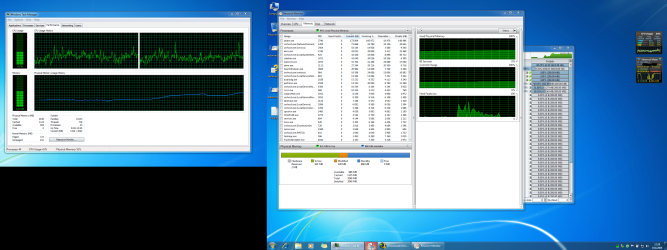
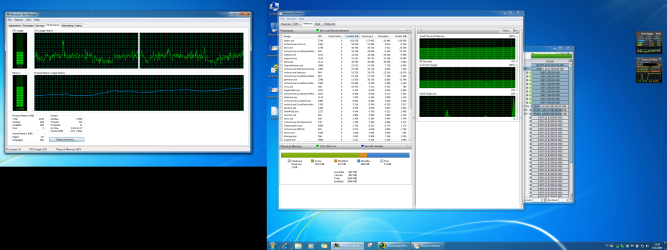
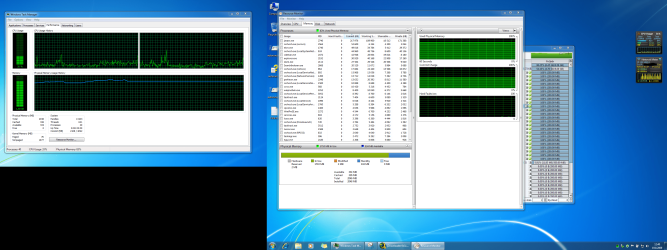
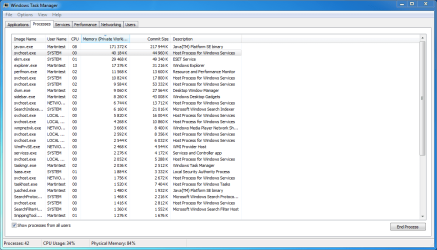
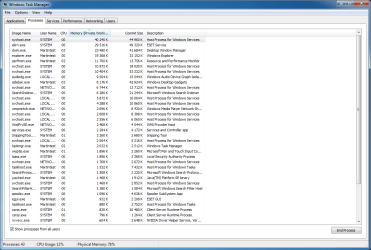
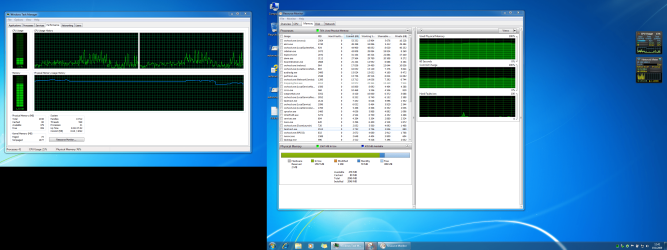
So here are screenshots. I could download only 5GB today so the RAM was not comnpletely full, but still something consumes a lot of it.

Before2,Before3.png are screens from before starting jdownloader
During1,During2.png - during downloading
Before Closing1,2 - after download finished (after i exceeded rapidshare download limit for today) before closing jdownloader
after closing1,2 - after i closed jdownloader - here you can see that somethings consumes a lot of RAM but it is not shown in task manager
 

Attachments

  • before2.PNG
    before2.PNG
    31.8 KB · Views: 67
  • before3.PNG
    before3.PNG
    18.3 KB · Views: 69
  • during1.PNG
    during1.PNG
    470.8 KB · Views: 53
  • during2.PNG
    during2.PNG
    465.9 KB · Views: 48
  • before closing.PNG
    before closing.PNG
    464.6 KB · Views: 65
  • before closing2.PNG
    before closing2.PNG
    38.4 KB · Views: 41
  • after closing 2.PNG
    after closing 2.PNG
    43.3 KB · Views: 26
  • after closing.PNG
    after closing.PNG
    478.4 KB · Views: 55

My Computer

Computer Manufacturer/Model Number
Compal FL90
OS
Windows 7
CPU
Core2Duo T7500
Memory
2GB
Graphics Card(s)
GeForce 8600M GT
Screen Resolution
1280x800, 1920x1200
Hard Drives
Seagate momentus, 160GB, 7200RPM, G-Force, NCQ
Mouse
Logitech G9
Internet Speed
50/50Mbps
Any ideas?
 

My Computer

Computer Manufacturer/Model Number
Compal FL90
OS
Windows 7
CPU
Core2Duo T7500
Memory
2GB
Graphics Card(s)
GeForce 8600M GT
Screen Resolution
1280x800, 1920x1200
Hard Drives
Seagate momentus, 160GB, 7200RPM, G-Force, NCQ
Mouse
Logitech G9
Internet Speed
50/50Mbps
You are misinterpreting the data. Nothing presented indicates a problem. In order to address your concerns, I will compile a list of references available here at SF and some other links. That will take me a while because it is not critical.

The RAM is being used by Windows, not your downloads. Riddle me this - when you are downloading, you can easily perform other activities, right?

If not, I would be more concerned with the high CPU usage that seems to be required of your download app.
 
You are misinterpreting the data. Nothing presented indicates a problem. In order to address your concerns, I will compile a list of references available here at SF and some other links. That will take me a while because it is not critical.

The RAM is being used by Windows, not your downloads. Riddle me this - when you are downloading, you can easily perform other activities, right?

If not, I would be more concerned with the high CPU usage that seems to be required of your download app.

During and after downloading i can run other programs but the whole system is due to no memory slowed down. It is like if i would be running photoshop, paused virtual PC and firefox (which can use up to 500MB with all my extensions). Then for example chrome is starting even 20s instead of 0,3s -before downloading; and it is not caused bu CPU but by swapping because no memory and I dont have fast SSD but normal hard drive so it is all slowed down until I reboot
 

My Computer

Computer Manufacturer/Model Number
Compal FL90
OS
Windows 7
CPU
Core2Duo T7500
Memory
2GB
Graphics Card(s)
GeForce 8600M GT
Screen Resolution
1280x800, 1920x1200
Hard Drives
Seagate momentus, 160GB, 7200RPM, G-Force, NCQ
Mouse
Logitech G9
Internet Speed
50/50Mbps
Well, I found yout that it is caused by NOD32 Antivirus 4. (sorry i wrote that i tried it on celan instalation, i just forgot that i have already nod installed)
To disable protection is not enough i had to uninstall it and problem disappeared

//EDIT: i contacted ESET customer support and hope they will solve it, because eset is one of the best antivirus i know. Now i am using AVG, which does not block memory while downloading, but it really slowes down booting (even for 1 minute)
 

My Computer

Computer Manufacturer/Model Number
Compal FL90
OS
Windows 7
CPU
Core2Duo T7500
Memory
2GB
Graphics Card(s)
GeForce 8600M GT
Screen Resolution
1280x800, 1920x1200
Hard Drives
Seagate momentus, 160GB, 7200RPM, G-Force, NCQ
Mouse
Logitech G9
Internet Speed
50/50Mbps
Well, I found yout that it is caused by NOD32 Antivirus 4. (sorry i wrote that i tried it on celan instalation, i just forgot that i have already nod installed)
To disable protection is not enough i had to uninstall it and problem disappeared

//EDIT: i contacted ESET customer support and hope they will solve it, because eset is one of the best antivirus i know. Now i am using AVG, which does not block memory while downloading, but it really slowes down booting (even for 1 minute)

As usual, yet another anti virus program causing problems. I always said those programs are more trouble than they are worth. Some call me stupid for saying that... how bout now?
 

My Computer

Computer type
PC/Desktop
Computer Manufacturer/Model Number
Home built
OS
Windows 7 Ult, Windows 8.1 Pro,
CPU
Q9650-4.275GHz, E8600 4.5GHz, E6750-3.8GHz
Motherboard
Evga 780i FTW
Memory
G.Skill PC2 9600 1200Mhz 5 5 5 15 2T
Graphics Card(s)
GTX480
Sound Card
Asus Xonar D2
Monitor(s) Displays
HannsG
Screen Resolution
1680X1050
Hard Drives
GSkill Phoenix Pro 120GB SSD
PSU
ThermalTake Toughpower 1000Watt modular
Case
ThermalTake XaserV
Cooling
Xigmatek S1283
Keyboard
Logitech G15
Mouse
Logitech G9
Internet Speed
T1
Well, I found yout that it is caused by NOD32 Antivirus 4. (sorry i wrote that i tried it on celan instalation, i just forgot that i have already nod installed)
To disable protection is not enough i had to uninstall it and problem disappeared

//EDIT: i contacted ESET customer support and hope they will solve it, because eset is one of the best antivirus i know. Now i am using AVG, which does not block memory while downloading, but it really slowes down booting (even for 1 minute)

I have same problem and i also have ESET4 :shock:

I realy like ESET, but i will uninstall it and be unprotected untill someone corect that error.
 

My Computer

OS
Windows 7 Ultimate 6.1.7600 Build 7600 64-bit
CPU
Intel(R) Core(TM)2 Duo CPU E8400 @ 3.00GHz
Motherboard
Gigabyte GA EP35-DS3
Memory
4X DDR2 1GB PC6400 (800MHz), Kingmax
Graphics Card(s)
Gigabyte ATI 3870 512 DDR3
Sound Card
Realtek ALC889A + ATI High Definition Audio Device
Monitor(s) Displays
Sony 40" 40W4000
Screen Resolution
1920x1080
Hard Drives
Samsung HD321KJ 320GB
PSU
Antec 380W 80+
Case
Antec NSK4480B
Cooling
1 x 120mm @low
Keyboard
Logitech Cordless Desktop S510
Mouse
Logitech Cordless Desktop S510
Internet Speed
2Mbit DSL Flatrate
As usual, yet another anti virus program causing problems. I always said those programs are more trouble than they are worth. Some call me stupid for saying that... how bout now?


wont call you stupid, but i've been running eset for years and not a single issue, ever
 

My Computer

Computer Manufacturer/Model Number
Custom Built By Me
OS
Windows 7 Ultimate x64
CPU
Core 2 Extreme QX9770 @ 4.3ghz
Motherboard
EVGA 780i A2
Memory
4GB DDR2 1000
Graphics Card(s)
EVGA 8800GT SSC SLI
Sound Card
Creative Xifi Xtreme Gamer
Monitor(s) Displays
Westinghouse L2210NW
Screen Resolution
1680x1050
Hard Drives
2 x 150gb WD Raptors Raid 0 For OS/
750gb Hitachi for Storage
PSU
Enermax Galaxy kilowatt Modular
Case
Custom Lian Li Extended ATX
Cooling
Ultra 120 Lapped with twin 120mm fans
Keyboard
Razor Reclusa
Mouse
Logitech Optical
Internet Speed
Verizon Fios 30mb down / 20mb up
wont call you stupid, but i've been running eset for years and not a single issue, ever

I also didnt have any issue until now with 64-bit W7
 

My Computer

OS
Windows 7 Ultimate 6.1.7600 Build 7600 64-bit
CPU
Intel(R) Core(TM)2 Duo CPU E8400 @ 3.00GHz
Motherboard
Gigabyte GA EP35-DS3
Memory
4X DDR2 1GB PC6400 (800MHz), Kingmax
Graphics Card(s)
Gigabyte ATI 3870 512 DDR3
Sound Card
Realtek ALC889A + ATI High Definition Audio Device
Monitor(s) Displays
Sony 40" 40W4000
Screen Resolution
1920x1080
Hard Drives
Samsung HD321KJ 320GB
PSU
Antec 380W 80+
Case
Antec NSK4480B
Cooling
1 x 120mm @low
Keyboard
Logitech Cordless Desktop S510
Mouse
Logitech Cordless Desktop S510
Internet Speed
2Mbit DSL Flatrate
Same issue

Iwas running ESET for a long time and not having any issues with Vista or Win 7 RC. Just reinstalled to RTM and now have this issue. Guess I will remove ESET until they get it fixed.
 

My Computer

OS
Win 7 x86
I have the same issue with Windows 7 64-bit.

Kernel memory goes through the roof, but none of the processes seem to claim it and ending the process of the application does very little.
 

My Computer

Computer type
PC/Desktop
OS
Microsoft Windows 7 Professional 64-bit 7601 Multiprocessor Free Service Pack 1
CPU
Intel(R) Core(TM) i7-3930K CPU @ 3.20GHz
Motherboard
ASUSTeK COMPUTER INC. RAMPAGE IV EXTREME
Memory
32.00 GB
Graphics Card(s)
NVIDIA GeForce GTX 580
Sound Card
(1) High Definition Audio Device (2) High Definition Audio
Monitor(s) Displays
Samsung SyncMaster T260
Screen Resolution
1920x1080 1-portrate 1-Landscape
Hard Drives
(1) OCZ-VERTEX4 ATA Device
(2) OCZ-VERTEX4 ATA Device
(3) SAMSUNG HE103UJ ATA Device
(4) WDC WD1002FBYS-02A6B0 ATA Device
(5) WDC WD2002FAEX-007BA0 ATA Device
(6) WDC WD2002FYPS-02W3B0 ATA Device
PSU
Rosewill Xtreme Series RX950-D-B 950W
Case
CM Storm Trooper
NOD32 is the problem

I just wanted to chime in and confirm I have been having the same problem that has been driving me crazy the last few days. Open up task manager, take a look at kernel memory under the performance tab. Normally mine hovers around under 200 mb both paged and non paged combined. If I start downloading a large multi-gig file using any of several download managers I have tried (getright, downthem all etc) my kernel memory quickly climbs. Over a period of maybe 30 minutes it will climb till it reaches about 3600mb nonpaged, then all hell breaks loose. system starts freezing, complaining it is out of memory, downloads drop to zero.

I run vista 32-bit and Windows 7 64-bit. The problem exists on both. Both have ESET AV 4 installed. disabling realtime scanning in ESET will not help. However, once ESET is uninstalled, my kernel memory stays under 200mb no matter what size file I am downloading.

So, its obviously a memory leak that ESET AV is causing. I have e-mailed them and I am hoping to receive a response back on how to correct this soon.

UPDATE: I think it is worth mentioning that Windows 7 handles the whole sitiuation much more gracefully that Vista. It still remains somewhat responsive, where Vista won't even allow you to shut down or do much of anything.
 

My Computer

OS
Windows 7
Back
Top