Solved Memory Compatibility

krustykobb

New member
Local time
11:41 PM
Messages
41
Location
Derby, UK
I have two DIMMS of Corsair Vengeance 4GB RAM (2 x 2GB) at 1600MHz, although whenever I try to turn it up to this speed Windows BSODs during boot so I left it at 1333MHz, however I would like to add a DIMM of KomputerBay 8GB 1600MHz to my system but I'm sure the timings are different; the Corsair has timings of 9-9-9-24, and the KomputerBay RAM has timings of 10-10-10-27. Will these run together in the same system? I have an Asus Z97 Pro Motherboard. Thanks in advance
 

My Computer

Computer type
PC/Desktop
Computer Manufacturer/Model Number
Custom Build
OS
Windows 7 Ultimate x64
CPU
Intel Core i7 4790k @ 4GHz
Motherboard
Asus Z97 Pro
Memory
8GB DDR3 1600MHz
Graphics Card(s)
AMD Radeon HD 6850
Sound Card
Asus Xonar DSX
Hard Drives
Samsung 840 EVO 120GB SSD
128GB SanDisk SSD
2TB WD Caviar Green HDD
PSU
Corsair CX600
Case
Fractal Design Define R4
Cooling
Stock cooler
Internet Speed
100Mbps Down / 10Mbps Up
Antivirus
Avast! Antivirus (Free)
Browser
Google Chrome/Mozilla Firefox

My Computer

Computer type
PC/Desktop
Computer Manufacturer/Model Number
Home made Desktop
OS
Windows 10 Pro. 64/ version 1709 Windows 7 Pro/64
CPU
Intel i7-6800K @ 4.3
Motherboard
ASUS X-99 Deluxe II
Memory
Corsair Platinum 16 gig @2400
Graphics Card(s)
EVGA GTX 1070 OC
Monitor(s) Displays
Asus 27" LED LCD/VE278Q
Screen Resolution
1920-1080 or 1280-720 HDMI
Hard Drives
INTEL SSD 730-240 Gb Sata 3.0/
PSU
EVGA Platium 1200W
Case
Phanteks Luxe Tempered Glass 8 fans/ one radiator
Cooling
XSPC/ Water Cooled CPU
Keyboard
Das 4 Professional
Mouse
Logitech M705/MX Anywhere 2-S
Internet Speed
100 mbits
Antivirus
Microsoft Security Essentials/ Malwarebytes Premium 3.0/ SAS
Browser
I.E. 11 default/Firefox/ ISP Time Warner Cable/Spectrum
Other Info
LG BluRay Burner/
Sound system-KLipsch-THX/
Icy Dock ssd Hot Swap bays.
The system says that the target DRAM frequency is 1333MHz, and I know the RAM is capable of running at 1600MHz as it has an XMP profile that enables this, however when I click this when Windows is loading I get a very quick BSOD and the system then restarts, repeating this process. Why would you suggest I don't run the unmatched RAM? I ran the same configuration in my old system and now in my new one the board refuses to POST
 

My Computer

Computer type
PC/Desktop
Computer Manufacturer/Model Number
Custom Build
OS
Windows 7 Ultimate x64
CPU
Intel Core i7 4790k @ 4GHz
Motherboard
Asus Z97 Pro
Memory
8GB DDR3 1600MHz
Graphics Card(s)
AMD Radeon HD 6850
Sound Card
Asus Xonar DSX
Hard Drives
Samsung 840 EVO 120GB SSD
128GB SanDisk SSD
2TB WD Caviar Green HDD
PSU
Corsair CX600
Case
Fractal Design Define R4
Cooling
Stock cooler
Internet Speed
100Mbps Down / 10Mbps Up
Antivirus
Avast! Antivirus (Free)
Browser
Google Chrome/Mozilla Firefox
I recommend not running mismatch ram so you don't get the problem you are having now.

What run in your old system does not qualify it to run in this new system.

When you use mismatched ram the system will only run at the speed and settings of the lowest ram installed.

I personally set my ram speed and voltages in the bios. But I can't set it to something the system doesn't like or it will BSOD.

XMP will sometimes set the voltages to high.
There is a system to what you can and can not do. First you must have the proper hardware.

If you use the program I posted and then post a picture it would help us understand what you got.

How to post a picture using a tutorial by Brink.

http://www.sevenforums.com/tutorials/9733-screenshots-files-upload-post-seven-forums.html

I will ask this question one more time. In order for members to help you we need information from you.

What are you looking at that makes you think it isn't running at that speed?
 

My Computer

Computer type
PC/Desktop
Computer Manufacturer/Model Number
Home made Desktop
OS
Windows 10 Pro. 64/ version 1709 Windows 7 Pro/64
CPU
Intel i7-6800K @ 4.3
Motherboard
ASUS X-99 Deluxe II
Memory
Corsair Platinum 16 gig @2400
Graphics Card(s)
EVGA GTX 1070 OC
Monitor(s) Displays
Asus 27" LED LCD/VE278Q
Screen Resolution
1920-1080 or 1280-720 HDMI
Hard Drives
INTEL SSD 730-240 Gb Sata 3.0/
PSU
EVGA Platium 1200W
Case
Phanteks Luxe Tempered Glass 8 fans/ one radiator
Cooling
XSPC/ Water Cooled CPU
Keyboard
Das 4 Professional
Mouse
Logitech M705/MX Anywhere 2-S
Internet Speed
100 mbits
Antivirus
Microsoft Security Essentials/ Malwarebytes Premium 3.0/ SAS
Browser
I.E. 11 default/Firefox/ ISP Time Warner Cable/Spectrum
Other Info
LG BluRay Burner/
Sound system-KLipsch-THX/
Icy Dock ssd Hot Swap bays.
What is making me think that it is not running at that speed is the fact that in the BIOS it says the DRAM frequency is 1333MHz whereas the RAM is capable of running at 1600MHz, but whenever I try to enable the XMP profile or manually turn up the DRAM frequency to achieve this it BSODs

A screenshot can be found below:

Capture.PNG
 

My Computer

Computer type
PC/Desktop
Computer Manufacturer/Model Number
Custom Build
OS
Windows 7 Ultimate x64
CPU
Intel Core i7 4790k @ 4GHz
Motherboard
Asus Z97 Pro
Memory
8GB DDR3 1600MHz
Graphics Card(s)
AMD Radeon HD 6850
Sound Card
Asus Xonar DSX
Hard Drives
Samsung 840 EVO 120GB SSD
128GB SanDisk SSD
2TB WD Caviar Green HDD
PSU
Corsair CX600
Case
Fractal Design Define R4
Cooling
Stock cooler
Internet Speed
100Mbps Down / 10Mbps Up
Antivirus
Avast! Antivirus (Free)
Browser
Google Chrome/Mozilla Firefox
Exactly what ram do you have installed and in what slots of the motherboard?

You could also go into bios and set to default (not XMP) and see if the system will read 1600.
 

My Computer

Computer type
PC/Desktop
Computer Manufacturer/Model Number
Home made Desktop
OS
Windows 10 Pro. 64/ version 1709 Windows 7 Pro/64
CPU
Intel i7-6800K @ 4.3
Motherboard
ASUS X-99 Deluxe II
Memory
Corsair Platinum 16 gig @2400
Graphics Card(s)
EVGA GTX 1070 OC
Monitor(s) Displays
Asus 27" LED LCD/VE278Q
Screen Resolution
1920-1080 or 1280-720 HDMI
Hard Drives
INTEL SSD 730-240 Gb Sata 3.0/
PSU
EVGA Platium 1200W
Case
Phanteks Luxe Tempered Glass 8 fans/ one radiator
Cooling
XSPC/ Water Cooled CPU
Keyboard
Das 4 Professional
Mouse
Logitech M705/MX Anywhere 2-S
Internet Speed
100 mbits
Antivirus
Microsoft Security Essentials/ Malwarebytes Premium 3.0/ SAS
Browser
I.E. 11 default/Firefox/ ISP Time Warner Cable/Spectrum
Other Info
LG BluRay Burner/
Sound system-KLipsch-THX/
Icy Dock ssd Hot Swap bays.
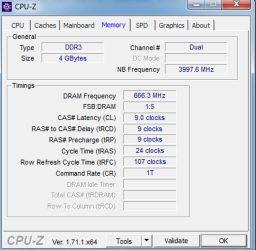
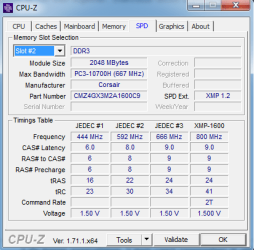
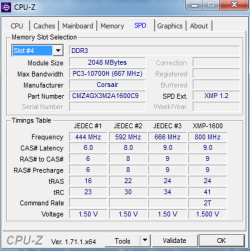
Current RAM installed is Corsair Vengeance 4gb (2 x 2GB) 1600Mhz Dual Channel kit, installed in slots 2 and 4 which is optimal according to the motherboard manual. I've tried restoring optimal defaults in BIOS and no change
 

My Computer

Computer type
PC/Desktop
Computer Manufacturer/Model Number
Custom Build
OS
Windows 7 Ultimate x64
CPU
Intel Core i7 4790k @ 4GHz
Motherboard
Asus Z97 Pro
Memory
8GB DDR3 1600MHz
Graphics Card(s)
AMD Radeon HD 6850
Sound Card
Asus Xonar DSX
Hard Drives
Samsung 840 EVO 120GB SSD
128GB SanDisk SSD
2TB WD Caviar Green HDD
PSU
Corsair CX600
Case
Fractal Design Define R4
Cooling
Stock cooler
Internet Speed
100Mbps Down / 10Mbps Up
Antivirus
Avast! Antivirus (Free)
Browser
Google Chrome/Mozilla Firefox
Very strange.
I will get another set of eyes on your problem and see what we can come up with.

Do I understand you correctly?

If you set the ram to 1600 and the proper ram voltage and and everything else to default you get a BSOD.
 

My Computer

Computer type
PC/Desktop
Computer Manufacturer/Model Number
Home made Desktop
OS
Windows 10 Pro. 64/ version 1709 Windows 7 Pro/64
CPU
Intel i7-6800K @ 4.3
Motherboard
ASUS X-99 Deluxe II
Memory
Corsair Platinum 16 gig @2400
Graphics Card(s)
EVGA GTX 1070 OC
Monitor(s) Displays
Asus 27" LED LCD/VE278Q
Screen Resolution
1920-1080 or 1280-720 HDMI
Hard Drives
INTEL SSD 730-240 Gb Sata 3.0/
PSU
EVGA Platium 1200W
Case
Phanteks Luxe Tempered Glass 8 fans/ one radiator
Cooling
XSPC/ Water Cooled CPU
Keyboard
Das 4 Professional
Mouse
Logitech M705/MX Anywhere 2-S
Internet Speed
100 mbits
Antivirus
Microsoft Security Essentials/ Malwarebytes Premium 3.0/ SAS
Browser
I.E. 11 default/Firefox/ ISP Time Warner Cable/Spectrum
Other Info
LG BluRay Burner/
Sound system-KLipsch-THX/
Icy Dock ssd Hot Swap bays.
Very strange.
I will get another set of eyes on your problem and see what we can come up with.

Do I understand you correctly?

If you set the ram to 1600 and the proper ram voltage and and everything else to default you get a BSOD.

Yes this is correct, I get a BSOD as Windows is starting
 

My Computer

Computer type
PC/Desktop
Computer Manufacturer/Model Number
Custom Build
OS
Windows 7 Ultimate x64
CPU
Intel Core i7 4790k @ 4GHz
Motherboard
Asus Z97 Pro
Memory
8GB DDR3 1600MHz
Graphics Card(s)
AMD Radeon HD 6850
Sound Card
Asus Xonar DSX
Hard Drives
Samsung 840 EVO 120GB SSD
128GB SanDisk SSD
2TB WD Caviar Green HDD
PSU
Corsair CX600
Case
Fractal Design Define R4
Cooling
Stock cooler
Internet Speed
100Mbps Down / 10Mbps Up
Antivirus
Avast! Antivirus (Free)
Browser
Google Chrome/Mozilla Firefox
Please post a screenshot of CPUz , the CPU, Mainboard, Memory and the SPD tabs. On the SPD tabs, each Dimm Slot can be selected from a dropdown list in the upper left. We only need the ones populated with ram.

I would also suggest you listen to Layback Bear's recommendations. It is never a good idea to run mismatched ram on any system and especially so on a system that already has ram problems. Plus, I have never heard of KomputerBay ram. It is not a top notch company and not one I could recommend. Ram sold in kits are tested by top notch companies to run well together. Individual sticks are not. Ram should always be bought in kits.
 

My Computers

System One System Two

  • Computer type
    PC/Desktop
    Computer Manufacturer/Model Number
    ALWAYS UNDER CONSTRUCTION
    OS
    Windows 11 Pro
    CPU
    Ryzen 9 5900X
    Motherboard
    Asus X570 Crosshair Viii Hero
    Memory
    32GB G Skill DDR4-3600
    Graphics Card(s)
    EVGA RTX 3080 FTW 3 Ultra
    Sound Card
    On Board/Sennheiser PC37X Headset
    Monitor(s) Displays
    3 X Asus 27"
    Screen Resolution
    2560x1440
    Hard Drives
    2 X 1 TB NVME drives
    PSU
    EVGA 850
    Case
    Phanteks Eclipse P400A
    Cooling
    EVGA 280 AIO
    Keyboard
    Logitech G510s/ Logitech G13
    Mouse
    Logitech G502
    Internet Speed
    24/1
    Antivirus
    ESET/MBAM Pro/SAS Pro
    Browser
    Chrome/ Firefox/ Edge
  • Computer type
    Laptop
    System Manufacturer/Model Number
    Dell 16 Plus
    OS
    Windows 11 Pro
    CPU
    Intel Ultra 9 288V
    Memory
    32 GB LPDDR5X 8533
    Monitor(s) Displays
    16" Mini-LED HDR600 Touch 90 Hz
    Screen Resolution
    2560X1600
    Hard Drives
    1 TB NVME
Thank you Steve for taking a look!
 

My Computer

Computer type
PC/Desktop
Computer Manufacturer/Model Number
Home made Desktop
OS
Windows 10 Pro. 64/ version 1709 Windows 7 Pro/64
CPU
Intel i7-6800K @ 4.3
Motherboard
ASUS X-99 Deluxe II
Memory
Corsair Platinum 16 gig @2400
Graphics Card(s)
EVGA GTX 1070 OC
Monitor(s) Displays
Asus 27" LED LCD/VE278Q
Screen Resolution
1920-1080 or 1280-720 HDMI
Hard Drives
INTEL SSD 730-240 Gb Sata 3.0/
PSU
EVGA Platium 1200W
Case
Phanteks Luxe Tempered Glass 8 fans/ one radiator
Cooling
XSPC/ Water Cooled CPU
Keyboard
Das 4 Professional
Mouse
Logitech M705/MX Anywhere 2-S
Internet Speed
100 mbits
Antivirus
Microsoft Security Essentials/ Malwarebytes Premium 3.0/ SAS
Browser
I.E. 11 default/Firefox/ ISP Time Warner Cable/Spectrum
Other Info
LG BluRay Burner/
Sound system-KLipsch-THX/
Icy Dock ssd Hot Swap bays.
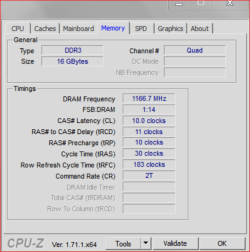
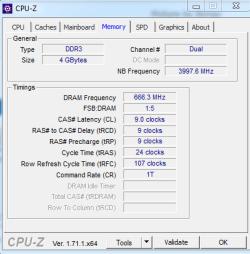
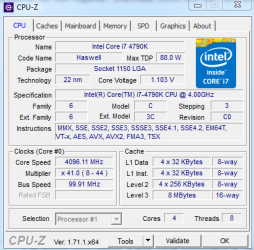
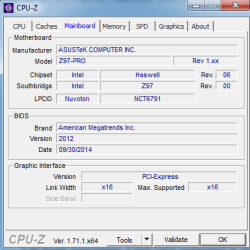
Here are the CPU-Z screenshots:

1.PNG

2.PNG

3.PNG

4.PNG

5.PNG
 

My Computer

Computer type
PC/Desktop
Computer Manufacturer/Model Number
Custom Build
OS
Windows 7 Ultimate x64
CPU
Intel Core i7 4790k @ 4GHz
Motherboard
Asus Z97 Pro
Memory
8GB DDR3 1600MHz
Graphics Card(s)
AMD Radeon HD 6850
Sound Card
Asus Xonar DSX
Hard Drives
Samsung 840 EVO 120GB SSD
128GB SanDisk SSD
2TB WD Caviar Green HDD
PSU
Corsair CX600
Case
Fractal Design Define R4
Cooling
Stock cooler
Internet Speed
100Mbps Down / 10Mbps Up
Antivirus
Avast! Antivirus (Free)
Browser
Google Chrome/Mozilla Firefox
You should be able to go into BIOS and set your ram timings to 9-9-24 2T, set your Dram Voltage to 1.5V and the dram speed to 1600 and it should boot fine.
 

My Computers

System One System Two

  • Computer type
    PC/Desktop
    Computer Manufacturer/Model Number
    ALWAYS UNDER CONSTRUCTION
    OS
    Windows 11 Pro
    CPU
    Ryzen 9 5900X
    Motherboard
    Asus X570 Crosshair Viii Hero
    Memory
    32GB G Skill DDR4-3600
    Graphics Card(s)
    EVGA RTX 3080 FTW 3 Ultra
    Sound Card
    On Board/Sennheiser PC37X Headset
    Monitor(s) Displays
    3 X Asus 27"
    Screen Resolution
    2560x1440
    Hard Drives
    2 X 1 TB NVME drives
    PSU
    EVGA 850
    Case
    Phanteks Eclipse P400A
    Cooling
    EVGA 280 AIO
    Keyboard
    Logitech G510s/ Logitech G13
    Mouse
    Logitech G502
    Internet Speed
    24/1
    Antivirus
    ESET/MBAM Pro/SAS Pro
    Browser
    Chrome/ Firefox/ Edge
  • Computer type
    Laptop
    System Manufacturer/Model Number
    Dell 16 Plus
    OS
    Windows 11 Pro
    CPU
    Intel Ultra 9 288V
    Memory
    32 GB LPDDR5X 8533
    Monitor(s) Displays
    16" Mini-LED HDR600 Touch 90 Hz
    Screen Resolution
    2560X1600
    Hard Drives
    1 TB NVME
The CPU should not need to be overclocked to run the ram at it's rated speed. It should run 1600 easily.
 

My Computers

System One System Two

  • Computer type
    PC/Desktop
    Computer Manufacturer/Model Number
    ALWAYS UNDER CONSTRUCTION
    OS
    Windows 11 Pro
    CPU
    Ryzen 9 5900X
    Motherboard
    Asus X570 Crosshair Viii Hero
    Memory
    32GB G Skill DDR4-3600
    Graphics Card(s)
    EVGA RTX 3080 FTW 3 Ultra
    Sound Card
    On Board/Sennheiser PC37X Headset
    Monitor(s) Displays
    3 X Asus 27"
    Screen Resolution
    2560x1440
    Hard Drives
    2 X 1 TB NVME drives
    PSU
    EVGA 850
    Case
    Phanteks Eclipse P400A
    Cooling
    EVGA 280 AIO
    Keyboard
    Logitech G510s/ Logitech G13
    Mouse
    Logitech G502
    Internet Speed
    24/1
    Antivirus
    ESET/MBAM Pro/SAS Pro
    Browser
    Chrome/ Firefox/ Edge
  • Computer type
    Laptop
    System Manufacturer/Model Number
    Dell 16 Plus
    OS
    Windows 11 Pro
    CPU
    Intel Ultra 9 288V
    Memory
    32 GB LPDDR5X 8533
    Monitor(s) Displays
    16" Mini-LED HDR600 Touch 90 Hz
    Screen Resolution
    2560X1600
    Hard Drives
    1 TB NVME
I agree it should.

I don't think I have ever seen a system like krustykobb got that couldn't run quality ram at 1600.

I removed my last dumb ass post.
I have been reading to many 5 year old posts online about this problem.

Okay I'm shifting from coffee to wine, may be things will get better.
 

My Computer

Computer type
PC/Desktop
Computer Manufacturer/Model Number
Home made Desktop
OS
Windows 10 Pro. 64/ version 1709 Windows 7 Pro/64
CPU
Intel i7-6800K @ 4.3
Motherboard
ASUS X-99 Deluxe II
Memory
Corsair Platinum 16 gig @2400
Graphics Card(s)
EVGA GTX 1070 OC
Monitor(s) Displays
Asus 27" LED LCD/VE278Q
Screen Resolution
1920-1080 or 1280-720 HDMI
Hard Drives
INTEL SSD 730-240 Gb Sata 3.0/
PSU
EVGA Platium 1200W
Case
Phanteks Luxe Tempered Glass 8 fans/ one radiator
Cooling
XSPC/ Water Cooled CPU
Keyboard
Das 4 Professional
Mouse
Logitech M705/MX Anywhere 2-S
Internet Speed
100 mbits
Antivirus
Microsoft Security Essentials/ Malwarebytes Premium 3.0/ SAS
Browser
I.E. 11 default/Firefox/ ISP Time Warner Cable/Spectrum
Other Info
LG BluRay Burner/
Sound system-KLipsch-THX/
Icy Dock ssd Hot Swap bays.
You can mix brands of RAM so long as they have identical specifications and they are both supported by your motherboard (definitely do check the motherboard’s compatibility list). And what I mean by identical specifications is that they have the same voltage, CAS latency and timings. As long as all of those things are true, you should not encounter problems mixing RAM brands (although, unfortunately, it is a fact that some RAM does not like each other - not unlike how some motherboards just doesn't like certain RAM - and so there are no guarantees that even if the specifications both match, that they will work well or at all together). And as previously mentioned, this is also providing that these are in fact two kits of RAM as in dual-channel and not single-channel DIMMs (which would be the stick sold by itself and which is not a dual-channel DIMM, even if it is paired with another). People do this all of the time without encountering problems, but that is again providing the aforementioned is true.

Generally, kits with different speeds are a non-issue as the faster kit will most often be downclocked to match the slower automatically (occasionally you have to do that manually). That is the only specification of two different kits which does not have to match for them to work together (although apparently capacities can also be mixed sometimes as well). But then, of course, there's always OC. Theoretically, you could OC the slower to match the faster.

Ultimately it really is best and far less of a hassle to just get the exact same and brand dual-channel kits and call it a day.
 

My Computer

Computer type
PC/Desktop
Computer Manufacturer/Model Number
Custom [03/21/2014]
OS
7 Ultimate SP1 x64
CPU
AMD FX-8350 4.0GHz
Motherboard
Asus M5A99FX Pro R2.0
Memory
8GB Corsair Vengeance LP DDR3 1600
Graphics Card(s)
EVGA GTX760 SC 2GB GDDR5
Sound Card
Realtek ALC892
Monitor(s) Displays
23" Syncmaster P2370HD
Screen Resolution
1920 x 1080
Hard Drives
Scorpio Black WD1003FZEX 1TB
PSU
Corsair RM 750W
Case
Gigabyte Sumo Omega
Cooling
Noctua NH-D14 | 6 120mm case.
Keyboard
Tt eSPORTS Poesidon Z - Blue Switch
Mouse
Logitech M510
Internet Speed
FiOS 100/100
Antivirus
MBAM
Browser
WaterFox & Chrome
Other Info
NETWORKING:
FiOS G1100 (v1.03)
Netgear WNDR37AV
Actiontec MI424WR (Rev. I)
PRINTER:
Canon MX340
Thanks all for your help - I'll try setting the RAM settings later on when I'm back home and I'll report back to you the results :)
 

My Computer

Computer type
PC/Desktop
Computer Manufacturer/Model Number
Custom Build
OS
Windows 7 Ultimate x64
CPU
Intel Core i7 4790k @ 4GHz
Motherboard
Asus Z97 Pro
Memory
8GB DDR3 1600MHz
Graphics Card(s)
AMD Radeon HD 6850
Sound Card
Asus Xonar DSX
Hard Drives
Samsung 840 EVO 120GB SSD
128GB SanDisk SSD
2TB WD Caviar Green HDD
PSU
Corsair CX600
Case
Fractal Design Define R4
Cooling
Stock cooler
Internet Speed
100Mbps Down / 10Mbps Up
Antivirus
Avast! Antivirus (Free)
Browser
Google Chrome/Mozilla Firefox
Okay. Take your time.
Please keep notes so you can if need be inform us what happens and when.
 

My Computer

Computer type
PC/Desktop
Computer Manufacturer/Model Number
Home made Desktop
OS
Windows 10 Pro. 64/ version 1709 Windows 7 Pro/64
CPU
Intel i7-6800K @ 4.3
Motherboard
ASUS X-99 Deluxe II
Memory
Corsair Platinum 16 gig @2400
Graphics Card(s)
EVGA GTX 1070 OC
Monitor(s) Displays
Asus 27" LED LCD/VE278Q
Screen Resolution
1920-1080 or 1280-720 HDMI
Hard Drives
INTEL SSD 730-240 Gb Sata 3.0/
PSU
EVGA Platium 1200W
Case
Phanteks Luxe Tempered Glass 8 fans/ one radiator
Cooling
XSPC/ Water Cooled CPU
Keyboard
Das 4 Professional
Mouse
Logitech M705/MX Anywhere 2-S
Internet Speed
100 mbits
Antivirus
Microsoft Security Essentials/ Malwarebytes Premium 3.0/ SAS
Browser
I.E. 11 default/Firefox/ ISP Time Warner Cable/Spectrum
Other Info
LG BluRay Burner/
Sound system-KLipsch-THX/
Icy Dock ssd Hot Swap bays.
I couldn't get it working - I swapped out the Corsair RAM for 1 stick of 8GB from another machine, and so far no problems so think I'll just stick with that for the time being
 

My Computer

Computer type
PC/Desktop
Computer Manufacturer/Model Number
Custom Build
OS
Windows 7 Ultimate x64
CPU
Intel Core i7 4790k @ 4GHz
Motherboard
Asus Z97 Pro
Memory
8GB DDR3 1600MHz
Graphics Card(s)
AMD Radeon HD 6850
Sound Card
Asus Xonar DSX
Hard Drives
Samsung 840 EVO 120GB SSD
128GB SanDisk SSD
2TB WD Caviar Green HDD
PSU
Corsair CX600
Case
Fractal Design Define R4
Cooling
Stock cooler
Internet Speed
100Mbps Down / 10Mbps Up
Antivirus
Avast! Antivirus (Free)
Browser
Google Chrome/Mozilla Firefox
Your computer, your choice.

Please remember that.

I couldn't get it working

Tells the members trying to help nothing.


What didn't work?
Was their a BSOD?
Did the computer Boot?
Did you get into the bios?
If you got into the bios what changes did you make?

When you decide you want help please remember; in order for us to help we need information.

Happy computing.
 

My Computer

Computer type
PC/Desktop
Computer Manufacturer/Model Number
Home made Desktop
OS
Windows 10 Pro. 64/ version 1709 Windows 7 Pro/64
CPU
Intel i7-6800K @ 4.3
Motherboard
ASUS X-99 Deluxe II
Memory
Corsair Platinum 16 gig @2400
Graphics Card(s)
EVGA GTX 1070 OC
Monitor(s) Displays
Asus 27" LED LCD/VE278Q
Screen Resolution
1920-1080 or 1280-720 HDMI
Hard Drives
INTEL SSD 730-240 Gb Sata 3.0/
PSU
EVGA Platium 1200W
Case
Phanteks Luxe Tempered Glass 8 fans/ one radiator
Cooling
XSPC/ Water Cooled CPU
Keyboard
Das 4 Professional
Mouse
Logitech M705/MX Anywhere 2-S
Internet Speed
100 mbits
Antivirus
Microsoft Security Essentials/ Malwarebytes Premium 3.0/ SAS
Browser
I.E. 11 default/Firefox/ ISP Time Warner Cable/Spectrum
Other Info
LG BluRay Burner/
Sound system-KLipsch-THX/
Icy Dock ssd Hot Swap bays.
Back
Top