
Solved Printer compatibility

Aardvarkly

New member
Power User
VIP
Local time
11:10 PM
Messages
222
Location
Northern France
I ran across a thread on a non-techy forum about printers. Generally people unhappy with being ripped off buying inkjet cartridges that are expensive, drying up from under usage, etc. Prices of new printers being only a little more than the cost of a set of cartridges it seems that a lot of usable printers are heading for landfill. A few people mention that if they buy a new one they will also have to buy a new laptop into the bargain because new models won't work with W7. Is this true?
I'm still running W7 on two desktops and the wife's laptop using a Brother DCP-7055W laser printer that was released ten years ago. The latest spec. shows it will work with everything from Windows 2000 to W11. After years of disatsfaction with HP, Canon, and Epson I am recommending Brother. Big and clunky maybe but they seem to be reliable and not too fussy about what OS you try to feed them with.
From reading here it seems printers always seem to be a probem area.
 

My Computer

Computer type
PC/Desktop
Computer Manufacturer/Model Number
Home built Asus
OS
Windows 7 Pro 64bit
CPU
Intel® Core™ i3 Processor 3.7ghz
Motherboard
Asus Intel Prime H270-Pro LGA 1151 ATX
Memory
Crucial (2x8GB) DDR4-2400
Graphics Card(s)
on board
Monitor(s) Displays
BENQ GL2450HE (24 inch)
Screen Resolution
1980 x 1080
Hard Drives
C drive is SSD Crucial 500gb mostly for the OS
PSU
Corsair CX750
Case
A big black one
Cooling
Cooler Master Hyper TX3i on the processor
Keyboard
Logitech k2700 wireless
Mouse
Logitech M575 wireless trackball
Internet Speed
Just under about 7mb/s on a good day
Antivirus
Avira Free
Browser
Opera, Firefox, Chrome, and Supermium
I ran across a thread on a non-techy forum about printers. [...] A few people mention that if they buy a new [printer] they will also have to buy a new laptop into the bargain because new models won't work with W7.
Wow, people jumping to conclusions! How surprising.

Even in tech forums (even this one), it's not uncommon to see people take their experience with a single encounter of something and extrapolate that to a broad generalization for everything similar -- hardware, software, OSes, et al. So that kind of fallacious reasoning is especially unsurprising in non-techie forums.

I just did a spot-check of a few currently available Epson ink-jets on sale at Office Depot/Max, and many have Win7 drivers available from the Epson website. I didn't check other brands, but do your homework and I expect you'll find some models here and there that still have Win7 drivers.

You didn't mention whether you're mainly focused on ink-jets or lasers, but with ink-jets I don't know how you'd work around the increasing propensity of manufacturers to put copy-protecting chips in their cartridges. If somebody finds a loophole, it's like playing whack-a-mole with the manufacturers while they close the loopholes.

OTOH, It's not something I personally worry much about because I always use genuine cartridges in my Epson printers anyway, after noticing quality differences in the printouts with third-party cartridges. YMMV, of course.

As for laser printers, I also recommend Brother.

I generally won't argue with someone else's brand preferences, except for HP. Stay away from HP!

HP has started going to an online-only requirement in several models, whereby the user is required to connect the printer to the internet, is required to create an online HP account, and drivers are not downloadable and can only be installed over the internet. It wouldn't surprise me to someday find HP remotely disabling printers if the owner hasn't re-upped some subscription or other.
 

My Computer

Computer type
PC/Desktop
Computer Manufacturer/Model Number
Dell Optiplex 7050
OS
Windows 7/8.1/10 multiboot
CPU
Intel Core i7-7700
Motherboard
Dell, Intel Q270 chipset
Memory
48GB (2x16GB Crucial DDR4-3200 + 2x8GB Hynix DDR4-2400)
Graphics Card(s)
Intel HD630 + AMD Radeon R7 450 PCIe
Monitor(s) Displays
Asus VC279 (27")
Screen Resolution
1920x1080
Hard Drives
Toshiba M.2 NVMe (256GB),
Samsung 960 Evo (500GB),
WD Red Plus 80EFBX (8TB)
I have been using HP printers for maybe 25 years. I agree you do have to do your homework when buying a new printer to make it has a driver for whatever operating system you are using.

I currently have an HP OfficeJet Pro 6975 printer. I tried 3rd party ink cartridges but was unsatisfied with them. Since I don't print anywhere as much as I used to then HP ink cartridges although expensive are worth the cost.

Currently HP is trying to get me to download a firmware upgrade. I have heard that this upgrade forces you to use HP ink cartridges. Even though I currently use HP ink cartridges I still want the freedom to choose.

My biggest complaint with the HP support site is they try to get you to download the HP Smart app. When you use it, it tries hard to get you to buy an ink subscription. Instead I use the HP All-in-One Print and Scan Driver and Accessories. It has everything I need and best yet doesn't bother me with attempts to sell me an ink subscription.
 

My Computers

System One System Two

  • Computer type
    PC/Desktop
    Computer Manufacturer/Model Number
    Custom build
    OS
    Windows 7 Home Premium 64-bits
    CPU
    AMD FX-8350
    Motherboard
    Gigabyte GA-990FXA-UD3 (AM3+)
    Memory
    GSKILL Ripjaw-X PC3 12800 8GB (2x4GB)
    Graphics Card(s)
    ASUS ROG STRIX GTX 1060 6GB
    Sound Card
    Integrated
    Monitor(s) Displays
    Asus VE228H (21.5-in)
    Screen Resolution
    1920x1080 60Hz
    Hard Drives
    SAMSUNG 870 EVO 2.5 Inch SATA SSD (1TB)
    SAMSUNG 870 EVO 2.5 Inch SATA SSD (1TB)
    SAMSUNG 870 EVO 2.5 Inch SATA SSD (1TB)
    PSU
    Corsair RM750x (750 watts)
    Case
    Corsair Carbide Series 200R
    Cooling
    Corsair Hydro Series H60 (CWCH60)
    Keyboard
    Logitech Elite
    Mouse
    Logitech M510 Wireless Mouse
    Internet Speed
    Comcast Gigabit Extra (1200Mbps down / 35Mbps up)
    Antivirus
    Malwarebytes
    Browser
    Firefox, Edge, Chrome
    Other Info
    ASUS DRW-24B1ST DVD-RW (24X) optical drive
    Seagate Expansion Desk (5TB) external SATA/USB HDD
    Comcast XB8 Internet Gateway
  • Computer type
    PC/Desktop
    System Manufacturer/Model Number
    Custom
    OS
    Windows 7 Pro (64-bit)
    CPU
    AMD Phenom II 960T X4
    Motherboard
    ASUS M4N82 Deluxe
    Memory
    Corsair XMS2 DDR2-800 8GB (4x2GB)
    Graphics Card(s)
    ASUS ENGTX560 DCII OC/2DI/1GD5 1GB
    Monitor(s) Displays
    Samsung 930B 19-inch LCD
    Screen Resolution
    1280x1024
    Hard Drives
    Samsung SSD 870 EVO 1000 GB (Windows 10)
    Seagate ST1000DM003 1000 GB (Windows 7)
    PSU
    Antec TruePower (new) TP-650
    Case
    Antec Three Hundred
    Cooling
    AMD stock cooler from FX8350
    Mouse
    Logitech M100
    Internet Speed
    Xfinity Gigabit Extra 1200/35 Mbps
I've owned several printers spanning decades starting with the original HP Deskjet. The best inkjet printer I've ever owned. The ink tank and print head were one unit. This means that practically any print problems could be solved by replacing the ink cartridge.

Today ink tank and print head are separate units. That means run the printer through 'clean print head' cycle several times, often resulting in replacing cartridges an equal number of times in the process.

IMO inkjets are straight garbage and wouldn't recommend anything but laser. I have an HP laser from 2014, works with Windows 7 and up. No HP account required or online setup. Static IP and default gateway 0.0.0.0. Been a workhorse and use HP cartridges. Reliable - something I could NEVER say about any inkjets I've owned (Canon, HP, Epson). I've heard good things about Brother lasers from users in other forums so when my trusty HP laser gives up the ghost I will replace it with a Brother.
 

My Computer

Computer type
PC/Desktop
OS
Windows 7 Pro x64
No HP account required or online setup. Static IP and default gateway 0.0.0.0. Been a workhorse and use HP cartridges.
Who says you have to have an HP account and do an online setup? I have never had to do that.
 

My Computers

System One System Two

  • Computer type
    PC/Desktop
    Computer Manufacturer/Model Number
    Custom build
    OS
    Windows 7 Home Premium 64-bits
    CPU
    AMD FX-8350
    Motherboard
    Gigabyte GA-990FXA-UD3 (AM3+)
    Memory
    GSKILL Ripjaw-X PC3 12800 8GB (2x4GB)
    Graphics Card(s)
    ASUS ROG STRIX GTX 1060 6GB
    Sound Card
    Integrated
    Monitor(s) Displays
    Asus VE228H (21.5-in)
    Screen Resolution
    1920x1080 60Hz
    Hard Drives
    SAMSUNG 870 EVO 2.5 Inch SATA SSD (1TB)
    SAMSUNG 870 EVO 2.5 Inch SATA SSD (1TB)
    SAMSUNG 870 EVO 2.5 Inch SATA SSD (1TB)
    PSU
    Corsair RM750x (750 watts)
    Case
    Corsair Carbide Series 200R
    Cooling
    Corsair Hydro Series H60 (CWCH60)
    Keyboard
    Logitech Elite
    Mouse
    Logitech M510 Wireless Mouse
    Internet Speed
    Comcast Gigabit Extra (1200Mbps down / 35Mbps up)
    Antivirus
    Malwarebytes
    Browser
    Firefox, Edge, Chrome
    Other Info
    ASUS DRW-24B1ST DVD-RW (24X) optical drive
    Seagate Expansion Desk (5TB) external SATA/USB HDD
    Comcast XB8 Internet Gateway
  • Computer type
    PC/Desktop
    System Manufacturer/Model Number
    Custom
    OS
    Windows 7 Pro (64-bit)
    CPU
    AMD Phenom II 960T X4
    Motherboard
    ASUS M4N82 Deluxe
    Memory
    Corsair XMS2 DDR2-800 8GB (4x2GB)
    Graphics Card(s)
    ASUS ENGTX560 DCII OC/2DI/1GD5 1GB
    Monitor(s) Displays
    Samsung 930B 19-inch LCD
    Screen Resolution
    1280x1024
    Hard Drives
    Samsung SSD 870 EVO 1000 GB (Windows 10)
    Seagate ST1000DM003 1000 GB (Windows 7)
    PSU
    Antec TruePower (new) TP-650
    Case
    Antec Three Hundred
    Cooling
    AMD stock cooler from FX8350
    Mouse
    Logitech M100
    Internet Speed
    Xfinity Gigabit Extra 1200/35 Mbps
Who says you have to have an HP account and do an online setup? I have never had to do that.
Not in the past, no. But that's changing. I've had personal experience with this shift, and in other forums other people have mentioned they're also starting to see this, particularly with the lower-priced printers HP is currently producing.

In my case, our local neighborhood association thought they could save on printing costs for the neighborhood newsletter by buying a cheap laser printer and simply using it as a stand-alone copier. So they bought a HP MFP m234, but couldn't get it to get past the "Setup" screen. It turned out there is no user-downloadable driver. One has to use the HP Smart app or Easy Start setup, which will find and download the driver from the internet for you — but only if you first create a mandatory user account at hp.com and then connect the printer directly to the internet. Our organization didn't want it connected to the internet or even connected to a computer. They just wanted a copier. But they couldn’t even do that because it was stuck in step-by-step Setup mode until the mandatory “installation” steps were completed.

They subsequently came to me for help, and I created a fake HP account and completed “installation” in a Win10 virtual machine, after which we were able to disconnect from the internet and use it as a stand-alone copier. It still complains about not being able to find the internet, but at least it now functions as a copier.
 

My Computer

Computer type
PC/Desktop
Computer Manufacturer/Model Number
Dell Optiplex 7050
OS
Windows 7/8.1/10 multiboot
CPU
Intel Core i7-7700
Motherboard
Dell, Intel Q270 chipset
Memory
48GB (2x16GB Crucial DDR4-3200 + 2x8GB Hynix DDR4-2400)
Graphics Card(s)
Intel HD630 + AMD Radeon R7 450 PCIe
Monitor(s) Displays
Asus VC279 (27")
Screen Resolution
1920x1080
Hard Drives
Toshiba M.2 NVMe (256GB),
Samsung 960 Evo (500GB),
WD Red Plus 80EFBX (8TB)
According to HP, an HP account is required only if you use the Easy Start Setup package.

https://support.hp.com/us-en/driver...m237-printer-series/model/30836604?sku=9YF91A

(I did a search for HP MFP m234 and that was the result).

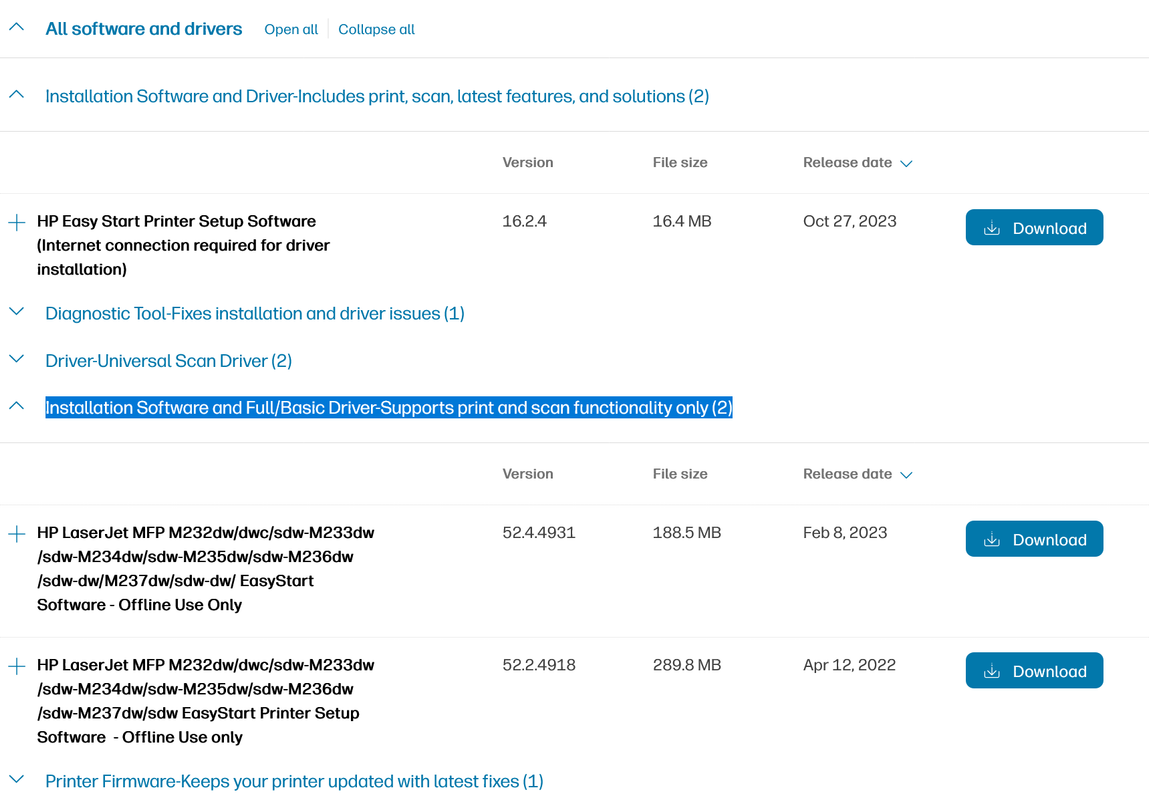
If you select 'Installation Software and Full/Basic Driver-Supports print and scan functionality only (2)' you will get the option for offline install.

image.png
 

My Computer

Computer type
PC/Desktop
OS
Windows 7 Pro x64
Brother is a good printer manufacturer and I do recommend them. And you DO want a laser printer. Inkjet is marvelous bullshit.

Go to YouStupid (YouTube) and look up Louis Rossmann. Better yet, side load the GrayJay App...

If a printer driver doesn't work due to incompatibility, do what I do. Use the network printing feature if supported. Installing the Printer Driver to Print Using the IPP Port | User Guide | IM 350, IM 430


I use Microsoft's IPP driver in Win 10.
 

My Computer

Computer type
PC/Desktop
OS
Windows 7 Ultimate x64
According to HP, an HP account is required only if you use the Easy Start Setup package.

That's true, unfortunately none of them works with Windows 7.
I'm searching all forums, does anyone knows about a working Win 7 driver for this printer?
I even called HP support, they said they won't support Win 7 anymore.
It's a strategy, writing a Win 7 driver would cost nothing to them, but the scope is to delete Win 7 and oblige all to buy new PCs

- - - Updated - - -

That's true, unfortunately none of them works with Windows 7.
I'm searching all forums, does anyone knows about a working Win 7 driver for this printer?
Today I was finally able to install a driver that works on Win 7!

I'm writing here the steps I did, in case someone else need it.

1) download and install the drivers in this package: https://ftp.hp.com/pub/softlib/soft...44.11.2779-LJM101-M106_U_Basicx64_Webpack.exe

2) On Win 7, go on Install a new printer (in my case the printer is installed and logged on my network) and select the network printer

3) when asked to pick a driver, select the Laserjet M101-M106

that's all
 

My Computers

System One System Two

  • OS
    Win 7 64 and Win 11
  • Computer type
    PC/Desktop
Back
Top